
Python-Markdown Environments
Replicating amsthm features and syntax in Markdown so you can publish mathematical papers in HTML—because what mathematician hasn't tried to publish in the very reputable journal called Their Janky Flask Personal Site That No One Will Ever See?
This Python-Markdown extension uses LaTeX-like syntax
\begin{...}
...
\end{...}
to create environments such as general-purpose <div>s, dropdowns, nested environments, and user-defined LaTeX-style theorems that can be styled with attached HTML classes.
Installation
pip install markdown-environments
Available Environments
- User-defined environments wrapped in general-purpose
<div>s with customizable HTML classes - User-defined environments formatted as
<details>and<summary>dropdowns - User-defined nested environments with customizable HTML tags and classes (think a figure with a caption, or a quote with a citation)
- User-defined LaTeX theorem environments with customizable:
- Theorem counters
- Heading punctuation
- Linkable
ids by theorem name - HTML classes
Documentation
Full documentation/API reference can be found here.
Example Usage
Backend:
import markdown
from markdown_environments import ThmsExtension

input_text = ...
output_text = markdown.markdown(input_text, extensions=[
    ThmsExtension(
        div_config={
            "types": {
                "thm": {
                    "thm_type": "Theorem",
                    "html_class": "md-thm",
                    "thm_counter_incr": "0,0,1"
                },
                r"thm\\\*": {
                    "thm_type": "Theorem",
                    "html_class": "md-thm"
                }
            },
            "html_class": "md-div"
        },
        dropdown_config={
            "types": {
                "exer": {
                    "thm_type": "Exercise",
                    "html_class": "md-exer",
                    "thm_counter_incr": "0,0,1"
                },
                "pf": {
                    "thm_type": "Proof",
                    "thm_counter_incr": "0,0,0,1",
                    "thm_name_overrides_thm_heading": True
                }
            },
            "html_class": "md-dropdown",
            "summary_html_class": "md-dropdown__summary mb-0"
        },
        thm_heading_config={
            "html_class": "md-thm-heading",
            "emph_html_class": "md-thm-heading__emph"
        }
    )
])
Markdown input:
# Section {{1}}: this is theorem counter syntax from ThmsExtension()

## Subsection {{0,1}}: Bees

Here we begin our study of bees.


\begin{thm}[the bee theorem]
According to all known laws of aviation, there is no way that a bee should be able to fly.
\end{thm}

\begin{pf}
Its wings are too small to get its fat little body off the ground.
\end{pf}


\begin{thm\*}{hidden thm name used as `id`; not real LaTeX syntax}
Bees, of course, fly anyways.
\end{thm\*}

\begin{pf}[Proofs are configured to have titles override the heading]{hidden names are useless when there's already a name}
Because bees don't care what humans think is impossible.
\end{pf}


\begin{exer}

\begin{summary}
Prove that this `summary` environment is common to all dropdown-based environments.
\end{summary}

Solution: by reading the documentation, of course!
\end{exer}


\begin{exer}
All dropdowns initialized in `ThmsExtension()` have a default `summary` value of `thm_type`,
so using dropdowns like `pf` and `exer` here without a `summary` block is also fine.
\end{exer}
HTML output (prettified):
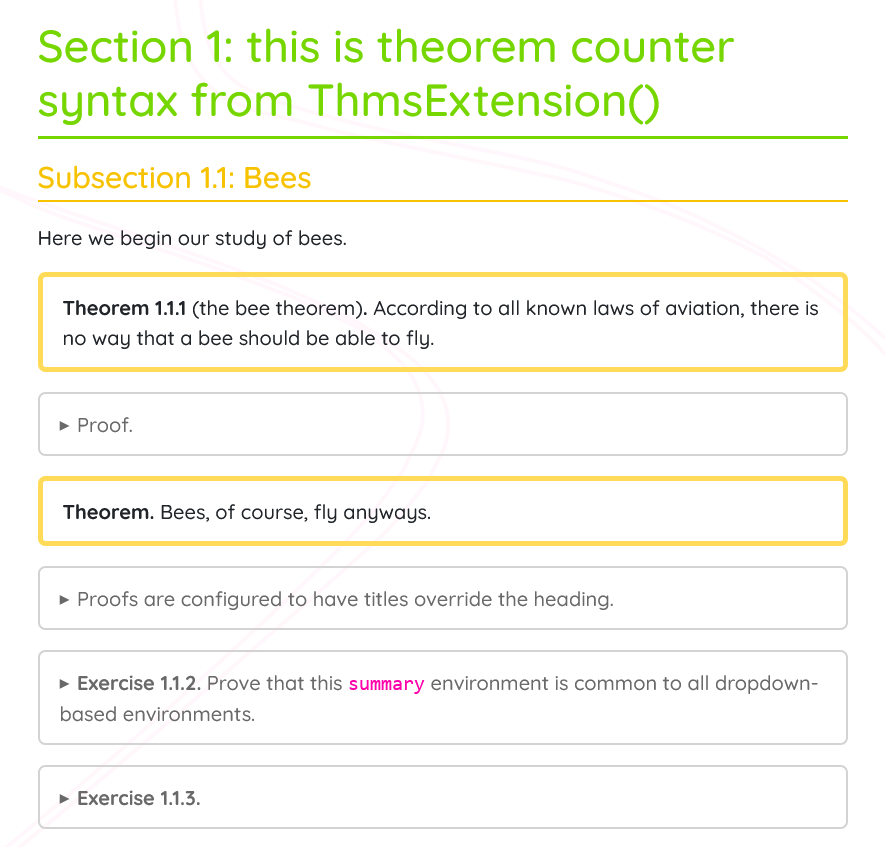
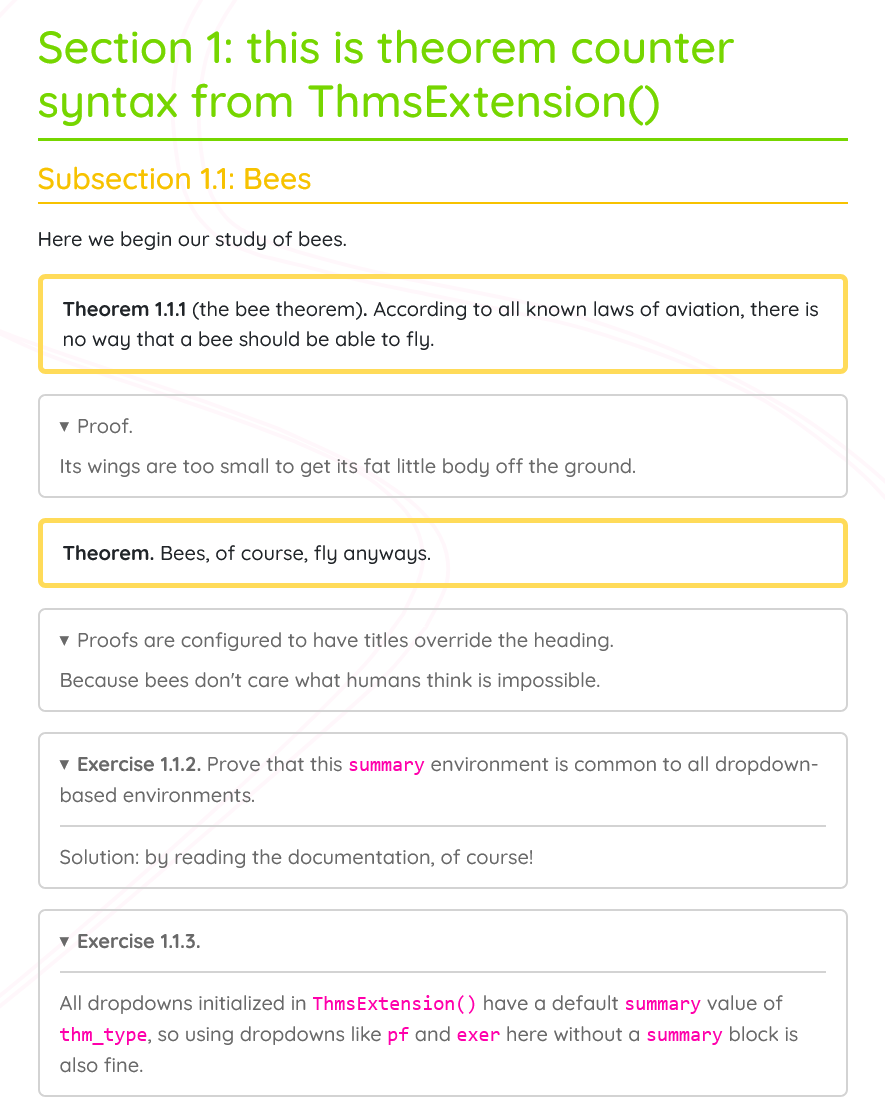
<h1>Section 1: this is theorem counter syntax from ThmsExtension()</h1>
<h2>Subsection 1.1: Bees</h2>
<p>Here we begin our study of bees.</p>


<div class="md-div md-thm">
  <p>
    <span class="md-thm-heading" id="the-bee-theorem">
      <span class="md-thm-heading__emph">Theorem 1.1.1</span> (the bee theorem)<span class="md-thm-heading__emph">.</span>
    </span>
    According to all known laws of aviation, there is no way that a bee should be able to fly.
  </p>
</div>

<details class="md-dropdown">
  <summary class="md-dropdown__summary mb-0">
    <span class="md-thm-heading">
      <span class="md-thm-heading__emph">Proof 1.1.1.1</span><span class="md-thm-heading__emph">.</span>
    </span>
  </summary>

  <div>
    <p>Its wings are too small to get its fat little body off the ground.</p>
  </div>
</details>


<div class="md-div md-thm">
  <p>
    <span class="md-thm-heading" id="hidden-thm-name-used-as-id-not-real-latex-syntax">
      <span class="md-thm-heading__emph">Theorem</span><span class="md-thm-heading__emph">.</span>
    </span>
    Bees, of course, fly anyways.
  </p>
</div>

<details class="md-dropdown">
  <summary class="md-dropdown__summary mb-0">
    <span class="md-thm-heading" id="proofs-are-configured-to-have-titles-override-the-heading">
      <span class="md-thm-heading__emph">Proofs are configured to have titles override the heading</span><span class="md-thm-heading__emph">.</span>
    </span>
  </summary>

  <div>
    <p>Because bees don't care what humans think is impossible.</p>
  </div>
</details>


<details class="md-dropdown md-exer">
  <summary class="md-dropdown__summary mb-0">
    <p>
      <span class="md-thm-heading">
        <span class="md-thm-heading__emph">Exercise 1.1.2</span><span class="md-thm-heading__emph">.</span>
      </span>
      Prove that this <code>summary</code> environment is common to all dropdown-based environments.
    </p>
  </summary>

  <div>
    <p>Solution: by reading the documentation, of course!</p>
  </div>
</details>


<details class="md-dropdown md-exer">
  <summary class="md-dropdown__summary mb-0">
    <span class="md-thm-heading">
      <span class="md-thm-heading__emph">Exercise 1.1.3</span><span class="md-thm-heading__emph">.</span>
    </span>
  </summary>

  <div>
    <p>
      All dropdowns initialized in <code>ThmsExtension()</code> have a default <code>summary</code> value of <code>thm_type</code>,
      so using dropdowns like <code>pf</code> and <code>exer</code> here without a <code>summary</code> block is also fine.
    </p>
  </div>
</details>
HTML example render:
Closed dropdowns:
Open dropdowns:
1 maintainer

Metadata
1 maintainer
Release files for markdown-environments 2.1.3
For a detailed explanation of source distributions (sdists) and built distributions (wheels), please see the package formats documentation.
Source distribution (sdist)
| File | Size | Uploaded | Provenance | Actions |
|---|---|---|---|---|
| markdown_environments-2.1.3.tar.gz | 44.2 kB | Without provenance | Details for markdown_environments-2.1.3.tar.gz |
Built distribution (wheel)
| File | Interpreter | ABI | Platform | Actions Reset |
|---|---|---|---|---|
| markdown_environments-2.1.3-py3-none-any.whl | Python 3 | none | any | Details for markdown_environments-2.1.3-py3-none-any.whl |
Total release size: 63.8 kB
Release files / markdown_environments-2.1.3.tar.gz
| Download URL | markdown_environments-2.1.3.tar.gz |
|---|---|
| Size | 44.2 kB |
| Tags | Source |
|
SHA-256 checksum How to use checksums |
17f442920dd50605459da40c09dd391e3bc11c30dcf0660df068a5b395ed021a
|
|
BLAKE2b-256 checksum How to use checksums |
defb4386f39fadc639cf7c12c64f0672675fa3c04705d4ed408541c08801bfd1
|
| Upload date | |
|
Uploaded using Trusted Publishing? What is trusted publishing? |
No |
| Uploaded via |
Hatch/1.18.2 {"ci":true,"cpu":"aarch64","distro":{"id":"resolute","libc":{"lib":"glibc","version":"2.43"},"name":"Ubuntu","version":"26.04"},"implementation":{"name":"CPython","version":"3.14.10"},"installer":{"name":"hatch","version":"1.18.2"},"openssl_version":"OpenSSL 3.5.5 27 Jan 2026","python":"3.14.10","system":{"name":"Linux","release":"6.8.0-1049-oracle"}} HTTPX2/2.16.0
|
Release files / markdown_environments-2.1.3-py3-none-any.whl
| Download URL | markdown_environments-2.1.3-py3-none-any.whl |
|---|---|
| Size | 19.6 kB |
| Tags | Python 3 |
|
SHA-256 checksum How to use checksums |
78b7ee38ceb98d4bf2152cc00ab769ebb4d1af626a371feab767f50ba260b8b2
|
|
BLAKE2b-256 checksum How to use checksums |
317dae847ce8b2b20c4e8d9dc03fc703bafa1352548350afa3d343dd8a1f08a9
|
| Upload date | |
|
Uploaded using Trusted Publishing? What is trusted publishing? |
No |
| Uploaded via |
Hatch/1.18.2 {"ci":true,"cpu":"aarch64","distro":{"id":"resolute","libc":{"lib":"glibc","version":"2.43"},"name":"Ubuntu","version":"26.04"},"implementation":{"name":"CPython","version":"3.14.10"},"installer":{"name":"hatch","version":"1.18.2"},"openssl_version":"OpenSSL 3.5.5 27 Jan 2026","python":"3.14.10","system":{"name":"Linux","release":"6.8.0-1049-oracle"}} HTTPX2/2.16.0
|
Security for markdown-environments 2.1.3
Provenance
Provenance describes where a file came from. On PyPI, provenance is shared via attestations, which provide a verifiable record of the build or publishing details. View details, limitations and caveats.
No provenance found
None of the files in this release were uploaded with provenance metadata.
A note on package security
PyPI is a repository for distributing packages, not a service for auditing them. While third-party security researchers and our staff do their best to detect and remove malicious packages, PyPI cannot guarantee the quality, security or suitability of any given package.
To learn more about protecting yourself from malicious actors, visit our package security documentation.














