
markdown-for-agents




HTML-to-Markdown converter built for AI agents. Zero dependencies, pure Python.
Try it in the playground - paste a URL or HTML and see the conversion live.
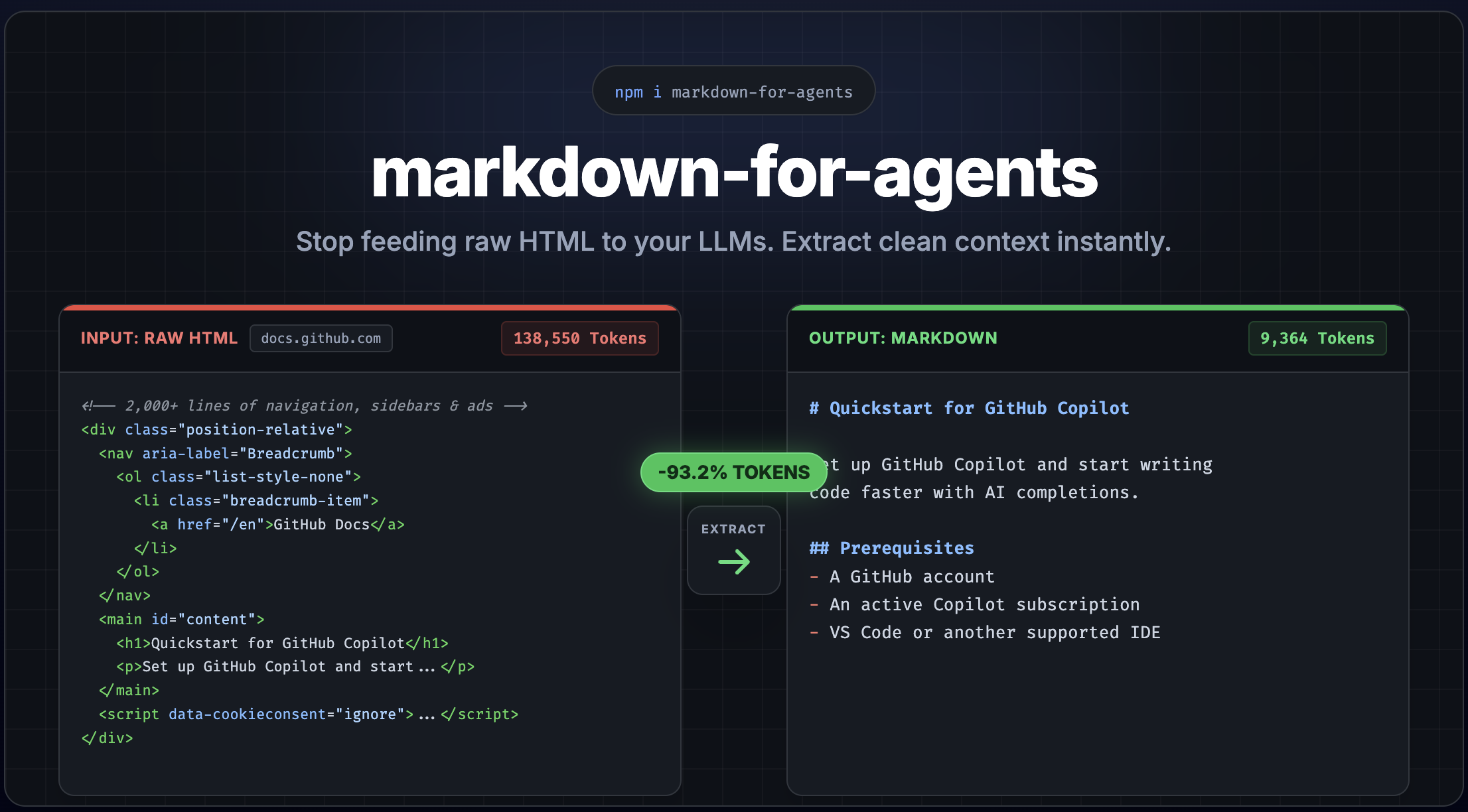
Convert any HTML page into clean, token-efficient Markdown - with built-in content extraction to strip away navigation, ads, and boilerplate. Python port of the TypeScript library, inspired by Cloudflare's Markdown for Agents.
Features
- Zero dependencies - pure Python stdlib, no external packages required
- Frontmatter - automatically extracts title, description, and image from
<head>and prepends YAML frontmatter - Content extraction - strip nav, footer, ads, sidebars, cookie banners automatically
- Content-signal header - opt-in
content-signalHTTP header for publisher consent (AI training, search, AI input) - Framework middleware - drop-in support for FastAPI, Flask, and Django
- Content negotiation - respond with Markdown when clients send
Accept: text/markdown - Token estimation - built-in heuristic token counter for LLM cost planning, with support for custom tokenizers
- Plugin system - override or extend any element conversion with custom rules
- Fully typed - complete type annotations with strict mypy compliance
- Python 3.12+ - modern Python with dataclasses, slots, and TypedDict
Install
pip install markdown-for-agents
Quick Start
from markdown_for_agents import convert

html = """
  <h1>Hello World</h1>
  <p>This is a <strong>simple</strong> example.</p>
"""

result = convert(html)

print(result.markdown)
# # Hello World
#
# This is a **simple** example.

print(result.token_estimate)
# TokenEstimate(tokens=12, characters=46, words=8)

print(result.content_hash)
# "d-1a3b4c5" - deterministic, use as ETag or cache key
Content Extraction
Real-world HTML pages are full of navigation, ads, sidebars, and cookie banners. Enable extraction mode to get just the main content:
result = convert(html, extract=True)
This strips <nav>, <header>, <footer>, <aside>, <script>, <style>, ad-related elements, cookie banners, social widgets, and more.
Customize extraction with ExtractOptions:
from markdown_for_agents import ExtractOptions

result = convert(html, extract=ExtractOptions(
    keep_header=True,
    keep_footer=True,
    strip_classes=("my-custom-ad",),
    strip_ids=("remove-me",),
))
Frontmatter
By default, metadata is extracted from the HTML <head> element and prepended as YAML frontmatter. This aligns with Cloudflare's Markdown for Agents convention.
html = """<html>
  <head>
    <title>My Page</title>
    <meta name="description" content="A great page about things">
    <meta property="og:image" content="https://example.com/hero.png">
  </head>
  <body><p>Content here</p></body>
</html>"""

result = convert(html)
# ---
# title: My Page
# description: A great page about things
# image: https://example.com/hero.png
# ---
# Content here
Extracted fields: title (from <title>), description (from <meta name="description">), image (from <meta property="og:image">).
Disable it or merge custom fields:
# Disable frontmatter
convert(html, frontmatter=False)

# Merge custom fields (custom overrides extracted)
convert(html, frontmatter={"author": "Jane", "title": "Custom Title"})
Middleware
Framework middleware is available as optional extras - they serve Markdown automatically when AI agents request it via Accept: text/markdown:
pip install markdown-for-agents[fastapi]
pip install markdown-for-agents[flask]
pip install markdown-for-agents[django]
# FastAPI / Starlette
from markdown_for_agents.middleware.fastapi import MarkdownMiddleware
app.add_middleware(MarkdownMiddleware)

# Flask
from markdown_for_agents.middleware.flask import markdown_after_request
markdown_after_request(app)

# Django - add to MIDDLEWARE in settings.py
MIDDLEWARE = [
    # ...
    "markdown_for_agents.middleware.django.MarkdownMiddleware",
]
The middleware inspects the Accept header. Normal browser requests pass through untouched. When an AI agent sends Accept: text/markdown, the HTML response is automatically converted.
Pass options to customize the conversion:
from markdown_for_agents import MiddlewareOptions

# FastAPI
app.add_middleware(
    MarkdownMiddleware,
    options=MiddlewareOptions(
        extract=True,
        deduplicate=True,
        server_timing=True,
    ),
)

# Flask
markdown_after_request(app, options=MiddlewareOptions(extract=True))
| Package extra | Framework |
|---|---|
markdown-for-agents[fastapi] |
FastAPI / Starlette |
markdown-for-agents[flask] |
Flask |
markdown-for-agents[django] |
Django |
Custom Rules
Override how any element is converted, or add support for custom elements:
from markdown_for_agents import convert, create_rule

result = convert(html, rules=[
    create_rule(
        filter=lambda node: node.name == "div" and "callout" in node.attribs.get("class", ""),
        replacement=lambda ctx: f"\n\n> **Note:** {ctx.convert_children(ctx.node).strip()}\n\n",
    )
])
Custom rules have higher priority than defaults and are applied first.
Rule replacements return:
str- the markdown outputNone- strip the element entirelySKIP- fall through to the next matching rule
from markdown_for_agents import Rule, SKIP

rule = Rule(
    filter=["div", "section"],
    replacement=lambda ctx: SKIP,  # Let default rules handle it
    priority=100,  # Higher runs first
)
Options
All options are optional. Defaults are shown below:
convert(html,
    # YAML frontmatter from <head> metadata
    frontmatter=True,  # False | dict[str, str]

    # Content extraction
    extract=False,  # True | ExtractOptions

    # Custom conversion rules
    rules=[],  # list[Rule]

    # Base URL for resolving relative links and images
    base_url="",  # "https://example.com"

    # Heading style
    heading_style="atx",  # "atx" (#) or "setext" (underline)

    # Bullet character for unordered lists
    bullet_char="-",  # "-", "*", or "+"

    # Code block style
    code_block_style="fenced",  # "fenced" or "indented"

    # Fence character
    fence_char="`",  # "`" or "~"

    # Strong delimiter
    strong_delimiter="**",  # "**" or "__"

    # Emphasis delimiter
    em_delimiter="*",  # "*" or "_"

    # Link style
    link_style="inlined",  # "inlined" or "referenced"

    # Remove duplicate content blocks
    deduplicate=False,  # True | DeduplicateOptions

    # Custom token counter (replaces built-in heuristic)
    token_counter=None,  # Callable[[str], TokenEstimate]

    # Performance timing (populates convert_duration in result)
    server_timing=False,  # True to measure conversion duration
)
Server Timing
Enable server_timing to measure conversion duration. The result includes convert_duration (in milliseconds), and middleware adapters use it to set a Server-Timing header:
result = convert(html, server_timing=True)
print(f"Conversion took {result.convert_duration}ms")
# Middleware sets: Server-Timing: mfa.convert;dur=4.7;desc="HTML to Markdown"
Custom Token Counter
By default, token estimation uses a fast heuristic (~4 characters per token). You can replace it with an exact tokenizer:
from markdown_for_agents import convert, TokenEstimate
import tiktoken

enc = tiktoken.encoding_for_model("gpt-4o")

result = convert(html, token_counter=lambda text: TokenEstimate(
    tokens=len(enc.encode(text)),
    characters=len(text),
    words=len(text.split()),
))
The custom counter receives the final markdown string and must return a TokenEstimate with tokens, characters, and words fields.
Deduplication Options
Pass deduplicate=True to use defaults, or pass a DeduplicateOptions object to customize behavior:
from markdown_for_agents import DeduplicateOptions

result = convert(html, deduplicate=DeduplicateOptions(min_length=5))
The min_length option (default: 10) controls the minimum block length eligible for deduplication. Blocks shorter than this are always kept. Lower it to catch short repeated phrases, raise it for more conservative deduplication.
Content-Signal Header
Middleware can set a content-signal HTTP header to communicate publisher consent for AI training, search indexing, and AI input. This is opt-in - the header is only set when explicitly configured:
from markdown_for_agents import MiddlewareOptions, ContentSignalOptions

app.add_middleware(
    MarkdownMiddleware,
    options=MiddlewareOptions(
        content_signal=ContentSignalOptions(
            ai_train=True,   # ai-train=yes
            search=True,     # search=yes
            ai_input=True,   # ai-input=yes
        ),
    ),
)
# Sets header: content-signal: ai-train=yes, search=yes, ai-input=yes
Only explicitly set fields are included. Set a field to False to signal denial (e.g. ai_train=False produces ai-train=no). Omit a field to exclude it from the header entirely.
Supported Elements
Block
| HTML | Markdown |
|---|---|
<h1>...<h6> |
# Heading (atx) or underline (setext) |
<p> |
Paragraph with blank lines |
<blockquote> |
> Quoted text |
<pre><code> |
Fenced code block with language |
<hr> |
--- |
<br> |
Trailing double-space line break |
<ul>, <ol>, <li> |
Lists with nesting and indentation |
<table> |
GFM pipe table with separator row |
<script>, <style>, <noscript>, <template> |
Stripped |
Inline
| HTML | Markdown |
|---|---|
<strong>, <b> |
**bold** |
<em>, <i> |
*italic* |
<del>, <s>, <strike> |
~~strikethrough~~ |
<code> |
`inline code` |
<a> |
[text](url) with title and base_url support |
<img> |
 with title and base_url support |
<sub> |
~subscript~ |
<sup> |
^superscript^ |
<abbr>, <mark> |
Pass-through (text preserved) |
Python Compatibility
| Python | Status |
|---|---|
| 3.12 | Tested |
| 3.13 | Tested |
| 3.14 | Tested |
TypeScript Version
The TypeScript version of this library offers additional features including framework middleware for Express, Fastify, Hono, Next.js, and Web Standard servers, plus a CLI audit tool. See the TypeScript package for details.
License
MIT
1 maintainer

Release files for markdown-for-agents 1.3.4
For a detailed explanation of source distributions (sdists) and built distributions (wheels), please see the package formats documentation.
Source distribution (sdist)
| File | Size | Uploaded | |
|---|---|---|---|
| markdown_for_agents-1.3.4.tar.gz | 59.6 kB | Details |
Built distribution (wheel)
| File | Interpreter | ABI | Platform | Reset |
|---|---|---|---|---|
| markdown_for_agents-1.3.4-py3-none-any.whl | Python 3 | none | any | Details |
Total release size: 88.8 kB
Release files / markdown_for_agents-1.3.4.tar.gz
| Download URL | markdown_for_agents-1.3.4.tar.gz |
|---|---|
| Size | 59.6 kB |
| Tags | Source |
|
SHA-256 checksum How to use checksums |
c6dad3e461279aa0094184beb0108328a2dfcecefa2e9f116c1b4c3828250178
|
|
BLAKE2b-256 checksum How to use checksums |
28c60ca794210d845e2fbe7cb783b5fb30d722a26467cb293cab26224c3bc796
|
| Upload date | |
|
Uploaded using Trusted Publishing? What is trusted publishing? |
Yes |
| Uploaded via |
twine/6.1.0 CPython/3.13.7
|
Provenance
Provenance describes where a file came from. On PyPI, provenance is shared via attestations, which provide a verifiable record of the build or publishing details. View details, limitations and caveats.


PyPI Publish Attestation
PyPI verified that this artifact, at this checksum, originated from the publisher listed below.
Signed by GitHub Actions, verified by PyPI on Mar 30, 2026.
Transparency logRelease files / markdown_for_agents-1.3.4-py3-none-any.whl
| Download URL | markdown_for_agents-1.3.4-py3-none-any.whl |
|---|---|
| Size | 29.2 kB |
| Tags | Python 3 |
|
SHA-256 checksum How to use checksums |
014837cd92717e7af122ce7df4f789c1d4a56d7ff6066bec4d8e47132a0f2d34
|
|
BLAKE2b-256 checksum How to use checksums |
9ca8481812a180ac27938b200aca532cdbe14192bcd159d5de8b208ea733f121
|
| Upload date | |
|
Uploaded using Trusted Publishing? What is trusted publishing? |
Yes |
| Uploaded via |
twine/6.1.0 CPython/3.13.7
|
Provenance
Provenance describes where a file came from. On PyPI, provenance is shared via attestations, which provide a verifiable record of the build or publishing details. View details, limitations and caveats.
PyPI Publish Attestation
PyPI verified that this artifact, at this checksum, originated from the publisher listed below.
Signed by GitHub Actions, verified by PyPI on Mar 30, 2026.
Transparency log













