
Stock analysis, screening, portfolios and alerts in one app.
AI analysts, ethical screening and alerts on Telegram, for India, the US, China, Hong Kong and crypto.






Try it online · Run your own copy · Features · Report a bug
Use it at https://marketmyna.com/, or run your own copy with pipx install marketmyna. Your copy has no sign-up,
no login, no plans and no limits: it has one owner (you), and every feature is on.
MarketMyna is an analysis tool, not investment advice.
Features
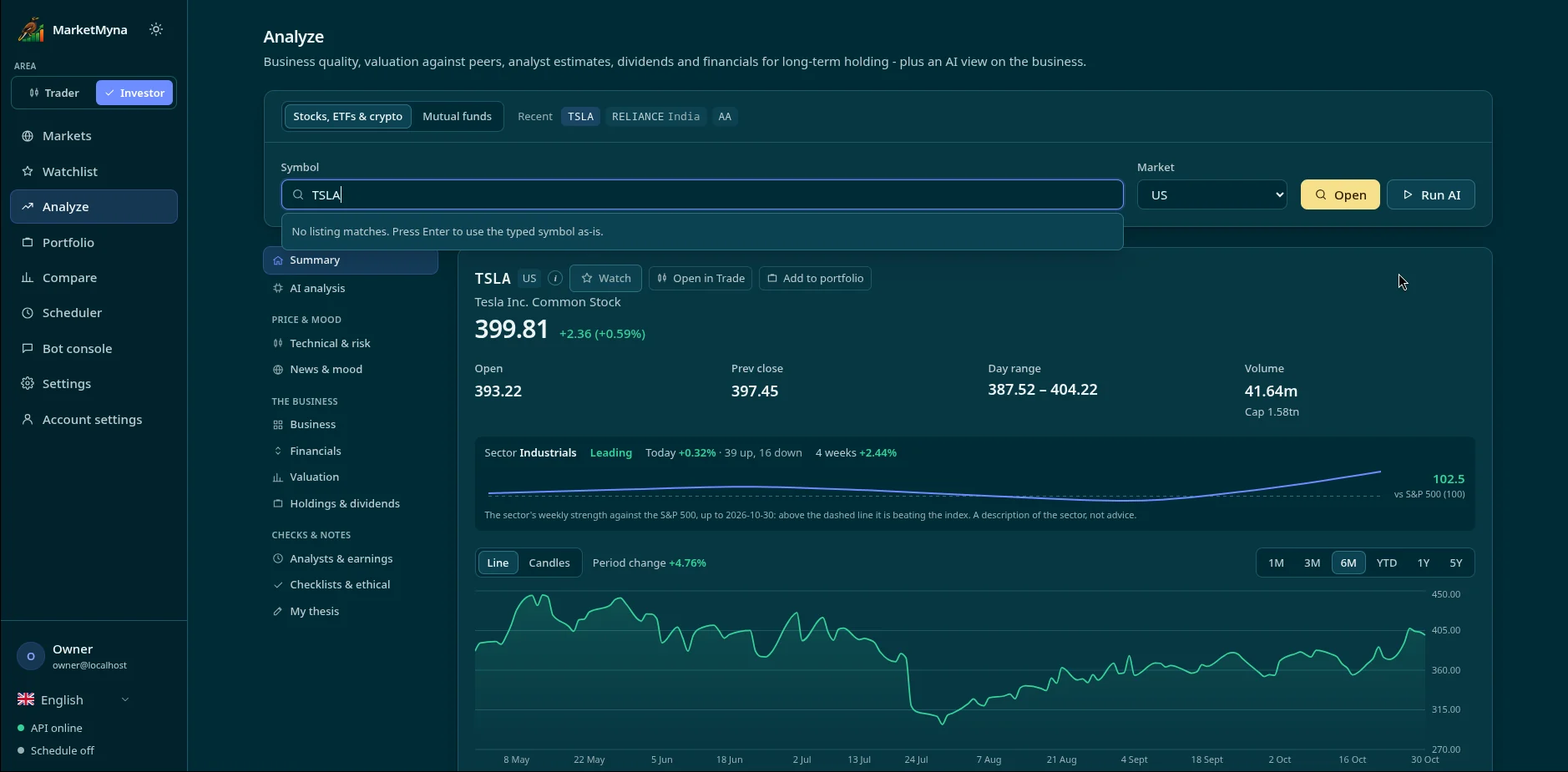
🤖 AI analysisA set of AI analysts (technical, risk, news) explains a stock in plain language, with a bullish / neutral / bearish outlook, never a buy or sell call. Paste your own key (Gemini, OpenAI, Claude, Groq, OpenRouter, DeepSeek, Mistral) or point it at a local Ollama. |
 |
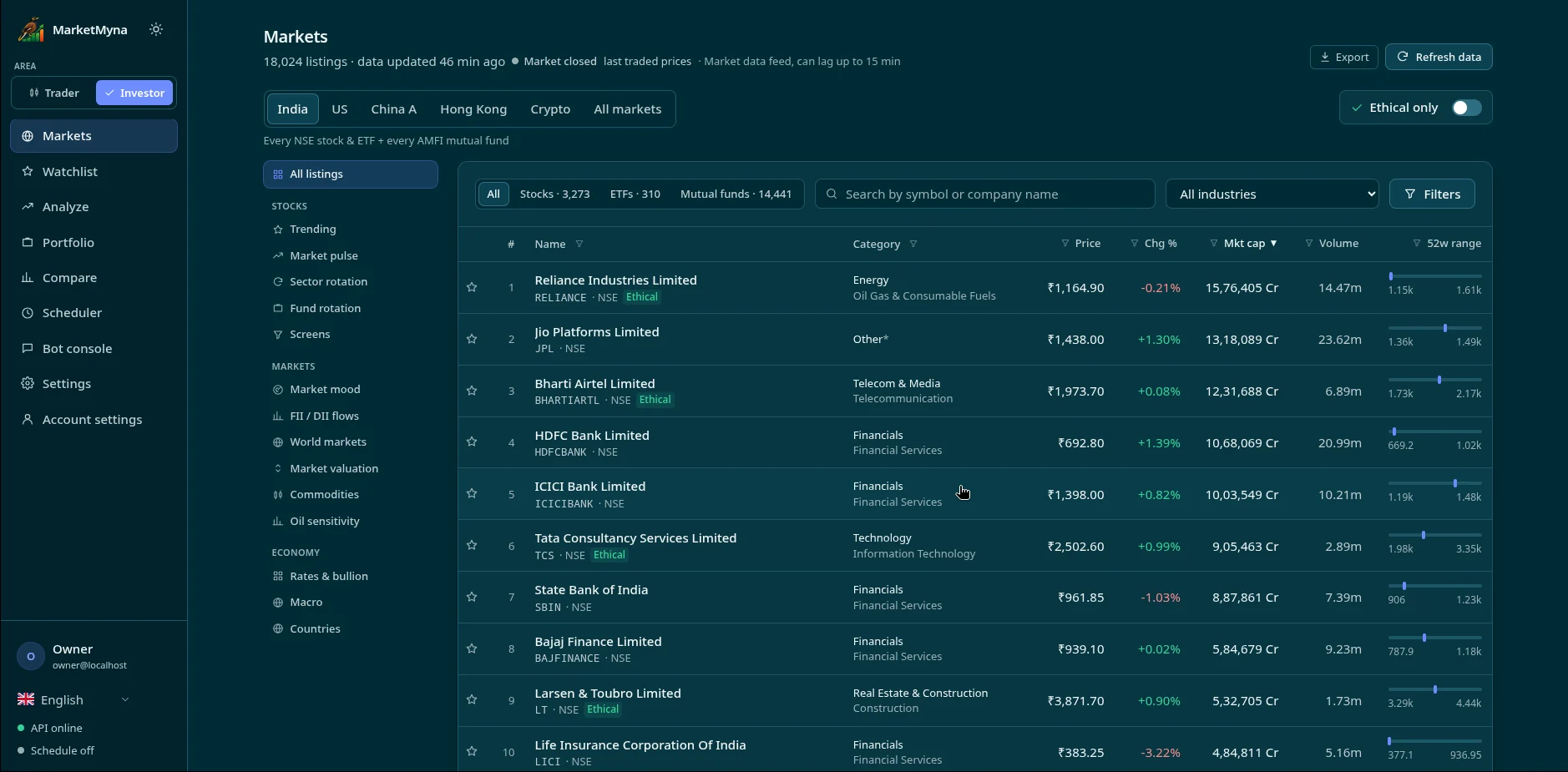 |
🔎 Screeners and ethical screeningIndia (NSE, BSE, mutual funds, ETFs), US, China A-shares, Hong Kong and crypto, with ready-made and custom screens. Ethical screening for stocks, mutual funds and ETFs: excluded businesses (liquor, pornography, gambling and similar) are screened out, and debt and interest are shown as numbers so you decide. No verdicts. |
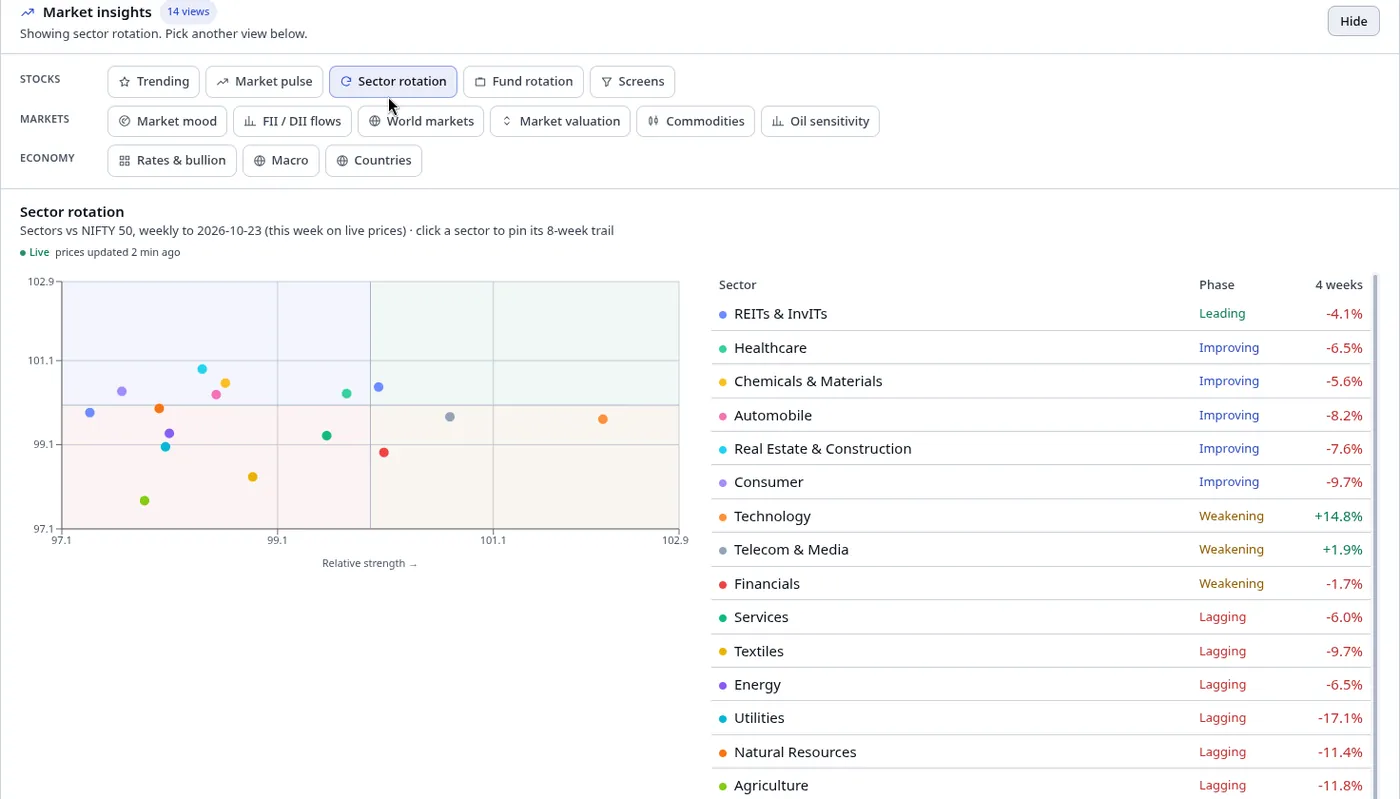
🧭 Market insightsSector and fund rotation, trending stocks, market mood, FII / DII flows, world markets, rates and macro, all on one page. |
 |
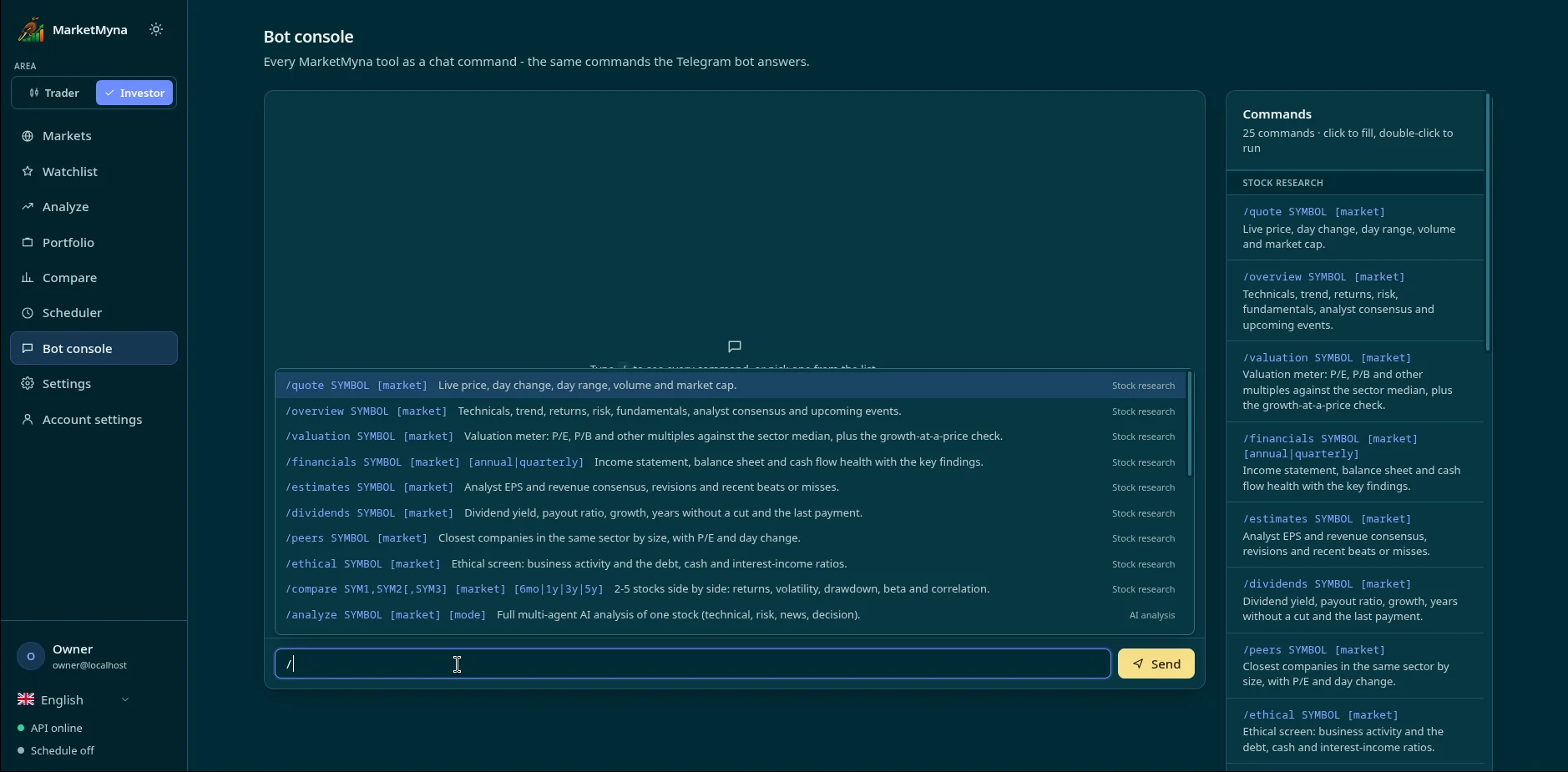 |
💬 Telegram bot and consoleEvery tool is also a chat command. Ask the Telegram bot, or use the same commands in the built-in console. |
| 📈 Charts and trading tools | Candlestick charts and indicators, scanner, backtesting, options payoff, pairs trading, position sizing, trading journal |
| 💼 Portfolios and funds | Holdings and returns, CAS import, fund overlap, SIP planner, XIRR |
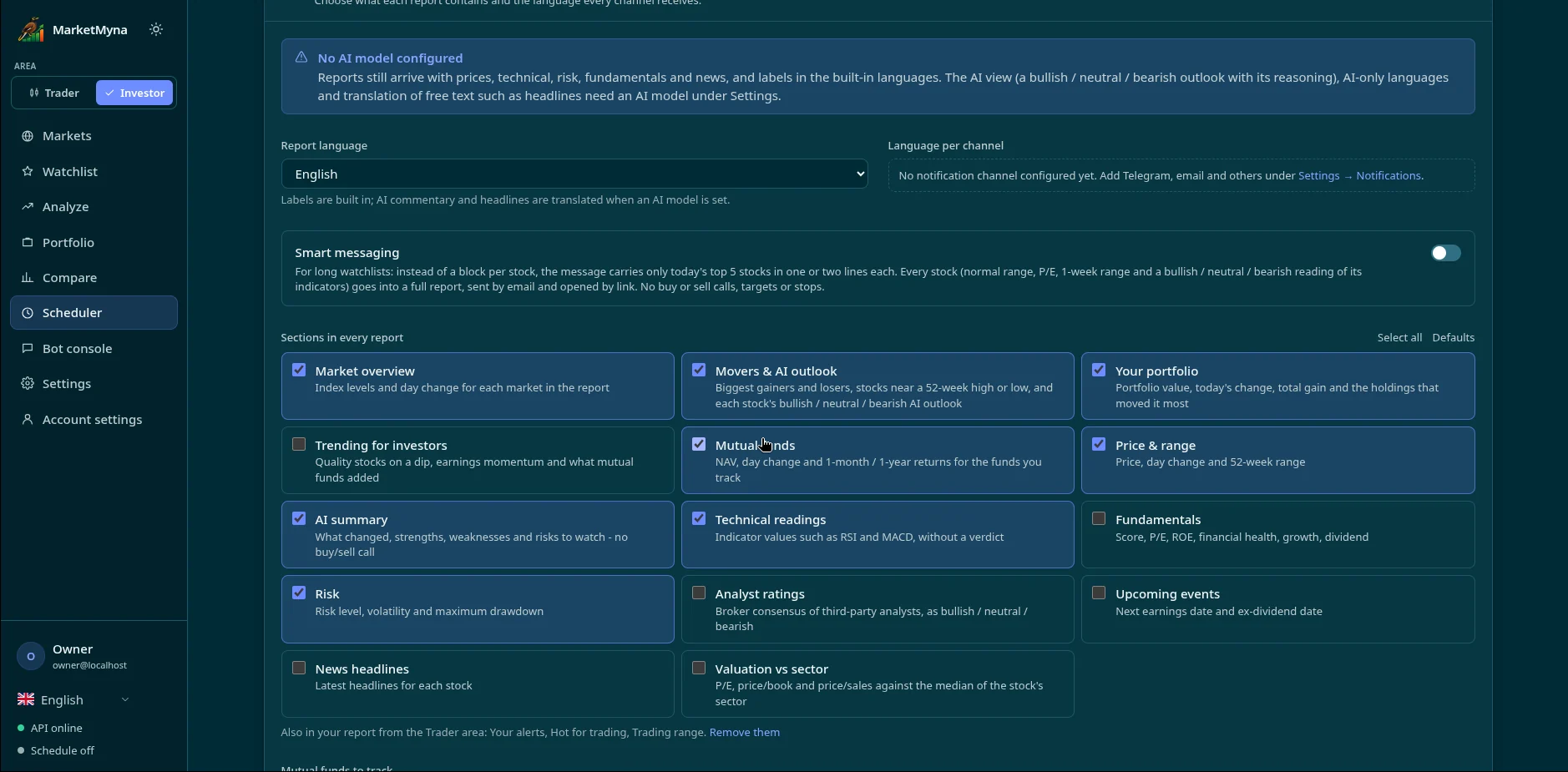
| 🔔 Alerts and scheduled reports | Telegram, email, browser push, Discord, Slack, Teams, ntfy and more, on any schedule you like. Reports carry a Bullish / Neutral / Bearish list from company figures (with the reasons), market overview, trending stocks and stocks matching your screen; Smart messaging sends a short message plus a PDF or Excel file |
| 🔀 Trader and Investor areas | One switch flips the menus and pages between short-term trading tools and long-term investing |
| 🌍 Seven languages | The whole app, with light and dark themes |
| 🔒 Private by default | One SQLite file on your computer; nothing leaves it except calls to the data and AI providers you choose |
More screenshots
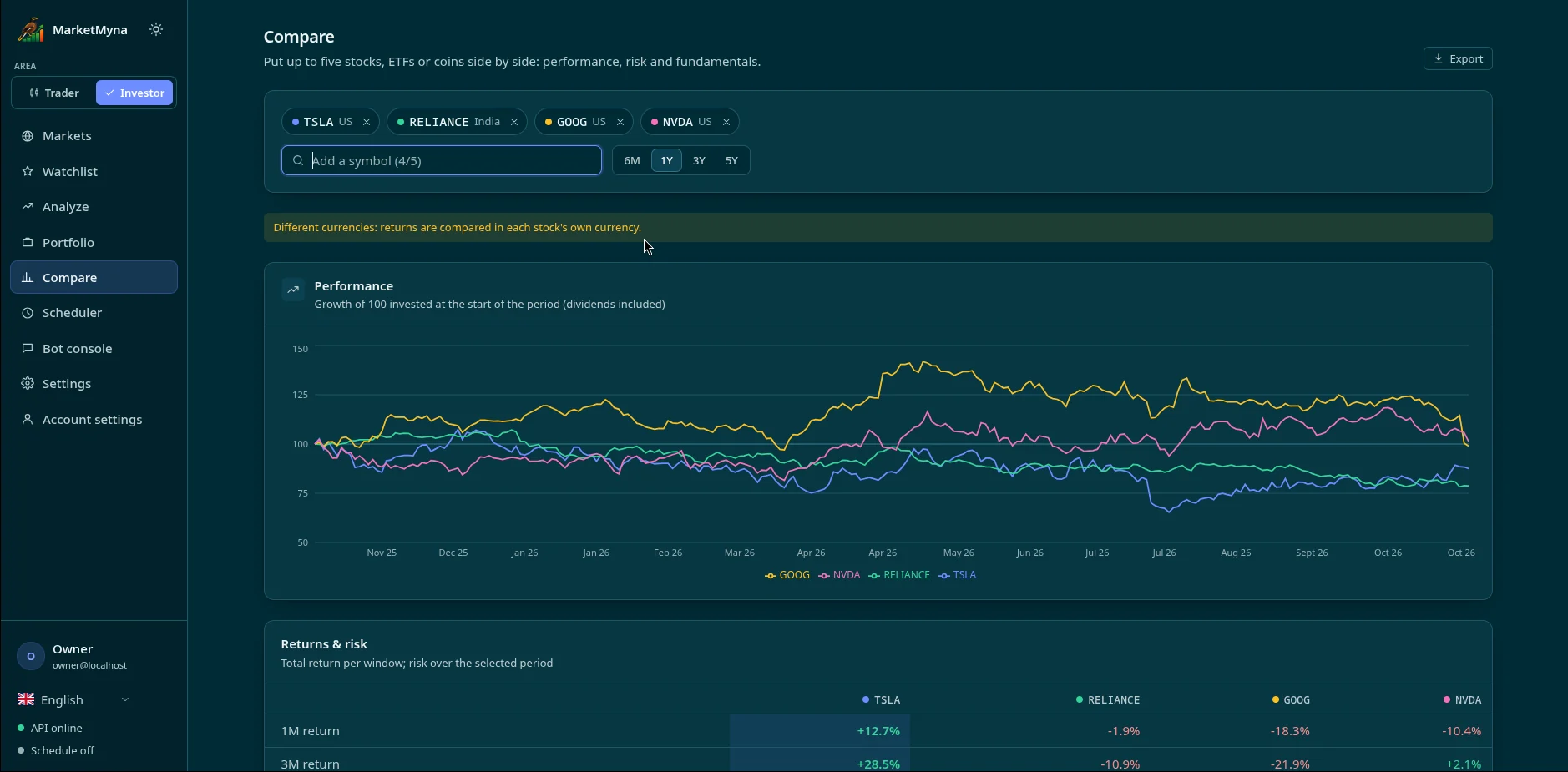
| Compare stocks side by side | Scheduled reports |
|---|---|
 |
 |
Quick start
MarketMyna is on PyPI. With Python 3.11 or newer on Linux, macOS or Windows:
pipx install marketmyna
marketmyna
The app opens in your browser at http://127.0.0.1:8001. Paste an AI key in Settings and look up any stock. No Node.js and no git needed: the web app comes inside the package.
No pipx? Install it (how to install pipx), or use pip in a
virtual environment:
python3 -m venv ~/marketmyna-venv           # Windows: py -m venv %USERPROFILE%\marketmyna-venv
. ~/marketmyna-venv/bin/activate            # Windows: %USERPROFILE%\marketmyna-venv\Scripts\activate
pip install marketmyna
marketmyna
Update: Settings -> Updates -> Update now in the app, or pipx upgrade marketmyna
(pip install --upgrade marketmyna in a venv). Your data is kept.
Your data (database, settings, keys, cache) lives in ~/.marketmyna; set MARKETMYNA_HOME to use another
folder. Uninstalling (pipx uninstall marketmyna) leaves it in place.
Options: marketmyna --port 9000, marketmyna --no-browser, marketmyna --version.
Run it from the source code
To follow the latest code with git pull, or to change it. Runs on Linux, macOS and Windows (tested on all three on every change). Needs
Python 3.12 and Node.js 22. All your data goes
into one SQLite file, so there is no database server to set up.
1. Get the code and install (one time)
Linux and macOS:
git clone https://github.com/pryndor/MarketMyna.git marketmyna
cd marketmyna
python3 -m venv venv
. venv/bin/activate
pip install -r requirements-web.txt
Windows (PowerShell):
git clone https://github.com/pryndor/MarketMyna.git marketmyna
cd marketmyna
py -m venv venv
venv\Scripts\Activate.ps1
pip install -r requirements-web.txt
If PowerShell refuses to run the activate script, run
Set-ExecutionPolicy -Scope CurrentUser RemoteSigned once, or use Command Prompt with venv\Scripts\activate.bat.
2. Start it (every time; activate the venv first as above)
python start.py
The first start builds the frontend (about a minute), then the app opens in your browser at
http://127.0.0.1:8001. Other options: --port 9000, --no-browser, --rebuild.
3. Update (whenever you like)
git pull
pip install -r requirements-web.txt
python start.py
The frontend rebuilds by itself when it has changed, and your data is kept.
Then open http://127.0.0.1:8001 and go to Settings:
- AI keys: paste a key; add several for automatic fallback.
- Notifications: Telegram, email and the other channels, and which messages go where.
- Data sources (optional): live US prices, backup price sources, Reddit.
Everything can also be set with environment variables; .env.example lists them.
Run only one copy at a time: the scheduler, price alerts and the Telegram bot run inside it.
Your data
Everything is under ~/.marketmyna (on Windows C:\Users\<you>\.marketmyna; set MARKETMYNA_HOME to use
another folder):
marketmyna.db: the SQLite database (watchlists, portfolios, alerts, journal, reports, settings). The tables are created on first start, and columns are added on later updates.config.jsonandsecret.key: your settings, and the key that encrypts saved API keys and passwords.
To back up or move the app, copy the whole folder while the API is stopped. An existing stockpulse.db from
before the rename is still used.
Keep it private
There is no login, so anyone who can reach the port can use the app and see your data.
The app listens on 127.0.0.1 only by default, so only this computer can reach it. To use it from your
phone, use a private network such as Tailscale or WireGuard. Don't open the port to the internet.
Troubleshooting
| Problem | Fix |
|---|---|
Install the requirements first |
Activate the venv, then pip install -r requirements-web.txt |
The frontend is built once with Node.js 22 |
Install Node.js 22 and run python start.py again |
marketmyna: command not found after pipx install |
Run pipx ensurepath, then open a new terminal |
| Port 8001 is already in use | Another copy is running, or use --port 9000 |
| The page looks old after an update | Source install: python start.py --rebuild. pipx: reload the page with Ctrl+Shift+R |
| AI analysis says no key | Add a key in Settings → AI keys, or point it at a local Ollama |
Still stuck? Open an issue with your OS, Python version and the error text.
Development
Run the API on its own, and the Vite dev server for live reload of the frontend:
python -m uvicorn marketmyna.api.app:app --port 8001 --reload
cd frontend && npm run dev   # another terminal: http://localhost:5174, sends /api to :8001
If the API runs on another port, start the frontend with MARKETMYNA_API=http://127.0.0.1:<port> npm run dev.
Tests: pip install pytest && python -m pytest -q. GitHub Actions runs them, builds the frontend and starts the
app on Linux, Windows and macOS for every push (.github/workflows/ci.yml).
Layout
| Folder | What's in it |
|---|---|
start.py |
Starts the app from the source code (builds the frontend when needed) |
marketmyna/ |
The Python package: data, analysis, AI agents, scheduler, alerts, notifiers, SQLite storage |
marketmyna/api/ |
FastAPI app and routes; it also serves the built frontend |
marketmyna/strategies/ |
AI strategy playbooks |
frontend/ |
React + Vite + Tailwind app |
tests/ |
pytest suite |
Built with


Roadmap
- More options for scheduled reports: what goes in them, when they run, and where they are sent
- More markets and data sources
- More AI analysts and strategy playbooks
Ideas and requests are welcome in Issues.
Support
MarketMyna is free and open source. If it helps you, you can support its development:
- GitHub Sponsors, monthly or one-time
- Buy Me A Coffee

License
MarketMyna is free and open source under the Apache License 2.0. Copyright 2026 Balasubramanian Periannan; see NOTICE.
In short (the LICENSE file is what counts):
| You can | As long as you |
|---|---|
| Use it for anything, personal or commercial | Keep the copyright, license and NOTICE |
| Change it, and keep your changes private if you want | Mark the files you changed when you share them |
| Run it as a website or service for other people | Don't use the MarketMyna name or logo for your copy |
| Share copies or build it into your own product, open or closed | Include a copy of the license |
The license also gives you a patent license from the contributors. It comes with no warranty, and the authors are not liable for any loss.
Contributing
Pull requests are welcome. Contributions are accepted under the Apache License 2.0; see CONTRIBUTING.md.
Name and logo
The license does not cover the MarketMyna name and logos (frontend/public/brand/).
If you publish a changed copy, give it your own name and logo.
Third-party software
Each package the app installs keeps its own license. The frontend packages and the Python packages are MIT, BSD, ISC or Apache-2.0, except PyMuPDF (AGPL-3.0), which is used only to make PDF reports. If you ship MarketMyna inside a closed product, check PyMuPDF's terms or remove it.
Not investment advice
MarketMyna is an analysis tool. Nothing it shows is investment advice, and you trade at your own risk.
1 maintainer

Metadata
1 maintainer
Release files for marketmyna 0.3.0
For a detailed explanation of source distributions (sdists) and built distributions (wheels), please see the package formats documentation.
Source distribution (sdist)
| File | Size | Uploaded | Provenance | Actions |
|---|---|---|---|---|
| marketmyna-0.3.0.tar.gz | 1.9 MB | With provenance | Details for marketmyna-0.3.0.tar.gz |
Built distribution (wheel)
| File | Interpreter | ABI | Platform | Actions Reset |
|---|---|---|---|---|
| marketmyna-0.3.0-py3-none-any.whl | Python 3 | none | any | Details for marketmyna-0.3.0-py3-none-any.whl |
Total release size: 3.8 MB
Release files / marketmyna-0.3.0.tar.gz
| Download URL | marketmyna-0.3.0.tar.gz |
|---|---|
| Size | 1.9 MB |
| Tags | Source |
|
SHA-256 checksum How to use checksums |
1a0aecd8212b825d3530a0d2e347fc850ee6814b09e32cc514ca6a3050259e2e
|
|
BLAKE2b-256 checksum How to use checksums |
1109daf0be4b62962cef2a2d0854770ec6bb50dbeb28e388f74d9676b5ac87ea
|
| Upload date | |
|
Uploaded using Trusted Publishing? What is trusted publishing? |
Yes |
| Uploaded via |
twine/7.0.0 CPython/3.13.16
|
Provenance
Provenance describes where a file came from. On PyPI, provenance is shared via attestations, which provide a verifiable record of the build or publishing details. View details, limitations and caveats.


PyPI Publish Attestation
PyPI verified that this artifact, at this checksum, originated from the publisher listed below.
Signed by GitHub Actions, verified by PyPI on Nov 1, 2026.
Transparency logRelease files / marketmyna-0.3.0-py3-none-any.whl
| Download URL | marketmyna-0.3.0-py3-none-any.whl |
|---|---|
| Size | 1.9 MB |
| Tags | Python 3 |
|
SHA-256 checksum How to use checksums |
32965cf6fd5fb655963e93b52442de1c731e4bd95a96f6b91b6fd4c28d54514c
|
|
BLAKE2b-256 checksum How to use checksums |
c42617a01404c3dd4a68b45a47d3e287084907698874c54a712b7d261cf21b38
|
| Upload date | |
|
Uploaded using Trusted Publishing? What is trusted publishing? |
Yes |
| Uploaded via |
twine/7.0.0 CPython/3.13.16
|
Provenance
Provenance describes where a file came from. On PyPI, provenance is shared via attestations, which provide a verifiable record of the build or publishing details. View details, limitations and caveats.
PyPI Publish Attestation
PyPI verified that this artifact, at this checksum, originated from the publisher listed below.
Signed by GitHub Actions, verified by PyPI on Nov 1, 2026.
Transparency logSecurity for marketmyna 0.3.0
Provenance
Provenance describes where a file came from. On PyPI, provenance is shared via attestations, which provide a verifiable record of the build or publishing details. View details, limitations and caveats.
Full provenance
All 2 files in this release have been uploaded with provenance metadata.
Attestation for marketmyna-0.3.0.tar.gz
PyPI Publish Attestation
PyPI verified that this artifact, at this checksum, originated from the publisher listed below.
Signed by GitHub Actions, verified by PyPI on Nov 1, 2026.
Transparency logA note on package security
PyPI is a repository for distributing packages, not a service for auditing them. While third-party security researchers and our staff do their best to detect and remove malicious packages, PyPI cannot guarantee the quality, security or suitability of any given package.
To learn more about protecting yourself from malicious actors, visit our package security documentation.














