
markitdown-advanced-pdf-llm-plugin
Overview
markitdown-advanced-pdf-llm-plugin is a plugin for the MarkItDown library, specifically engineered for extracting the knowledge out of complex multi-modal PDF documents which is non-text heavy. This plugin addresses the challenges of reduced LLM output quality on large multi-modal documents by leveraging higher intelligence Large Language Models (LLMs) to interpret/extract knowledge out of these documents.
Why MarkItDown
MarkItDown is a lightweight Python utility for converting various files to Markdown for use with LLMs and related text analysis pipelines. Markdown is extremely close to plain text, with minimal markup or formatting, but still provides a way to represent important document structure. Mainstream LLMs, such as OpenAI's GPT-4o, natively "speak" Markdown, and often incorporate Markdown into their responses unprompted. This suggests that they have been trained on vast amounts of Markdown-formatted text, and understand it well. As a side benefit, Markdown conventions are also highly token-efficient.
Why markitdown-advanced-pdf-llm-plugin
- Token efficiency: When involving Multi-Modal document in RAG, text only capabilities consume less token than multi-modal capabilities
- RAG output quality: The quality of LLMs output degrades as input token increases. Passing several pages of multi-modal document at once can lead to poor LLM summarization than several pages of text documents
- Latency: Text only input has lesser latency than multi-modal input
What it does?
SimpleLLMKnowledgeExtractor
- Converts each PDF page to both a standalone PDF and an image
- prompts LLM (presently only OpenAI Client) to extract all text, tables, and picture information
- Processes pages concurrently for improved performance
- Generates a complete markdown document with both extracted content and adds page image
Future Extractor (In Progress)
Current approach of sending full pages to LLMs sometimes results in incomplete extraction or information loss. Future extractor's goal is to
- Make the extraction more deterministic by extracting each element (text, table and picture) using libraries like PyMuPDF4LLM
- Validate the deterministic extraction performed well using LLM
- Apply LLM extraction if needed
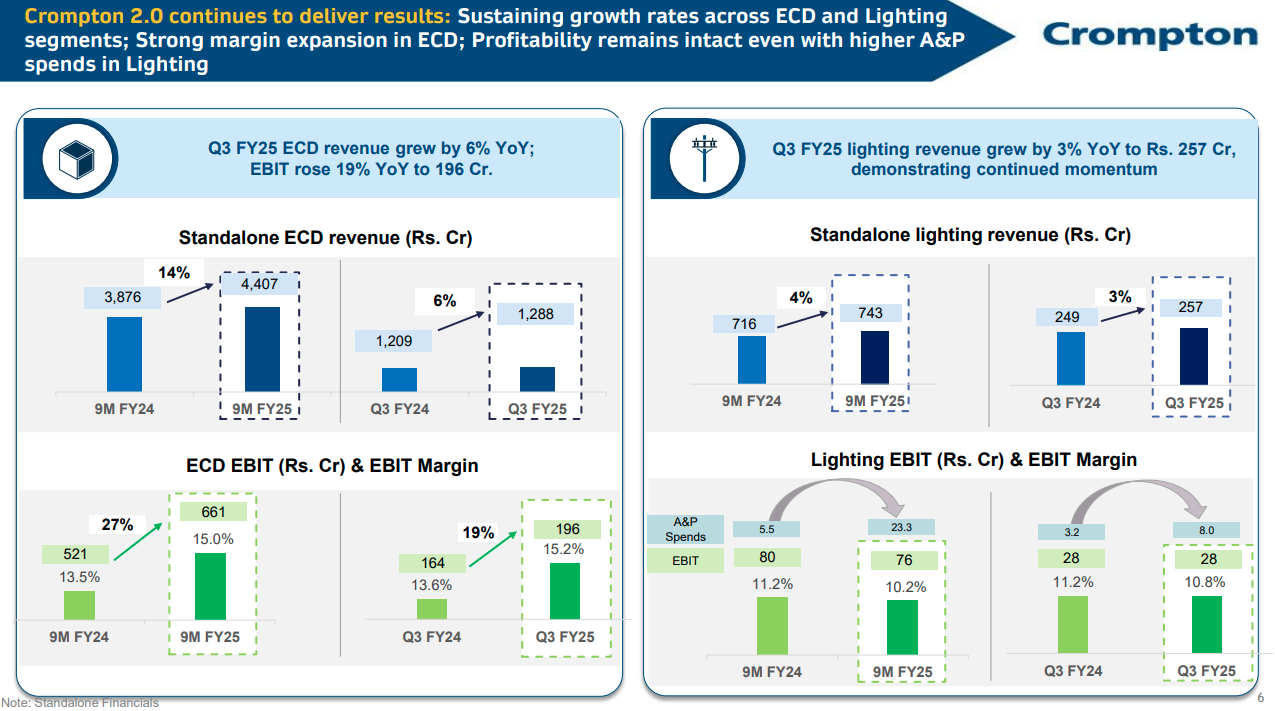
Example page from a document where this plugin is beneficial
Installation
The plugin is available for installation through pip
pip install markitdown-advanced-pdf-llm-plugin
Usage
from markitdown import MarkItDown
from openai import OpenAI

client = OpenAI(api_key="openai-key")

md = MarkItDown(enable_plugins=True, llm_client=openai_client, llm_model="prefered-model") # Incase custom prompt, use arg 'llm_prompt'
result = md.convert("doc.pdf")

markdown_content = result.markdown
1 maintainer

Metadata
1 maintainer
Release files for markitdown-advanced-pdf-llm-plugin 0.1.1
For a detailed explanation of source distributions (sdists) and built distributions (wheels), please see the package formats documentation.
Source distribution (sdist)
| File | Size | Uploaded | |
|---|---|---|---|
| markitdown_advanced_pdf_llm_plugin-0.1.1.tar.gz | 7.3 kB | Details |
Built distribution (wheel)
| File | Interpreter | ABI | Platform | Reset |
|---|---|---|---|---|
| markitdown_advanced_pdf_llm_plugin-0.1.1-py3-none-any.whl | Python 3 | none | any | Details |
Total release size: 14.7 kB
Release files / markitdown_advanced_pdf_llm_plugin-0.1.1.tar.gz
| Download URL | markitdown_advanced_pdf_llm_plugin-0.1.1.tar.gz |
|---|---|
| Size | 7.3 kB |
| Tags | Source |
|
SHA-256 checksum How to use checksums |
19efbc8c94d440c8617f3ffe8f46b57f4fbfa8e93603bc252941d100bf09bfc8
|
|
BLAKE2b-256 checksum How to use checksums |
d87aee13f40c3adfb20bd81673b75c13a705425fe024a3c1ba0b1c6178dde373
|
| Upload date | |
|
Uploaded using Trusted Publishing? What is trusted publishing? |
No |
| Uploaded via |
twine/6.1.0 CPython/3.10.11
|
Release files / markitdown_advanced_pdf_llm_plugin-0.1.1-py3-none-any.whl
| Download URL | markitdown_advanced_pdf_llm_plugin-0.1.1-py3-none-any.whl |
|---|---|
| Size | 7.3 kB |
| Tags | Python 3 |
|
SHA-256 checksum How to use checksums |
1cc4a33be2c21e485277c6e7566e97c2bfd741b45722429c44084820aeb9dc23
|
|
BLAKE2b-256 checksum How to use checksums |
5342dc0615c8cb2189b7b54bbe5b3c2104a704dbddf8ff444ace8efb447ce1a1
|
| Upload date | |
|
Uploaded using Trusted Publishing? What is trusted publishing? |
No |
| Uploaded via |
twine/6.1.0 CPython/3.10.11
|














