
markserv



markserv opens local Markdown files and docs folders in your browser as a lightweight live-preview web app.
Point it at a README, notes directory, or docs tree and you get a clean GitHub-style reading view with live reload, sidebar navigation, heading anchors, syntax highlighting, Mermaid diagrams, and theme switching.
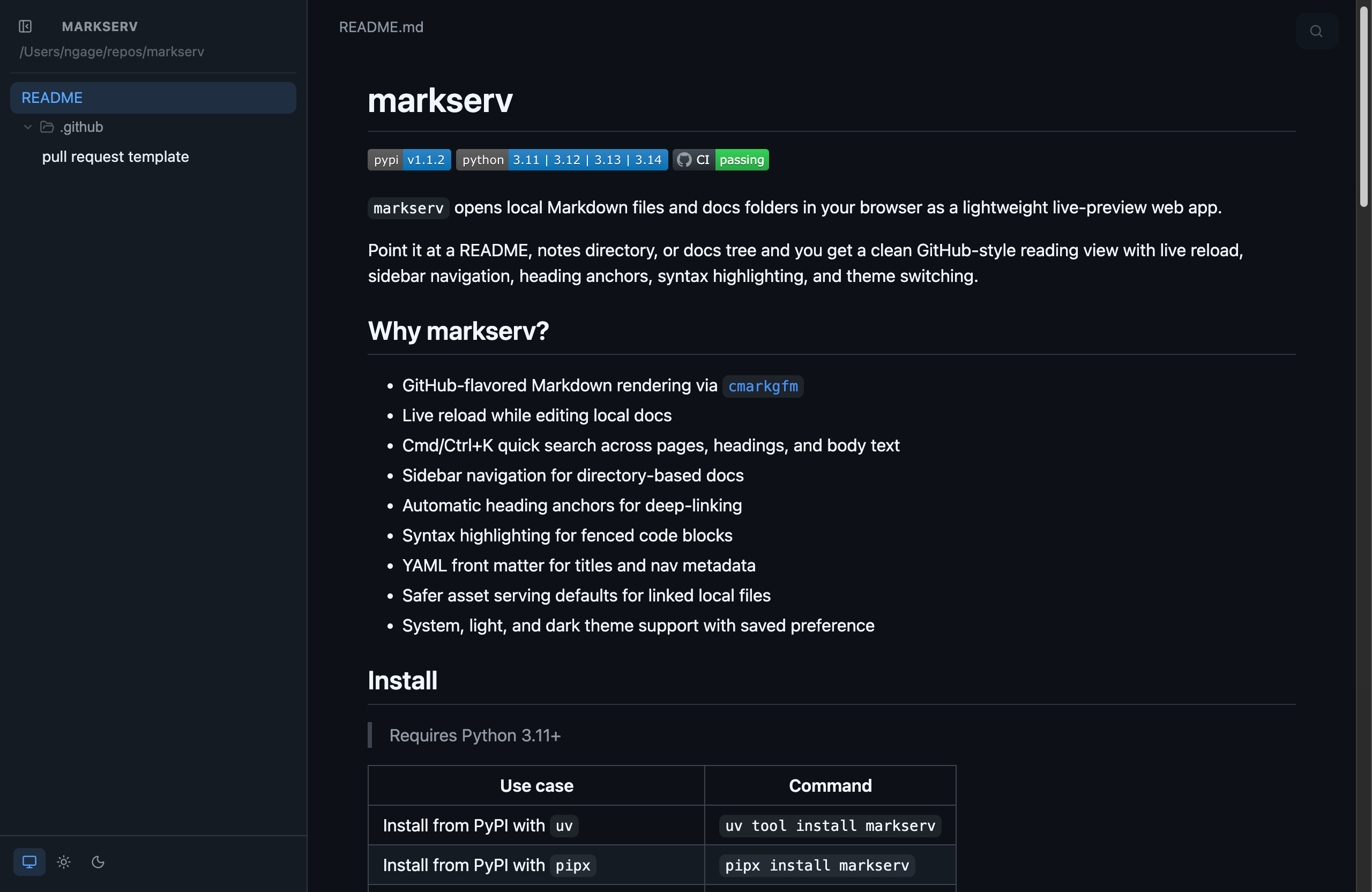
Why markserv?
- GitHub-flavored Markdown rendering via
cmarkgfm - Live reload while editing local docs
- Cmd/Ctrl+K quick search across pages, headings, and body text
- Sidebar navigation for directory-based docs
- Automatic heading anchors for deep-linking
- Syntax highlighting for fenced code blocks
- Mermaid diagram rendering for
mermaidfenced code blocks - YAML front matter for titles and nav metadata
- Safer asset serving defaults for linked local files
- System, light, and dark theme support with saved preference
Install
Requires Python 3.11+
| Use case | Command |
|---|---|
Install from PyPI with uv |
uv tool install markserv |
Install from PyPI with pipx |
pipx install markserv |
| Install a local checkout for development | uv tool install . |
Quick start
Serve a docs directory
markserv docs/
Serve a single Markdown file
markserv README.md
Run the built-in demo site
markserv.demo
Common variations
| Command | What it does |
|---|---|
markserv . |
Serve the current directory |
markserv --host localhost --port 4422 . |
Bind to a custom host/port |
markserv --port 0 README.md |
Bind to any free port |
markserv --no-open README.md |
Start without opening a browser |
markserv.demo --no-open --port 9001 |
Run the demo on a custom port |
What it does
- Renders common Markdown extensions like
.mdand.markdown - Watches Markdown files and reloads the browser when content changes
- Supports multiple concurrent instances by choosing the next free default port when needed
- Supports Cmd/Ctrl+K quick search across page titles, headings, paths, and body text
- Respects
.gitignorewhile scanning, so ignored trees like.venv/are skipped - Serves linked local assets from the same file tree with safer defaults for hidden, executable, and sensitive files
- In directory mode, shows a sidebar for browsing multiple Markdown pages
- Adds heading anchors automatically for easy deep-linking
- Syntax-highlights fenced code blocks
- Renders Mermaid diagrams from
mermaidfenced code blocks - Supports YAML front matter for page titles and navigation labels/order
- Remembers your theme choice in browser storage
Front matter
markserv supports YAML front matter for page and navigation metadata:
---
title: Overview
nav_label: Start Here
nav_order: 10
hidden: false
---

# Overview
| Key | Purpose |
|---|---|
title |
Browser/page title fallback |
nav_label |
Sidebar label override |
nav_order |
Numeric sort order in the sidebar |
hidden |
Hide the page from sidebar navigation while keeping it routable |
Tech stack
markserv uses:
cmarkgfmfor GitHub-flavored Markdown renderingFastAPIfor the local web appFastHXfor HTMX-aware FastAPI renderinghtmyfor Python component-based HTML renderinggithub-markdown-cssfor GitHub-like stylingMermaidfor diagram renderingwatchfilesfor live reloadignoretreeto respect.gitignorerules while scanning
Development
Install dev tooling:
make install
Common commands:
| Task | Command |
|---|---|
| Format | make format |
| Check formatting | make format-check |
| Lint | make lint |
| Type-check | make typecheck |
| Test | make test |
| Run the full local CI suite | make all-ci |
| Install optional asset update tooling | make install-assets |
| Refresh vendored frontend assets | make vendor-assets |
| Update Mermaid and refresh the vendored asset | make update-mermaid |
Notes
markservis intended for plain Markdown / GFM-style docs, not MDX.- UI components are rendered with
htmyfrom Python. - Front-end assets live under
src/markserv/public/. - Bundled CSS comes from
github-markdown-cssand generated Pygments themes. - Mermaid runtime files are vendored into
src/markserv/public/vendor/and included in built wheels and sdists. npmis only needed by maintainers who are updating the vendored Mermaid files withmake update-mermaid.- Bundled HTMX assets are used for SSE-driven live updates.
- The upstream stylesheet license is included at
src/markserv/public/licenses/github-markdown-css.LICENSE. - The bundled HTMX license is included at
src/markserv/public/licenses/htmx.LICENSE. - The bundled Mermaid license is included at
src/markserv/public/licenses/mermaid.LICENSE.
1 maintainer

Metadata
1 maintainer
Release files for markserv 1.4.5
For a detailed explanation of source distributions (sdists) and built distributions (wheels), please see the package formats documentation.
Source distribution (sdist)
| File | Size | Uploaded | |
|---|---|---|---|
| markserv-1.4.5.tar.gz | 953.3 kB | Details |
Built distribution (wheel)
| File | Interpreter | ABI | Platform | Reset |
|---|---|---|---|---|
| markserv-1.4.5-py3-none-any.whl | Python 3 | none | any | Details |
Total release size: 2.0 MB
Release files / markserv-1.4.5.tar.gz
| Download URL | markserv-1.4.5.tar.gz |
|---|---|
| Size | 953.3 kB |
| Tags | Source |
|
SHA-256 checksum How to use checksums |
dc88fa7579e68601f87b73d0315536dde58111f1e6c122db6543bdbf4da663d5
|
|
BLAKE2b-256 checksum How to use checksums |
87585f2c069f6656725dcdf462ff567d3786a1f2a693858962a06021b6c0f5b1
|
| Upload date | |
|
Uploaded using Trusted Publishing? What is trusted publishing? |
Yes |
| Uploaded via |
twine/7.0.0 CPython/3.13.14
|
Provenance
Provenance describes where a file came from. On PyPI, provenance is shared via attestations, which provide a verifiable record of the build or publishing details. View details, limitations and caveats.


PyPI Publish Attestation
PyPI verified that this artifact, at this checksum, originated from the publisher listed below.
Signed by GitHub Actions, verified by PyPI on Sep 15, 2026.
Transparency logRelease files / markserv-1.4.5-py3-none-any.whl
| Download URL | markserv-1.4.5-py3-none-any.whl |
|---|---|
| Size | 1.0 MB |
| Tags | Python 3 |
|
SHA-256 checksum How to use checksums |
88d85788ba4c0605cbf31242b4ea8d09c82f24a8352d1cc89d3f47b36b9a1532
|
|
BLAKE2b-256 checksum How to use checksums |
5a47bfe9333e992d85cfc70c5eae58d19de63087f61ca37c7dcda6221d5b6590
|
| Upload date | |
|
Uploaded using Trusted Publishing? What is trusted publishing? |
Yes |
| Uploaded via |
twine/7.0.0 CPython/3.13.14
|
Provenance
Provenance describes where a file came from. On PyPI, provenance is shared via attestations, which provide a verifiable record of the build or publishing details. View details, limitations and caveats.
PyPI Publish Attestation
PyPI verified that this artifact, at this checksum, originated from the publisher listed below.
Signed by GitHub Actions, verified by PyPI on Sep 15, 2026.
Transparency log













