
This release has been yanked by its maintainers, and will be ignored by installers, except when explicitly specified.
Consider using release 1.0.1 instead.
Reason given by maintainers: stale
MARL-BattleGrounds
The JAX-native Benchmark for Heterogeneous and Competitive Multi-agent Reinforcement Learning.




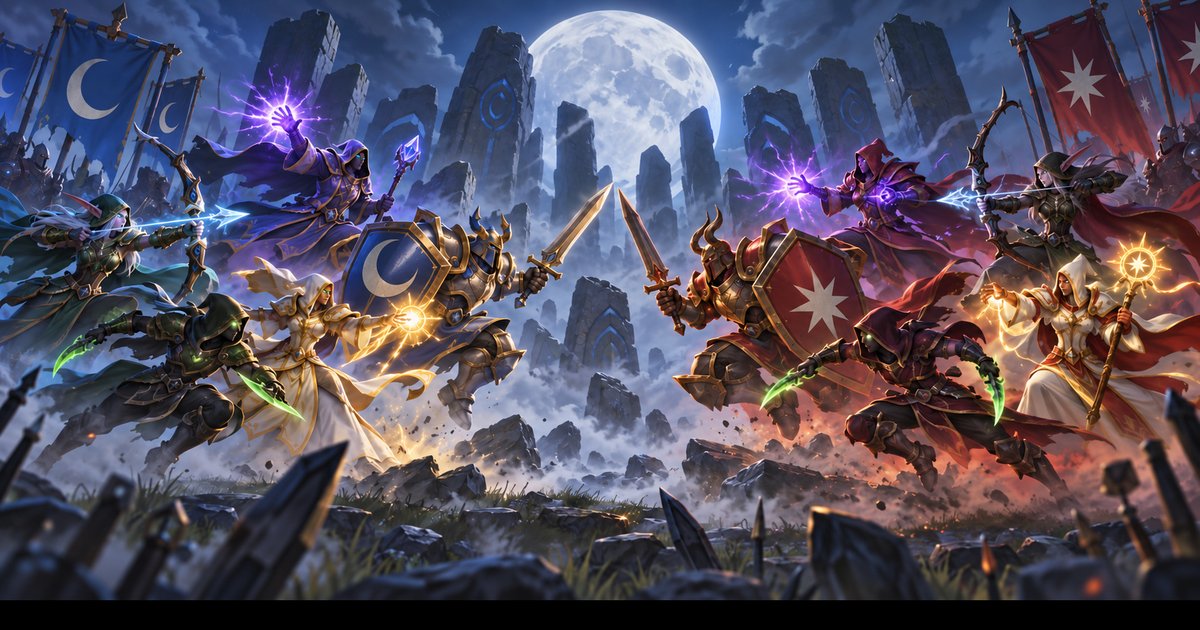
Two teams of up to five agents fight Team Deathmatch on 52 maps. Each agent is a Mage, Warrior, Hunter, Rogue or Priest, so a team wins by combining movement, attacks, healing and support. The whole game is written in JAX, so thousands of games run at once on one GPU. You bring the method; MARL-BGs gives you the game, training helpers, evaluation, tournaments and replays.
Install
On Linux, an Apple Silicon Mac or Windows with WSL2, one command installs everything and opens the BattleClient. It picks the right JAX build for your GPU:
curl -L https://github.com/oceansystemslab/MARL-BattleGrounds/archive/refs/tags/v1.0.0.tar.gz | tar xz
cd MARL-BattleGrounds-1.0.0 && sh start.sh
In your own Python project (Python 3.12 to 3.14; 3.14 recommended):
pip install "marl-battlegrounds[all]"           # CPU
pip install "marl-battlegrounds[all,cuda13]"    # NVIDIA GPU, driver 580 or newer
With Docker, on any system (add --gpus all and the 1.0.0-cuda12 tag for an NVIDIA GPU):
docker run --rm -it -p 127.0.0.1:8765:8766 -p 127.0.0.1:8767:8768 -v "${PWD}:/work" ghcr.io/oceansystemslab/marl-battlegrounds:1.0.0
| Route | Works on | Tested |
|---|---|---|
One command, sh start.sh |
Linux, Apple Silicon Mac, Windows with WSL2 | Linux with NVIDIA; install and evaluation on Linux and Mac CPUs, by every release; WSL2 not tested yet |
| pip | Linux, Apple Silicon Mac, WSL2 | Linux and Apple Silicon Mac, by every release |
| Docker | Any system with Docker; NVIDIA on Linux and Windows hosts | Linux, CPU and NVIDIA; the arm64 image by every release, under emulation; Docker Desktop not tested yet |
| Colab and Kaggle, Open in Colab | A browser | Not tested yet |
Docker runs everything: play, replays, training, evaluation, tournaments, analysis and notebooks. Its limits:
| Limit | What to do |
|---|---|
| No GPU in Docker on a Mac | Use the CPU image; Docker cannot reach Apple GPUs |
study (big multi-run jobs) is not tested in containers and stops when the container stops |
Start the container with -d; not tested yet |
| You cannot add packages to a running container | Build a two-line Dockerfile: FROM ghcr.io/oceansystemslab/marl-battlegrounds:1.0.0, then RUN uv pip install <package> |
| Docker Desktop (Mac, Windows) limits the container's memory | Raise the memory limit in Docker Desktop's settings for large training runs |
Every route, the GPU builds, Windows, clusters and offline use: the install guide.
Quick Start
import jax
import marl_battlegrounds as marl_bgs

env = marl_bgs.make("tdm", map_id=0, num_envs=4)  # four games at once
key = jax.random.key(0)
observation, state = env.reset(key)
for _ in range(50):
    key, act_key, step_key, reset_key = jax.random.split(key, 4)
    actions = env.sample_actions(act_key, state)  # legal random actions
    observation, state, reward, done, info = env.step(step_key, state, actions)
    observation, state = env.reset_done(reset_key, state)  # restart finished games
On one RTX 5090 with 1,024 parallel 5v5 games, the simulator alone runs 50,416 game steps per second (random legal actions, compilation excluded), and recurrent MAPPO trains at 29,878 game steps per second in pure self-play.
Train
One command trains recurrent IPPO with the Season 0 learner settings (250 million game steps, a few hours on one RTX 5090) against scripted opponents, and keeps its best checkpoint on the validation maps:
python -m marl_battlegrounds.experiments.train method=ippo pool=scripted \
  'validation_opponents=[tdm-alpha,tdm-beta,tdm-gamma]' output_dir=runs/my-ippo
Evaluate
import marl_battlegrounds as marl_bgs

results = marl_bgs.evaluate("random", "tdm-alpha", num_episodes=32, num_envs=32)
print(results.head_to_head())  # games, wins, draws, losses, point margin
Your method is always Team A, and paired games swap the spawn ends, so a map's layout cannot favor either side.
Watch And Play
python -m marl_battlegrounds replay path/to/game.marlbg-replay.json
import marl_battlegrounds as marl_bgs

marl_bgs.battle_client(team_b="tdm-alpha")  # play in your browser against a scripted team
The Six Built-In Learners
| Method | Name | Memory | Critic |
|---|---|---|---|
| Recurrent MAPPO | mappo |
Recurrent | Centralized |
| Feedforward MAPPO | ff_mappo |
None | Centralized |
| Recurrent IPPO | ippo |
Recurrent | One per agent |
| Feedforward IPPO | ff_ippo |
None | One per agent |
| QMIX | qmix |
Recurrent | QMIX mixer |
| PQN-VDN | pqn_vdn |
Recurrent | Sum of agent values |
The six trained Season 0 models, with every save from 0 to 250M steps, load by name,
for example marl_bgs.load_method("MARL-BattleGrounds/tdm-season-0-qmix@final")
(Training).
Your own method can be anything that turns permitted observations into legal actions: a network, a planner, a language model or a mix.
Guides
| Guide | What It Covers | Website |
|---|---|---|
| Getting Started | Install, your first games, maps, rosters, what agents see | start |
| Game Rules | Classes, abilities, scoring, Red Zone, scenarios | game |
| Your Method | Plug in your own model or learner, with JAX's jit, vmap and scan | your-method |
| Training | The six learners, opponents, curriculum, rewards, checkpoints | training |
| Hydra Configs | Settings files, overrides, sweeps, studies and the experiment stages | configs |
| Evaluation | Fair games, validation and test maps, scenarios, saved results | evaluate |
| Metrics | What is measured and how to read it | metrics |
| Tournaments | Round robins, Elo ratings and tiers | round-robin |
| Tournament Rules | The leaderboard rulebook | rules |
| Replays | Save games and watch them in the Replay Viewer | replay-format |
| BattleClient | Play against or beside your own agents in the browser | battleclient |
| LLM Agents | Run a language model as a team | llm |
| Performance | Speed and memory, and how to measure them on your machine | performance |
| Method Sources | Where the built-in learners come from | method-sources |
| API Reference | Every public name on one page | api |
Reproduce The Paper
The paper's commands, frozen settings and result tables are in
scripts/paper_experiments/.
Cite
Use the "Cite this repository" button on GitHub, or:
@software{marl_battlegrounds,
  author = {Hawili, Ulixes Tariq},
  title = {{MARL-BattleGrounds}: The JAX-native Benchmark for Heterogeneous and Competitive Multi-agent Reinforcement Learning},
  version = {1.0.0},
  year = {2026},
  url = {https://github.com/oceansystemslab/MARL-BattleGrounds}
}
Contribute
Pull requests are welcome. Start with CONTRIBUTING.md, and open an issue for bugs, ideas, questions and leaderboard submissions.
Author
MARL-BattleGrounds is developed by Ulixes Tariq Hawili as part of the SPADS CDT, University of Edinburgh School of Engineering, and the Ocean Systems Lab at HWU.
License
Licensed under the Apache License, Version 2.0.
1 maintainer

Metadata
1 maintainer
Release files for marl-battlegrounds 1.0.0
For a detailed explanation of source distributions (sdists) and built distributions (wheels), please see the package formats documentation.
Source distribution (sdist)
| File | Size | Uploaded | |
|---|---|---|---|
| marl_battlegrounds-1.0.0.tar.gz | 4.5 MB | Details |
Built distribution (wheel)
| File | Interpreter | ABI | Platform | Reset |
|---|---|---|---|---|
| marl_battlegrounds-1.0.0-py3-none-any.whl | Python 3 | none | any | Details |
Total release size: 9.4 MB
Release files / marl_battlegrounds-1.0.0.tar.gz
| Download URL | marl_battlegrounds-1.0.0.tar.gz |
|---|---|
| Size | 4.5 MB |
| Tags | Source |
|
SHA-256 checksum How to use checksums |
abda562c00104db80eb3249c49cfe2f183c1cf14a7a683dd02d53eec178b5501
|
|
BLAKE2b-256 checksum How to use checksums |
5ab53a5230bae168868210afaeb5838bb750a6dd1af7685a26291fef01ea7ca1
|
| Upload date | |
|
Uploaded using Trusted Publishing? What is trusted publishing? |
Yes |
| Uploaded via |
twine/7.0.0 CPython/3.13.14
|
Provenance
Provenance describes where a file came from. On PyPI, provenance is shared via attestations, which provide a verifiable record of the build or publishing details. View details, limitations and caveats.


PyPI Publish Attestation
PyPI verified that this artifact, at this checksum, originated from the publisher listed below.
Signed by GitHub Actions, verified by PyPI on Oct 10, 2026.
Transparency logRelease files / marl_battlegrounds-1.0.0-py3-none-any.whl
| Download URL | marl_battlegrounds-1.0.0-py3-none-any.whl |
|---|---|
| Size | 4.8 MB |
| Tags | Python 3 |
|
SHA-256 checksum How to use checksums |
1906a4c264d75905bca8178fcecfbbaa24fefb3c08302652bfb575a758d4efa7
|
|
BLAKE2b-256 checksum How to use checksums |
30e025a1043035845e4cb87fffb6566e9cb6383dd7820677af92404bc91aadbc
|
| Upload date | |
|
Uploaded using Trusted Publishing? What is trusted publishing? |
Yes |
| Uploaded via |
twine/7.0.0 CPython/3.13.14
|
Provenance
Provenance describes where a file came from. On PyPI, provenance is shared via attestations, which provide a verifiable record of the build or publishing details. View details, limitations and caveats.
PyPI Publish Attestation
PyPI verified that this artifact, at this checksum, originated from the publisher listed below.
Signed by GitHub Actions, verified by PyPI on Oct 10, 2026.
Transparency log













