
MARM-Systems is a complete protocol and platform—combining an advanced memory backend, modular semantic search, and agent-to-agent coordination with a scientifically structured, community-vetted methodology for reasoning, session recall, and collaborative AI workflows. More then just a set of tools, it's a complete AI memory ecosystem
Verified details
These details have been verified by PyPIProject links
GitHub Statistics
Maintainers

Project description
MARM: The AI That Remembers Your Conversations V2.5.0







Why MARM MCP: The Problem & Solution
Your AI forgets everything. MARM MCP doesn't.
Modern LLMs lose context over time, repeat prior ideas, and drift off requirements. MARM MCP solves this with a unified, persistent, MCP‑native memory layer that sits beneath any AI client you use. It blends semantic search, structured session logs, reusable notebooks, and smart summaries so your agents can remember, reference, and build on prior work—consistently, across sessions, and across tools.
Before vs After
- Without MARM: lost context, repeated suggestions, drifting scope, "start from scratch."
- With MARM: session memory, cross-session continuity, concrete recall of decisions, and faster, more accurate delivery.
What MARM MCP Delivers
| Memory | Multi-AI | Architecture |
|---|---|---|
| Semantic Search - Find by meaning using AI embeddings | Unified Memory Layer - Works with Claude, Qwen, Gemini, MCP clients | 18 Complete MCP Tools - Full Model Context Protocol coverage |
| Auto-Classification - Content categorized (code, project, book, general) | Cross-Platform Intelligence - Different AIs learn from shared knowledge | Database Optimization - SQLite with WAL mode and connection pooling |
| Persistent Cross-Session Memory - Memories survive across agent conversations | User-Controlled Memory - "Bring Your Own History," granular control | Rate Limiting - IP-based tiers for stability |
| Smart Recall - Vector similarity search with context-aware fallbacks | MCP Compliance - Response size management for predictable performance | |
| Docker Ready - Containerized deployment with health/readiness checks |
MARM Demo Video: Docker Install + Persistent AI Memory in Action
https://github.com/user-attachments/assets/c7c6a162-5408-4eda-a461-610b7e713dfe
Watch MARM install through Docker, connect to Claude, and share persistent memory across Claude, Gemini, and Qwen.
What Users Are Saying
“MARM successfully handles our industrial automation workflows in production. We've validated session management, persistent logging, and smart recall across container restarts in our Windows 11 + Docker environment. The system reliably tracks complex technical decisions and maintains data integrity through deployment cycles.”
@Ophy21, GitHub user (Industrial Automation Engineer)
“MARM proved exceptionally valuable for DevOps and complex Docker projects. It maintained 100% memory accuracy, preserved context on 46 services and network configurations, and enabled standards-compliant Python/Terraform work. Semantic search and automated session logs made solving async and infrastructure issues far easier. Value Rating: 9.5/10 - indispensable for enterprise-grade memory, technical standards, and long-session code management.” @joe_nyc, Discord user (DevOps/Infrastructure Engineer)
🚀 Quick Start for MCP (HTTP & STDIO)

Use this quick rule of thumb to choose your setup:
- Local HTTP/STDIO = fastest single-machine setup.
- Docker HTTP = shared/always-on server (key required).
- Docker STDIO = private containerized local use (no HTTP key).
Local pip HTTP (zero config):
pip install marm-mcp-server
python -m marm_mcp_server
# most agents use this --transport command
"agent" mcp add --transport http marm-memory http://localhost:8001/mcp
codex mcp add marm-memory --url http://localhost:8001/mcp
# xAI / Grok Remote MCP
# Use a hosted HTTPS MARM endpoint, not localhost. See Docker / hosted setup below.
Local pip STDIO:
pip install marm-mcp-server
# most agents use this --transport command
"agent" mcp add --transport stdio marm-memory-stdio marm-mcp-stdio
codex mcp add marm-memory-stdio -- marm-mcp-stdio
# xAI / Grok Remote MCP
# Use a hosted HTTPS MARM endpoint, not localhost. See Docker / hosted setup below.
python -m marm_mcp_server.server_stdio
Docker HTTP (key required):
# Step 1: generate key (do not add < > around the key)
docker run --rm lyellr88/marm-mcp-server:latest python -m marm_mcp_server --generate-key

# Step 2: run server
docker pull lyellr88/marm-mcp-server:latest
docker run -d --name marm-mcp-server \
  -p 127.0.0.1:8001:8001 \
  -e SERVER_HOST=0.0.0.0 \
  -e MARM_API_KEY=your-generated-key \
  -v ~/.marm:/home/marm/.marm \
  lyellr88/marm-mcp-server:latest

# Step 3: connect client
"agent" mcp add --transport http marm-memory http://localhost:8001/mcp --header "Authorization: Bearer your-generated-key"
codex mcp add marm-memory --url http://localhost:8001/mcp --bearer-token-env-var MARM_API_KEY
Docker STDIO (no HTTP key):
docker run --rm -i \
  -v ~/.marm:/home/marm/.marm \
  lyellr88/marm-mcp-server:latest \
  python -m marm_mcp_server.server_stdio
Most useful support info:
- Docker HTTP requires a key; Docker STDIO does not.
- If you get
401, verify key match and client restart after env var changes. - For full key setup, rotation, and troubleshooting: INSTALL-DOCKER.md
Connect Your Client Fast
Claude Code remains the recommended first setup path, but MARM also works with other MCP clients and IDE agents.
All supported clients and platforms
CLI clients - Claude Code · Codex · Gemini CLI · Qwen CLI · Linux variants · Docker/key
IDE agents - VS Code / Copilot Agent · Cursor · Docker/key IDE setup
Remote/API platforms - xAI / Grok Remote MCP · Platform integration
Complete MCP Tool Suite (18 Tools)

💡 Pro Tip: You don't need to manually call these tools! Just tell your AI agent what you want in natural language:
- "Claude, log this session as 'Project Alpha' and add this conversation as 'database design discussion'"
- "Remember this code snippet in your notebook for later"
- "Search for what we discussed about authentication yesterday"
The AI agent will automatically use the appropriate tools. Manual tool access is available for power users who want direct control.
| Category | Tool | Description |
|---|---|---|
| Memory Intelligence | marm_smart_recall |
AI-powered semantic similarity search across all memories. Supports global search with search_all=True flag |
marm_contextual_log |
Intelligent auto-classifying memory storage using vector embeddings | |
| Session Management | marm_start |
Activate MARM intelligent memory and response accuracy layers |
marm_refresh |
Refresh AI agent session state and reaffirm protocol adherence | |
| Logging System | marm_log_session |
Create or switch to named session container |
marm_log_entry |
Add structured log entry with auto-date formatting | |
marm_log_show |
Display all entries and sessions (filterable) | |
marm_log_delete |
Delete specified session or individual entries | |
| Reasoning & Workflow | marm_summary |
Generate context-aware summaries with intelligent truncation for LLM conversations |
marm_context_bridge |
Smart context bridging for seamless AI agent workflow transitions | |
| Notebook Management | marm_notebook_add |
Add new notebook entry with semantic embeddings |
marm_notebook_use |
Activate entries as instructions (comma-separated) | |
marm_notebook_show |
Display all saved keys and summaries | |
marm_notebook_delete |
Delete specific notebook entry | |
marm_notebook_clear |
Clear the active instruction list | |
marm_notebook_status |
Show current active instruction list | |
| System Utilities | marm_system_info |
Comprehensive system information, health status, and loaded docs |
marm_reload_docs |
Reload documentation into memory system |
MARM Dashboard
A local web UI for browsing and managing your MARM memory — separate from the MCP server, reads and writes the same ~/.marm/marm_memory.db.
| What it gives you | How it works |
|---|---|
| Browse/search/edit all memories | Direct SQLite — no MCP required |
| Manage sessions and protocol logs | Runs on port :8002 alongside MCP on :8001 |
| Notebook CRUD with inline editor | Same auth model (MARM_API_KEY) as the MCP server |
| Delete-all with count confirmation | Docker image included; WAL mode handles concurrent access |
# Quick start (pip)
cd marm-dashboard
pip install -e .
python -m marm_dashboard --open
# Docker (same key and volume as MCP)
docker build -t marm-dashboard:local ./marm-dashboard
docker run --rm -p 127.0.0.1:8002:8002 \
  -e MARM_API_KEY=your-key \
  -v ~/.marm:/home/marm/.marm \
  marm-dashboard:local
See marm-dashboard/README.md for the full guide.
Architecture Overview
Core Technology Stack (click to expand)
FastAPI (0.115.4) + FastAPI-MCP (0.4.0)
├── SQLite with WAL Mode + Custom Connection Pooling
├── Sentence Transformers (all-MiniLM-L6-v2) + Semantic Search
├── Structured Logging (structlog) + Memory Monitoring (psutil)
├── Auth Middleware (loopback enforcement + optional API key)
├── IP-Based Rate Limiting + Usage Analytics
├── MCP Response Size Compliance (1MB limit)
├── Event-Driven Automation System
├── Docker Containerized Deployment + Health Monitoring
└── Advanced Memory Intelligence + Auto-Classification
Production Optimizations (click to expand)
- Custom SQLite Connection Pool: Thread-safe with configurable limits (default: 5)
- WAL Mode: Write-Ahead Logging for concurrent access performance
- Lazy Loading: Semantic models loaded only when needed (resource efficient)
- Intelligent Caching: Memory usage optimization with cleanup cycles
- Response Size Management: MCP 1MB compliance with smart truncation
Security & Configuration (click to expand)
MARM defaults to localhost-only (127.0.0.1). No credentials are required for local pip use — the loopback interface is the trust boundary.
| Environment Variable | Default | Description |
|---|---|---|
SERVER_HOST |
127.0.0.1 |
Bind address. Set to 0.0.0.0 to allow network/Docker access. |
SERVER_PORT |
8001 |
Port the server listens on. |
MARM_API_KEY |
(unset) | Bearer token required on all capability endpoints when set. |
Pip + localhost (default): zero config, no key, no friction.
Pip + SERVER_HOST=0.0.0.0: MARM auto-generates a key on first start, saves it to ~/.marm/.env, and prints the client connection command once. Subsequent starts load silently.
Docker HTTP: always requires MARM_API_KEY — Docker bridge networking means requests never arrive as loopback. Generate with docker run --rm lyellr88/marm-mcp-server:latest python -m marm_mcp_server --generate-key, pass as -e MARM_API_KEY=your-key. Use HTTP for multi-agent workflows because one MARM process coordinates database access.
Docker STDIO: no port or API key, best for private single-agent/local use. Multiple STDIO containers can share the same mounted ~/.marm database, but heavy concurrent writers may hit normal SQLite locking; use Docker HTTP for Hermes-style multi-agent runs.
Resetting a Docker HTTP key: removing an MCP client entry only removes the client config. To rotate the server key, stop the container, generate a new key, restart Docker HTTP with the new MARM_API_KEY, then re-add/update the client with the matching bearer token. Docker STDIO has no API key to rotate.
Behind a reverse proxy: bind to 127.0.0.1, let the proxy handle TLS and auth forwarding.
Competitive Advantage vs. Basic MCP Implementations (click to expand)
| Feature | MARM | Basic MCP Servers |
|---|---|---|
| Memory Intelligence | AI-powered semantic search with auto-classification | Basic key-value storage |
| Tool Coverage | 18 complete MCP protocol tools | 3-5 basic wrappers |
| Scalability | Database optimization + connection pooling | Single connection |
| MCP Compliance | 1MB response size management | No size controls |
| Deployment | Docker containerization + health monitoring | Local development only |
| Analytics | Usage tracking + business intelligence | No tracking |

Contributing
MARM is open to useful contributions: bug reports, install feedback, documentation fixes, client connection notes, performance testing, and focused pull requests.
Good places to help:
- Test MARM with more MCP clients and IDE agents
- Improve install docs and platform-specific setup notes
- Report bugs with clear reproduction steps
- Suggest practical memory workflows and tool improvements
- Submit small, focused pull requests
See CONTRIBUTING.md for the full contribution guide.
Join the MARM Community
Help build the future of AI memory - no coding required!
Connect: MARM Discord | GitHub Discussions
Easy Ways to Get Involved
- Try the MCP server and share your experience
- Star the repo if MARM solves a problem for you
- Share on social - help others discover memory-enhanced AI
- Open issues with bugs, feature requests, or use cases
- Join discussions about AI reliability and memory
For Developers
- Build integrations - MCP tools, browser extensions, API wrappers
- Enhance the memory system - improve semantic search and storage
- Expand platform support - new deployment targets and integrations
- Submit Pull Requests - Every PR helps MARM grow. Big or small, I review each with respect and openness to see how it can improve the project
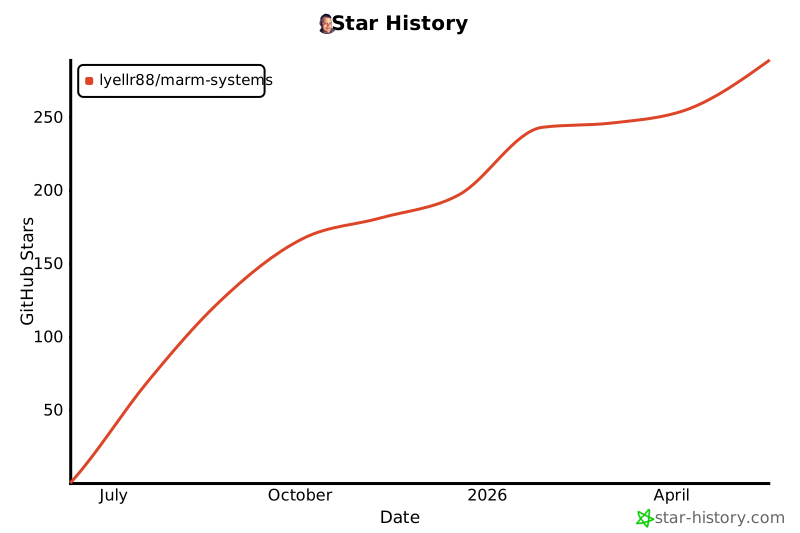
⭐ Star the Project
If MARM helps with your AI memory needs, please star the repository to support development!
License & Usage Notice
This project is licensed under the MIT License. Forks and derivative works are permitted.
However, use of the MARM name and version numbering is reserved for releases from the official MARM repository.
Derivatives should clearly indicate they are unofficial or experimental.
Project Documentation
Usage Guides
- MCP-HANDBOOK.md - Complete MCP server usage guide with commands, workflows, and examples
- PROTOCOL.md - Quick start commands and protocol reference
- FAQ.md - Answers to common questions about using MARM
MCP Server Installation
- QUICK-INSTALL.md - Quick start guide for all platforms.
- INSTALL-DOCKER.md - Docker deployment (recommended)
- INSTALL-WINDOWS.md - Windows installation guide
- INSTALL-LINUX.md - Linux installation guide
- INSTALL-PLATFORMS.md - Platform installation guide
Project Information
- README.md - This file - ecosystem overview and MCP server guide
- CONTRIBUTING.md - How to contribute to MARM
- CHANGELOG.md - Version history and updates
- ROADMAP.md - Planned features and development roadmap
- LICENSE - MIT license terms
mcp-name: io.github.Lyellr88/marm-mcp-server
Project details
Verified details
These details have been verified by PyPIProject links
GitHub Statistics
Maintainers
Release history Release notifications | RSS feed


Download files
Download the file for your platform. If you're not sure which to choose, learn more about installing packages.
Source Distribution
Built Distribution
Filter files by name, interpreter, ABI, and platform.
If you're not sure about the file name format, learn more about wheel file names.
Copy a direct link to the current filters
File details
Details for the file marm_mcp_server-2.5.3.tar.gz.
File metadata
- Download URL: marm_mcp_server-2.5.3.tar.gz
- Upload date:
- Size: 62.5 kB
- Tags: Source
- Uploaded using Trusted Publishing? Yes
- Uploaded via: twine/6.1.0 CPython/3.13.12
File hashes
| Algorithm | Hash digest | |
|---|---|---|
| SHA256 |
978b8f8b0f1b8fcb5e049fc6898648faf539428c5d872142d0d2f9316cbeac81
|
|
| MD5 |
5e98b9a4a19a7250fdd35c59dc0c3133
|
|
| BLAKE2b-256 |
91bf00e8becd979568f4126566d819e8594201193ae0e45c0db571348885f8bb
|
Provenance
The following attestation bundles were made for marm_mcp_server-2.5.3.tar.gz:
Publisher:
publish-mcp.yml on Lyellr88/MARM-Systems
-
Statement:
-
Statement type:
https://in-toto.io/Statement/v1 -
Predicate type:
https://docs.pypi.org/attestations/publish/v1 -
Subject name:
marm_mcp_server-2.5.3.tar.gz -
Subject digest:
978b8f8b0f1b8fcb5e049fc6898648faf539428c5d872142d0d2f9316cbeac81 - Sigstore transparency entry: 1566138865
- Sigstore integration time:
-
Permalink:
Lyellr88/MARM-Systems@c40c1b4be044973350839c1d0333d394471b92b9 -
Branch / Tag:
refs/heads/MARM-main - Owner: https://github.com/Lyellr88
-
Access:
public
-
Token Issuer:
https://token.actions.githubusercontent.com -
Runner Environment:
github-hosted -
Publication workflow:
publish-mcp.yml@c40c1b4be044973350839c1d0333d394471b92b9 -
Trigger Event:
workflow_dispatch
-
Statement type:
File details
Details for the file marm_mcp_server-2.5.3-py3-none-any.whl.
File metadata
- Download URL: marm_mcp_server-2.5.3-py3-none-any.whl
- Upload date:
- Size: 56.6 kB
- Tags: Python 3
- Uploaded using Trusted Publishing? Yes
- Uploaded via: twine/6.1.0 CPython/3.13.12
File hashes
| Algorithm | Hash digest | |
|---|---|---|
| SHA256 |
792cf7644ea3e06eabbb3c976345bbb7013c58f5b3406e816013f51237a5d143
|
|
| MD5 |
c78210b9f40906e222d22f439b86aba2
|
|
| BLAKE2b-256 |
a1a47382ab265e5b1c613837affcbdaf2b7163a0e4307701b6aee8993c3e2b95
|
Provenance
The following attestation bundles were made for marm_mcp_server-2.5.3-py3-none-any.whl:
Publisher:
publish-mcp.yml on Lyellr88/MARM-Systems
-
Statement:
-
Statement type:
https://in-toto.io/Statement/v1 -
Predicate type:
https://docs.pypi.org/attestations/publish/v1 -
Subject name:
marm_mcp_server-2.5.3-py3-none-any.whl -
Subject digest:
792cf7644ea3e06eabbb3c976345bbb7013c58f5b3406e816013f51237a5d143 - Sigstore transparency entry: 1566138875
- Sigstore integration time:
-
Permalink:
Lyellr88/MARM-Systems@c40c1b4be044973350839c1d0333d394471b92b9 -
Branch / Tag:
refs/heads/MARM-main - Owner: https://github.com/Lyellr88
-
Access:
public
-
Token Issuer:
https://token.actions.githubusercontent.com -
Runner Environment:
github-hosted -
Publication workflow:
publish-mcp.yml@c40c1b4be044973350839c1d0333d394471b92b9 -
Trigger Event:
workflow_dispatch
-
Statement type:






