

Transform ordinary codebases into explainable execution artifacts.
Martian captures how software behaves while it runs — function calls, outputs, artifacts, logs, execution flow, runtime metadata, and relationships — then compiles them into rich interactive mission reports called MartianBooks.
Write normal code.
Martian observes.
No notebooks required.
👨🚀 📈 👁️ 😨🔥
🤖 Using an AI assistant? Attach
SKILL.mdto your conversation for accurate MartianBook help out of the box.
Why?
Developers often end up choosing between clean projects:
src/
models/
utils/
main.py
and:
analysis_FINAL_v7_REAL_FINAL.ipynb
because notebooks are easy to explain, visualize, and share.
Martian preserves normal software structure while giving you notebook-like explainability after execution. No cell-based workflows. No regression to notebooks just to show management a chart.
Installation
uv add martianbook
Martian runs inside your project's own environment so it can see all your dependencies — torch, numpy, sklearn, huggingface, whatever you use. Install it alongside your other packages, not as a global tool.
# Add martianbook alongside your own deps
uv add martianbook numpy matplotlib torch
Or with pip:
pip install martianbook
Running
Martian understands Python files directly — no subcommand needed:
uv run martian main.py              # run a single script
uv run martian "examples/*.py"      # run all scripts matching pattern
uv run martian "src/**/*.py"        # recursive wildcard
The go subcommand also works if you prefer explicit:
uv run martian go main.py
Optional: martian Alias
Set this up once and never type uv run martian again.
Linux / macOS — add to ~/.bashrc or ~/.zshrc:
alias martian="uv run martian"
source ~/.bashrc # reload
Windows PowerShell — add to $PROFILE:
function martian { uv run martian @args }
After that, everywhere in your project:
martian main.py
martian "examples/*.py"
martian serve
martian export
Quick Start
1. Choose which functions to show in MartianBook.
You are in full control. Martian only captures the functions you explicitly decorate — everything else runs normally and stays invisible. Decorate the functions that tell the story: the ones with meaningful outputs, the ones that produce charts, the ones you want to explain to others.
# main.py
import martianbook as martian

# ✓ Decorate the functions you want in MartianBook
@martian.capture
def load_data(path: str):
    """Loads raw CSV data and validates schema."""
    print(f"Loading {path}...")
    return {"rows": 1200}

@martian.capture
def clean_data(dataset: dict):
    """Removes nulls and validates required columns."""
    print(f"Cleaning {dataset['rows']} rows...")
    return {**dataset, "rows": dataset["rows"] - 14}

# ✗ Skip functions you don't want shown — they still run normally
@martian.skip
def debug_dump(data):
    print(f"DEBUG: {data}")

# Group related functions under a named section
@martian.section("Pipeline")
def run():
    """Full pipeline from ingestion to output."""
    data  = load_data("data/raw.csv")
    clean = clean_data(data)
    debug_dump(clean)   # runs but never appears in MartianBook

if __name__ == "__main__":
    run()
2. Run:
uv run martian main.py
3. Open MartianBook in your browser:
uv run martian serve
CLI Reference
uv run martian main.py                 # run script, capture execution
uv run martian "examples/*.py"         # run all matching scripts
uv run martian main.py --inspect       # run and print terminal summary
uv run martian inspect                 # print summary of last run
uv run martian serve                   # open MartianBook in browser
uv run martian export                  # export standalone HTML
uv run martian export -o report.html   # export to specific path
Works With Your Existing Stack
Martian runs inside your environment. It sees everything you have installed.
import martianbook as martian
import torch
import numpy as np
import pandas as pd
from sklearn.ensemble import RandomForestClassifier

@martian.capture
def train_model(X, y):
    """Trains a random forest classifier on the cleaned dataset."""
    clf = RandomForestClassifier(n_estimators=100)
    clf.fit(X, y)
    print(f"Accuracy: {clf.score(X, y):.3f}")
    return clf
torch, sklearn, pandas, huggingface, beautifulsoup — all visible. No lockout.
Artifact Detection
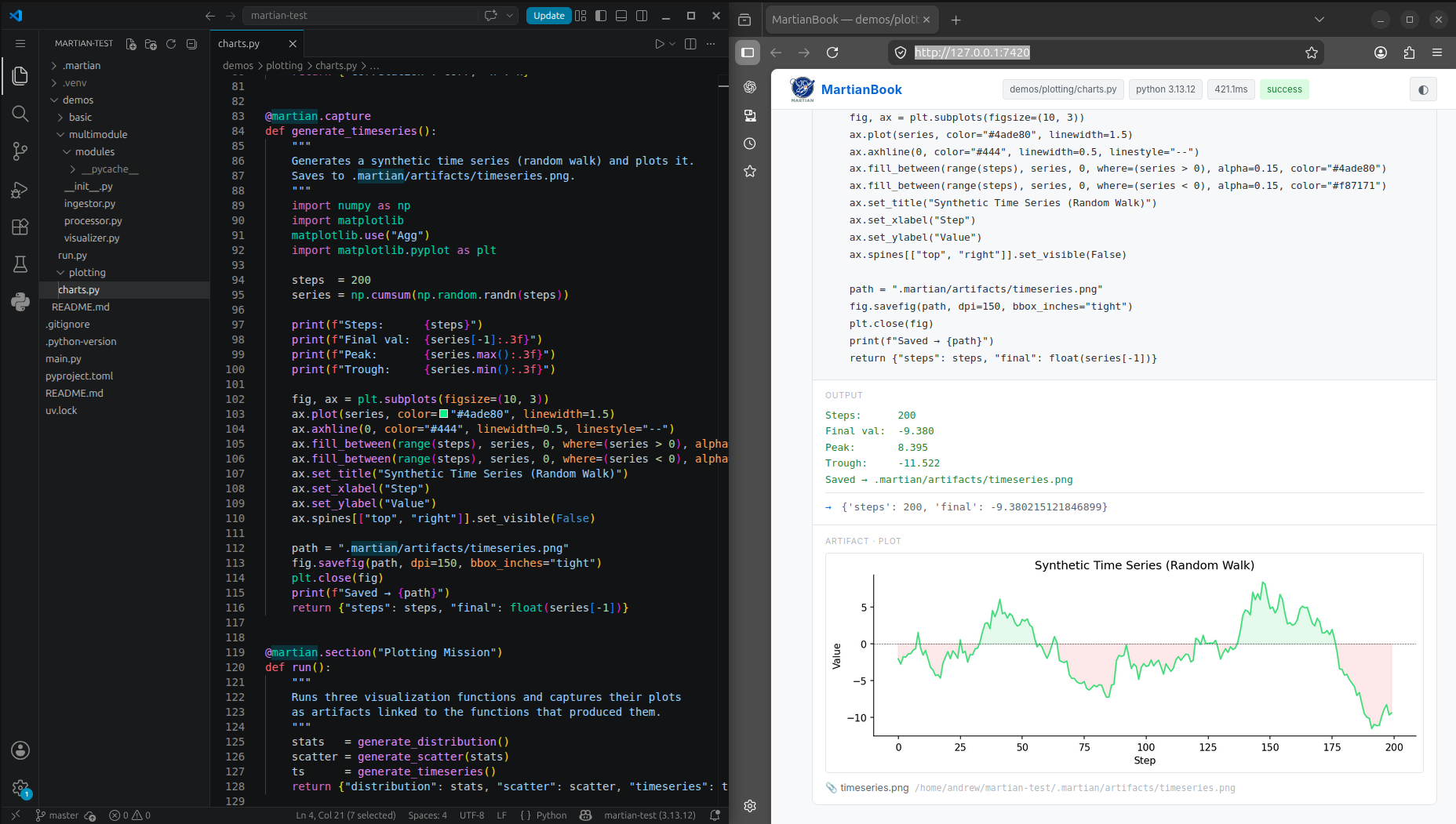
Martian automatically detects files produced during execution. Save plots, CSVs, or any file to .martian/artifacts/ and they appear in the report linked to the function that created them — embedded inline in the exported HTML.
@martian.capture
def plot_results(data):
    """Plots distribution across numeric columns."""
    import matplotlib
    matplotlib.use("Agg")   # always required — prevents GUI errors
    import matplotlib.pyplot as plt
    fig, ax = plt.subplots()
    ax.hist(data, bins=40)
    ax.set_title("Result Distribution")
    fig.savefig(".martian/artifacts/distribution.png")
    plt.close(fig)
uv run martian main.py
uv run martian export

# Open the exported file
open martianbook.html        # macOS
firefox martianbook.html    # Linux
Supported: PNG, SVG, JPG, CSV, JSON, TXT, and any other format.
Decorators
@martian.capture
Instruments a function. Martian records its source code, docstring, arguments, stdout, return value summary, timing, exceptions, and any artifacts it produces. Only decorate the functions you want to appear in MartianBook.
@martian.capture
def train_model(data):
    """Trains the model on cleaned data."""
    ...
@martian.skip
Function executes normally and completely. Martian ignores it. Use for debug helpers, noisy internals, or anything you don't want surfaced in the report.
@martian.skip
def debug_dump():
    print("internal state...")
@martian.section
Groups all captured functions called inside this one under a named section in MartianBook. Useful for organizing complex pipelines into readable chapters.
@martian.section("Data Pipeline")
def run_pipeline():
    """Full pipeline from ingestion to output."""
    load_data()
    clean_data()
    train_model()
Generated Structure
.martian/
├── report.json       ← full execution IR
└── artifacts/        ← files produced during the run
Intermediate Representation
Martian uses a language-independent runtime schema. All adapters produce the same report.json. All renderers consume only that file.
{
  "martian_version": "0.3.0",
  "mission": {
    "entry_point": "main.py",
    "duration_ms": 104.3,
    "status": "success"
  },
  "execution": [
    {
      "name": "load_data",
      "duration_ms": 50.3,
      "stdout": ["Loading data/raw.csv..."],
      "children": ["clean_data"]
    }
  ]
}
This separation allows HTML renderers, desktop apps, hosted viewers, VSCode integrations, and future language adapters to all consume the same format.
Demos
The demos/ directory in the repo contains working examples.
They cannot be run directly from the repo — they need their own
environment. See demos/README.md for setup instructions.
| Demo | What it shows |
|---|---|
demos/basic/pipeline.py |
Single file pipeline, all three decorators |
demos/plotting/charts.py |
Matplotlib artifact capture, 3 plots |
demos/multimodule/run.py |
Cross-file decorated functions, 3 modules |
Current Status
✅ Python runtime instrumentation
✅ Execution tree generation
✅ Function-level telemetry
✅ stdout/stderr capture
✅ Runtime duration tracking
✅ Exception capture
✅ Artifact detection (PNG, SVG, CSV, and more)
✅ Inline image embedding in HTML exports
✅ Return value summaries
✅ Dependency relationships
✅ JSON intermediate representation
✅ Modular adapter architecture
✅ Direct script invocation (martian main.py)
✅ Wildcard execution (martian "examples/*.py")
✅ CLI — martian go, martian inspect, martian serve, martian export
Roadmap
Near-term
- Syntax highlighting in code blocks
- Call graph visualization
- Execution timeline
- Full styled MartianBook UI
Future
- Rust adapter
- C++ adapter
- JavaScript adapter
- Desktop application
- VSCode integration
- Hosted mission viewer
- Multi-language execution support
Far future
martian universe/
Results may vary.
Author
Built by Andrew Garcia, Ph.D.
Martian started with a simple question:
Why should developers have to choose between clean software architecture and explainable notebooks?
Martian explores a different path:
Write ordinary software.
Observe execution.
Generate explainable artifacts afterward.
License
MIT
1 maintainer

Metadata
1 maintainer
Release files for martianbook 0.3.0
For a detailed explanation of source distributions (sdists) and built distributions (wheels), please see the package formats documentation.
Source distribution (sdist)
| File | Size | Uploaded | |
|---|---|---|---|
| martianbook-0.3.0.tar.gz | 55.6 kB | Details |
Built distribution (wheel)
| File | Interpreter | ABI | Platform | Reset |
|---|---|---|---|---|
| martianbook-0.3.0-py3-none-any.whl | Python 3 | none | any | Details |
Total release size: 112.0 kB
Release files / martianbook-0.3.0.tar.gz
| Download URL | martianbook-0.3.0.tar.gz |
|---|---|
| Size | 55.6 kB |
| Tags | Source |
|
SHA-256 checksum How to use checksums |
efcc6be6e0b658c8f74cd5217c81a04a64615e0d93e6c80b722846abd911d460
|
|
BLAKE2b-256 checksum How to use checksums |
18113c36a69759a018b2f28e366596728667349741f57f8bc1b7635859f48c50
|
| Upload date | |
|
Uploaded using Trusted Publishing? What is trusted publishing? |
No |
| Uploaded via |
twine/6.2.0 CPython/3.13.12
|
Release files / martianbook-0.3.0-py3-none-any.whl
| Download URL | martianbook-0.3.0-py3-none-any.whl |
|---|---|
| Size | 56.5 kB |
| Tags | Python 3 |
|
SHA-256 checksum How to use checksums |
bc616a0f912930d4b8938b99d88cf43875a118751cd5a3855325d6f279a39d3b
|
|
BLAKE2b-256 checksum How to use checksums |
904fdecb9cfb11e75d31db1d7b1c6d97957fb9e53d6ad2c99f1426c9cc4bfb1c
|
| Upload date | |
|
Uploaded using Trusted Publishing? What is trusted publishing? |
No |
| Uploaded via |
twine/6.2.0 CPython/3.13.12
|














