




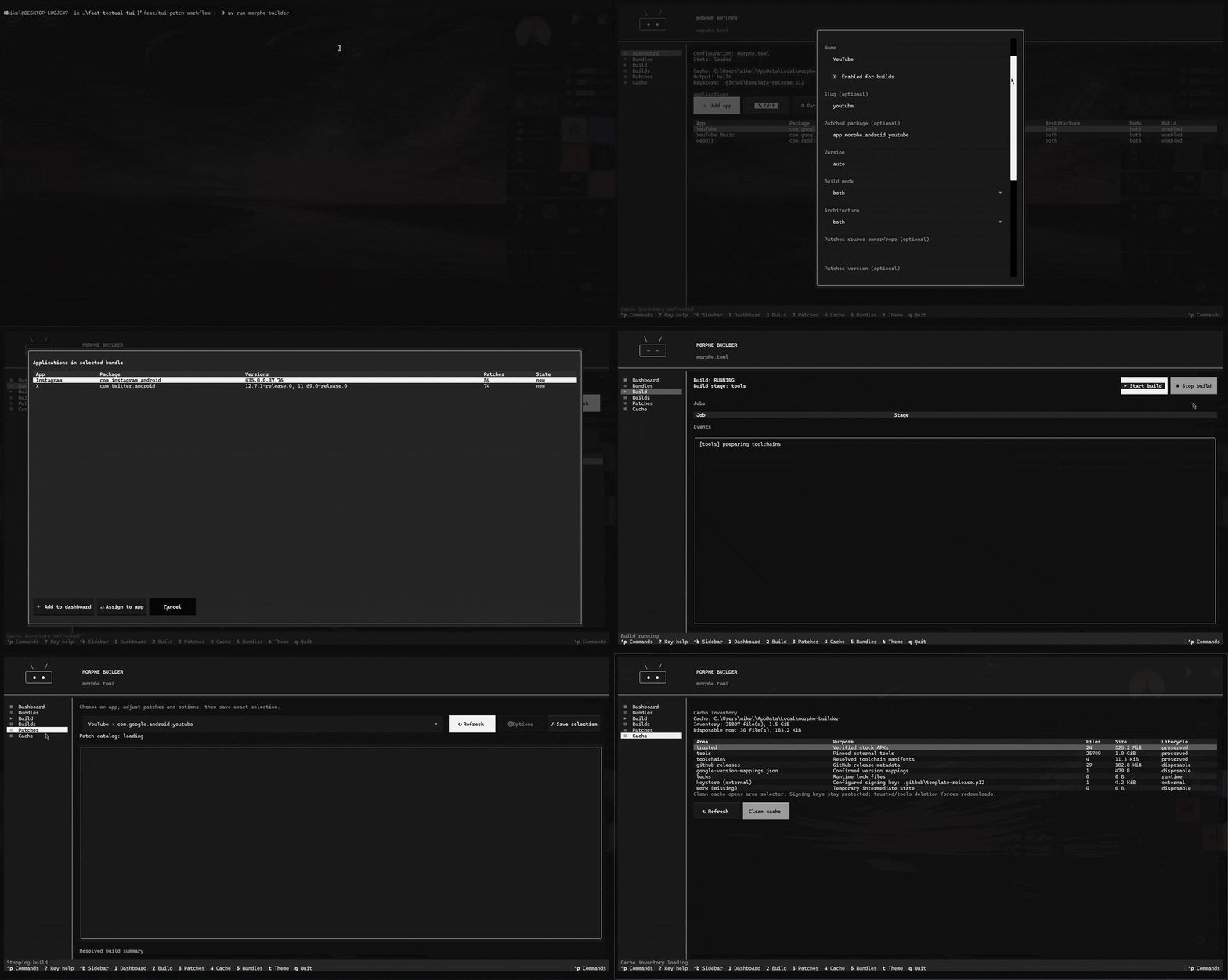
Masamune is a Textual terminal interface for building Morphe APKs from local APK/split inputs or verified stock downloads.
It verifies inputs, merges splits, resolves Morphe tooling, applies patches, signs outputs, and optionally packages modules. Downloads are explicit; Start build never performs network activity.
Preview
Requirements
| Requirement | Version | Notes |
|---|---|---|
Python |
3.11–3.13 | Runtime and development support. |
Java |
21+ | Required by Morphe CLI, APKEditor, and uber-apk-signer. |
uv |
latest | Recommended for installation and development. |
Windows and Linux are supported. Morphe CLI, patch bundles, APKEditor, and uber-apk-signer are prepared in the user cache when a build starts.
Features
- Local APK input: native APK and folder pickers; build input stays local-only.
- Explicit verified downloads: Google Play → APKMirror → Direct, available from Downloads and tracked in the Downloaded library view.
- Input verification: package identity, version, version code, architecture, split coverage, hashes, and signing certificates are checked before use.
- Config-driven builds: apps, architectures, versions, patch sources, and
build modes live in
morphe.toml. - Morphe patch workflow: discover patches, select exact patch sets, and edit configurable patch options.
- APK and module output: build patched APKs plus optional deterministic Magisk/KernelSU modules.
- Background execution: current stage, per-job status, redacted events, and build logs remain visible while tools run.
- Signing controls: auto-generated per-user keystore, or an explicit private keystore for real signing.
- Build history: completed, failed, and cancelled builds remain available with output paths and summaries.
- Safe cache cleanup: inspect cache areas and remove only disposable data.
- Atomic publication: existing outputs are never overwritten; failed builds publish nothing.
- Terminal-native UI: keyboard navigation, command palette, themes, compact sidebar, and reduced-motion support.
Install
From PyPI
uv tool install masamune-tui
masamune
From source
git clone https://github.com/Villoh/masamune.git
cd masamune
uv sync
uv run masamune
Running masamune without arguments opens the TUI. The explicit
masamune tui form accepts launch options.
Configure local APKs
Create morphe.toml:
[toolchain]
morphe-source = "MorpheApp/morphe-desktop"
morphe-version = "latest"
patches-source = "MorpheApp/morphe-patches"
patches-version = "latest"

[[apps]]
package = "com.google.android.youtube"
name = "YouTube"
source-dir = "C:/Users/me/Downloads/youtube-splits"
version = "auto"
arch = "arm64-v8a"
build-mode = "apk"
include-patches = ["GmsCore support", "SponsorBlock"]
source-dir is optional. Build source precedence is:
- Configured
source-dir. - Matching verified APK/split set from Downloads.
- Native picker if no verified download exists.
Select an APK to use its containing directory, or select a folder directly.
Use {arch}, {abi}, or {module} placeholders for architecture-specific
local directories.
The TUI writes validated configuration changes atomically. Unsupported TOML fields remain safe to edit manually.
Launch options
masamune tui \
  --config morphe.toml \
  --cache /path/to/cache \
  --output build
| Option | Default | Meaning |
|---|---|---|
--config PATH |
User config path | Configuration displayed and edited by TUI. |
--cache PATH |
Platform cache root | Toolchain, patch, and build cache. |
--output PATH |
build |
Atomic build publication directory. |
--keystore PATH |
Generated per-user key under cache | Optional external signing keystore. |
--keystore-alias ALIAS |
masamune |
Signing alias. |
Private keystore passwords are read only from MORPHE_KEYSTORE_PASSWORD. They
are never displayed or stored by TUI.
Interface
| View | Key | Purpose |
|---|---|---|
| Dashboard | 1 |
Inspect and edit configured applications. |
| Bundles | 2 |
Discover supported applications from patch sources. |
| Downloads | 3 |
Resolve versions and download verified stock APKs. |
| Downloaded | 4 |
Browse, verify, open, and delete downloaded APK sets. |
| Build | 5 |
Review parameters, start builds, and monitor results. |
| Builds | 6 |
Review persisted build history and outputs. |
| Patches | 7 |
Discover patches and save exact selections. |
| Cache | 8 |
Inspect cache paths and remove disposable work. |
| Key | Action |
|---|---|
Ctrl+B |
Toggle compact sidebar. |
Ctrl+P |
Open command palette. |
? |
Show available keys. |
T |
Open theme selector. |
Q |
Quit. |
Download flow
Downloads require an explicit action in Downloads (3). User can choose
Automatic (Google Play → APKMirror → Direct), Google Play, APKMirror, or Direct.
Destination is fixed at %LOCALAPPDATA%\\masamune\\downloads on Windows
(and the platform data equivalent). Downloads view resolves versions from Morphe
patch compatibility and lets the user choose any supported version manually.
The Downloaded view lists verified APK/split sets and supports opening, verifying,
and deleting them. Credentials come from goopdl
environment variables and never appear
in TUI, logs, or provenance. Press Resolve versions to query Morphe patch
compatibility, then choose a supported version manually. Every result is independently
verified before atomic publication. Builds can use matching downloaded sources
automatically when source-dir is not configured; configuration is never changed
implicitly.
Build flow
- Add or select an application.
- Configure
source-dir, or download a verified stock APK/split set. - Review source, version, architecture, patches, output, and signing key.
- Confirm the build.
- TUI verifies inputs, merges splits, applies Morphe patches, signs outputs, and publishes verified artifacts atomically.
Build view reports:
- pending, running, success, failed, and cancelled states;
- current stage and per-job state;
- redacted, scrollable subprocess events;
- output paths and artifact names;
build.logand provenance files in each published build directory.
Only one build runs at a time. Stop build requests cancellation after the current build operation and cleans temporary staging; it does not interrupt arbitrary external tools.
Patch bundles and individual patches
Bundles provides discovery data for supported applications from public patch sources. Add an application to the dashboard or assign a patch source to an existing app without replacing unrelated configuration.
Patches resolves the configured source, lists compatible patches, and saves an exact selection. Configurable patches expose boolean, numeric, and free-text options with upstream defaults and suggestions.
Patch resolution may download Morphe metadata and toolchains into the external cache. It never downloads stock APKs.
Safety model
- Start build performs no network activity or provider fallback.
- Downloads run only after user confirmation in Downloads.
- Google Play, APKMirror, and explicit Direct URLs are independently verified.
- Original local split APKs remain unchanged.
- APK metadata, hashes, architecture, and signer identity are verified.
- Existing output directories are never overwritten.
- Signing keys are protected from cache cleanup.
- Sensitive passwords and subprocess output are redacted.
- Failed builds publish no partial output.
Generated keys are for local builds only. Use an explicit private keystore for distributable builds.
Current limits
The TUI intentionally does not provide:
- credential storage or display;
- raw/free-form TOML editing;
- GitLab patch-source assignment;
- parallel builds;
- web mode;
- runtime PNG rendering;
- hard cancellation of every external subprocess.
Use the CLI or a text editor for automation and unsupported configuration fields.
Development
uv sync
uv run python -m unittest discover -s tests
uv lock --check
uv build
Detailed interface notes live in docs/tui.md.
License
MIT. See LICENSE.
1 maintainer

Metadata
1 maintainer
Release files for masamune-tui 1.1.0
For a detailed explanation of source distributions (sdists) and built distributions (wheels), please see the package formats documentation.
Source distribution (sdist)
| File | Size | Uploaded | |
|---|---|---|---|
| masamune_tui-1.1.0.tar.gz | 148.2 kB | Details |
Built distribution (wheel)
| File | Interpreter | ABI | Platform | Reset |
|---|---|---|---|---|
| masamune_tui-1.1.0-py3-none-any.whl | Python 3 | none | any | Details |
Total release size: 264.0 kB
Release files / masamune_tui-1.1.0.tar.gz
| Download URL | masamune_tui-1.1.0.tar.gz |
|---|---|
| Size | 148.2 kB |
| Tags | Source |
|
SHA-256 checksum How to use checksums |
dec4a2281eaf98baaa3384119bd8085f5e48f4796fe86cb4118b39bd81e2971e
|
|
BLAKE2b-256 checksum How to use checksums |
1eb7ae5f7a12450a23e2ea793418b0e2cf696105eed78bb89d41a84df3cd5190
|
| Upload date | |
|
Uploaded using Trusted Publishing? What is trusted publishing? |
Yes |
| Uploaded via |
twine/6.1.0 CPython/3.13.14
|
Provenance
Provenance describes where a file came from. On PyPI, provenance is shared via attestations, which provide a verifiable record of the build or publishing details. View details, limitations and caveats.


PyPI Publish Attestation
PyPI verified that this artifact, at this checksum, originated from the publisher listed below.
Signed by GitHub Actions, verified by PyPI on Aug 7, 2026.
Transparency logRelease files / masamune_tui-1.1.0-py3-none-any.whl
| Download URL | masamune_tui-1.1.0-py3-none-any.whl |
|---|---|
| Size | 115.8 kB |
| Tags | Python 3 |
|
SHA-256 checksum How to use checksums |
c49a63bb1a91caed2c29dff84b4dd707803cb37df13b173a8199232902ea67de
|
|
BLAKE2b-256 checksum How to use checksums |
3a9ced29fb24d819a1983774866fe746331431f2bf77d0f8849a38abae1f3248
|
| Upload date | |
|
Uploaded using Trusted Publishing? What is trusted publishing? |
Yes |
| Uploaded via |
twine/6.1.0 CPython/3.13.14
|
Provenance
Provenance describes where a file came from. On PyPI, provenance is shared via attestations, which provide a verifiable record of the build or publishing details. View details, limitations and caveats.
PyPI Publish Attestation
PyPI verified that this artifact, at this checksum, originated from the publisher listed below.
Signed by GitHub Actions, verified by PyPI on Aug 7, 2026.
Transparency log













