
Mask2PolyMin


Turn noisy segmentation mask contours into clean polygons with a minimal number of segments, whose vertices are reconstructed corners. The inner step of an energy minimization that stitches neighboring polygons into topological maps and B-reps.
Quick Start
pip install mask2polymin
import numpy as np
from mask2polymin import FitterToPointsSequence as Fitter

contour = np.array([[0, 0], [10, 0], [10, 10], [0, 10]], dtype=float)  # replace with your dense (N, 2) contour, e.g. from skimage.measure.find_contours
polygon, segments, energy = Fitter().fit(contour)
Demos
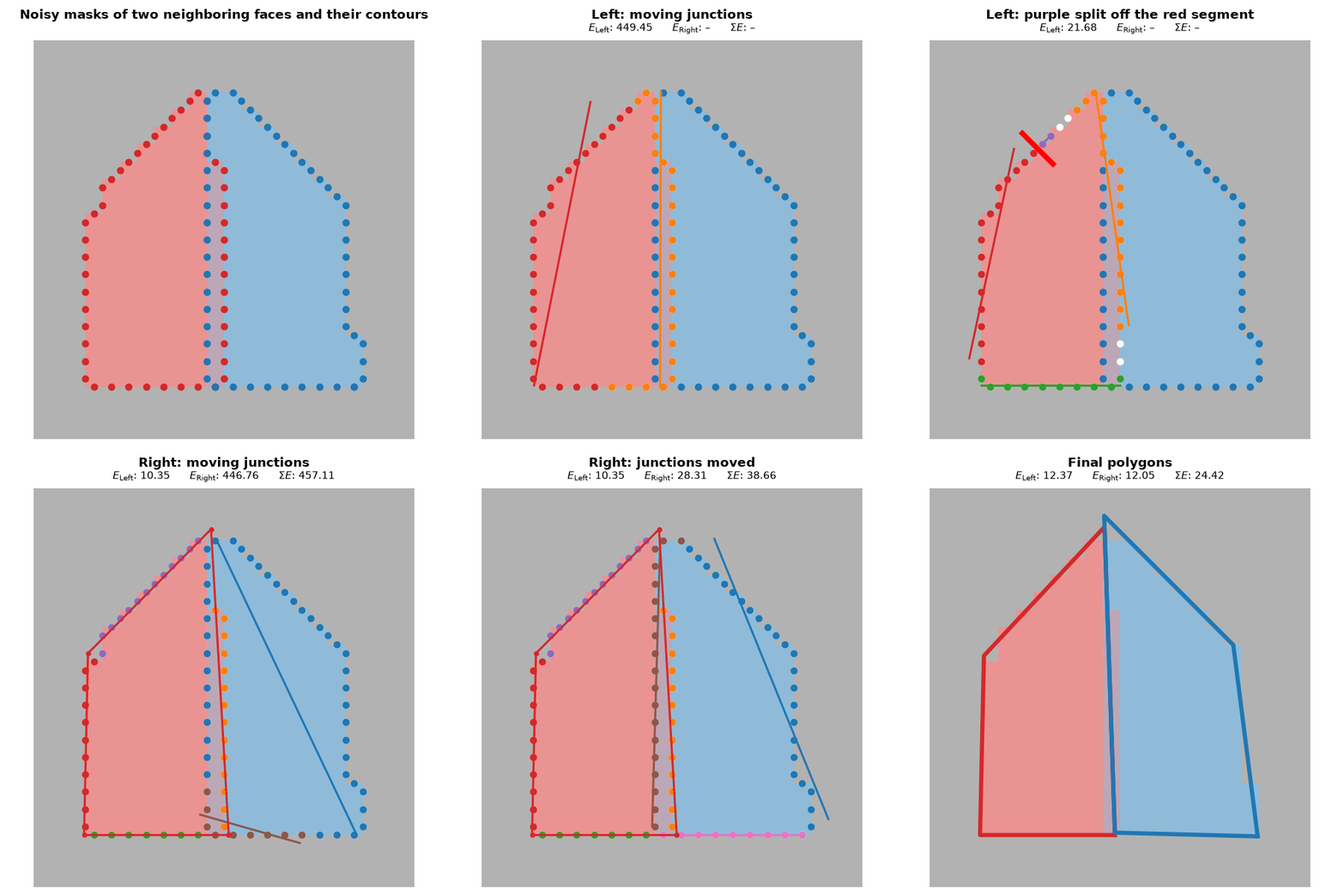
Two neighboring faces fitted and stitched to share an edge.
📹 Watch examples/example_house/example_house.py in action.
Motivation
Useful for post‑processing bitmask segmentation outputs from models such as MaskRCNN or YOLO‑Seg, especially when regular or low‑complexity shapes are required:
- to obtain simple geometric representations
- to reconstruct artificial objects that consist of straight edges, sharp corners, and regular geometric properties
- as the inner step of an energy minimization over neighboring faces (topological maps / B-rep) — see
refit()
Unlike common point‑thinning algorithms (Ramer–Douglas–Peucker, Visvalingam–Whyatt, Zhang–Suen), this method:
- minimizes segment count while preserving the raw shape
- does not shrink the area or remove corners
- reconstructs corners with sub-pixel accuracy: vertices are intersections of least-squares fitted lines.
Example
git clone https://github.com/AlexanderHaritonov/Mask2PolyMin.git
cd Mask2PolyMin
python -m venv .venv && source .venv/bin/activate
pip install -r requirements-examples.txt
python example_usage.py
- The input is a dense bitmask produced by a segmentation model.

- A contour is extracted from the bitmask using skimage.measure.find_contours

- Mask2PolyMin fits a minimal‑segment polyline to this contour

fit()returns aFitResultthat unpacks as(polygon, segments, energy): a closed polygon of float (sub-pixel) vertices, ready for GeoJSON/SVG/COCO export, the underlying fitted segments, and their Energy.- Each segment has its points,
segment.points(), and its fitted line,segment.line_segment_params.fit_line(points)fits a line to any points the same way, e.g. to the points of two segments on an edge that neighboring faces share.
Energy minimization with refit()
def refit(self, points_sequence, previous: FitResult, is_closed: bool = False, *, guard: bool = True) -> FitResult
Usable as the inner step of an energy minimization over neighboring faces, e.g. stitching their polygons into a topological map or boundary representation by making them share edges.
Starts from previous.segments; previous stays intact. points_sequence must be the contour previous was fitted to, otherwise ValueError.
segment.freeze(point, direction, key=...)pins a segment to a line;result.frozen[key]finds it in the result ofrefit().- With
guard=True,refit()never returns a higher Energy than its start. Withguard=False, it returns the fitter's result as it is.
import numpy as np
from mask2polymin import FitterToPointsSequence as Fitter

t = np.arange(20.0)
contour = np.concatenate([np.c_[t, 0 * t], np.c_[20 + 0 * t, t], np.c_[20 - t, 20 + 0 * t], np.c_[0 * t, 20 - t]])  # dense closed square

fitter = Fitter()
result = fitter.fit(contour, is_closed=True)
result.segments[0].freeze(point=[0, 0.5], direction=[1, 0])  # e.g. the line shared with the neighboring face
polygon, segments, energy = fitter.refit(contour, result, is_closed=True)  # side 0 now lies on y = 0.5
The whole loop over two neighboring faces, as in the B-rep demo: examples/brep/stitch_faces.py.
Tuning Parameters
fitter = Fitter(FitterConfig(tolerance=2.0, segment_cost=3))
max_segments_count (default 18): Upper limit on the number of segments in the output polygon. Keeping this bound relatively tight prevents over-fitting to noise and generally improves reconstructed shape accuracy.
tolerance (default 1.0): the maximum perpendicular deviation, in input units (pixels), that a fitted line may have from the points it represents. Roughly, tolerance ≈ epsilon / √2, where epsilon is what you'd pass to Ramer–Douglas–Peucker — RDP's epsilon bounds the max (L∞) deviation, while tolerance bounds the L2 deviation.
rule of thumb: tolerance ≈ max(1.0, jitter_amp), where jitter_amp how noisy the segmentation is - the standard deviation of how far the mask's boundary randomly wanders from its true edge.
The 1.0 floor covers ordinary pixel-quantization jitter present even in a "clean" mask.
segment_cost (default 2): the cost of one segment, in units of tolerance². A split, merge or junction move is kept only if it lowers the Energy:
Energy = SSE + tolerance² · orphans_count + segment_cost · tolerance² · segments_count
An orphan costs as much as a point at distance tolerance. Higher values give fewer segments.
energy (default None): your own Energy, used instead of the built-in one; segment_cost is then not used.
Merges and junction moves then compare the Energy of the whole segmentation.
With an energy as fast as the built-in one, fit() takes about 10% longer.
from mask2polymin import FitterToPointsSequence, FitterConfig
from mask2polymin.energy import orphans_count, segment_sse

def my_energy(segments) -> float:
    return sum(segment_sse(s) for s in segments) + orphans_count(segments) + 5 * len(segments)

fitter = FitterToPointsSequence(FitterConfig(energy=my_energy))
rank_split_by_max_deviation (default False)
Pass True to slightly improve simpler shapes (low segments count, enough space between opposite sides). Can damage complex shapes.
Algorithm
The input is an ordered sequence of contour points, open or closed. Lines are fitted by total least squares (minimizing perpendicular distances), and the segmentation is refined top-down:
- Fit a single line to the whole sequence.
- Split the worst-fitting segment at its point farthest from its line — a segment needs splitting when its mean squared deviation exceeds
tolerance²or any single point lies farther thantolerancefrom its line. - Adjust: slide each junction between neighboring segments to the cut with the lowest total squared error, re-fitting the segments as points change sides; a point far from both lines may be left orphaned. A move is kept only if it lowers the Energy. Iterate until stable.
- Repeat 2–3 until the average squared-error sum per segment is within
tolerance², a split no longer lowers the Energy, ormax_segments_countis reached. - Merge adjacent segments with similar directions when this lowers the Energy.
- Reconstruct vertices: each corner is the intersection of the two adjacent fitted lines — sub-pixel accurate even when no input point lies at the true corner.
refit() starts from previous.segments instead of step 1, and adjusts their junctions first.
To watch these steps, e.g. to draw them, pass on_step to fit() or refit(): it is called after each of steps 1–5.
Thanks to precomputed cumulative moments of the sequence, fitting a line to any contiguous point range is O(1).
Orphaned junction points
A junction point — where one fitted segment ends and the next begins — is often an outlier to one or both segments, and in a least-squares fit an outlier at the segment's end has disproportionately large influence. A single misplaced pixel can rotate the fitted line and drag the reconstructed vertex.
Mask2PolyMin therefore may leave up to 2 points at each junction orphaned — assigned to no segment: a point farther than tolerance from both adjacent lines becomes an orphan when this lowers the Energy, and the orphans' mean then anchors the corner reconstruction.
Input conventions
FitterToPointsSequence takes a dense, ordered contour as a float (N, 2) array and is agnostic to what the two columns mean: it never interprets the axes, and the returned vertices are in the same coordinate system as the input. tolerance is in input units.
- Input Dense contours, not sparse polygons!
- Axis order doesn't matter —
(row, col)from skimage and(x, y)from OpenCV both work; output vertices keep the input's order. - Closed contours: pass
is_closed=Truetofit(); a duplicated closing point (skimage-style) is detected and stripped automatically.
Notes for the two common contour sources:
skimage.measure.find_contours |
cv2.findContours |
|
|---|---|---|
| axis order | (row, col) |
(x, y) |
| coordinates | float, sub-pixel | integer pixel indices |
| boundary semantics | between pixel centers (half-integers at level=0.5) |
through the centers of the outermost object pixels — ~0.5 px inside the true region edge |
| array shape | (N, 2) |
(N, 1, 2) accepted directly — cv2's general contour shape |
| density | dense | dense only with CHAIN_APPROX_NONE |
- With OpenCV, use
cv2.findContours(..., cv2.CHAIN_APPROX_NONE): the commonCHAIN_APPROX_SIMPLEpre-simplifies collinear runs, starving the least-squares fits of exactly the evidence this algorithm relies on. - The half-pixel difference in boundary semantics is deliberate, and the fitter does not compensate — vertices come back in the input's own convention. Account for it when comparing results from different contour extractors, or against the original mask.
Performance
The implementation is optimized, uses NumPy broadcasting.
Benchmarked against RDP (cv2.approxPolyDP) on synthetic shapes across noise levels
(performance_test/): comparable on most fidelity metrics (IoU, RMS, Hausdorff). But Mask2PolyMin avoids corner-cutting bias — see corner_bias, corner_bias comparison and perimeter shrinkage in perimeter_ratio, perimeter_ratio comparison. Tradeoff: Mask2PolyMin is far slower — although not dramatically slow in absolute terms: 12 ms per contour on average, even on a weak laptop (Intel i5-12450H, UHD Graphics), single-threaded — see wall-clock time.
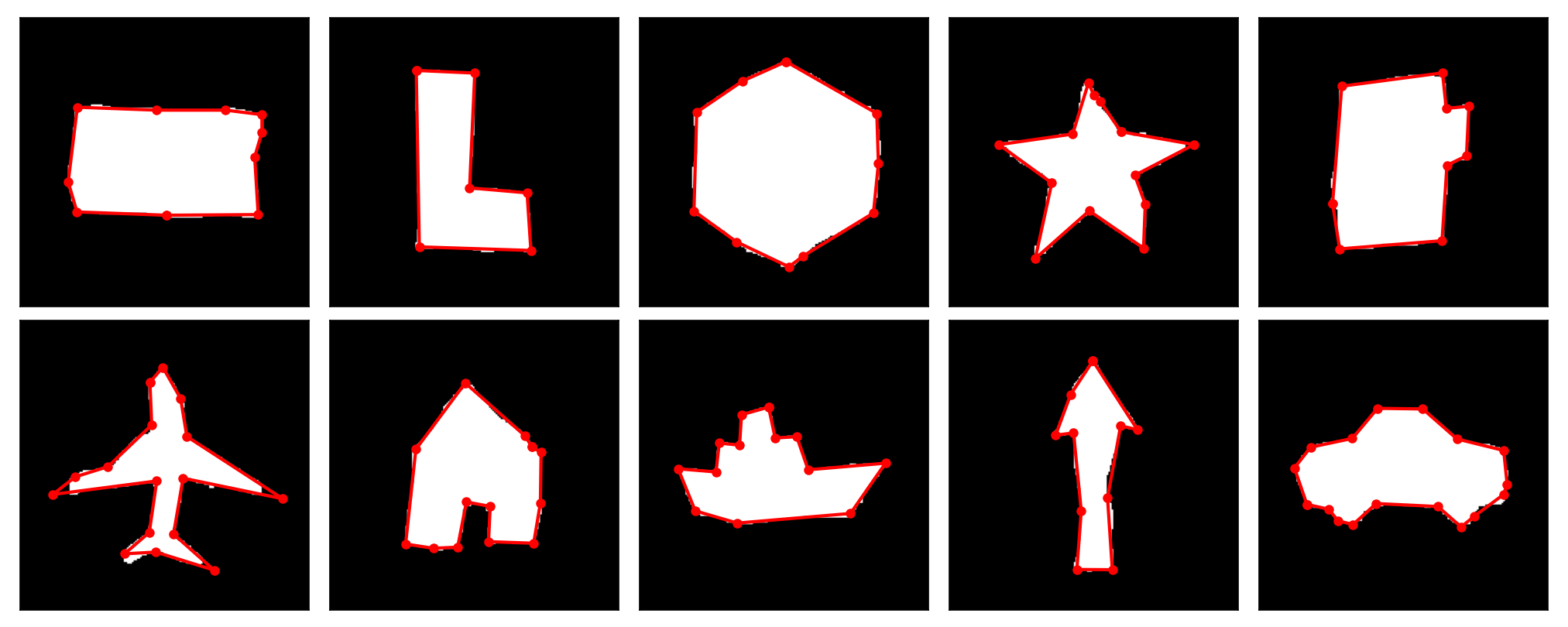
10 synthetic shapes (performance_test/) at noise level 3, Mask2PolyMin fit in red.
Future work and ideas
- explore line fitting with Theil–Sen and respectively the Median or Mean Absolute Error as stop criterion ?
Running Tests
.venv/bin/pytest test/
Tests run headless by default (no plot windows). To show plots during a test run:
SHOW_PLOTS=1 .venv/bin/pytest test/
Install dev dependencies first if needed: pip install -r requirements-dev.txt — this installs the package itself in editable mode (-e .), so no path tricks are needed to import mask2polymin.
1 maintainer

Metadata
1 maintainer
Release files for mask2polymin 0.3.0
For a detailed explanation of source distributions (sdists) and built distributions (wheels), please see the package formats documentation.
Source distribution (sdist)
| File | Size | Uploaded | Provenance | Actions |
|---|---|---|---|---|
| mask2polymin-0.3.0.tar.gz | 23.9 kB | Without provenance | Details for mask2polymin-0.3.0.tar.gz |
Built distribution (wheel)
| File | Interpreter | ABI | Platform | Actions Reset |
|---|---|---|---|---|
| mask2polymin-0.3.0-py3-none-any.whl | Python 3 | none | any | Details for mask2polymin-0.3.0-py3-none-any.whl |
Total release size: 50.8 kB
Release files / mask2polymin-0.3.0.tar.gz
| Download URL | mask2polymin-0.3.0.tar.gz |
|---|---|
| Size | 23.9 kB |
| Tags | Source |
|
SHA-256 checksum How to use checksums |
213ac96510b28f1a533d893952b930a87825f113bcaf4ea4e4c44ce84ecd2b9d
|
|
BLAKE2b-256 checksum How to use checksums |
bfcece603f73e4378956d5c775271aa86d0b5624e488a57bcb3bd7a3e82f0677
|
| Upload date | |
|
Uploaded using Trusted Publishing? What is trusted publishing? |
No |
| Uploaded via |
twine/6.2.0 CPython/3.12.3
|
Release files / mask2polymin-0.3.0-py3-none-any.whl
| Download URL | mask2polymin-0.3.0-py3-none-any.whl |
|---|---|
| Size | 26.9 kB |
| Tags | Python 3 |
|
SHA-256 checksum How to use checksums |
9dcad1edbcd92ca11ca7d1eda83706ada525a0997352074f5d277d72120701bd
|
|
BLAKE2b-256 checksum How to use checksums |
55d7bd35b27b8f5f384b3225d70e891a95c8822d4e9aab7011d967953c1a67fd
|
| Upload date | |
|
Uploaded using Trusted Publishing? What is trusted publishing? |
No |
| Uploaded via |
twine/6.2.0 CPython/3.12.3
|
Security for mask2polymin 0.3.0
Provenance
Provenance describes where a file came from. On PyPI, provenance is shared via attestations, which provide a verifiable record of the build or publishing details. View details, limitations and caveats.
No provenance found
None of the files in this release were uploaded with provenance metadata.
A note on package security
PyPI is a repository for distributing packages, not a service for auditing them. While third-party security researchers and our staff do their best to detect and remove malicious packages, PyPI cannot guarantee the quality, security or suitability of any given package.
To learn more about protecting yourself from malicious actors, visit our package security documentation.

















