
masklens
English | 한국어
Preflight check for SFT loss masks: before you spend GPU time, see which tokens your chat template, tokenizer and labels will actually train on. It is a framework-independent CLI that needs only a tokenizer (no model weights, no GPU), and it works the same whether you train with TRL, Unsloth or your own loop.
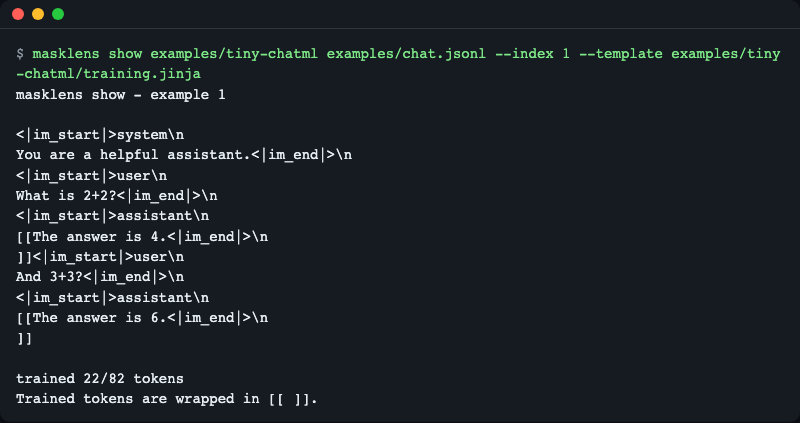
masklens show wraps every trained token in [[ ]]: only the assistant answers and their <|im_end|> are trained.
Who is this for
- You fine-tune a chat model with LoRA/SFT and want to know, before the run, that the loss is computed on the answers only.
- Your trainer printed "all labels are -100" (or the loss never moved) and you want to find out which example or which template line causes it.
- You edited a chat template by hand (added
{% generation %}, changed a header) and want proof that it still renders exactly the same text. - You truncate with
max_lengthand suspect that some answers are cut in half or cut away completely.
Install
Python 3.11 or newer and uv are required.
curl -LsSf https://astral.sh/uv/install.sh | sh   # installs uv
git clone https://github.com/LeeGyeongPil/masklens
cd masklens
uv sync
Then run commands with uv run masklens .... On a minimal Linux image you also need git and curl.
The commands below use the practice tokenizer in examples/tiny-chatml/. It is a tiny tokenizer built by scripts/make_tiny_tokenizer.py for demonstration (a ChatML-style vocabulary of 400 entries). It is not the tokenizer of a real model, so token counts differ from a real one. For real work, pass your model's tokenizer folder or Hub ID instead. The tests do not download anything.
Check the install with uv run masklens --version (prints masklens 0.1.4).
Quick start
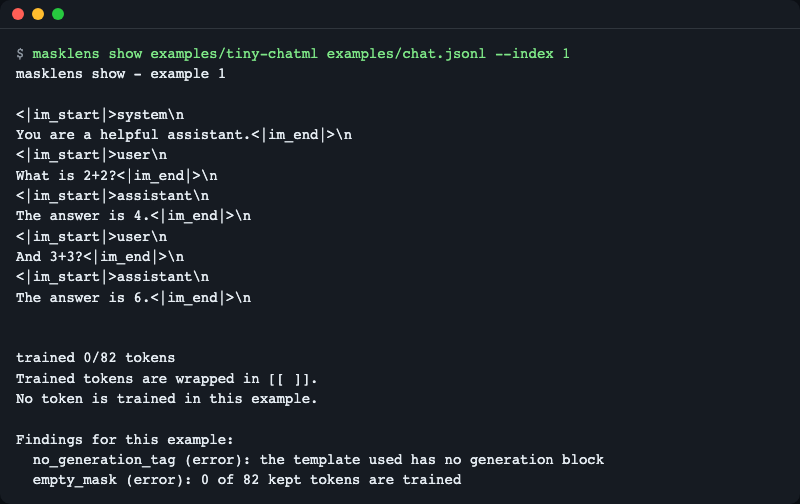
uv run masklens show examples/tiny-chatml examples/chat.jsonl --index 1
The output language follows your system locale; add --lang en to match the outputs shown here.
masklens show - example 1

<|im_start|>system\n
You are a helpful assistant.<|im_end|>\n
<|im_start|>user\n
What is 2+2?<|im_end|>\n
<|im_start|>assistant\n
The answer is 4.<|im_end|>\n
<|im_start|>user\n
And 3+3?<|im_end|>\n
<|im_start|>assistant\n
The answer is 6.<|im_end|>\n


trained 0/82 tokens
Trained tokens are wrapped in [[ ]].
No token is trained in this example.

Findings for this example:
  no_generation_tag (error): the template used has no generation block
  empty_mask (error): 0 of 82 kept tokens are trained
Nothing is highlighted: the tokenizer's own template has no {% generation %} block, so the "assistant tokens only" mask is empty. Libraries such as transformers do not raise an error in this case; the labels are silently all -100.
Now pass a training template that marks the assistant answer:
uv run masklens show examples/tiny-chatml examples/chat.jsonl --index 1 --template examples/tiny-chatml/training.jinja
masklens show - example 1

<|im_start|>system\n
You are a helpful assistant.<|im_end|>\n
<|im_start|>user\n
What is 2+2?<|im_end|>\n
<|im_start|>assistant\n
[[The answer is 4.<|im_end|>\n
]]<|im_start|>user\n
And 3+3?<|im_end|>\n
<|im_start|>assistant\n
[[The answer is 6.<|im_end|>\n
]]

trained 22/82 tokens
Trained tokens are wrapped in [[ ]].
Only the two answers and their end token (22 of 82 tokens) are trained. In an interactive terminal the same tokens are shown in color; the [[ ]] form is used with --no-color or when the output is piped (as in the outputs above).
Why masks break
Think of the labels as a marking film laid over an exam sheet: -100 is a covered spot (ignored by the loss), and every other id is a hole where the model is graded. For chat data you want holes only over the assistant answers. Three things decide where the holes are:
flowchart LR
  D[messages in JSONL] --> T[chat template]
  T --> R[rendered text]
  R --> K[tokenizer]
  K --> M{mask source}
  M -->|generation block| G[assistant_masks]
  M -->|marker strings| P[parts]
  G --> C[truncate to max_length]
  P --> C
  C --> L[labels: -100 or token id]
- Template: the template renders messages to text. With
{% generation %}...{% endgeneration %}around the answer, transformers can report which tokens came from it. Without the tags, the mask is all zeros. - Marker strings (the
partsmode, as in Unsloth's response-only training): instead of tags, you give the text that starts a user turn and the text that starts an assistant turn. A typo means nothing matches. - Truncation: cutting to
max_lengthcan remove the end of an answer, or all of it.
masklens computes the mask, applies your truncation, and checks the result against rules.
Usage
| Command / option | What it does | Example |
|---|---|---|
masklens show TOKENIZER DATA |
Show one example with trained tokens highlighted | --index 1 |
masklens check TOKENIZER DATA |
Check every example against the rules | --limit 100 |
--template FILE |
Use a Jinja chat template file instead of the tokenizer's own | --template training.jinja |
--mode generation|parts |
Mask source: {% generation %} blocks or marker strings |
--mode parts |
--instruction-part, --response-part |
Marker strings for parts mode (\n is turned into a newline) |
--response-part '<|im_start|>assistant\n' |
--max-length N, --truncation keep_start|keep_end |
Truncate like your trainer before judging the mask | --max-length 48 |
--field NAME |
JSON key that holds the message list (default messages) |
--field conversations |
--index I |
(show) Which example to show, counting from 0 |
--index 1 |
--no-color |
(show) No ANSI colors, trained tokens only in [[ ]] |
--no-color |
--limit N |
(check) Check only the first N examples |
--limit 100 |
--json |
Print a machine-readable report instead of the table | --json > report.json |
--strict |
Treat warnings as failures | --strict |
--lang en|ko |
Screen language | --lang ko |
TOKENIZER is anything AutoTokenizer.from_pretrained accepts (a folder or a Hub ID). DATA is a JSONL file with one {"messages": [...]} per line. Exit codes (check): 0 no problem, 1 problem found, 2 input error (including a file that is not UTF-8 text; save it as UTF-8). show only inspects one example: it exits 0 even when it reports problems, and 2 on input errors.
Check a dataset with the original template
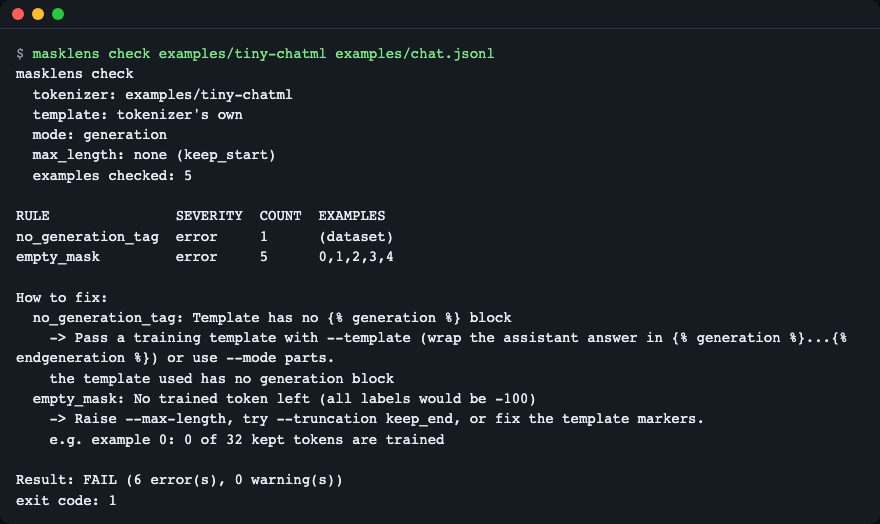
uv run masklens check examples/tiny-chatml examples/chat.jsonl
masklens check
  tokenizer: examples/tiny-chatml
  template: tokenizer's own
  mode: generation
  max_length: none (keep_start)
  examples checked: 5

RULE               SEVERITY  COUNT  EXAMPLES
no_generation_tag  error     1      (dataset)
empty_mask         error     5      0,1,2,3,4

How to fix:
  no_generation_tag: Template has no {% generation %} block
    -> Pass a training template with --template (wrap the assistant answer in {% generation %}...{% endgeneration %}) or use --mode parts.
    the template used has no generation block
  empty_mask: No trained token left (all labels would be -100)
    -> Raise --max-length, try --truncation keep_end, or fix the template markers.
    e.g. example 0: 0 of 32 kept tokens are trained

Result: FAIL (6 error(s), 0 warning(s))
This is the "all labels are -100" situation, found before training. The exit code is 1.
With the training template the same check passes:
uv run masklens check examples/tiny-chatml examples/chat.jsonl --template examples/tiny-chatml/training.jinja
masklens check
  tokenizer: examples/tiny-chatml
  template: examples/tiny-chatml/training.jinja
  mode: generation
  max_length: none (keep_start)
  examples checked: 5

No findings.

Result: PASS
See what truncation does
uv run masklens check examples/tiny-chatml examples/chat.jsonl --template examples/tiny-chatml/training.jinja --max-length 48
masklens check
  tokenizer: examples/tiny-chatml
  template: examples/tiny-chatml/training.jinja
  mode: generation
  max_length: 48 (keep_start)
  examples checked: 5

RULE                SEVERITY  COUNT  EXAMPLES
empty_mask          error     2      2,3
response_truncated  warn      3      1,2,3

How to fix:
  empty_mask: No trained token left (all labels would be -100)
    -> Raise --max-length, try --truncation keep_end, or fix the template markers.
    e.g. example 2: 0 of 48 kept tokens are trained
  response_truncated: Truncation cut into the assistant answer
    -> Raise --max-length, shorten the prompts, or drop these examples.
    e.g. example 1: 10 answer token(s) cut off

Result: FAIL (2 error(s), 3 warning(s))
At 48 tokens, examples 2 and 3 lose every answer token and example 1 loses part of an answer. Adding --truncation keep_end (keep the last tokens instead of the first) gives No findings. for this data.
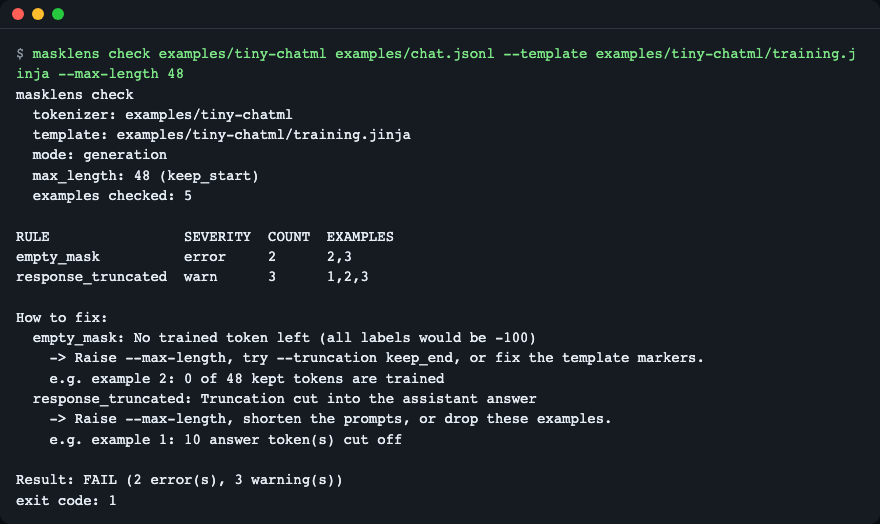
response_truncated and empty_mask with the example numbers.
Marker strings (Unsloth-style parts mode)
uv run masklens check examples/tiny-chatml examples/chat.jsonl --mode parts --instruction-part '<|im_start|>user\n' --response-part '<|im_start|>assistant\n'
This gives No findings. / Result: PASS. With a typo (assistent) in --response-part:
uv run masklens check examples/tiny-chatml examples/chat.jsonl --mode parts --instruction-part '<|im_start|>user\n' --response-part '<|im_start|>assistent\n'
RULE             SEVERITY  COUNT  EXAMPLES
empty_mask       error     5      0,1,2,3,4
parts_not_found  error     5      0,1,2,3,4
(The header lines and fix hints are shortened here; the full output ends with Result: FAIL (10 error(s), 0 warning(s)).)
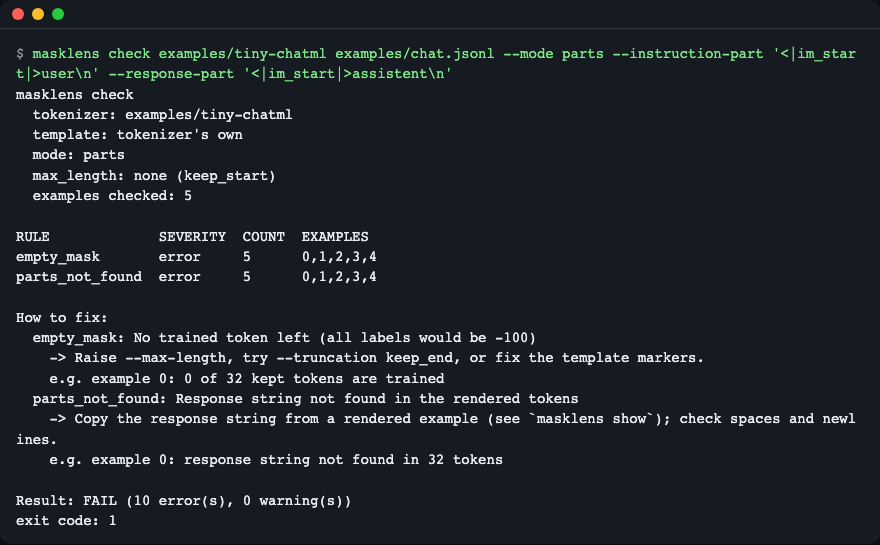
--response-part is reported as parts_not_found.
Rules
| Rule | Severity | Means | How to fix |
|---|---|---|---|
no_generation_tag |
error | The template has no {% generation %} block (dataset-wide) |
Use --template with a training template, or --mode parts |
empty_mask |
error | An example has no trained token (all -100) |
Fix markers, raise --max-length, try keep_end |
prompt_leak |
error | System/user/tool text is trained | Make the generation block cover only the assistant content |
render_mismatch |
error | Your template renders different text than the tokenizer's own (the report gives the first differing character) | Change only the {% generation %} markers |
parts_not_found |
error | A marker string was not found in the rendered tokens | Copy the string from masklens show output |
response_truncated |
warn | Truncation cut into an answer | Raise --max-length, shorten prompts, or drop the example |
untrained_turn |
warn | An assistant turn is not trained at all | Check the markers of that turn |
eos_not_trained |
warn | The end-of-turn token after an answer is not trained | Put the end token inside the generation block so the model learns to stop |
content_not_found |
warn | Message text was not found verbatim (the template rewrites content), so that message is skipped in the cross-check | Informational |
render_mismatch is checked only when you pass --template. A quick demonstration: --template tests/fixtures/leaky.jinja reports prompt_leak and eos_not_trained for all five examples, because that template trains every turn.
Configuration
| Setting | Meaning |
|---|---|
--lang en|ko |
Screen language. Priority: --lang, then MASKLENS_LANG, then LC_ALL, LC_MESSAGES, LANG; anything that is not Korean falls back to English. Rule IDs and JSON keys are never translated. |
MASKLENS_LANG |
en or ko |
HF_HUB_OFFLINE=1 |
Standard Hugging Face setting; use it so a local tokenizer folder never touches the network |
MASKLENS_REAL_TOK_DIR |
Optional folder with a real tokenizer for an extra test in the repo; skipped when unset |
Korean screen: uv run masklens check examples/tiny-chatml examples/chat.jsonl --lang ko.
How it works
flowchart TD
  A[load JSONL] --> B[render with template]
  B --> C[tokens + assistant_masks or marker spans]
  A --> D[expected mask from message content]
  C --> E[truncate with max_length]
  D --> E
  E --> F[apply rules]
  F --> G[table, JSON, exit code]
- The messages are rendered with the template and tokenized.
- The mask comes from
{% generation %}(assistant_masks) or from your marker strings. - Independently, masklens computes an "expected mask" from the character ranges of the assistant
content(plus the end-of-turn token). A correct training template makes both masks equal token by token; differences becomeprompt_leak,eos_not_trained, and so on. - Truncation is done by masklens itself (
keep_startorkeep_end), so the result does not depend on a trainer option. - Rules turn the final mask into findings, a table, a JSON report and an exit code.
Writing a training template
Wrap the assistant branch in {% generation %}. The practice template does this (shown on several lines):
{%- for message in messages %}
  {%- if message.role == 'assistant' %}
    {{- '<|im_start|>assistant\n' }}
    {%- generation %}{{- message.content + '<|im_end|>' + '\n' }}{%- endgeneration %}
  {%- else %}
    {{- '<|im_start|>' + message.role + '\n' + message.content + '<|im_end|>' + '\n' }}
  {%- endif %}
{%- endfor %}
The role header (<|im_start|>assistant\n) stays outside the block, so it is not trained; the answer, the end token and the trailing newline are inside. Some templates in the wild also train the header, which is a policy choice, not an error. Run masklens check ... --template your.jinja to see what your choice does, and the equality check against the tokenizer's own output (render_mismatch) to be sure the text itself did not change.
Using it with your trainer
- TRL
SFTTrainerwithassistant_only_loss=Trueneeds{% generation %}markers in the template: use the default--mode generation, with the template you give the trainer. - Unsloth
train_on_responses_only: use--mode partswith the same instruction and response strings. - Your own loop: pass the same
max_lengthand truncation side you use in your collator.
CI
--json writes a report with versions, mode, max_length, summary.by_rule and findings[]; the exit code is 0 clean, 1 errors (or warnings with --strict), 2 bad input.
uv run masklens check examples/tiny-chatml examples/chat.jsonl --template examples/tiny-chatml/training.jinja --json
{
  "versions": {
    "masklens": "0.1.4",
    "transformers": "5.24.0",
    "tokenizers": "0.23.3"
  },
  "tokenizer": "examples/tiny-chatml",
  "template": "examples/tiny-chatml/training.jinja",
  "mode": "generation",
  "max_length": null,
  "truncation": "keep_start",
  "examples": 5,
  "summary": {
    "errors": 0,
    "warnings": 0,
    "by_rule": {},
    "exit_code": 0
  },
  "findings": []
}
When to use it
- Good fit: a quick, framework-independent check of loss masks on the whole dataset before a run, with the template and truncation you really use.
- Other tools: to see labels inside a specific trainer pipeline, look at the debug output of axolotl or the documentation of TRL and Unsloth. masklens does not run training.
Limits
It does not rewrite templates, and it handles chat messages only (no tool-call or think-block rules yet). If a template rewrites message content (trimming, removing think blocks), those messages cannot be cross-checked (content_not_found). If a message's text is identical to a role name such as user, the character range can be wrong. Mask behavior depends on the transformers version (5.24.0 was used here, >=5.24.0,<6 is allowed). The repo tests use the practice tokenizer; real Qwen2.5 or SmolLM3 tokenizers were not exercised in the test suite.
Troubleshooting
| Symptom | Cause | Fix |
|---|---|---|
no_generation_tag + empty_mask on every example |
The template has no {% generation %} block |
Use --template with a training template, or --mode parts |
parts_not_found |
Marker string differs from the rendered text (spaces, newline, typo) | Copy it from masklens show; in a shell write the newline as \n |
unrecognized arguments: --no-color |
--no-color exists only for show |
Drop it for check (its output has no colors to turn off) |
| Hub download errors or slow first run | Remote tokenizer being fetched | Use a local folder and HF_HUB_OFFLINE=1; try --limit N first |
| Exit code 2 | Input error (bad JSONL, missing file) | The message names the line number |
Development
HF_HUB_OFFLINE=1 uv run pytest -q
Without uv, install the pinned test environment and run the same tests (this is what the CI workflow does):
python -m pip install -r requirements-ci.txt
HF_HUB_OFFLINE=1 python -m pytest -q
Bug reports and suggestions are welcome as issues. Changes are listed in CHANGELOG.md.
License
MIT. The practice tokenizer in examples/tiny-chatml/ is generated by this repo's script and contains no third-party model data.
1 maintainer

Metadata
1 maintainer
Release files for masklens 0.1.4
For a detailed explanation of source distributions (sdists) and built distributions (wheels), please see the package formats documentation.
Source distribution (sdist)
| File | Size | Uploaded | Provenance | Actions |
|---|---|---|---|---|
| masklens-0.1.4.tar.gz | 828.3 kB | Without provenance | Details for masklens-0.1.4.tar.gz |
Built distribution (wheel)
| File | Interpreter | ABI | Platform | Actions Reset |
|---|---|---|---|---|
| masklens-0.1.4-py3-none-any.whl | Python 3 | none | any | Details for masklens-0.1.4-py3-none-any.whl |
Total release size: 855.6 kB
Release files / masklens-0.1.4.tar.gz
| Download URL | masklens-0.1.4.tar.gz |
|---|---|
| Size | 828.3 kB |
| Tags | Source |
|
SHA-256 checksum How to use checksums |
d576741de4634a410d13acabefc37734d66493ac75f8e2f9ea550a801f80a8bf
|
|
BLAKE2b-256 checksum How to use checksums |
30026e07f991ca73b00d4e50cfed76d1bd06dcb1b8b114159e4f0ba774254b01
|
| Upload date | |
|
Uploaded using Trusted Publishing? What is trusted publishing? |
No |
| Uploaded via |
uv/0.13.6 {"installer":{"name":"uv","version":"0.13.6","subcommand":["publish"]},"python":null,"implementation":{"name":null,"version":null},"distro":{"name":"macOS","version":null,"id":null,"libc":null},"system":{"name":null,"release":null},"cpu":null,"openssl_version":null,"setuptools_version":null,"rustc_version":null,"ci":null}
|
Release files / masklens-0.1.4-py3-none-any.whl
| Download URL | masklens-0.1.4-py3-none-any.whl |
|---|---|
| Size | 27.3 kB |
| Tags | Python 3 |
|
SHA-256 checksum How to use checksums |
01ac4e017df85622feba4d7ac26aa6592b33cbcfd1c4ad58f42a1f7b7e4fb93a
|
|
BLAKE2b-256 checksum How to use checksums |
b18787141da379bda668783376ce57f1a895beed1c9555a10f3b70356dbccb80
|
| Upload date | |
|
Uploaded using Trusted Publishing? What is trusted publishing? |
No |
| Uploaded via |
uv/0.13.6 {"installer":{"name":"uv","version":"0.13.6","subcommand":["publish"]},"python":null,"implementation":{"name":null,"version":null},"distro":{"name":"macOS","version":null,"id":null,"libc":null},"system":{"name":null,"release":null},"cpu":null,"openssl_version":null,"setuptools_version":null,"rustc_version":null,"ci":null}
|
Security for masklens 0.1.4
Provenance
Provenance describes where a file came from. On PyPI, provenance is shared via attestations, which provide a verifiable record of the build or publishing details. View details, limitations and caveats.
No provenance found
None of the files in this release were uploaded with provenance metadata.
A note on package security
PyPI is a repository for distributing packages, not a service for auditing them. While third-party security researchers and our staff do their best to detect and remove malicious packages, PyPI cannot guarantee the quality, security or suitability of any given package.
To learn more about protecting yourself from malicious actors, visit our package security documentation.













