
MassComposition


MassComposition is a python package that allows Geoscientists and Metallurgists to easily work with, and visualise mass-compositional data.
Mass Composition in this context is just that - Mass and Composition. It is not Compositional Data Analysis (CoDA), since here we care more about mathematical operations like weight averaging and technically correct mathematical operations. Of course, we also need to manage moisture correctly - chemical composition is reported on a dry basis and moisture on a wet basis.
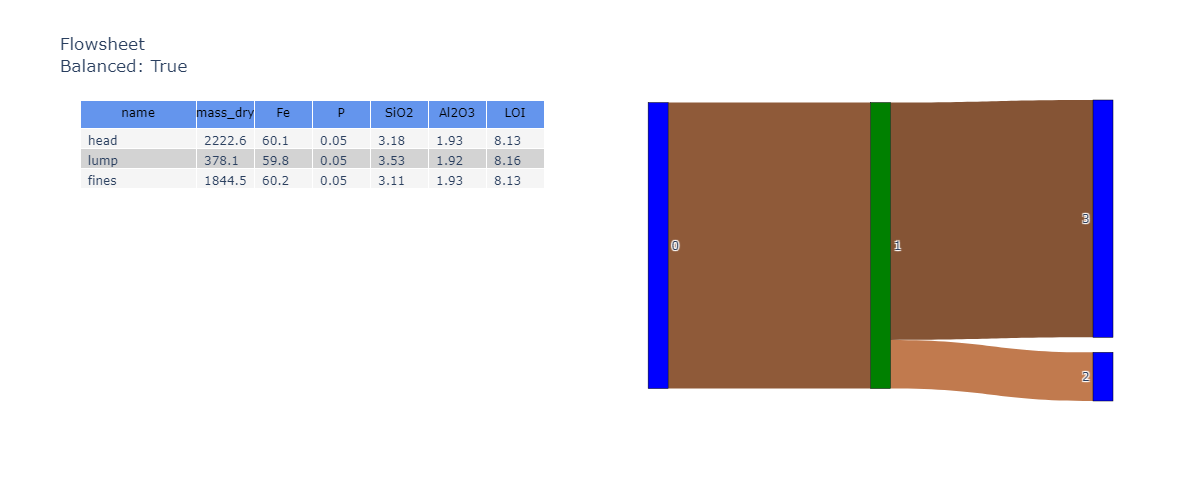
The package not only supports individual MassComposition, but collections of objects that are mathematically related in a Directional Graph (a.k.a. network or flowsheet).
Prerequisites
Before you begin, ensure you have met the following requirements:
- You have installed the latest version of the mass-composition python package.
- You have a Windows/Linux/Mac machine.
- You have read the docs.
Installing MassComposition
To install MassComposition, follow these steps:
pip install mass-composition -e .[viz,network]
Or, if poetry is more your flavour.
poetry add "mass-composition[viz,network]"
Using MassComposition
To use MassComposition, follow these steps:
There are some basic requirements that the incoming DataFrame must meet. We'll use a sample DataFrame here.
df_data: pd.DataFrame = sample_data()
Create the object
obj_mc: MassComposition = MassComposition(df_data)
It is then trivial to calculate the weight average aggregate of the dataset.
obj_mc.aggregate()
Multiple composition analytes can be viewed in a single interactive parallel coordinates plot.
obj_mc: MassComposition = MassComposition(df_data.reset_index().set_index(['DHID', 'interval_from', 'interval_to']),
                                          name=name)

fig: Figure = obj_mc.plot_parallel(color='Fe')
fig
Network visualisations and other plots are interactive.
For full examples, see the gallery.
Contributing to MassComposition
To contribute to MassComposition, follow these steps:
- Fork this repository.
- Create a branch:
git checkout -b <branch_name>. - Make your changes and commit them:
git commit -m '<commit_message>' - Push to the original branch:
git push origin mass-composition - Create the pull request.
Alternatively see the GitHub documentation on creating a pull request.
Contributors
This project is still in its infancy, but I'm keen to work with contributors.
Contact
If you want to contact me you can reach me at your_email@address.com.
License
This project uses the following license: MIT.
1 maintainer

Metadata
1 maintainer
Release files for mass-composition 0.6.8
For a detailed explanation of source distributions (sdists) and built distributions (wheels), please see the package formats documentation.
Source distribution (sdist)
| File | Size | Uploaded | Provenance | Actions |
|---|---|---|---|---|
| mass_composition-0.6.8.tar.gz | 66.7 kB | Without provenance | Details for mass_composition-0.6.8.tar.gz |
Built distribution (wheel)
| File | Interpreter | ABI | Platform | Actions Reset |
|---|---|---|---|---|
| mass_composition-0.6.8-py3-none-any.whl | Python 3 | none | any | Details for mass_composition-0.6.8-py3-none-any.whl |
Total release size: 140.7 kB
Release files / mass_composition-0.6.8.tar.gz
| Download URL | mass_composition-0.6.8.tar.gz |
|---|---|
| Size | 66.7 kB |
| Tags | Source |
|
SHA-256 checksum How to use checksums |
6f5f7b729202b9f07e8b5396e1edb669a5f2de5141d487165bebcc2af202a733
|
|
BLAKE2b-256 checksum How to use checksums |
bbe1d8c200cc3199f7a446adc568f60bec3d6b0edc7a3e4f224de73733bef56a
|
| Upload date | |
|
Uploaded using Trusted Publishing? What is trusted publishing? |
No |
| Uploaded via |
twine/5.1.0 CPython/3.9.19
|
Release files / mass_composition-0.6.8-py3-none-any.whl
| Download URL | mass_composition-0.6.8-py3-none-any.whl |
|---|---|
| Size | 74.0 kB |
| Tags | Python 3 |
|
SHA-256 checksum How to use checksums |
6171c6843147f363dc907c2e8c5d2c56df7f2d0c04f3f69dba3b5798e86eb567
|
|
BLAKE2b-256 checksum How to use checksums |
a4b3bbe0950a2e0fe6c6ba80e36b49bff5672f468223f9bfefabf6c7f706dbc1
|
| Upload date | |
|
Uploaded using Trusted Publishing? What is trusted publishing? |
No |
| Uploaded via |
twine/5.1.0 CPython/3.9.19
|
Security for mass-composition 0.6.8
Provenance
Provenance describes where a file came from. On PyPI, provenance is shared via attestations, which provide a verifiable record of the build or publishing details. View details, limitations and caveats.
No provenance found
None of the files in this release were uploaded with provenance metadata.
A note on package security
PyPI is a repository for distributing packages, not a service for auditing them. While third-party security researchers and our staff do their best to detect and remove malicious packages, PyPI cannot guarantee the quality, security or suitability of any given package.
To learn more about protecting yourself from malicious actors, visit our package security documentation.














