
Command-line tool for running a single mastapy script in multiple APIs and comparing results.

Project description




mastapy-cli-regression is a command-line plugin for mastapy.
- Website: https://www.smartmt.com/
- Support: https://support.smartmt.com/
To install this plugin, run the following:
pip install mastapy[cli-regression]
This plugin is designed to be used on the command-line via the mastapy package using the following syntax:
python -m mastapy regression ...
Features
- Compare results between different versions of the MASTA API and automatically identify regressions.
- Completely automated and parallelized virtual environment creation, installation and script execution for each specified version of the MASTA API.
- Fully customisable comparisons; choose your own tolerances, group values together and decide how you want them to be compared.
- Supports loading legacy
mastapypackages using modern Python versions. - Export results to an Excel workbook for further analysis.
Release Information
This is the initial release of the package.
Pre-Requisites
Note that these pre-requisites are only required for launching the plugin from the command-line.
mastapy>=15.1.3- An internet connection
Usage
Before starting, prepare a Python script for the plugin to execute. This must be a self-contained script (i.e. does not rely on @mastapy.masta_property) that can be executed from the command-line.
There are two steps to using this plugin. Before executing your script, you must modify it to export a comparison structure, mastapy_cli_regression.Comparer, which the plugin will read to run your regression tests. The following is an example script demonstrating a modified script.
from mastapy import Examples

# Import the Comparer from the regression package.
from mastapy_cli_regression import Comparer


def main() -> None:
    design = Examples.Components.SIMPLE_HOUSING_FULL_MESH.load()

    # Create a new Comparer object. We will add values to this for regression testing.
    comparer = Comparer()

    for load_case in design.static_loads:
        # For each load case, create a new group. Any values added to the comparer while
        # indented inside the `with` statement will get added to the group. his will
        # help organise our results.
        with comparer.group("Load Case: " + load_case.name):
            system_deflection = load_case.system_deflection
            system_deflection.perform_analysis()

            gear_sets = design.all_parts_of_type_cylindrical_gear_set()
            mesh_groups = (gear_set.cylindrical_meshes for gear_set in gear_sets)
            meshes = (mesh for group in mesh_groups for mesh in group)

            for mesh in meshes:
                sd = system_deflection.results_for_cylindrical_gear_mesh(
                    mesh
                ).cast_to.cylindrical_gear_mesh_system_deflection_with_ltca_results
                altca_results = sd.advanced_ltca_results

                # Once we have results, we can add them to our comparison
                # structure. We must also decide how we want to configure
                # our tolerances for the regression tests. We have opted for a
                # relative tolerance, but other options are available.
                comparer.add(
                    "Total Misalignment",
                    sd.misalignment_data.total_equivalent_misalignment_for_rating,
                    relative_tolerance=0.0000001,
                )

                flank_rating = altca_results.rating.cylindrical_mesh_single_flank_rating
                flank_rating = flank_rating.gear_single_flank_ratings

                # Add values for the gear bending stress.
                comparer.add(
                    "Root Stress 0",
                    flank_rating[0].tooth_root_stress,
                    relative_tolerance=0.0000001,
                )
                comparer.add(
                    "Root Stress 1",
                    flank_rating[1].tooth_root_stress,
                    relative_tolerance=0.0000001,
                )

                # Add values for the gear contact stress.
                comparer.add(
                    "Contact Stress 0",
                    flank_rating[0].calculated_contact_stress,
                    relative_tolerance=0.0000001,
                )
                comparer.add(
                    "Contact Stress 1",
                    flank_rating[1].calculated_contact_stress,
                    relative_tolerance=0.0000001,
                )

    # Once we are done, we must call `comparer.collect`. This will output our
    # comparison structure for the regression plugin to read!
    comparer.collect()


if __name__ == "__main__":
    main()
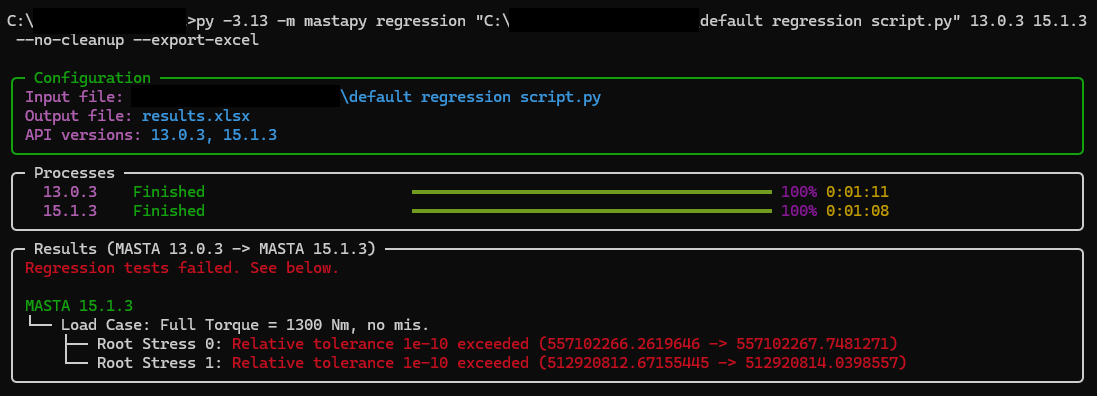
Once the script has been modified to output a comparison structure, we are ready to launch it using the plugin. This is done from the command line.
For instance, to compare results between MASTA 14.0 and MASTA 15.0 and export results to Excel, assuming both versions of MASTA are installed in the default location, we could run:
python -m mastapy regression "path/to/script.py" 14.0 15.0 --export-excel
This will execute your script in both versions of the API and automatically compile test results, then export them to Excel. Alternatively, you can provide paths to your MASTA installations:
python -m mastapy regression "path/to/script.py" "path/to/MASTA 14.0" "path/to/MASTA 15.0" --export-excel
To view the full list of features, run:
python -m mastapy regression --help
Troubleshooting
Version differences
If you are attempting to compare different major versions of the API (e.g. comparing 14.0 and 15.0), changes in the API might cause your script to work in one API but not the other. To work around this, you can import __api_version__ from mastapy and branch on it:
from mastapy import __api_version__

if __api_version__ == "14.0.0":
    # Run code for MASTA 14.0
    ...
else:
    # Run code for MASTA 15.0
    ...
You may also need to use different versions of Python, depending on what each version of mastapy supports. This can be configured in your launch command using @VERSION syntax (or @PATH if you have a path to the Python executable):
python -m mastapy regression "path/to/script.py" 14.0@3.10 15.0
This will launch MASTA 14.0 using Python 3.10. You must have the corresponding version of Python installed.
Package Installation
This plugin automatically creates virtual environments, then downloads and installs packages into them. Internally, pip is used for all package management. If you require SSL certification, you can optionally use the --truststore flag to install it into your virtual environments:
python -m mastapy regression --truststore ...
Everything else must be configured using pip.ini or environment variables.
Release history Release notifications | RSS feed


Download files
Download the file for your platform. If you're not sure which to choose, learn more about installing packages.
Source Distribution
Built Distribution
Filter files by name, interpreter, ABI, and platform.
If you're not sure about the file name format, learn more about wheel file names.
Copy a direct link to the current filters
File details
Details for the file mastapy_cli_regression-0.1.0b1.tar.gz.
File metadata
- Download URL: mastapy_cli_regression-0.1.0b1.tar.gz
- Upload date:
- Size: 256.8 kB
- Tags: Source
- Uploaded using Trusted Publishing? No
- Uploaded via: uv/0.10.2 {"installer":{"name":"uv","version":"0.10.2","subcommand":["publish"]},"python":null,"implementation":{"name":null,"version":null},"distro":null,"system":{"name":null,"release":null},"cpu":null,"openssl_version":null,"setuptools_version":null,"rustc_version":null,"ci":null}
File hashes
| Algorithm | Hash digest | |
|---|---|---|
| SHA256 |
426c82842d3af64b2e379aac2ae2eae7f46af44aade54cb2d0aa79cc3fc4d587
|
|
| MD5 |
50c4023e018dcbc5f651406323d10145
|
|
| BLAKE2b-256 |
403ebeaf69731bc4141588b6e1b5f10effacdb1fbcf0ca05314bb8fb2d477630
|
File details
Details for the file mastapy_cli_regression-0.1.0b1-py3-none-any.whl.
File metadata
- Download URL: mastapy_cli_regression-0.1.0b1-py3-none-any.whl
- Upload date:
- Size: 268.2 kB
- Tags: Python 3
- Uploaded using Trusted Publishing? No
- Uploaded via: uv/0.10.2 {"installer":{"name":"uv","version":"0.10.2","subcommand":["publish"]},"python":null,"implementation":{"name":null,"version":null},"distro":null,"system":{"name":null,"release":null},"cpu":null,"openssl_version":null,"setuptools_version":null,"rustc_version":null,"ci":null}
File hashes
| Algorithm | Hash digest | |
|---|---|---|
| SHA256 |
40e61b400a0151c838e0ccbcea5f560dbace43c8a791b2f2072a6c04fbbd4a69
|
|
| MD5 |
e40922efe51e88cd08d7489f96c7cd8e
|
|
| BLAKE2b-256 |
916910f9c4a43d8d54c3c9d522089e6a01afdd9e069613d12cd1001eb87e2a80
|






