
Versatile Python logging package with source management.

Project description
MasterLog
This module provides a versatile logging system with configurable log levels, sources, and formatting options. It supports colorized output for terminal logging and allows for file-based logging with customizable settings.
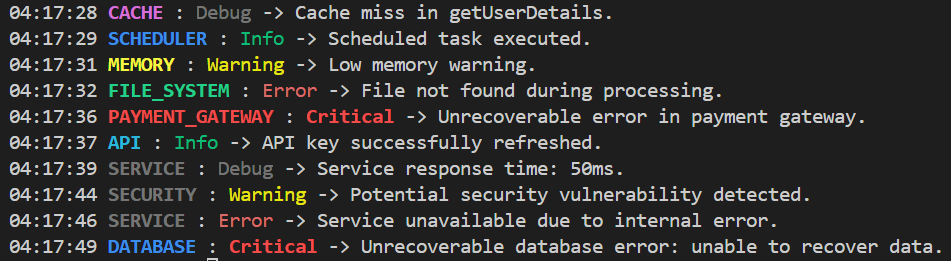
Features
- Log Levels: DEBUG, INFO, WARNING, ERROR, CRITICAL, RELEASE
- Source-Based Filtering: Log messages can be filtered by source, with optional colorization.
- Customizable Format: Adjust log message format and date format.
- File Logging: Option to save logs to a file with configurable filename.
- Dynamic Source Management: Add or remove logging sources and set a default source.
Installation
You can install MasterLog directly from PyPI:
pip install masterlog
Alternatively, you can clone the repository (no external dependencies required):
git clone https://github.com/sergey-hovhannisyan/masterlog.git
Usage
- Configure the logger using the
configfunction. - Log messages at various levels using
debug,info,warning,error, andcritical. - Manage logging sources with
add_sourceandremove_source. - Toggle logging with
enableanddisable. - Set or update the default logging source with
set_default_source.
Examples
import masterlog as log

log.config(level=log.DEBUG, sources=('SYSTEM', 'APP'), format="{asctime} {source} - {levelname}: {message}")
log.info("This is an info message", source="APP")
log.error("This is an error message", source="SYSTEM")
Configuration
Configure the logger using the config function:
# Basic configuration
log.config(level=log.DEBUG, sources=('SYSTEM', 'APP'), format="{asctime} {source} - {levelname}: {message}")

# Enable file logging
log.config(enable_save=True, filename="output.log")
Logging Messages
Log messages at various levels:
log.info("This is an info message", source="APP")
log.error("This is an error message", source="SYSTEM")
log.critical("Critical system failure detected.")
log.warning("Disk space running low.")
Source Management
Manage logging sources:
log.add_source("DATABASE", "MAGENTA")
log.add_source("API", "GREEN")
log.remove_source("SYSTEM")
Dynamic Source and Logging Control
Switch between terminal and file outputs, and adjust logging levels and sources:
# Switch to terminal output only
log.config(enable_save=False)
log.info("Application server started on port 8080.", source="SERVER")
log.warning("User session timeout approaching.", source="SESSION")
# Add and remove sources
log.add_source("DATABASE", "MAGENTA")
log.add_source("API", "GREEN")

log.info("API key successfully refreshed.", source="API")
log.debug("Database query execution time: 120ms.", source="DATABASE")

log.remove_source("SYSTEM")
log.info("The 'SYSTEM' source was deleted. Printing from the default source.")
# Log level control
log.disable()
log.info("This will not be logged!")
log.enable()
log.critical("Critical error in authentication service: key rotation failed.", source="AUTH")
# Configure sources and default source
log.config(sources=("SYSTEM", "API"))
log.error("This will not be logged!", source="FILESYSTEM")
log.warning("API response took longer than expected: 2 seconds.", source="API")

log.set_default_source("SERVICE")
log.info("Hello from service.")

log.set_default_source("NETWORK", "YELLOW")
log.debug("Network request payload: {\"user_id\": 123}.")
Shutdown Hook
The masterlog shutdown hook clears the buffer and writes the buffer into the file if enable_save was set before exiting.
Contributing
Feel free to submit issues and pull requests on GitHub. Contributions are welcome!
License
This project is licensed under the Apache License 2.0 - see the LICENSE file for details.
Release history Release notifications | RSS feed

Download files
Download the file for your platform. If you're not sure which to choose, learn more about installing packages.
Source Distribution
Built Distribution
Filter files by name, interpreter, ABI, and platform.
If you're not sure about the file name format, learn more about wheel file names.
Copy a direct link to the current filters
File details
Details for the file masterlog-0.1.4.tar.gz.
File metadata
- Download URL: masterlog-0.1.4.tar.gz
- Upload date:
- Size: 10.8 kB
- Tags: Source
- Uploaded using Trusted Publishing? No
- Uploaded via: twine/5.1.1 CPython/3.11.2
File hashes
| Algorithm | Hash digest | |
|---|---|---|
| SHA256 |
425c4d6004c6a523c2878e8d8cfddee46c921e9065cbe15fb8264fe631ebaa28
|
|
| MD5 |
4f2df5f9fce162aea2eff9a25bc07154
|
|
| BLAKE2b-256 |
b8cecaae0344317b62f541c6acabbeeb5629c0ed4c37e56852e69b5516f24dc3
|
File details
Details for the file masterlog-0.1.4-py3-none-any.whl.
File metadata
- Download URL: masterlog-0.1.4-py3-none-any.whl
- Upload date:
- Size: 11.5 kB
- Tags: Python 3
- Uploaded using Trusted Publishing? No
- Uploaded via: twine/5.1.1 CPython/3.11.2
File hashes
| Algorithm | Hash digest | |
|---|---|---|
| SHA256 |
2a31778b680727c1fd75b493d29bb7852368a208a388f6d778138c7739d010f9
|
|
| MD5 |
216c706f1070ee1bee8ea9bb1284a4b8
|
|
| BLAKE2b-256 |
a935fd191a26ee4310490269a70e4ad51536f312f4f93bdcb021ec971e9cc61e
|






