


wode
WOrkflow DEfinitions - houses the definitions for:
Workflow- a workflow to be executedSubworkflow- a logical collection of units of work defined by a uniqueApplidation, andModelUnits- one of the following:AssertionUnit- assert an expressionAssignmentUnit- assign a valueConditionUnit- evaluate a conditionIOUnit- Read or write dataExecutionUnit- execute anADeApplicationMapUnit- create a dynamic number of units based on output of a previous unitReduceUnit- collect the results of a fanned out operation
Workflow configurations are processed at build time using build_workflows.js and compiled into
a single JS file so that workflow configurations can be accessed in the browser runtime, not just
in a NodeJS process.
The relevant data parameterizing supported entities is housed in the Standata repository.
Installation
For usage within a JavaScript project:
npm install @mat3ra/wode
For development:
git clone https://github.com/Exabyte-io/wode.git
Contributions
This repository is an open-source work-in-progress and we welcome contributions.
We regularly deploy the latest code containing all accepted contributions online as part of the Mat3ra.com platform, so contributors will see their code in action there.
See ESSE for additional context regarding the data schemas used here.
Useful commands for development:
# run linter without persistence
npm run lint

# run linter and save edits
npm run lint:fix

# compile the library
npm run transpile

# run tests
npm run test
Using Linter
Linter setup will prevent committing files that don't adhere to the code standard. It will
attempt to fix what it can automatically prior to the commit in order to reduce diff noise. This can lead to "unexpected" behavior where a
file that is staged for commit is not identical to the file that actually gets committed. This happens
in the lint-staged directive of the package.json file (by using a husky pre-commit hook). For example,
if you add extra whitespace to a file, stage it, and try to commit it, you will see the following:
➜  repo-js git:(feature/cool-feature) ✗ git commit -m "Awesome feature works great"
✔ Preparing...
✔ Running tasks...
✖ Prevented an empty git commit!
✔ Reverting to original state because of errors...
✔ Cleaning up...

  ⚠ lint-staged prevented an empty git commit.
  Use the --allow-empty option to continue, or check your task configuration

husky - pre-commit hook exited with code 1 (error)
The staged change may remain but will not have been committed. Then it will look like you still have a staged change to commit, but the pre-commit hook will not actually commit it for you, quite frustrating! Styling can be applied manually and fixed by running:
npm run lint:fix
In which case, you may need to then add the linter edits to your staging, which in the example above, puts the file back to identical with the base branch, resulting in no staged changes whatsoever.
Other
Workflow Spec
Workflows defined as configuration conform to the following specification:
Workflow: Object- The workflow configuration itselfname: String- a human readable name describing the functionality of the workflowunits: Array- a list of workflow units where each unit takes the following shape Not == Unitname: String- the snake_case name of a subworkflow or another workflow that must existconfig: Optional[Object]- seeConfigdefined belowtype: String- one of:subworkflow|workflow- Note: workflow units may specify
mapUnit: truein their config
- Note: workflow units may specify
units: Optional[Array]- iftype == workflowsee above (recursively defined)
config: Optional[Object]- seeConfigdefined below
Subworkflow: Object- a logical collection of workflow unitsapplication: Object- an application specificationname: String- an application name recognized by ADeversion: Optional[String]- (often a semver) application version string supported by ADebuild: Optional[String]- application build string supported by ADe
method: Object- a method specificationname: String- a named method class exported from MeDeconfig: Optional[Object]- seeConfigdefined below
model: Object- a model specificationname: String- a named model class exported from MeDeconfig: Optional[Object]- seeConfigdefined below
config: Optional[Object]- seeConfigdefined belowunits: Array- a list of subworkflow units where each unit is a Unit defined below
Unit: Object- a unit of computational work in a workflowtype: String- one of:execution|assignment|condition|io|processing|map|subworkflow|assertion- Note: optionally may have
Builderappended to type to use unit builders instead of units directlyexecutionBuilderis the primary use case for this
- Note: optionally may have
config: Object- arguments to pass to constructor based on typefunctions: Object- similar toConfig.functions defined below- in the case of builders, functions are applied before calling build
attributes: Object- similar toConfig.attributes defined below- in the case of builders, attributes are applied after calling build
Config: Object- custom configuration to apply to an entity- Note:
functionsandattributesmay not be supported for all entities, please check the implementation functions: Object- collection of functions defined on the entity to run[key]: {{functionName}}: String- name of function to run[value]: {{args}}: Any- arguments matching the call signature
attributes: Object- collection of attributes to assign to the entity on creation[key]: {{attributeName}}: String- name of function to run[value]: {{value}}: Any- value to assign to attribute
[key]: {{constructorArgument}}: String- parameter passed to constructor[value]: {{constructorValue}}: Any- value for a given constructor parameter
- Note:
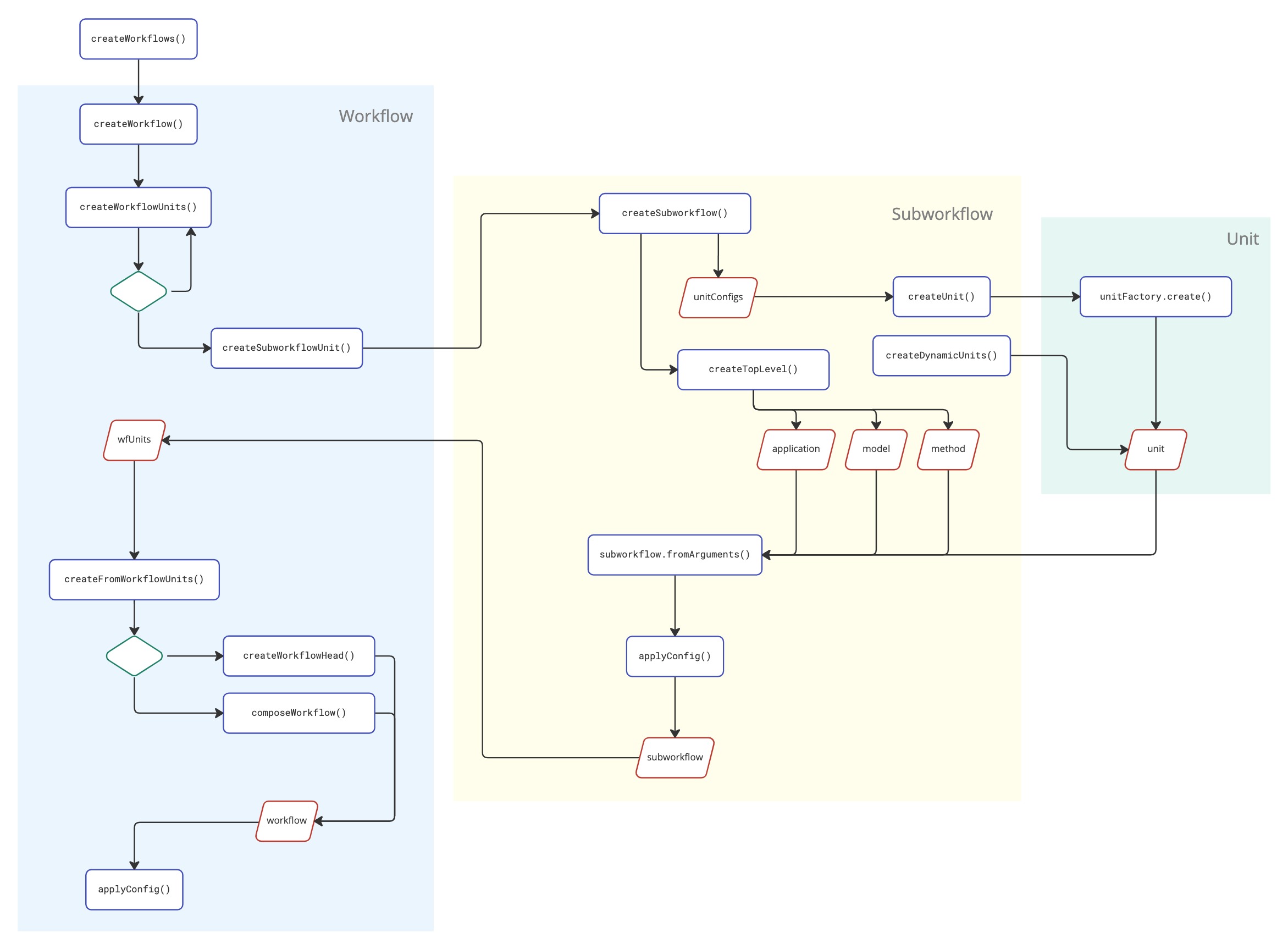
Workflow Creation
The Workflow instances associated with the workflow configurations are built by
the createWorkflows function traversing all three levels (workflow, subworkflow, unit):
Links
- Workflows explained in Mat3ra documentation: https://docs.mat3ra.com/workflows/overview/
1 maintainer

Metadata
1 maintainer
Release files for mat3ra-wode 2026.8.29.post0
For a detailed explanation of source distributions (sdists) and built distributions (wheels), please see the package formats documentation.
Source distribution (sdist)
| File | Size | Uploaded | |
|---|---|---|---|
| mat3ra_wode-2026.8.29.post0.tar.gz | 149.2 kB | Details |
Built distribution (wheel)
| File | Interpreter | ABI | Platform | Reset |
|---|---|---|---|---|
| mat3ra_wode-2026.8.29.post0-py3-none-any.whl | Python 3 | none | any | Details |
Total release size: 176.9 kB
Release files / mat3ra_wode-2026.8.29.post0.tar.gz
| Download URL | mat3ra_wode-2026.8.29.post0.tar.gz |
|---|---|
| Size | 149.2 kB |
| Tags | Source |
|
SHA-256 checksum How to use checksums |
fe2866cf31900c798d5c72e3f839923df190778a70395c3c3bbd839a7be04c5f
|
|
BLAKE2b-256 checksum How to use checksums |
8685ce877e641db73b80a52e4e4c23df75fa4f2aa002f5d327ebeebbeb2d4007
|
| Upload date | |
|
Uploaded using Trusted Publishing? What is trusted publishing? |
No |
| Uploaded via |
twine/3.7.1 importlib_metadata/9.0.1 pkginfo/1.12.1.2 requests/2.34.2 requests-toolbelt/1.0.0 tqdm/4.70.0 CPython/3.10.13
|
Release files / mat3ra_wode-2026.8.29.post0-py3-none-any.whl
| Download URL | mat3ra_wode-2026.8.29.post0-py3-none-any.whl |
|---|---|
| Size | 27.7 kB |
| Tags | Python 3 |
|
SHA-256 checksum How to use checksums |
2a672cfe36204c498d4763d63e4eb66eaeffecf5722ac568ec32cceff2a31dfb
|
|
BLAKE2b-256 checksum How to use checksums |
eb57e98f1ea2bec196d27bfaae88acf657045eb8b0efe91207e225a02424b584
|
| Upload date | |
|
Uploaded using Trusted Publishing? What is trusted publishing? |
No |
| Uploaded via |
twine/3.7.1 importlib_metadata/9.0.1 pkginfo/1.12.1.2 requests/2.34.2 requests-toolbelt/1.0.0 tqdm/4.70.0 CPython/3.10.13
|














