
Model tournament knockout stages in JSON format and render the schedule in SVG or html table format

Project description
matamata





Model a tournament knockout stage in a small JSON "language" and render the schedule in SVG or HTML table format.
matamata also lets a host system map documents representing championship knockout stages onto its own business objects (e.g. a Championship or Cup entity) and persist them apart from any presentation concern — updating results means editing a document, never the code.
Example rendered from
examples/knockout-8.json,
with each match's date and venue from the document and national flags supplied by a host
(examples/world_cup_flags_host.py):

Quickstart
Requires Python ≥ 3.10. No runtime dependencies. Install from PyPI:
pip install matamata
Render a knockout stage document — plain JSON following the format — to an SVG file, or to an HTML table for small screens:
# the installed command
matamata stage.json -o schedule.svg

# or via the module, writing to stdout
python -m matamata stage.json > schedule.svg

# or as an HTML table
matamata stage.json -o schedule.html
Open the result in a browser to view the schedule. From Python:
from matamata import load_stage, render_svg

svg = render_svg(load_stage("stage.json"))
Ready-to-render worked examples live in
examples/. For the
latest unreleased commit use
pip install git+https://github.com/anibalpacheco/matamata.git; to work on matamata
itself, clone the repo and pip install -e ..
Examples
Both examples are rendered from the JSON files in examples/.
The World Cup example above shows single matches — one goal figure per side, with
shootouts in parentheses (Argentina won its quarterfinal on penalties). Each match draws a
metadata line with its date and venue, and sides not resolved yet fall back to
placeholders such as "Winner SF2". The flags come from a host: knockout-8.json carries no
ids, so examples/world_cup_flags_host.py
resolves each national team's flag from its name, while the dates and venues live in the
document itself.
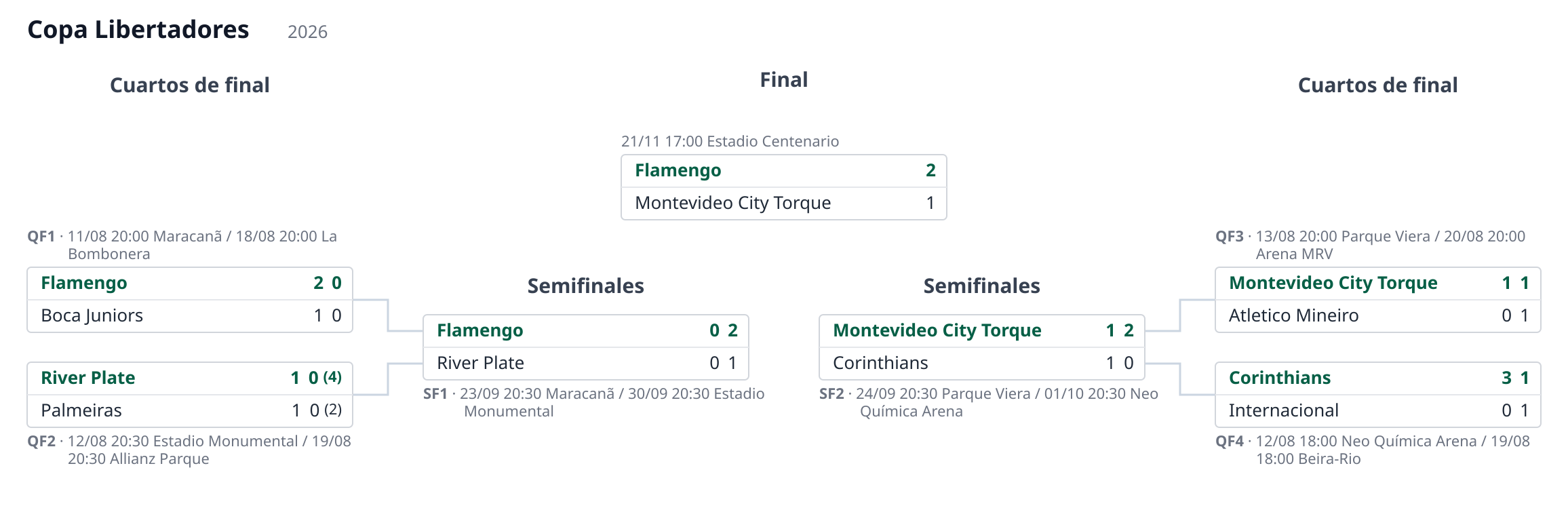
The Copa Libertadores example shows two-legged ties — each leg's goals are shown,
shootouts appear in parentheses, and the winner of each tie is emphasized. Its first
quarterfinal is host-resolved: its legs carry only a ref, so its teams and scores
come from get_match (see
examples/libertadores_host.py) rather than from the
document. Played ties take their team names from the legs; the final is a single match —
one leg, so just one goal figure per side — with its winnerof links wiring the
advancement tree. The demo also renders it in Spanish (round names localized via the
translate hook) and in local America/Montevideo time (the GMT kickoff times converted),
showing the i18n and timezone features:
The format
The document is plain JSON, so any system can store and exchange it natively, and the
language is designed so a match can evolve from a placeholder (e.g. "winner
of QF1") into a reference to a real match entity — each leg can carry a ref to
the real game, resolved dynamically by the host — without changing the language. The
advancement tree is laid out deterministically: coordinates are
computed directly and the SVG is emitted as a string, with no layout engine and no
heavy dependencies.
See the format specification and its
JSON Schema. Worked examples live in
examples/.
Minimal example:
{
  "tournament": "Copa Libertadores",
  "season": "2026",
  "rounds": [
    {
      "name": "Final",
      "matches": [
        {
          "id": "final",
          "legs": [
            { "team1": "Flamengo", "goals1": 1, "team2": "River Plate", "goals2": 2 }
          ],
          "winner": 2
        }
      ]
    }
  ]
}
Documentation
The manual covers rendering from the CLI and from Python
(e.g. a Django view), feeding live data from your own database through
KnockoutStage, updating the stored document with apply_results — including a
before/after walkthrough of one call — and running the test suite.
Status
Working: the language spec, JSON Schema, Python renderer, CLI and tests are in place, and the package is installable from GitHub.
Release history Release notifications | RSS feed


Download files
Download the file for your platform. If you're not sure which to choose, learn more about installing packages.
Source Distribution
Built Distribution
Filter files by name, interpreter, ABI, and platform.
If you're not sure about the file name format, learn more about wheel file names.
Copy a direct link to the current filters
File details
Details for the file matamata-0.1.0.tar.gz.
File metadata
- Download URL: matamata-0.1.0.tar.gz
- Upload date:
- Size: 1.2 MB
- Tags: Source
- Uploaded using Trusted Publishing? Yes
- Uploaded via: twine/6.1.0 CPython/3.13.12
File hashes
| Algorithm | Hash digest | |
|---|---|---|
| SHA256 |
f1e9e5cb8a09bbc299772369bee1737d88d49539ff2abd76448684fd2ec79f01
|
|
| MD5 |
fdcd5fbeb13cd50932a6ab28849fe3e8
|
|
| BLAKE2b-256 |
5cd569c5da7976fadfa5bffd7ac1526bd9295c23c88105cab2f4dec26a71e864
|
Provenance
The following attestation bundles were made for matamata-0.1.0.tar.gz:
Publisher:
release.yml on anibalpacheco/matamata
-
Statement:
-
Statement type:
https://in-toto.io/Statement/v1 -
Predicate type:
https://docs.pypi.org/attestations/publish/v1 -
Subject name:
matamata-0.1.0.tar.gz -
Subject digest:
f1e9e5cb8a09bbc299772369bee1737d88d49539ff2abd76448684fd2ec79f01 - Sigstore transparency entry: 1849308813
- Sigstore integration time:
-
Permalink:
anibalpacheco/matamata@89c6bfbf054f4442657297293927b7834a305922 -
Branch / Tag:
refs/tags/v0.1.0 - Owner: https://github.com/anibalpacheco
-
Access:
public
-
Token Issuer:
https://token.actions.githubusercontent.com -
Runner Environment:
github-hosted -
Publication workflow:
release.yml@89c6bfbf054f4442657297293927b7834a305922 -
Trigger Event:
release
-
Statement type:
File details
Details for the file matamata-0.1.0-py3-none-any.whl.
File metadata
- Download URL: matamata-0.1.0-py3-none-any.whl
- Upload date:
- Size: 35.2 kB
- Tags: Python 3
- Uploaded using Trusted Publishing? Yes
- Uploaded via: twine/6.1.0 CPython/3.13.12
File hashes
| Algorithm | Hash digest | |
|---|---|---|
| SHA256 |
c769fc8c0ff820dd4e361a13ea549a9edd5d108350d86119e4cc2d53f3b153f5
|
|
| MD5 |
81bea5e60ab90ec73a4db0859d569632
|
|
| BLAKE2b-256 |
e50bf860009e28ef7e9020863e103006485beda34d1aa434f8ec148b32556478
|
Provenance
The following attestation bundles were made for matamata-0.1.0-py3-none-any.whl:
Publisher:
release.yml on anibalpacheco/matamata
-
Statement:
-
Statement type:
https://in-toto.io/Statement/v1 -
Predicate type:
https://docs.pypi.org/attestations/publish/v1 -
Subject name:
matamata-0.1.0-py3-none-any.whl -
Subject digest:
c769fc8c0ff820dd4e361a13ea549a9edd5d108350d86119e4cc2d53f3b153f5 - Sigstore transparency entry: 1849308973
- Sigstore integration time:
-
Permalink:
anibalpacheco/matamata@89c6bfbf054f4442657297293927b7834a305922 -
Branch / Tag:
refs/tags/v0.1.0 - Owner: https://github.com/anibalpacheco
-
Access:
public
-
Token Issuer:
https://token.actions.githubusercontent.com -
Runner Environment:
github-hosted -
Publication workflow:
release.yml@89c6bfbf054f4442657297293927b7834a305922 -
Trigger Event:
release
-
Statement type:






