
materialx-bookmarks




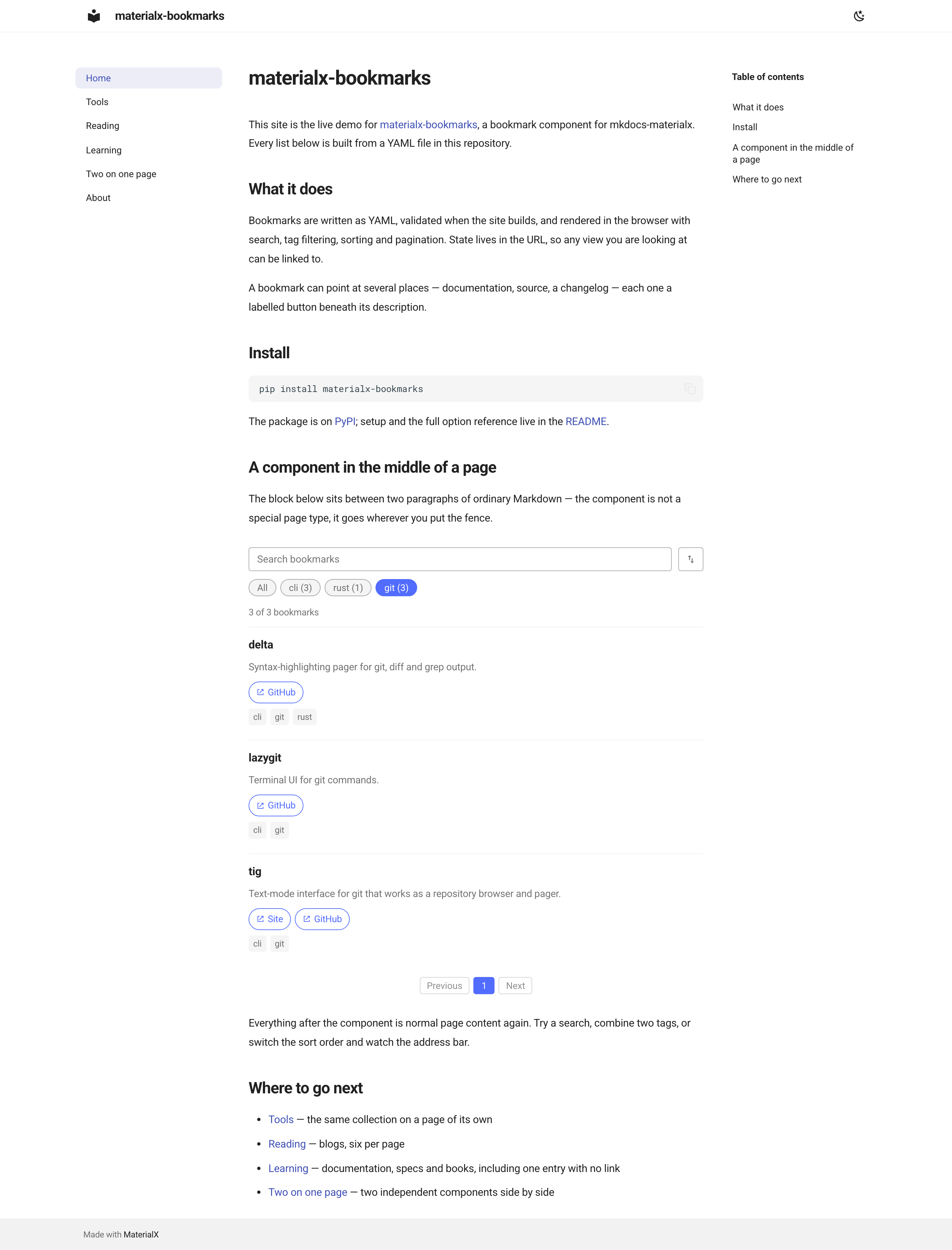
A bookmark list component for mkdocs-materialx. Write your links in YAML, drop one fence into any page, and readers get search, tag filtering, sorting and pagination — no JavaScript to write, no database, no build step of your own.
🔖 Try the live demo →
Search for a typo'd name, stack two tag filters, flip the order, page through — then copy the address bar and see the whole view come back.
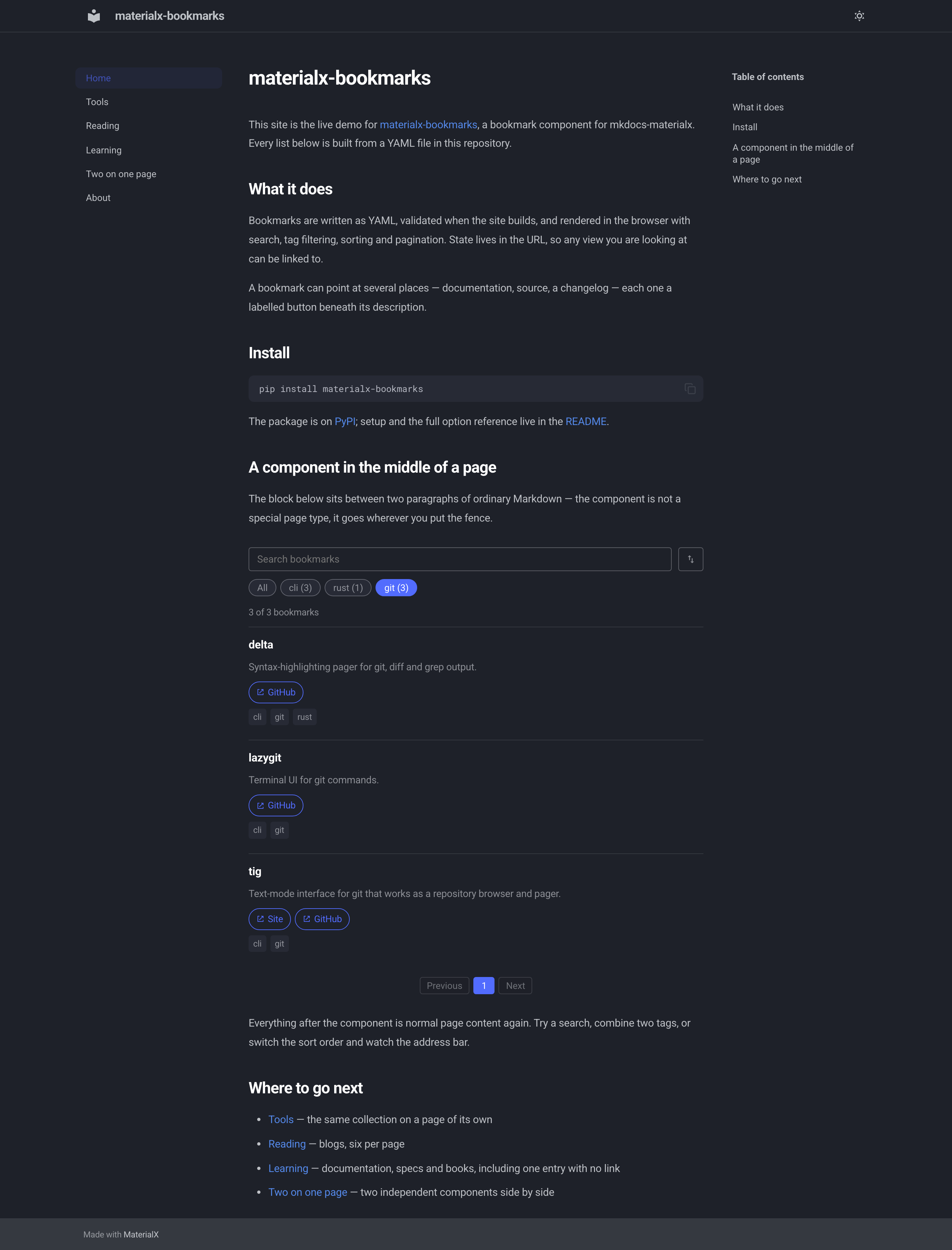
| Light | Dark |
|---|---|
 |
 |
Why
Documentation sites accumulate link lists. Written as plain Markdown they turn into a wall of bullets nobody can search, and keeping them tidy means editing prose. This plugin keeps the data in YAML and the presentation in the theme:
| 🔍 Fuzzy search | Powered by Fuse.js, tolerant of typos, weighted toward titles |
| 🔗 Several links per bookmark | Docs, source, changelog — each one a labelled button, or labelled by hostname if you'd rather not |
| 🏷️ Tag filtering | Multi-select with AND semantics. Counts follow the current view, and a tag that would return nothing steps aside. Chips sit in your order, alphabetically, or most-used first |
| 🏷️ Your own noun | A collection of projects says "Search projects" and "3 of 12 projects", not "bookmarks" |
| ↕️ Sorting | Your YAML order, or reversed |
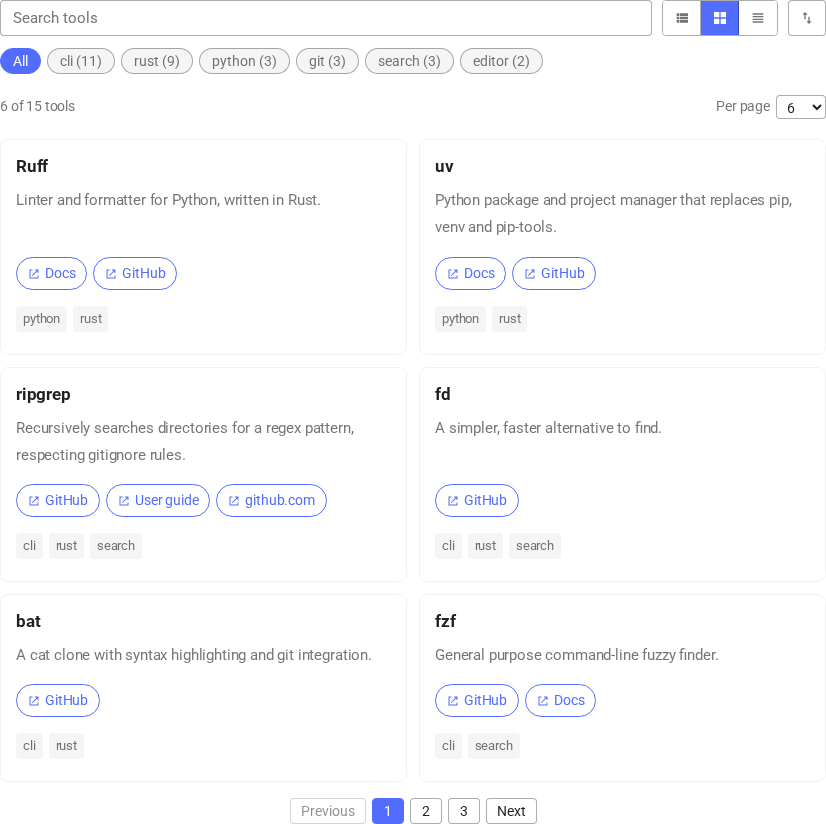
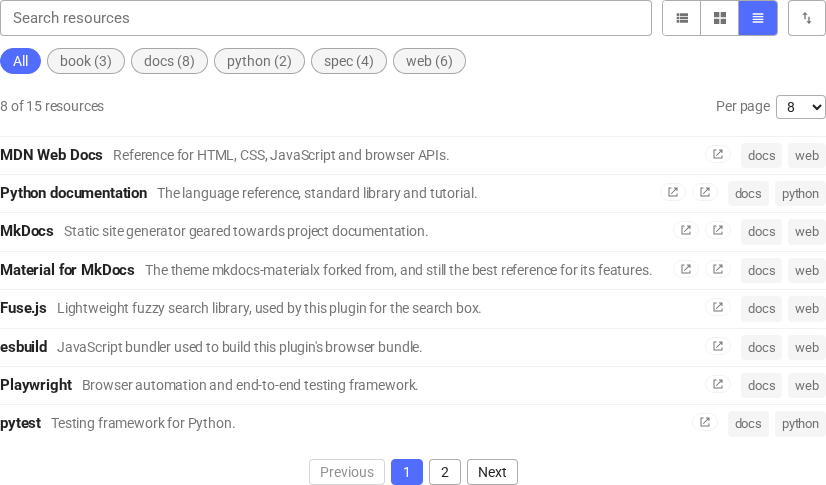
| 🔲 Display modes | A list, responsive blocks, or one dense row per entry. Readers switch; the choice sticks |
| 📄 Pagination | Numbered, with a page size the reader can change if you offer the choice |
| 🔗 Shareable state | Every view is a URL — search, tags, sort and page all round-trip |
| 🧩 Anywhere on any page | Mid-article, several per page, as many collections as you like |
| 🎨 Themed automatically | Styled entirely with the theme's own CSS variables — light, dark and your accent colour |
| ✅ Validated at build time | A typo'd tag or an unknown collection fails the build, not the page |
| 🌍 Translated | English and Turkish included, one file to add your own |
Quick start
1. Install
pip install materialx-bookmarks
2. Write some bookmarks
Create bookmarks/reading.yml next to your mkdocs.yml:
tags:
  - python
  - rust

bookmarks:
  - title: Ruff
    description: Linter and formatter for Python, written in Rust.
    tags: [python, rust]
    links:
      - text: Docs
        url: https://docs.astral.sh/ruff/
      - text: GitHub
        url: https://github.com/astral-sh/ruff

  - title: ripgrep
    description: Recursively searches directories for a regex pattern.
    tags: [rust]
    links:
      - url: https://github.com/BurntSushi/ripgrep
3. Register the collection
plugins:
  - materialx-bookmarks:
      collections:
        - name: reading
          file: bookmarks/reading.yml
4. Drop it on a page
# My reading list

Things worth coming back to.

```bookmarks
collection: reading
```
That's it. mkdocs serve, and editing the YAML live-reloads the page.
Reference
Bookmark files
tags: [python, rust]        # allowlist — a bookmark may only use tags listed here

bookmarks:
  - title: Ruff             # the only required field
    description: …          # optional
    tags: [python]          # optional
    links:                  # optional — each entry needs a url
      - text: Docs          # optional — without it the button shows the hostname
        url: https://…
Bookmarks appear in the order you write them. The tags allowlist is what turns a misspelled tag
into a build error instead of a chip nobody ever clicks.
Links render as buttons under the description, in the order you write them. A bookmark with no links renders as plain text.
Plugin options
plugins:
  - materialx-bookmarks:
      language: en
      collections:
        - name: reading
          file: bookmarks/reading.yml
          per_page: 20
| Option | Required | Default | Description |
|---|---|---|---|
language |
no | theme.language, else en |
Language for the interface strings |
collections[].name |
yes | — | The name pages refer to. Must be unique |
collections[].file |
yes | — | Path to the YAML file, relative to mkdocs.yml. Keep it outside docs/ so it is not copied into the built site |
collections[].per_page |
no | 20 |
Bookmarks per page |
collections[].item_name |
no | the language's own word | Singular noun for one entry, e.g. project |
collections[].item_name_plural |
no | the language's own word | Plural noun, e.g. projects. Required together with item_name |
collections[].tag_sorting |
no | manual |
Tag chip order: manual, alphabetical or count |
collections[].per_page_options |
no | — | Page sizes the reader may pick from, e.g. [10, 25, all]. Must include per_page. Omit it and there is no picker |
collections[].display |
no | list |
How the collection is drawn first: list, blocks or compact |
collections[].display_options |
no | all three | Modes the reader may switch between. Must include display. Use [] for no switcher |
collections[].block_min_width |
no | 12rem |
Narrowest a block column may get before the grid drops one |
Naming what a collection holds
By default the interface says "bookmarks" — "Search bookmarks", "3 of 12 bookmarks". A collection that holds something else can say so:
collections:
  - name: projects
    file: bookmarks/projects.yml
    item_name: project
    item_name_plural: projects
The nouns go into every string that needs one: Search projects, No projects found,
3 of 12 projects, and 1 of 1 project when a single entry matches. Give both keys or neither —
the plugin will not guess a plural. Leave them out and each language supplies its own word, so a
Turkish site reads "Yer işaretleri içinde ara" without any configuration.
Ordering the tag chips
collections:
  - name: tools
    file: bookmarks/tools.yml
    tag_sorting: count
manual |
The order the tags are written in the collection's YAML. The default |
alphabetical |
Sorted under the site's language, so Turkish ı lands where a Turkish reader expects it |
count |
Most-used tag first, ties keeping the YAML order. The counts follow the current view, so the chips re-order as the reader searches and filters |
Display modes
Bookmarks can be drawn three ways, and the reader picks between them from a switcher beside the search box:
list |
Title, description, links and tags stacked down the page. The default |
blocks |
A responsive grid of bordered cards. Columns are a function of the component's own width, so it reflows the same whether it sits in a narrow content column or a wide page |
compact |
One row per bookmark: title, a single-line description, tags and unlabelled link icons |
collections:
  - name: tools
    file: bookmarks/tools.yml
    display: blocks
    block_min_width: 14rem
blocks |
compact |
|---|---|
 |
 |
display is where a collection starts. Set display_options to narrow what the reader may choose,
or to [] to fix the mode and hide the switcher entirely:
    display: blocks
    display_options: [list, blocks]
The reader's choice is remembered in localStorage, namespaced by component id, so two collections
on one page each keep their own. It is deliberately not in the URL: the display mode says how a
collection is drawn, not which bookmarks it shows.
Letting readers choose the page size
collections:
  - name: tools
    file: bookmarks/tools.yml
    per_page: 12
    per_page_options: [12, 24, all]
A picker appears at the end of the count line. all drops pagination for that view. The list must
include per_page, which stays the default. Without per_page_options nothing changes: the page
size is yours alone.
Unlike the display mode, the page size is in the URL — it decides which bookmarks a given page number lands on, so a shared link would otherwise point somewhere else for the person who opens it.
Placing components
A page may hold as many components as you like. Give a fence an id when two of them would
otherwise collide:
```bookmarks
collection: reading
id: reading-secondary
```
| Key | Required | Description |
|---|---|---|
collection |
yes | Name of a collection from mkdocs.yml |
id |
no | Defaults to the collection name. Namespaces this component's URL parameters |
URL state
Every control that changes which bookmarks are shown writes to the address bar, namespaced by component id, so a filtered view can be linked to and returns intact:
?reading.q=ruff&reading.tags=python,rust&reading.sort=reversed&reading.page=2&reading.size=50
The display mode is the one exception, and lives in localStorage instead — see
Display modes.
How it works
At build time the plugin reads your YAML, validates it, and writes one JSON file per collection into the site. Each fence becomes an empty container carrying its configuration. Anything wrong — a missing file, a bookmark without a title, a tag outside the allowlist, a fence naming a collection that does not exist — stops the build with a message naming the file and the entry.
In the browser a small bundle (about 30 KB including Fuse.js) fetches that JSON once per collection and renders the list. Assets are emitted under content-hashed filenames, so upgrading the plugin never leaves a visitor on a stale bundle.
Controls are real buttons with aria-pressed, the search box is labelled, the result count is a
live region, and pagination sits in a landmark nav — all of it keyboard reachable.
Languages
English (en) and Turkish (tr) ship with the plugin, and the language follows your
theme.language unless you set one. Adding another is a single file — see
CONTRIBUTING.md.
Requirements
Python 3.10+, MkDocs 1.5+, and the mkdocs-materialx theme.
Contributing
Tests, the demo site and the release workflow are described in CONTRIBUTING.md.
License
1 maintainer

Metadata
1 maintainer
Release files for materialx-bookmarks 0.5.0
For a detailed explanation of source distributions (sdists) and built distributions (wheels), please see the package formats documentation.
Source distribution (sdist)
| File | Size | Uploaded | |
|---|---|---|---|
| materialx_bookmarks-0.5.0.tar.gz | 45.1 kB | Details |
Built distribution (wheel)
| File | Interpreter | ABI | Platform | Reset |
|---|---|---|---|---|
| materialx_bookmarks-0.5.0-py3-none-any.whl | Python 3 | none | any | Details |
Total release size: 75.9 kB
Release files / materialx_bookmarks-0.5.0.tar.gz
| Download URL | materialx_bookmarks-0.5.0.tar.gz |
|---|---|
| Size | 45.1 kB |
| Tags | Source |
|
SHA-256 checksum How to use checksums |
359dd70ed13804225af0faaf0edd234859131fb9667e87b042e814b9b573d8ac
|
|
BLAKE2b-256 checksum How to use checksums |
f3e34c01c464396cea05e63ef9658150b975171b5ae7a720f5146bf3ecfdf791
|
| Upload date | |
|
Uploaded using Trusted Publishing? What is trusted publishing? |
Yes |
| Uploaded via |
twine/7.0.0 CPython/3.13.14
|
Provenance
Provenance describes where a file came from. On PyPI, provenance is shared via attestations, which provide a verifiable record of the build or publishing details. View details, limitations and caveats.


PyPI Publish Attestation
PyPI verified that this artifact, at this checksum, originated from the publisher listed below.
Signed by GitHub Actions, verified by PyPI on Sep 3, 2026.
Transparency logRelease files / materialx_bookmarks-0.5.0-py3-none-any.whl
| Download URL | materialx_bookmarks-0.5.0-py3-none-any.whl |
|---|---|
| Size | 30.8 kB |
| Tags | Python 3 |
|
SHA-256 checksum How to use checksums |
a856c187905717f2183159b9bfe48d957932812c194ac5d6239e4f41194c0da0
|
|
BLAKE2b-256 checksum How to use checksums |
76dd75c13b1a94742b14d2b718819ca14d03653ba41eaa793f2c4f2fa738169c
|
| Upload date | |
|
Uploaded using Trusted Publishing? What is trusted publishing? |
Yes |
| Uploaded via |
twine/7.0.0 CPython/3.13.14
|
Provenance
Provenance describes where a file came from. On PyPI, provenance is shared via attestations, which provide a verifiable record of the build or publishing details. View details, limitations and caveats.
PyPI Publish Attestation
PyPI verified that this artifact, at this checksum, originated from the publisher listed below.
Signed by GitHub Actions, verified by PyPI on Sep 3, 2026.
Transparency log













