
materialxgltf
Contents
Introduction
This package supports the bi-directional translation between MaterialX materials and glTF materials. The minimum version of MaterialX required is 1.38.9 and the target glTF version is 2.0.1. The current PyPi package is synced with MaterialX release 1.39.5. The current version under development is 1.39.5.
See the home page for this project.
Below is an example of converting the "Sci Fi Helmet" asset (found in the glTF Sample Model repository) to MaterialX and previewing.
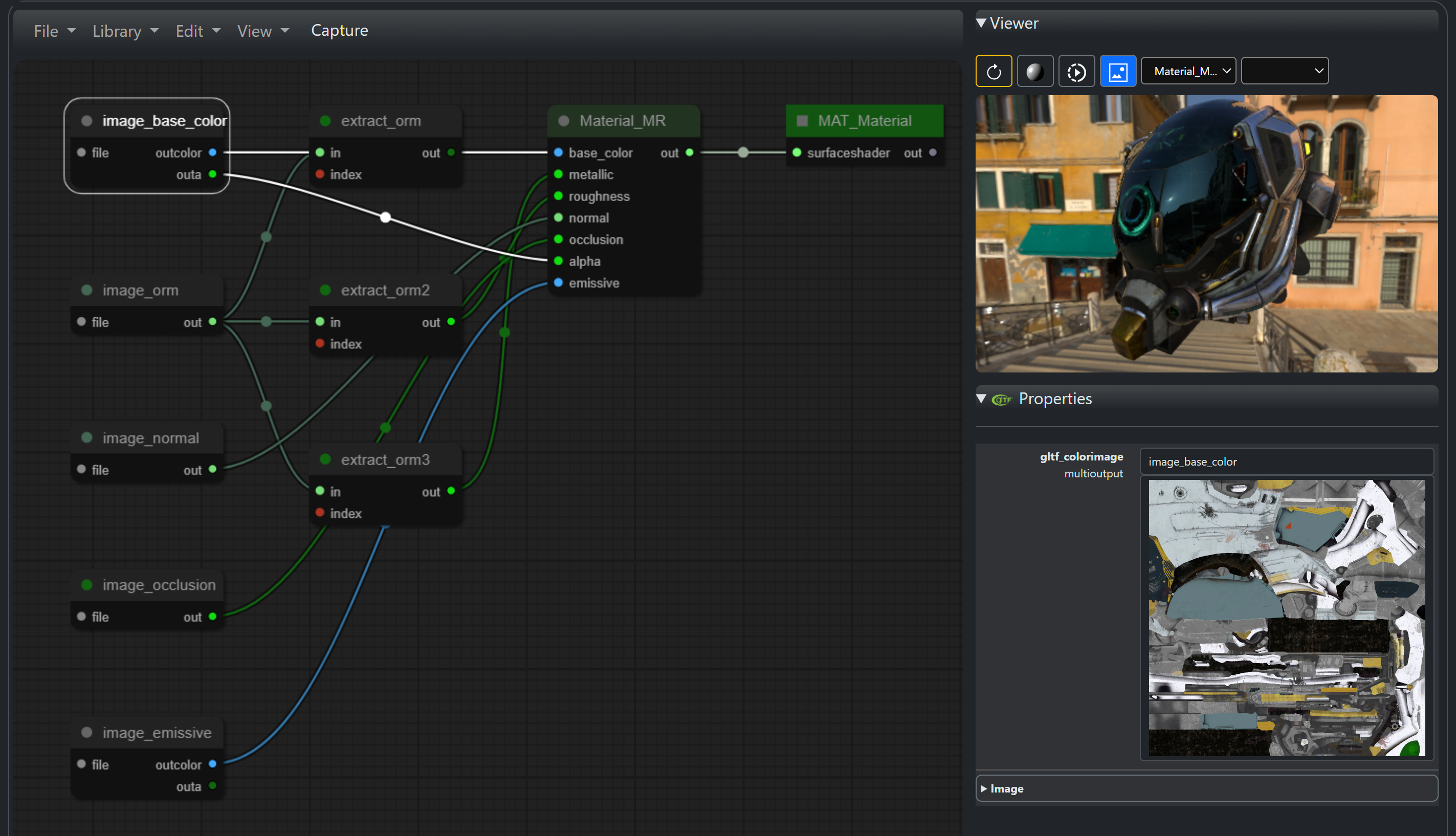
The functionality found here is equivalent to the C++ module available in this repository. Note that additional documentation can be found on that site.
Installation
The minimum version of Python is assumed to be 3.9 and has been tested up to 3.11.
The package hosted on PyPi can be installed using pip:
pip install materialxgltf
or the source repository can be cloned and the package built from the command line:
py -m build
This will build a distribution folder called dist which contains a zip file which can be installed using:
pip --install <name of zip>
Requirements
Requires the installation of the following packages:
materialxversion 1.39 or higher: For MaterialX support.pygltflib: For conversion fromglTFtoglbincluding packaging dependent geometry and image resources.
Documentation
Command Line Utilities
The package provides basic command line utilities for converting between glTF and MaterialX. These can be found by running the module:
python -m materialxgltf -h
which will result in the following output:
Usage: python -m materialxgltf <command> [options] where command is mtlx2gltf or gltf2mtlx
Querying for help for each command will provide more detailed information:
glTF to MaterialX Conversion
python -m materialxgltf gltf2mtlx -h
usage: gltf2mtlx.py [-h] [-fn MTLXFILENAME] [-ca CREATEASSIGNMENTS] [-ai ADDALLINPUTS] [-ax ASSIGNXFORM] [-z ZIP]
                    gltfFileName

Utility to convert a glTF file to MaterialX file

positional arguments:
  gltfFileName          Path containing glTF file to convert.

options:
  -h, --help            show this help message and exit
  -fn MTLXFILENAME, --mtlxFileName MTLXFILENAME
                        Name of MaterialX output file. If not specified the glTF name with "_converted.mtlx" suffix
                        will be used
  -ca CREATEASSIGNMENTS, --createAssignments CREATEASSIGNMENTS
                        Create material assignments. Default is True
  -ai ADDALLINPUTS, --addAllInputs ADDALLINPUTS
                        Add all definition inputs to MaterialX shader nodes. Default is False
  -ax ASSIGNXFORM, --assignXform ASSIGNXFORM
                        Assign to transforms vs shapes. Default is False
  -z ZIP, --zip ZIP     Write a zip file containing the MaterialX file and all referenced texture files. Default is
                        False
MaterialX to glTF Conversion
python -m materialxgltf mtlx2gltf -h
usage: mtlx2gltf.py [-h] [--gltfFileName GLTFFILENAME] [--gltfGeomFileName GLTFGEOMFILENAME] [--primsPerMaterial PRIMSPERMATERIAL] [--packageBinary PACKAGEBINARY] [--translateShaders TRANSLATESHADERS] [--bakeTextures BAKETEXTURES][--bakeResolution BAKERESOLUTION] [--writeDefaultInputs WRITEDEFAULTINPUTS]
 mtlxFileName

Utility to convert a MaterialX file to a glTF file

positional arguments:
  mtlxFileName          Path containing MaterialX file to convert.

options:
  -h, --help            show this help message and exit
  --gltfFileName GLTFFILENAME
                        Name of MaterialX output file. If not specified the glTF name with "_tomtlx.mtlx" suffix will be used
  --gltfGeomFileName GLTFGEOMFILENAME
                        Name of MaterialX output file. If not specified the glTF name with "_tomtlx.mtlx" suffix will be used
  --primsPerMaterial PRIMSPERMATERIAL
                        Create a new primitive per material and assign the material. Default is False
  --packageBinary PACKAGEBINARY
                        Create a biary packaged GLB file. Default is False
  --translateShaders TRANSLATESHADERS
                        Translate shaders to glTF. Default is False
  --bakeTextures BAKETEXTURES
                        Bake pattern graphs as textures. Default is False
  --bakeResolution BAKERESOLUTION
                        Bake image resolution. Default is 256
  --writeDefaultInputs WRITEDEFAULTINPUTS
                        Write default inputs on shader nodes. Default is False
For more detailed information about the workflow this package supports, please refer to this documentation.
For API usage, refer to this documentation.
Usage
<script type="module" src="https://unpkg.com/@google/model-viewer/dist/model-viewer.js"></script>The following shows is a set of progressive examples to convert from a glTF file to MaterialX and then to a new glTF file for "shader ball" preview of extracted materials.
Note that the sample data is included as part of the package for convenience.
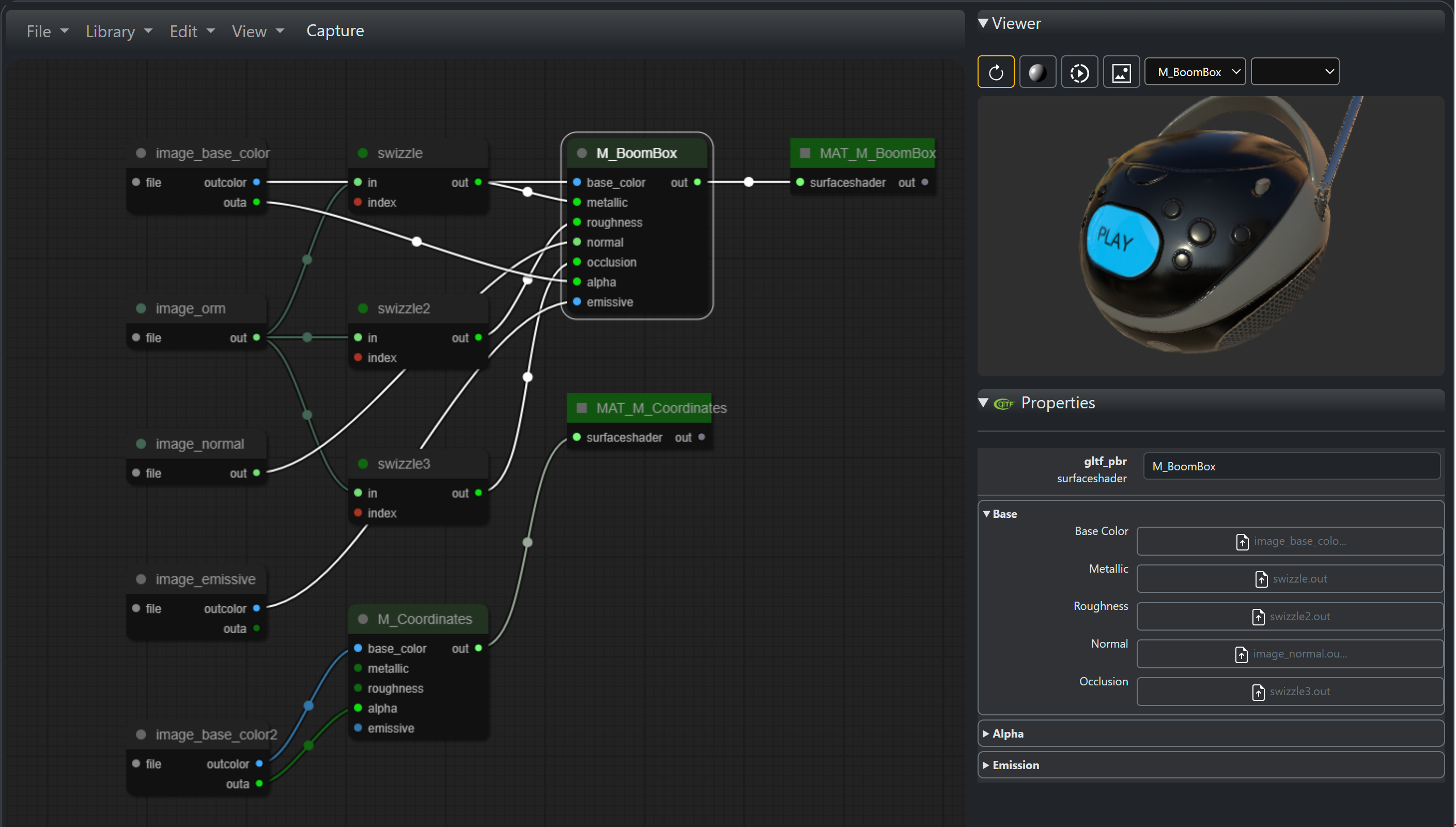
The sample input file is the "BoomBox with Axes" file from the glTF https://github.com/KhronosGroup/glTF-Sample-Assets/tree/main/Models/sitory found here.

This is converted from glTF to a MaterialX document which can be previewed / modified using an integration which supports MaterialX. Here the file is loaded into the a graph editor
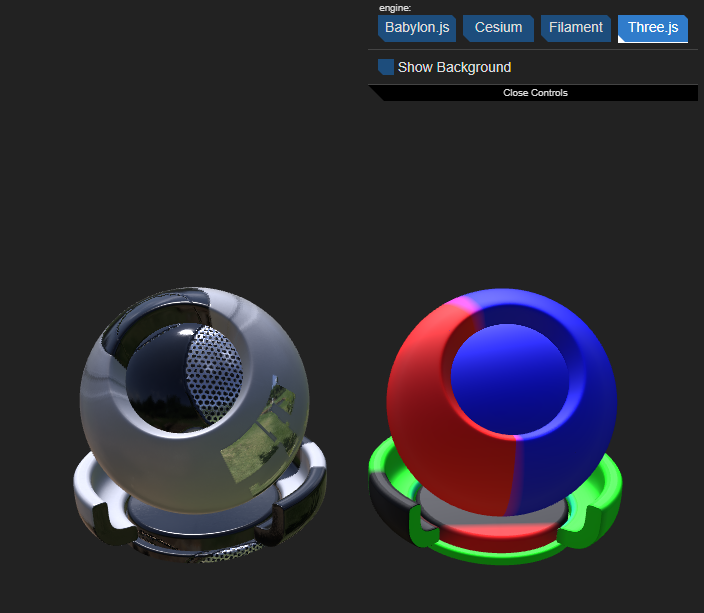
The converted materials are then used to create a new glTF file using sample "shaderball" data with each material found assigned to different instances of the "shaderball"
Interactive Example
A Jupyter notebook which performs the same steps is available here.
This or any other notebook can be used if the user wishes to test the package in an interactive environment.
Import the package
import materialxgltf.core as core
Check Available Sample Data
import pkg_resources

directory_name = "data"
files = pkg_resources.resource_listdir('materialxgltf', directory_name)
for file in files:
    print('Data file: ', file)
Convert from glTF to MaterialX
import pkg_resources
import MaterialX as mx

gltfFileName = pkg_resources.resource_filename('materialxgltf', 'data/BoomBoxWithAxes.gltf')
print(gltfFileName)

# Instantiate a the reader class. Read in sample  glTF file
# and output a MaterialX document
gltf2MtlxReader = core.GLTF2MtlxReader()
doc = gltf2MtlxReader.convert(gltfFileName)
if not doc:
    print('Existing due to error')
else:
    status, err = doc.validate()
    if not status:
        print('Generated MaterialX document has validation errors: ', err)
    else:
        print('Generated MaterialX document is valid')

# Write the document to a string
print('Resulting MaterialX document:\n')
result = core.Util.writeMaterialXDocString(doc)
print(result)
Using glTF to MaterialX Generation Options
- Example: Set option to write material assignments
options = core.GLTF2MtlxOptions()
options['createAssignments'] = True
gltf2MtlxReader.setOptions(options)

doc = gltf2MtlxReader.convert(gltfFileName)
if not doc:
    print('Existing due to error')
else:
    status, err = doc.validate()
    if not status:
        print('Generated MaterialX document has validation errors: ', err)
    else:
        print('Generated MaterialX document is valid')
Writing glTF to MaterialX Conversion to Different Destinations
-
Example: Write the document to a string
print('Resulting MaterialX document:\n')
result = core.Util.writeMaterialXDocString(doc)
print(result)
-
Example: Write the document and reference images to zip
image_references = gltf2MtlxReader.getImageReferences()
zip_path = 'mtlx_output.zip'
mtlx_file = 'mtlx_output.mtlx'
core.Util.writeMaterialXZip(doc, mtlx_file, zip_path, image_references)
Conversion from MaterialX to glTF
materialXFileName = pkg_resources.resource_filename('materialxgltf', 'data/BoomBoxWithAxes.mtlx')
print('> Load MaterialX document: %s' % materialXFileName)

mtlx2glTFWriter = core.MTLX2GLTFWriter()
doc, libFiles = core.Util.createMaterialXDoc()
mx.readFromXmlFile(doc, materialXFileName, mx.FileSearchPath())

options = core.MTLX2GLTFOptions()
options['debugOutput'] = True
mtlx2glTFWriter.setOptions(options)
gltfString = mtlx2glTFWriter.convert(doc)
if len(gltfString) > 0:
    print('> Resulting glTF:\n')
    print(gltfString)
else:
    print('> Failed to convert MaterialX document to glTF')
Embedding Geometry
gltfGeometryFile = pkg_resources.resource_filename('materialxgltf', 'data/shaderBall.gltf')
print('> Load glTF geometry file: %s' % gltfGeometryFile)

options = core.MTLX2GLTFOptions()
options['geometryFile'] = gltfGeometryFile
options['primsPerMaterial'] = False
mtlx2glTFWriter.setOptions(options)
gltfString = mtlx2glTFWriter.convert(doc)
if len(gltfString) > 0:
    print('> Resulting glTF:\n')
    print(gltfString)
else:
    print('> Failed to convert MaterialX document to glTF')
Creating Primitives Per Material
gltfGeometryFile = pkg_resources.resource_filename('materialxgltf', 'data/shaderBall.gltf')
print('> Load glTF geometry file: %s' % gltfGeometryFile)

options = core.MTLX2GLTFOptions()
options['geometryFile'] = gltfGeometryFile
options['primsPerMaterial'] = True
mtlx2glTFWriter.setOptions(options)
gltfString = mtlx2glTFWriter.convert(doc)
if len(gltfString) > 0:
    print('> Resulting glTF:\n')
    print(gltfString)
else:
    print('> Failed to convert MaterialX document to glTF')
Packaging A Binary File
gltfFileName = pkg_resources.resource_filename('materialxgltf', 'data/BoomBoxWithAxes_primMaterials.gltf')
print('> Load glTF geometry file: %s' % gltfGeometryFile)
binaryFileName = str()
binaryFileName = gltfFileName .replace('.gltf', '.glb')
print('Packaging GLB...')
try:
    saved, images, buffers = mtlx2glTFWriter.packageGLTF(gltfFileName , binaryFileName)
    print('Save GLB file:' + binaryFileName + '. Status:' + str(saved))
    for image in images:
        print('- Embedded image: %s' % image)
    for buffer in buffers:
        print('  - Embedded buffer: %s' % buffer)
    print('Packaging GLB...Done')
except Exception as err:
    print('Failed to package GLB file: %s' % err)
Translate Shader and Bake Textures
All materials are assumed to use glTF PBR surface shaders. Conversion to this shading model can be performed via MaterialX utilities, which includes texture baking.
Please refer to the sample Jupyter notebook for an example of shader translation and baking using some convenience functions included with the package. Note that they do not need to be used as the core MaterialX distribution provides access to the APIs used in this package.
Build
There are a number of build scripts in the utiltities folder provided for convenience if users wish to build the repository locally.
Authors
- LinkedIn: Bernard Kwok
- GitHub: kwokcb
- Email: kwokcb@gmail.com
1 maintainer

Metadata
1 maintainer
Release files for materialxgltf 1.39.5
For a detailed explanation of source distributions (sdists) and built distributions (wheels), please see the package formats documentation.
Source distribution (sdist)
| File | Size | Uploaded | Provenance | |
|---|---|---|---|---|
| materialxgltf-1.39.5.tar.gz | 24.4 MB | Without provenance | Details |
Built distribution (wheel)
| File | Interpreter | ABI | Platform | Reset |
|---|---|---|---|---|
| materialxgltf-1.39.5-py3-none-any.whl | Python 3 | none | any | Details |
Total release size: 48.9 MB
Release files / materialxgltf-1.39.5.tar.gz
| Download URL | materialxgltf-1.39.5.tar.gz |
|---|---|
| Size | 24.4 MB |
| Tags | Source |
|
SHA-256 checksum How to use checksums |
d48cff89a7454f872df7c65e1b7e8e3847add0cd19c52288308d4286da03ed78
|
|
BLAKE2b-256 checksum How to use checksums |
dfacb0e911742d2f1ffd32134896ce2b5c715ace185749a5c64983404335d9cc
|
| Upload date | |
|
Uploaded using Trusted Publishing? What is trusted publishing? |
No |
| Uploaded via |
twine/5.1.1 CPython/3.11.0
|
Release files / materialxgltf-1.39.5-py3-none-any.whl
| Download URL | materialxgltf-1.39.5-py3-none-any.whl |
|---|---|
| Size | 24.4 MB |
| Tags | Python 3 |
|
SHA-256 checksum How to use checksums |
05a1769698dfd20f293c509ce8e45b2baa6ad9eb3268a14878ea5a93a336fd95
|
|
BLAKE2b-256 checksum How to use checksums |
5bfaa8686df41d20f8d1b986c338b547e9fab2231318f2613917c58632d97348
|
| Upload date | |
|
Uploaded using Trusted Publishing? What is trusted publishing? |
No |
| Uploaded via |
twine/5.1.1 CPython/3.11.0
|
Security for materialxgltf 1.39.5
Provenance
Provenance describes where a file came from. On PyPI, provenance is shared via attestations, which provide a verifiable record of the build or publishing details. View details, limitations and caveats.
No provenance found
None of the files in this release were uploaded with provenance metadata.
A note on package security
PyPI is a repository for distributing packages, not a service for auditing them. While third-party security researchers and our staff do their best to detect and remove malicious packages, PyPI cannot guarantee the quality, security or suitability of any given package.
To learn more about protecting yourself from malicious actors, visit our package security documentation.














