
MathShuttle
Move equations between LaTeX and Word / PowerPoint, both ways, offline.
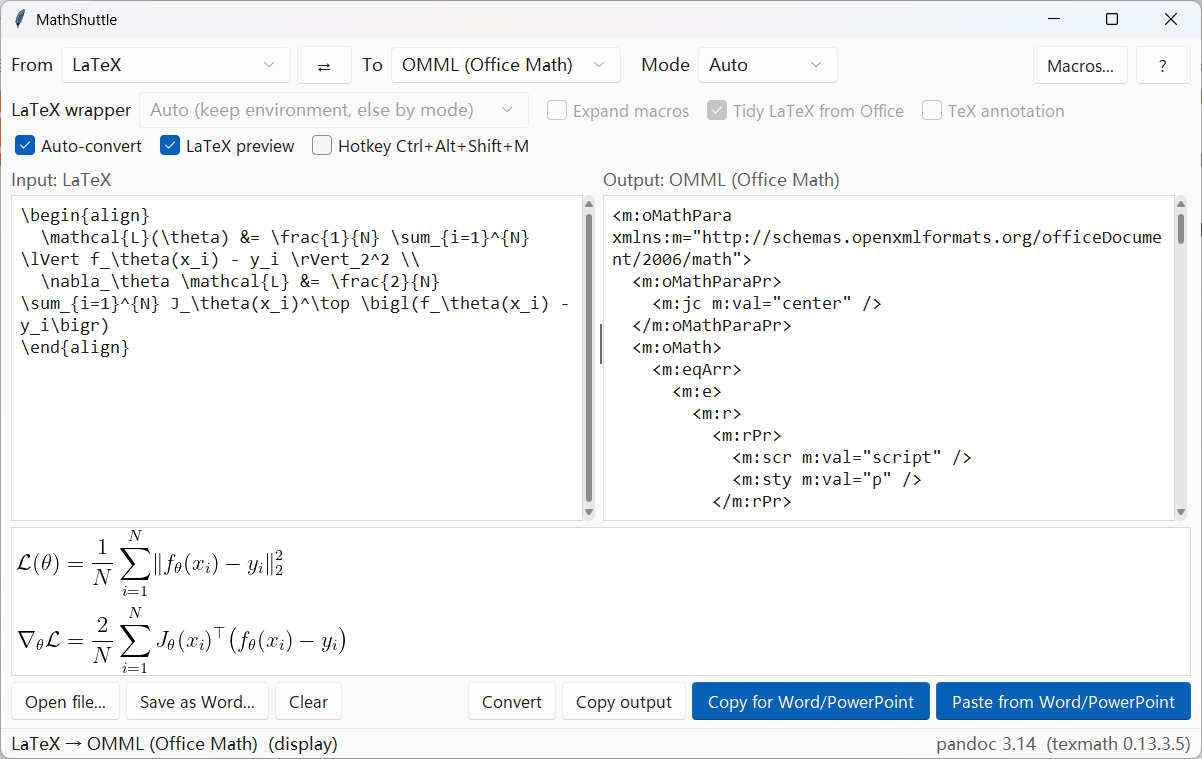
- LaTeX to Word and PowerPoint. Copy LaTeX, with your paper's macros, and paste it into Word or
PowerPoint as a native, editable equation. Aligned blocks arrive lined up at the
=signs. - Word and PowerPoint to LaTeX. Copy an equation in Office and get LaTeX you can put in a paper
(
\mathrm{OOD},\operatorname{softmax},\boldsymbol{\theta},cases,a &= b). An equation you sent and nobody edited comes back as the LaTeX you wrote. - Whole papers to Word. A
.texor Markdown file, or a pasted chat answer, becomes a Word document with native equations, numbered as LaTeX numbers them, with references and citations. Every equation of a.docx,.pptx,.texor.mdfile can be listed, filtered and exported. - Other people's LaTeX. A paper's own definitions, commands of common packages (physics, braket, siunitx...) and old TeX font switches are handled. An equation that still fails says why, in plain words.
- Also: LaTeX, MathML and OMML conversion with Typst and eqn output (a local stand-in for the texmath web demo), LaTeX with your macros written out, a hotkey that works in any program, a LaTeX preview, and a command line.
Windows and macOS. Everything runs on your computer; nothing is sent anywhere.
Install
- Download the zip for your system from the
latest release:
MathShuttle-<version>-windows-x64.ziporMathShuttle-<version>-macos-arm64.zip. - Windows: unzip it anywhere and run
MathShuttle\MathShuttle.exe. The exe is not code-signed, so SmartScreen may warn the first time: More info, then Run anyway. macOS: dragMathShuttle.appinto Applications. It is not signed by a registered developer, so the first time open it with System Settings > Privacy & Security > Open Anyway. - MathShuttle needs pandoc, the conversion engine. If pandoc is not installed,
the window offers to download it (pandoc's own release, about 40 MB, checked against its SHA-256). You can
also install it yourself:
winget install JohnMacFarlane.Pandoc(Windows) orbrew install pandoc(macOS).
With Python 3.9 or later (with tkinter): pipx install mathshuttle gives the commands mathshuttle
(the window without arguments, the command line with them) and mathshuttle-gui. No other Python
packages are needed. A LaTeX installation (MiKTeX, TeX Live, MacTeX) turns on the LaTeX preview.
Use
- Type or paste LaTeX, click Copy for Word/PowerPoint (Ctrl+Shift+C), and press Ctrl+V in Word or PowerPoint.
- The other way: select an equation in Word or PowerPoint, press Ctrl+C, and click Paste from Word/PowerPoint (Ctrl+Shift+V).
- Your macros: Macros... takes your paper's macro file or preamble, once.
- A whole paper: Open file..., then Whole file as Word..., or
mathshuttle word paper.tex -o paper.docx.
On the Mac, Cmd takes the place of Ctrl. The window follows the system's light or dark mode. On
Windows and Linux you can fix one: set "theme" to "light", "dark" or "native" (Tk's own look) in
settings.json (%APPDATA%\MathShuttle on Windows); on the Mac the window keeps the system's look.
Next to Office's own LaTeX support
Microsoft 365 (Version 2606 and later) turns LaTeX pasted with $…$ / \[…\] delimiters into an
equation itself. It rejects \newcommand and \DeclareMathOperator, though, and gives back LaTeX in
its own style. On a 784-equation PhD thesis (Word 16.0.20527), Word's own paste turned 781 into
equations; MathShuttle converts all 784, and 764 of them come back from Word as the same symbols and
fonts. MathShuttle also works with Office versions without LaTeX paste (Office 2021 / 2024 LTSC, older
Mac Office).
Documentation
- Word and PowerPoint: both directions, what Word changes, your own LaTeX back, the preview, the hotkey
- Documents: Open file, Word export of passages and papers, equation numbers, references and citations
- LaTeX input and output: modes, chat answers and Markdown, macros, packs, what is rewritten for texmath, the wrapper box
- Command line
- macOS
- Building, testing and how it works
- Changelog
Found a problem? Open an issue; Help > Copy details for a bug report in the window copies the versions it asks for.
How it works
The conversion engine is texmath, which runs inside pandoc (same author). MathShuttle prepares the LaTeX that texmath cannot read (macros, packages, old syntax), tidies the LaTeX that comes back from Office, and talks to the Word and PowerPoint clipboard. It needs only Python's standard library and pandoc.
Licence
MIT, see LICENSE. pandoc (which contains texmath) is a separate program under the GPL
(version 2 or later); MathShuttle only runs it. A copy downloaded by the window is pandoc's own release,
with its licence files next to it. A build made with build_exe.ps1 -BundlePandoc contains pandoc.exe:
if you pass such a build on, the GPL applies to that copy of pandoc (include its licence and offer its
source code).
1 maintainer

Metadata
1 maintainer
Release files for mathshuttle 0.8.0
For a detailed explanation of source distributions (sdists) and built distributions (wheels), please see the package formats documentation.
Source distribution (sdist)
| File | Size | Uploaded | Provenance | Actions |
|---|---|---|---|---|
| mathshuttle-0.8.0.tar.gz | 306.1 kB | With provenance | Details for mathshuttle-0.8.0.tar.gz |
Built distribution (wheel)
| File | Interpreter | ABI | Platform | Actions Reset |
|---|---|---|---|---|
| mathshuttle-0.8.0-py3-none-any.whl | Python 3 | none | any | Details for mathshuttle-0.8.0-py3-none-any.whl |
Total release size: 537.1 kB
Release files / mathshuttle-0.8.0.tar.gz
| Download URL | mathshuttle-0.8.0.tar.gz |
|---|---|
| Size | 306.1 kB |
| Tags | Source |
|
SHA-256 checksum How to use checksums |
3e0f4d0ae5829853f6d6ee42801563f56ef3a45529913e4c76fc592adb73ec80
|
|
BLAKE2b-256 checksum How to use checksums |
8402c3ea04a558c956016484b70945c89735f68c9bb9eaf7310f630226d78379
|
| Upload date | |
|
Uploaded using Trusted Publishing? What is trusted publishing? |
Yes |
| Uploaded via |
twine/7.0.0 CPython/3.13.16
|
Provenance
Provenance describes where a file came from. On PyPI, provenance is shared via attestations, which provide a verifiable record of the build or publishing details. View details, limitations and caveats.


PyPI Publish Attestation
PyPI verified that this artifact, at this checksum, originated from the publisher listed below.
Signed by GitHub Actions, verified by PyPI on Nov 28, 2026.
Transparency logRelease files / mathshuttle-0.8.0-py3-none-any.whl
| Download URL | mathshuttle-0.8.0-py3-none-any.whl |
|---|---|
| Size | 231.0 kB |
| Tags | Python 3 |
|
SHA-256 checksum How to use checksums |
89af0ad17db1aca82fe9bdf057abd1e3a4742a36ade539091809d6f1e89dd429
|
|
BLAKE2b-256 checksum How to use checksums |
1225e6f39ba16ba6ead89c406d367458d95e1ab1f7391cb4055cd516f5b35c1b
|
| Upload date | |
|
Uploaded using Trusted Publishing? What is trusted publishing? |
Yes |
| Uploaded via |
twine/7.0.0 CPython/3.13.16
|
Provenance
Provenance describes where a file came from. On PyPI, provenance is shared via attestations, which provide a verifiable record of the build or publishing details. View details, limitations and caveats.
PyPI Publish Attestation
PyPI verified that this artifact, at this checksum, originated from the publisher listed below.
Signed by GitHub Actions, verified by PyPI on Nov 28, 2026.
Transparency logSecurity for mathshuttle 0.8.0
Provenance
Provenance describes where a file came from. On PyPI, provenance is shared via attestations, which provide a verifiable record of the build or publishing details. View details, limitations and caveats.
Full provenance
Both files in this release have been uploaded with provenance metadata.
Attestation for mathshuttle-0.8.0.tar.gz
PyPI Publish Attestation
PyPI verified that this artifact, at this checksum, originated from the publisher listed below.
Signed by GitHub Actions, verified by PyPI on Nov 28, 2026.
Transparency logA note on package security
PyPI is a repository for distributing packages, not a service for auditing them. While third-party security researchers and our staff do their best to detect and remove malicious packages, PyPI cannot guarantee the quality, security or suitability of any given package.
To learn more about protecting yourself from malicious actors, visit our package security documentation.













