
matplotlib-fontja



matplotlibを日本語表示に対応させます。
uehara1414さんのjapanize-matplotlibをフォークし、Python 3.12以降でも動作するよう修正したものです。変更点の詳細についてはCHANGELOGをお読みください。
利用方法
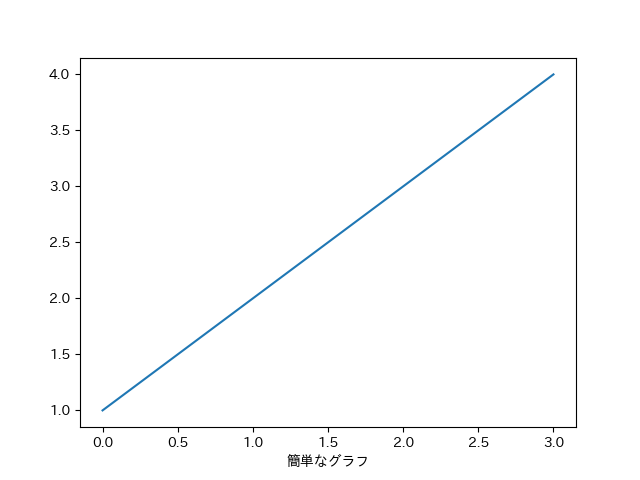
matplotlibをimportした後、matplotlib_fontjaをimportします。
import matplotlib.pyplot as plt
import matplotlib_fontja

plt.plot([1, 2, 3, 4])
plt.xlabel('簡単なグラフ')
plt.show()
インストール
# pipを使う場合
pip install matplotlib-fontja

# uvを使う場合
uv add matplotlib-fontja

# Ryeを使う場合
rye add matplotlib-fontja

# Pipenvを使う場合
pipenv install matplotlib-fontja

# Poetryを使う場合
poetry add matplotlib-fontja

# Condaを使う場合
conda install conda-forge::matplotlib-fontja
動作確認環境
以下のPythonとMatplotlibのバージョンの組み合わせで動作を確認しています。
- Python 3.7: Matplotlib 3.0 - 3.5
- Python 3.8: Matplotlib 3.3 - 3.7
- Python 3.9: Matplotlib 3.3 - 3.9
- Python 3.10: Matplotlib 3.3 - 3.10
- Python 3.11: Matplotlib 3.3 - 3.10
- Python 3.12: Matplotlib 3.5 - 3.10
- Python 3.13: Matplotlib 3.5 - 3.10
利用フォント
IPAexゴシック (Ver.004.01) を利用しています。 利用にあたってはIPAフォントライセンスv1.0に同意してください。
FAQ
import matplotlib_fontjaしたのに日本語が表示されません
import matplotlib_fontjaしてからグラフを描画するまでにフォントの設定が変わる処理が入っている可能性があります。
例えば、seabornを使用しているとsns.set_theme()などでフォントがseabornのデフォルトに上書きされてしまいます。
以下のように、フォント上書き後にmatplotlib_fontja.japanize()を実行してください。
sns.set_theme()
matplotlib_fontja.japanize()
seabornの場合は、sns.set_theme(font="IPAexGothic")としてIPAexGothicを使用するよう設定することもできます。
import matplotlib_fontjaに対してリンターの警告(F401)が出ます/フォーマッターに消されてしまいます
importしたmatplotlib_fontjaを使用していないため、不要なimportと誤判定されています。以下のようにnoqaで無効化してください。
import matplotlib_fontja # noqa: F401
あるいは、matplotlib_fontja.japanize()を使用すれば未使用と判定されません。無意味な実行になりますが、import直後などに追加して警告を消すこともできます。
import matplotlib_fontja

matplotlib_fontja.japanize()
IPAexゴシック以外のフォントを使いたいです
matplotlibの標準機能で任意のフォントを使用できます。matplotlib-fontjaは不要です。以下はNoto Sans Japaneseを使う例です。
import matplotlib.font_manager
import matplotlib.pyplot as plt

# フォントファイルを読み込み
matplotlib.font_manager.fontManager.addfont(
    "/path/to/NotoSansJP-Regular.ttf"
)

# 読み込んだフォントを使用するよう設定
matplotlib.rc("font", family="Noto Sans JP")

plt.plot([1, 2, 3, 4])
plt.xlabel('簡単なグラフ')
plt.show()
1 maintainer

Metadata
1 maintainer
Release files for matplotlib-fontja 1.1.0
For a detailed explanation of source distributions (sdists) and built distributions (wheels), please see the package formats documentation.
Source distribution (sdist)
| File | Size | Uploaded | |
|---|---|---|---|
| matplotlib_fontja-1.1.0.tar.gz | 4.2 MB | Details |
Built distribution (wheel)
| File | Interpreter | ABI | Platform | Reset |
|---|---|---|---|---|
| matplotlib_fontja-1.1.0-py2.py3-none-any.whl | Python 2, Python 3 | none | any | Details |
Total release size: 8.3 MB
Release files / matplotlib_fontja-1.1.0.tar.gz
| Download URL | matplotlib_fontja-1.1.0.tar.gz |
|---|---|
| Size | 4.2 MB |
| Tags | Source |
|
SHA-256 checksum How to use checksums |
eb0ad93eea01ceac6b563bccce9959335bfd487824160712a81984142ffb8e44
|
|
BLAKE2b-256 checksum How to use checksums |
1b0a6710bc330f4372287e73c7fbc61d27b9a3c93ff19d6bf1d492b3482d3e52
|
| Upload date | |
|
Uploaded using Trusted Publishing? What is trusted publishing? |
Yes |
| Uploaded via |
uv/0.6.16
|
Release files / matplotlib_fontja-1.1.0-py2.py3-none-any.whl
| Download URL | matplotlib_fontja-1.1.0-py2.py3-none-any.whl |
|---|---|
| Size | 4.2 MB |
| Tags | Python 2 Python 3 |
|
SHA-256 checksum How to use checksums |
930603aaffd420ad89a6cf3399f074b14e939e8e349843ed1cb558ac97c8c94a
|
|
BLAKE2b-256 checksum How to use checksums |
32d87c0487747902ced21faf4cc6f9cfd8467a845261908dbdaf9e256faa9119
|
| Upload date | |
|
Uploaded using Trusted Publishing? What is trusted publishing? |
Yes |
| Uploaded via |
uv/0.6.16
|














