
Matrix Crypto
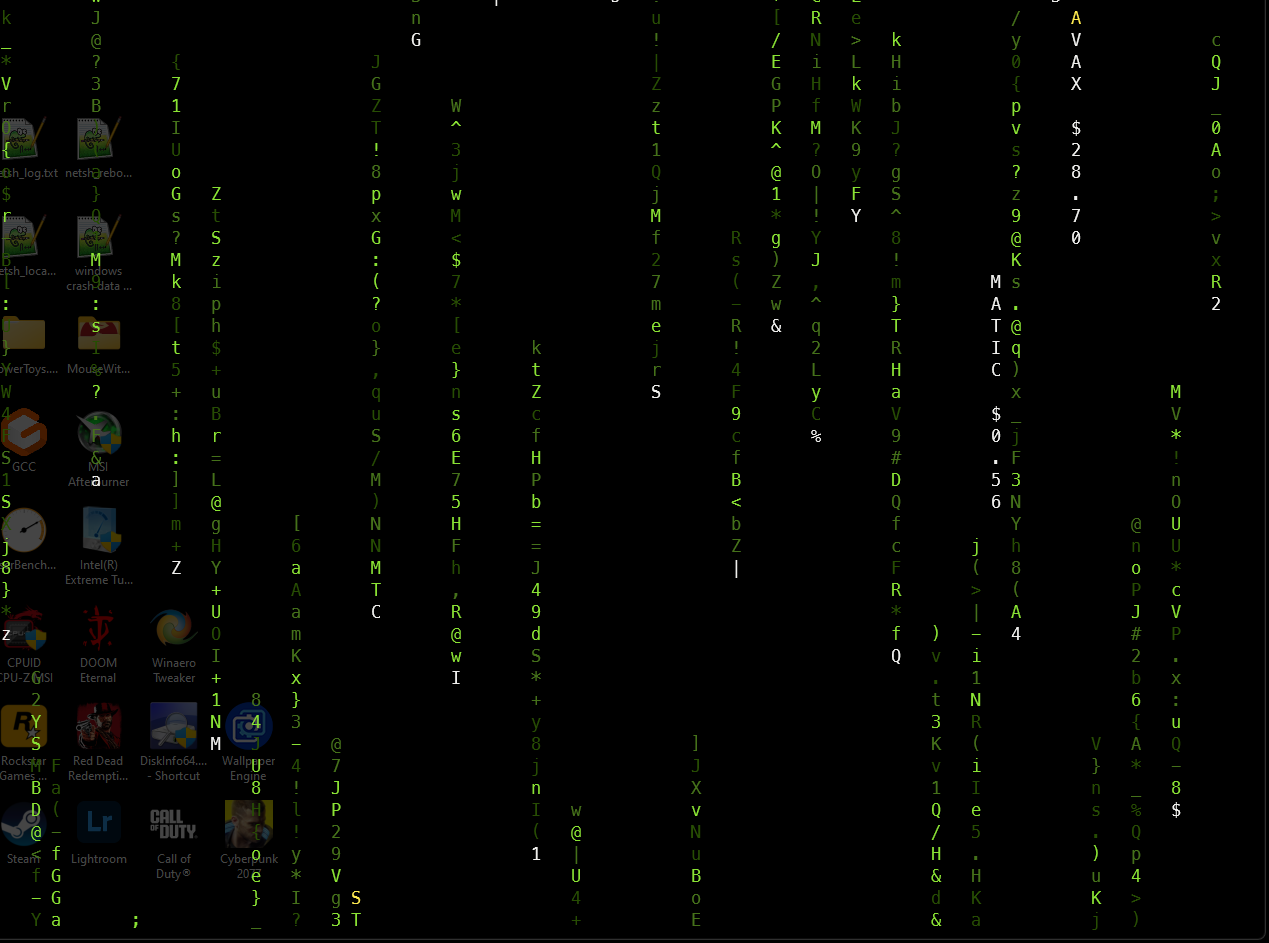
A Matrix-style cryptocurrency ticker for your terminal. It displays live USD prices from CoinGecko's public API, or tickers only in offline mode. No API key or .env file is needed.
Requirements
- Python 3.12 or newer
- A terminal with color support. On Windows,
windows-cursesis installed automatically. - Network access for live prices. Offline mode does not make API requests.
Install
After the first PyPI release, install into a virtual environment:
python3.12 -m venv .venv
source .venv/bin/activate
python -m pip install matrixcrypto
matrixcrypto
On Windows, create a virtual environment with py -3.12 -m venv .venv, activate it with .venv\Scripts\activate, then run python -m pip install matrixcrypto and matrixcrypto.
With uv, create a virtual environment and install the same package:
uv venv --python 3.12
uv pip install matrixcrypto
source .venv/bin/activate
matrixcrypto
The installed commands are matrixcrypto, matrixcrypto-offline, and matrixcrypto-update-list. Press any key, including Ctrl+C, to exit the display.
Run from a source checkout
python3.12 -m venv .venv
source .venv/bin/activate
python -m pip install -e .
matrixcrypto
The included run_linux.sh and run_windows.bat scripts also create a local virtual environment and install the checkout. The install.sh script remains available for Linux users who prefer the repository installer and its matrixc command.
Options
matrixcrypto --bg-color red --crypto-color yellow --eth
matrixcrypto --solana
matrixcrypto --offline
matrixcrypto-offline
matrixcrypto --config ./my-cryptos.json
--bg-color and --crypto-color accept red, green, blue, yellow, cyan, magenta, or white. The --solana and --eth options select bundled ecosystem lists. The display requests fresh prices about every 75 seconds; a coin without a current price shows N/A.
CoinGecko may rate-limit public requests. If a price request fails, the display shows N/A until a later request succeeds.
The offline default is a curated set of 12 active tickers from the refreshed overall list. Older entries from the previous offline snapshot, including MATIC, have been removed. You can use --config to show any other coins.
For a custom list, save a JSON file like this and pass its path with --config:
{
  "cryptos": [
    {"id": "bitcoin", "ticker": "BTC", "name": "Bitcoin"},
    {"id": "ethereum", "ticker": "ETH", "name": "Ethereum"}
  ]
}
The id values are CoinGecko coin IDs. Run matrixcrypto --help for all display options.
Refresh a list
The bundled lists are release snapshots. To generate a current list in the working directory, run:
matrixcrypto-update-list --ecosystem all --output crypto_list.json
matrixcrypto-update-list --ecosystem solana --output solana.json
matrixcrypto-update-list --ecosystem ethereum --output ethereum.json
matrixcrypto --config ./crypto_list.json
The list updater only writes a file after CoinGecko returns a valid, nonempty result. Use --limit to change the default of 20 coins. To update a future release's bundled defaults, write the new files under src/matrixcrypto/data/ in a source checkout and rebuild the package.
Publishing
See RELEASING.md for the first release checklist and token-safe upload commands.
Licensed under MIT. See LICENSE.md.
1 maintainer

Metadata
1 maintainer
Release files for matrixcrypto 0.1.0
For a detailed explanation of source distributions (sdists) and built distributions (wheels), please see the package formats documentation.
Source distribution (sdist)
| File | Size | Uploaded | Provenance | Actions |
|---|---|---|---|---|
| matrixcrypto-0.1.0.tar.gz | 12.0 kB | Without provenance | Details for matrixcrypto-0.1.0.tar.gz |
Built distribution (wheel)
| File | Interpreter | ABI | Platform | Actions Reset |
|---|---|---|---|---|
| matrixcrypto-0.1.0-py3-none-any.whl | Python 3 | none | any | Details for matrixcrypto-0.1.0-py3-none-any.whl |
Total release size: 23.4 kB
Release files / matrixcrypto-0.1.0.tar.gz
| Download URL | matrixcrypto-0.1.0.tar.gz |
|---|---|
| Size | 12.0 kB |
| Tags | Source |
|
SHA-256 checksum How to use checksums |
bf423c96fa45bf6037b2093e7950ae188cf8bbb9782fef10d1190567c1fea394
|
|
BLAKE2b-256 checksum How to use checksums |
31727732f9b003cdc7b8e4a01795f6c38a096a7980560952d5d5f46080d150f5
|
| Upload date | |
|
Uploaded using Trusted Publishing? What is trusted publishing? |
No |
| Uploaded via |
twine/7.0.0 CPython/3.12.3
|
Release files / matrixcrypto-0.1.0-py3-none-any.whl
| Download URL | matrixcrypto-0.1.0-py3-none-any.whl |
|---|---|
| Size | 11.4 kB |
| Tags | Python 3 |
|
SHA-256 checksum How to use checksums |
d4a03a78d51b30d29ccb95826849397d9fec299fa1184779ae30a01674388aa0
|
|
BLAKE2b-256 checksum How to use checksums |
8ad88738d2436f9afa7ab670d71bbe587b520cc6029db5a7828d1dba0fbbd867
|
| Upload date | |
|
Uploaded using Trusted Publishing? What is trusted publishing? |
No |
| Uploaded via |
twine/7.0.0 CPython/3.12.3
|
Security for matrixcrypto 0.1.0
Provenance
Provenance describes where a file came from. On PyPI, provenance is shared via attestations, which provide a verifiable record of the build or publishing details. View details, limitations and caveats.
No provenance found
None of the files in this release were uploaded with provenance metadata.
A note on package security
PyPI is a repository for distributing packages, not a service for auditing them. While third-party security researchers and our staff do their best to detect and remove malicious packages, PyPI cannot guarantee the quality, security or suitability of any given package.
To learn more about protecting yourself from malicious actors, visit our package security documentation.













