
Enterprise-grade, local-first autonomous background AI daemon and headless mutation plane for Logseq OG.
Verified details
These details have been verified by PyPIProject links
GitHub Statistics
Maintainers

Project description
Matryca Plumber



















I gave my AI access to my notes. It corrupted them.
I built Matryca Plumber so that never happens again.
CLI · MCP · background daemon · Sovereign UI · Logseq OG · OCC-safe · local-first
Install · Tana import · Architecture · Compare · Agents · Docs · Contributing
AI agents: read llms.txt — run uvx matryca-plumber --help; do not parse Markdown manually.
Matryca Plumber is the definitive bridge between your trusted AI agent and your Logseq OG vault — a headless CLI and MCP server for safe read/write on Logseq's block tree (no raw Markdown parsing, no Logseq API, no silent overwrites), plus a background daemon and Sovereign UI. v1.11.0 adds Tana → Logseq OG migration; v1.11.1 pins logseq-matryca-parser 1.4.0; v1.11.2 refactors the graph layer boundary with bounded RAM LRU caches and OCC nanosecond parity. Built on Andrej Karpathy's LLM-Wiki vision. Current: v1.11.2 — CHANGELOG.md.
Developed by Marco Porcellato · Matryca.ai — the product name is Matryca Plumber (not “Matryca” alone). See docs/BRANDING.md.

What it does
- Tana → Logseq OG import —
matryca import tana --file export.json [--apply]and MCPimport_tanastream Tana workspace JSON into your vault:ijsonanti-OOM parsing,logseq/config.ednjournal routing, depth-split, catalog wikilink resolution,tana-ididempotent OCC writes — dry-run by default (docs/openspec/tana-import.md) - Agent CLI —
matryca --json read,context load,read subtree— structured access to pages and block trees without hand-parsing.md - MCP server — eight FastMCP stdio tools for Cursor / Claude Desktop; query and mutate the graph headlessly (
MATRYCA_MCP_ENABLED=truewhen you trust the host) - Logseq-native writes —
logseq-matryca-parserAST compliance: line-0 frontmatter,+2block properties, namespace encoding — agents stop breaking vaults - OCC safety —
st_mtimesnapshots + page locks; if you edited while the model was thinking, the commit aborts — your typing always wins - Background daemon — semantic summaries, dangling
[[link]]healing, entity consolidation while you sleep (local LLM via LM Studio / Ollama) - Sovereign UI — browser dashboard at
:8500; pre-flight checklist, trust tiers, live telemetry — configure everything without terminal env vars - Link hygiene — background URL/asset checks, Journey Log in today's journal — no per-cycle journal spam
- 100% local-first — vault stays on disk; no cloud API key required
Tana → Logseq OG migration
Export your Tana workspace as JSON (Export workspace as JSON in Tana), then import into a clone of your Logseq graph first:
export LOGSEQ_GRAPH_PATH=/path/to/your/logseq/graph

# Dry-run (default) — JSON report on stdout; stderr warns no writes
matryca import tana --file ~/Downloads/workspace.json | jq '.write'

# Commit after reviewing counters
matryca import tana --file ~/Downloads/workspace.json --apply | jq '.write.pages_created'
| Tana concept | Logseq OG destination |
|---|---|
| Entity / supertag page | Tana/{Supertag}/{Name} under pages/ |
#day / calendar node |
journals/ (title from your logseq/config.edn) |
| Nested children | Indented bullets with fresh id:: UUIDs |
| Tana node ID | tana-id:: property (idempotent re-import skip) |
Full pipeline spec: docs/openspec/tana-import.md · MCP: import_tana(export_path, dry_run=True)
How it works (30 seconds)
CLI, MCP, daemon, and Sovereign UI converge on one OCC-protected mutation plane — same vault on disk, no Logseq HTTP API.
flowchart TB
  subgraph operators [Operators and agents]
    Human[Human · Logseq optional]
    UI[Sovereign UI :8500]
    Daemon[Maintenance daemon]
    CLI[matryca CLI --json]
    MCP[FastMCP stdio optional]
  end

  subgraph plane [Shared headless mutation plane]
    GD[graph_dispatch]
    Lock[OCC + page_rmw_lock\n+ platform_lock flock]
    Parser[logseq-matryca-parser]
    GD --> Lock
    GD --> Parser
  end

  subgraph local [Local inference — 100% offline]
    LLM[LM Studio / Ollama]
  end

  subgraph vault [LOGSEQ_GRAPH_PATH — single source of truth]
    Pages[pages/ · journals/ · templates/]
    Meta[.matryca_* cache & ledgers\nmatryca-l1/ session rules]
  end

  Human <-->|co-edit Markdown| Pages
  UI -->|start · stop · config · telemetry| Daemon
  Daemon -->|Phase 1 harvest · Phase 2 lint| GD
  Daemon <-->|structured JSON| LLM
  CLI --> GD
  MCP --> GD
  Lock -->|atomic UTF-8 writes| Pages
  Meta -.-> GD
- Single mutation plane —
graph_dispatch+ OCC locks; CLI, MCP, and daemon share the same write contract - Phase 1 → Phase 2 — catalog harvest, then cognitive lint against a local LLM
- Parser-first — agents never touch raw Markdown; the AST layer handles Logseq quirks
- One vault path —
LOGSEQ_GRAPH_PATH(set in the Sovereign UI or.env)
Get started (60 seconds)
# 1 — Try instantly (opens Sovereign UI in your browser)
uvx --from matryca-plumber matryca-plumber status

# 2 — Configure in the browser — no terminal env vars needed
#    Pre-flight → Settings (gear) → Logseq Graph Path → local LLM → Start Engine

# 3 — Optional: install globally + background service
uv tool install matryca-plumber
matryca service install
The first command opens the Sovereign UI at http://127.0.0.1:8500. Use the pre-flight wizard to point at your vault, pick a local LLM, and click Start Engine. The daemon does not run until you confirm.
| Command | What it starts | Browser / :8500 |
Maintenance daemon |
|---|---|---|---|
matryca plumber status (recommended) |
Sovereign UI + local API | Yes | No — use Start Engine or plumber start |
matryca plumber ui |
Same as status |
Yes | No |
matryca plumber start |
Background daemon only | No | Yes |
matryca plumber stop |
— | — | Stops daemon |
Common mistake: matryca plumber start does not open the dashboard — run matryca plumber status (or use Start Engine from the UI).
How it compares
| Feature | Matryca Plumber | Official Logseq AI Plugin | Obsidian LLM Plugins |
|---|---|---|---|
| Local-only | Yes — vault stays on disk | Typically cloud-backed | Mixed (local + cloud options) |
| No API Key required | Yes — local LLM endpoint | Usually requires provider API key | Often requires API key |
| OCC Safety (no corruption) | Yes — st_mtime + page locks |
No comparable write guard | No standard OCC layer |
| MCP Support | Yes — FastMCP stdio tools | No | Varies by plugin |
| Agent CLI (structured graph access) | Yes — matryca --json |
No | Varies by plugin |
| Tana workspace import | Yes — import tana / import_tana (dry-run default) |
No | No |
Matryca Plumber targets Logseq OG (Markdown on disk); Obsidian comparisons refer to common community plugins, not a single product.
Clone your graph first
Matryca Plumber edits local .md files directly. OCC prevents silent data loss, but test on a clone first — especially before import tana --apply:
- Duplicate your graph folder (e.g.
MyGraph→MyGraph_Test) and add it in Logseq via Add new graph. - If you use Logseq Sync: do not enable Sync on the test graph.
- In the Sovereign UI: Settings → Logseq Graph Path → point at the clone → Save.
Once comfortable, switch to your main graph in Settings.
Trust & Safety
You are in control. Nothing mutates your prose unless you explicitly enable it in the UI.
| Mode | Risk | What it allows |
|---|---|---|
| 🟢 Safe Mode | Read-only | Semantic cache, entity consolidation (alias::), property hygiene — never edits bullet text. |
| 🟠 Augmented Mode | Side-blocks | Heal Dangling Links, Backpropagate Links — original bullets stay intact. |
| 🔴 Surgeon Mode | Inline edits | Inline Semantic Corrections, Auto-Split Dense Blocks — strictly opt-in. |
"Logseq is building the best local outliner database. But AI Agent memory is at the very bottom of their roadmap. Matryca Plumber gives you that future today, safely bridging your local agents to your Logseq graph without waiting years." — Marco Porcellato, Matryca.ai
Agent CLI & MCP
Point the vault in the Sovereign UI (or .env) — agents inherit LOGSEQ_GRAPH_PATH.
matryca --json read page "My Project"
matryca context load "My Project"
matryca import tana --file ~/Downloads/workspace.json   # dry-run; add --apply to write
Eight MCP tools (five mega-tools + store_fact + ingest_document + import_tana) — MATRYCA_MCP_ENABLED=true when you trust the host. Spec: llms.txt · docs/openspec/agent-dx.md · docs/openspec/tana-import.md · docs/openspec/agent-onboarding.md
Sovereign UI, configuration & full capabilities
UI (:8500) — pre-flight checklist, live telemetry, trust tiers, Bearer auth (SECURITY.md). Recommended LLM: Gemma 4-E4b Instruct (gemma-4-e4b-it) on 16 GB RAM.
Daemon — semantic indexing, dangling links, entity consolidation, auto-split, ingest_document, import_tana, link verification, LLM OS Soft Gate. OpenSpec: docs/openspec/README.md.
Advanced .env — copy .env.example; Tana knobs: MATRYCA_TANA_IMPORT_NAMESPACE, MATRYCA_TANA_DEPTH_LIMIT; edge profile for large vaults: docs/v1.8-OPTIMIZATION-PLAN.md. Release history: CHANGELOG.md.
Developer setup
git clone https://github.com/MarcoPorcellato/matryca-plumber.git && cd matryca-plumber
make install
cd frontend && npm install && npm run build && cd ..
make test-fast    # fast loop (~5s)
make check        # full CI gate before PR
Documentation
| Start here | Go deeper |
|---|---|
SUPPORT.md |
docs/ARCHITECTURE.md |
CONTRIBUTING.md |
docs/openspec/README.md |
llms.txt |
docs/openspec/tana-import.md |
ROADMAP.md |
CHANGELOG.md |
SYSTEM_PROMPT.md |
docs/integrations/hermes-agent.md |
| Good first issues | good_first_issues_blueprints.md |
docs/releases/v1.11.2-GITHUB.md |
Copy-paste GitHub Release body for v1.11.2 |
docs/releases/v1.11.1-GITHUB.md |
Copy-paste GitHub Release body for v1.11.1 |
License
Apache-2.0 — see LICENSE.

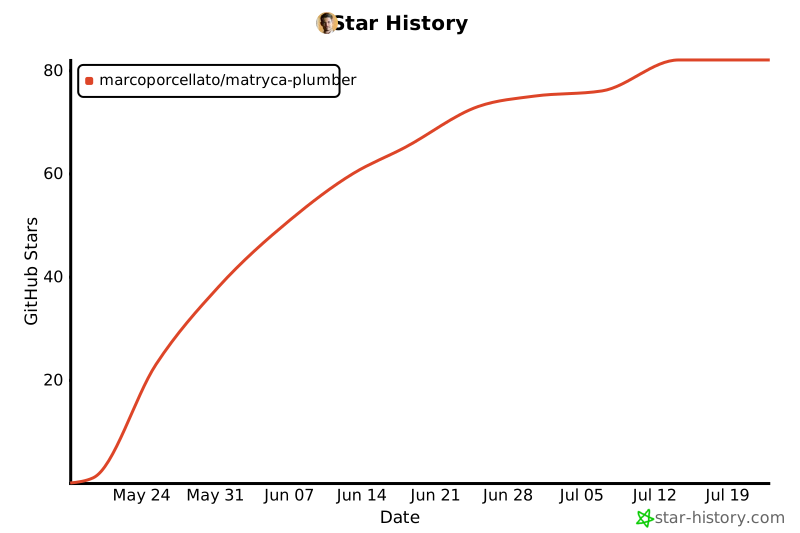
Star History
Project details
Verified details
These details have been verified by PyPIProject links
GitHub Statistics
Maintainers
Release history Release notifications | RSS feed


Download files
Download the file for your platform. If you're not sure which to choose, learn more about installing packages.
Source Distribution
Built Distribution
Filter files by name, interpreter, ABI, and platform.
If you're not sure about the file name format, learn more about wheel file names.
Copy a direct link to the current filters
File details
Details for the file matryca_plumber-1.11.2.tar.gz.
File metadata
- Download URL: matryca_plumber-1.11.2.tar.gz
- Upload date:
- Size: 523.2 kB
- Tags: Source
- Uploaded using Trusted Publishing? Yes
- Uploaded via: twine/6.1.0 CPython/3.13.12
File hashes
| Algorithm | Hash digest | |
|---|---|---|
| SHA256 |
bbedac57b49af9b8a08787728a7b72cafac5d34b4426f320aa548dadcc8176ad
|
|
| MD5 |
e93c23f6562cd6a04225ce7f177096d8
|
|
| BLAKE2b-256 |
d1f8166b42f8993714c3900e083646ebba9478abc84a2be0e22120fcb463476c
|
Provenance
The following attestation bundles were made for matryca_plumber-1.11.2.tar.gz:
Publisher:
release.yml on MarcoPorcellato/matryca-plumber
-
Statement:
-
Statement type:
https://in-toto.io/Statement/v1 -
Predicate type:
https://docs.pypi.org/attestations/publish/v1 -
Subject name:
matryca_plumber-1.11.2.tar.gz -
Subject digest:
bbedac57b49af9b8a08787728a7b72cafac5d34b4426f320aa548dadcc8176ad - Sigstore transparency entry: 1935158250
- Sigstore integration time:
-
Permalink:
MarcoPorcellato/matryca-plumber@6960a6c32e2b3751756b1bd147a21d13e253ac1c -
Branch / Tag:
refs/tags/v1.11.2 - Owner: https://github.com/MarcoPorcellato
-
Access:
public
-
Token Issuer:
https://token.actions.githubusercontent.com -
Runner Environment:
github-hosted -
Publication workflow:
release.yml@6960a6c32e2b3751756b1bd147a21d13e253ac1c -
Trigger Event:
push
-
Statement type:
File details
Details for the file matryca_plumber-1.11.2-py3-none-any.whl.
File metadata
- Download URL: matryca_plumber-1.11.2-py3-none-any.whl
- Upload date:
- Size: 464.1 kB
- Tags: Python 3
- Uploaded using Trusted Publishing? Yes
- Uploaded via: twine/6.1.0 CPython/3.13.12
File hashes
| Algorithm | Hash digest | |
|---|---|---|
| SHA256 |
d83732ec6241210f96a473fbc035ba1fe65ff3980da0668cffaf13cc1d374df9
|
|
| MD5 |
f07fe344e4980a986ad88f09937d3d25
|
|
| BLAKE2b-256 |
661d14bf7f19dca401020b5e41cdbb59ab269b9c293b622fdce7089cdf979f01
|
Provenance
The following attestation bundles were made for matryca_plumber-1.11.2-py3-none-any.whl:
Publisher:
release.yml on MarcoPorcellato/matryca-plumber
-
Statement:
-
Statement type:
https://in-toto.io/Statement/v1 -
Predicate type:
https://docs.pypi.org/attestations/publish/v1 -
Subject name:
matryca_plumber-1.11.2-py3-none-any.whl -
Subject digest:
d83732ec6241210f96a473fbc035ba1fe65ff3980da0668cffaf13cc1d374df9 - Sigstore transparency entry: 1935158347
- Sigstore integration time:
-
Permalink:
MarcoPorcellato/matryca-plumber@6960a6c32e2b3751756b1bd147a21d13e253ac1c -
Branch / Tag:
refs/tags/v1.11.2 - Owner: https://github.com/MarcoPorcellato
-
Access:
public
-
Token Issuer:
https://token.actions.githubusercontent.com -
Runner Environment:
github-hosted -
Publication workflow:
release.yml@6960a6c32e2b3751756b1bd147a21d13e253ac1c -
Trigger Event:
push
-
Statement type:






