
MATSim Agent-Based Transportation Simulation Framework - official python analysis tools

Project description
matsim-tools
Official tools for working with MATSim output files
MATSim is an open-source, multi-agent transportation simulation framework. Find out more about MATSim at https://matsim.org
About this library
We are at the very early stages of building this library. The API will change, things will break, and there are certainly bugs. You probably shouldn't use this for anything.
- Our primary goal is to make MATSim play nice with pandas and geopandas, for data analysis workflows.
- We have only tested this using Anaconda Python. Only Python 3.x is supported.
- Currently MATSim network, event, and plans files are supported. Hopefully more will be coming soon.
- For Geopandas network support, you also need to install
geopandasandshapely. - Supports JSON and Protobuf event file formats
- Can write MATSim files too!
Quickstart
-
Install using
pip install matsim-tools -
In lieu of real documentation, here is some sample code to get you started. Good luck!
Read a network
import matsim
import pandas as pd
from collections import defaultdict
%matplotlib inline

# -------------------------------------------------------------------
# 1. NETWORK: Read a MATSim network:
net = matsim.read_network('output_network.xml.gz')

net.nodes
# Dataframe output:
#           x        y node_id
# 0  -20000.0      0.0       1
# 1  -15000.0      0.0       2
# 2    -865.0   5925.0       3
# ...

net.links
# Dataframe output:
#      length  capacity  freespeed  ...  link_id from_node to_node
# 0   10000.0   36000.0      27.78  ...        1         1       2
# 1   10000.0    3600.0      27.78  ...        2         2       3
# 2   10000.0    3600.0      27.78  ...        3         2       4
# ...

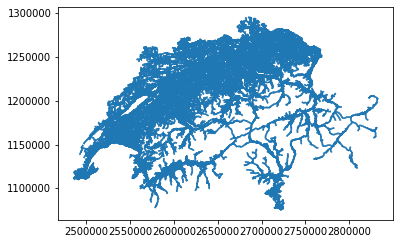
geo = net.as_geo()  # combines links+nodes into a Geopandas dataframe with LINESTRINGs
geo.plot()    # try this in a notebook to see your network!
Stream through events
# -------------------------------------------------------------------
# 2. EVENTS: Stream through a MATSim event file.

# The event_reader returns a python generator function, which you can then
# loop over without loading the entire events file in memory.
# In this example let's sum up all 'entered link' events to get link volumes.
#
# NEW! Now supports .xml.gz and protobuf .pb.gz event file formats!

events = matsim.event_reader('output_events.xml.gz', types='entered link,left link')

link_counts = defaultdict(int) # defaultdict creates a blank dict entry on first reference

for event in events:
    if event['type'] == 'entered link':
        link_counts[event['link']] += 1

# convert our link_counts dict to a pandas dataframe,
# with 'link_id' column as the index and 'count' column with value:
link_counts = pd.DataFrame.from_dict(link_counts, orient='index', columns=['count']).rename_axis('link_id')

# attach counts to our Geopandas network from above
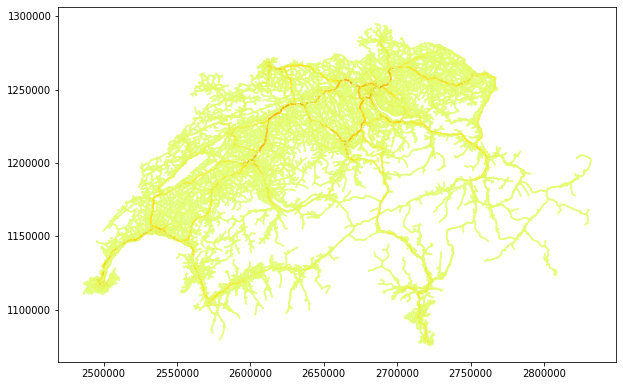
volumes = geo.merge(link_counts, on='link_id')
volumes.plot(column='count', figsize=(10,10), cmap='Wistia') #cmap is colormap
Read plans
# -------------------------------------------------------------------
# 3. PLANS: Stream through a MATSim plans file.

plans = matsim.plan_reader('output_plans.xml.gz', selectedPlansOnly = True)

# Each plan is returned as a tuple with its owning person (for now, is this ok?)
# - The name of the element is in its .tag (e.g. 'plan', 'leg', 'route', 'attributes')
# - An element's attributes are accessed using .attrib['attrib-name']
# - Use the element's .text field to get data outside of attributes (e.g. a route's list of links)
# - Every element can be iterated on to get its children (e.g. the plan's activities and legs)
# - Emits person even if that person has no plans

for person, plan in plans:

    # do stuff with this plan, e.g.
    work_activities = filter(
        lambda e: e.tag == 'activity' and e.attrib['type'] == 'w',
        plan)

    print('person', person.attrib['id'], 'selected plan w/', len(list(work_activities)), 'work-act')
    activities.append(num_activities)

# person 1 selected plan w/ 2 work-act
# person 10 selected plan w/ 1 work-act
# person 100 selected plan w/ 1 work-act
# ...
Write MATSim input XML files
# -------------------------------------------------------------------
# 4. WRITERS: Write MATSim input files.

# MATSim input files may be iteratively constructed as in the example below.
# For a more detailed example, see tests/test_MatsimPlansWriter.py

with open("plans.xml", 'wb+') as f_write:
    writer = matsim.writers.PopulationWriter(f_write)

    writer.start_population()
    writer.start_person("person_id_123")
    writer.start_plan(selected=True)

    writer.add_activity(type='home', x=0.0, y=0.0, end_time=8*3600)
    writer.add_leg(mode='walk')
    writer.add_activity(type='work', x=10.0, y=0.0, end_time=18*3600)
    writer.add_leg(mode='pt')
    writer.add_activity(type='home', x=0.0, y=0.0)

    writer.end_plan()
    writer.end_person()

    writer.end_population()
Calibration
Scenarios created with the matsim-application contrib provide an interface that can be used with the automatic calibration module:
# -------------------------------------------------------------------
# 5. CALIBRATION: Automatic calibration for MATSim scenario.

modes = ["walk", "car", "pt", "bike"]
fixed_mode = "walk"
target = {
    "walk": 0.277,
    "bike": 0.175,
    "pt": 0.19,
    "car": 0.359
}

study, obj = calibration.create_mode_share_study("calib", "./matsim-scenario-1.0-SNAPSHOT.jar",
                                        "./scenarios/input/scenario-v1.0-10pct.config.xml",
                                        modes, fixed_mode, target)


study.optimize(obj, 10)
Release history Release notifications | RSS feed

Download files
Download the file for your platform. If you're not sure which to choose, learn more about installing packages.
Source Distributions
Built Distribution
Filter files by name, interpreter, ABI, and platform.
If you're not sure about the file name format, learn more about wheel file names.
Copy a direct link to the current filters
File details
Details for the file matsimtools_ifpen-0.0.13-py3-none-any.whl.
File metadata
- Download URL: matsimtools_ifpen-0.0.13-py3-none-any.whl
- Upload date:
- Size: 23.9 kB
- Tags: Python 3
- Uploaded using Trusted Publishing? No
- Uploaded via: twine/4.0.2 CPython/3.9.15
File hashes
| Algorithm | Hash digest | |
|---|---|---|
| SHA256 |
c1fa7770bdddf3f24130a01aa5c8dae0838f5388db7c6588721d083bbb747361
|
|
| MD5 |
b5c0836790088bb8541500a8bd5c8eff
|
|
| BLAKE2b-256 |
cd2d91e7c97f3e0de6809867ed5846398b307347d45e597d0d645319f84df865
|






