




MatSpy
Sparse matrix spy plot and sparkline renderer.
from matspy import spy

spy(A)
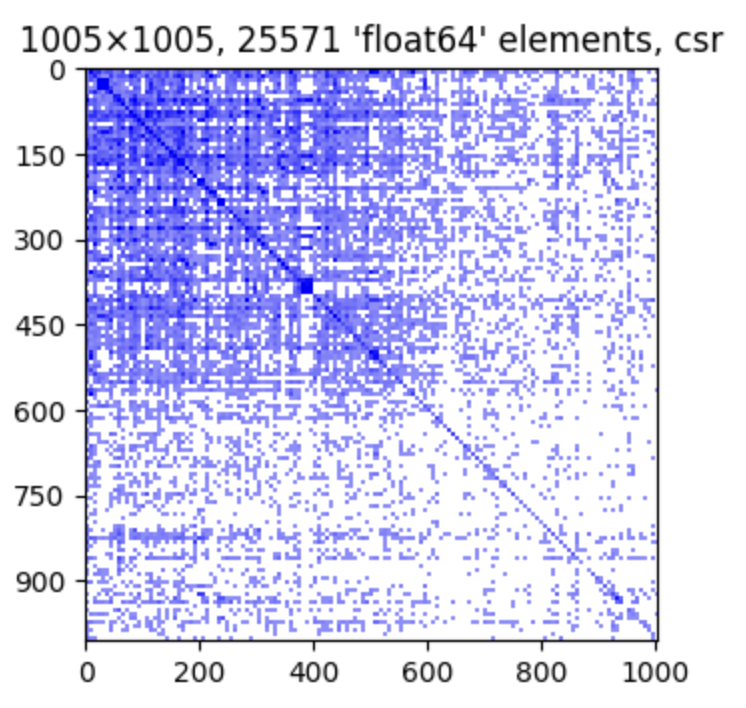
Supports:
- SciPy - sparse matrices and arrays like
csr_matrixandcoo_array(https://nbviewer.org/github/alugowski/matspy/blob/main/demo) - NumPy -
ndarray(https://nbviewer.org/github/alugowski/matspy/blob/main/demo) - Python-graphblas -
gb.Matrix(https://nbviewer.org/github/alugowski/matspy/blob/main/demo) - PyData/Sparse -
COO,DOK,GCXS(https://nbviewer.org/github/alugowski/matspy/blob/main/demo)
Features:
- Simple
spy()method plots non-zero structure of a matrix, similar to MatLAB's spy. - Sparklines:
to_sparkline()creates small self-contained spy plots for inline HTML visuals. - FAST and handles very large matrices.
See a Jupyter notebook demo.
pip install matspy
conda install matspy
Methods
spy(A): Plot the sparsity pattern (location of nonzero values) of sparse matrixA.to_sparkline(A): Return a small spy plot as a self-contained HTML string. Multiple sparklines can be automatically to-scale with each other using theretscaleandscalearguments.spy_to_mpl(A): Same asspy()but returns the matplotlib Figure without showing it.to_spy_heatmap(A): Return the raw 2D array for spy plots.
Examples
See the demo notebook for more.
Save spy plot as a PNG image
fig, ax = matspy.spy_to_mpl(A)
fig.savefig("spy.png", bbox_inches='tight')
Arguments
All methods take the same arguments. Apart from the matrix itself:
title: string label. IfTrue, then a matrix description is auto generated.indices: Whether to show matrix indices.figsize,sparkline_size: size of the plot, in inchesshading:binary,relative,absolute.buckets: spy plot pixels (longest side).dpi: determinebucketsrelative to figure size.precision: For numpy arrays, only plot values with magnitude greater thanprecision. Like matplotlib.pyplot.spy()'sprecision.
Overriding defaults
matspy.params contains the default values for all arguments.
For example, to default to binary shading, no title, and no indices:
matspy.params.shading = 'binary'
matspy.params.title = False
matspy.params.indices = False
Jupyter
spy() simply shows a matplotlib figure and works well within Jupyter.
to_sparkline() creates small spy plots that work anywhere HTML is displayed.
Fast
All operations work with very large matrices. A spy plot of tens of millions of elements takes less than half a second.
Large matrices are downscaled using two native matrix multiplies. The final dense 2D image is small.
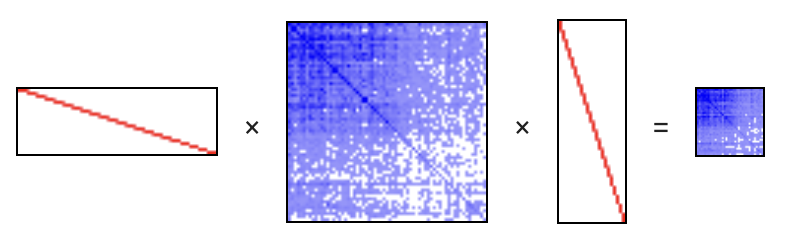
Note: the spy plots in this image were created with to_sparkline(). Code in the demo notebook.
Spy Plot Anti-Aliasing
One application of spy plots is to quickly see if a matrix has a noticeable structure. Aliasing artifacts can give the false impression of structure where none exists, such as moiré or even a false grid pattern.
MatSpy employs some simple methods to help eliminate these effects in most cases.

See the Anti-Aliasing demo for more.
How to support more packages
Each package that MatSpy supports implements two classes:
Driver: Declares what types are supported and supplies an adapter.get_supported_type_prefixes: This declares what types are supported, as strings to avoid unnecessary imports.adapt_spy(A): Returns aMatrixSpyAdapterfor a matrix that this driver supports.
MatrixSpyAdapter. A common interface for extracting spy data.describe(): Describes the adapted matrix. This description serves as the plot title.get_shape(): Returns the adapted matrix's shape.get_spy(): Returns spy plot data as a dense 2D numpy array.
See matspy/adapters for details.
You may use matspy.register_driver to register a Driver for your own matrix class.
1 maintainer

Release files for matspy 1.0.0
For a detailed explanation of source distributions (sdists) and built distributions (wheels), please see the package formats documentation.
Source distribution (sdist)
| File | Size | Uploaded | |
|---|---|---|---|
| matspy-1.0.0.tar.gz | 16.2 kB | Details |
Built distribution (wheel)
| File | Interpreter | ABI | Platform | Reset |
|---|---|---|---|---|
| matspy-1.0.0-py3-none-any.whl | Python 3 | none | any | Details |
Total release size: 32.8 kB
Release files / matspy-1.0.0.tar.gz
| Download URL | matspy-1.0.0.tar.gz |
|---|---|
| Size | 16.2 kB |
| Tags | Source |
|
SHA-256 checksum How to use checksums |
4c9abda5c57c4e35fca9aa6d436995c0ecfdc001b28a45f746f408e9acf6b9e8
|
|
BLAKE2b-256 checksum How to use checksums |
7ed736edf302c496ae21f6ad0244d28ac4840ede8919ae50ffc12d063caec707
|
| Upload date | |
|
Uploaded using Trusted Publishing? What is trusted publishing? |
Yes |
| Uploaded via |
twine/4.0.2 CPython/3.11.6
|
Release files / matspy-1.0.0-py3-none-any.whl
| Download URL | matspy-1.0.0-py3-none-any.whl |
|---|---|
| Size | 16.6 kB |
| Tags | Python 3 |
|
SHA-256 checksum How to use checksums |
455696693a3eb9bd774aadb2fa3a0dc8125c2fa86ff57a7760bdc0618895451b
|
|
BLAKE2b-256 checksum How to use checksums |
d8efc4108012589c50b767988eee40cea60159c71eefe733eb891d830fa820aa
|
| Upload date | |
|
Uploaded using Trusted Publishing? What is trusted publishing? |
Yes |
| Uploaded via |
twine/4.0.2 CPython/3.11.6
|














