







Mausoleum consists of a command line application and GUI application wrapped around Tomb (the Crypto Undertaker). Both applications were created with the intention of making it easier for users to interact with Tomb.
Installation
As Mausoleum is purely a wrapper for Tomb, it requires Tomb to be installed locally. For Tomb installation details, please see: https://www.dyne.org/software/tomb/.
With your environment set, the following command may be used to install Mausoleum:
$ pip install mausoleum
If you would rather install from source, run:
$  git clone https://github.com/mandeep/Mausoleum.git
$  cd Mausoleum
$  python setup.py install
GUI Application
To run the GUI application, simply run the following command in a terminal:
$ mausoleum-gui
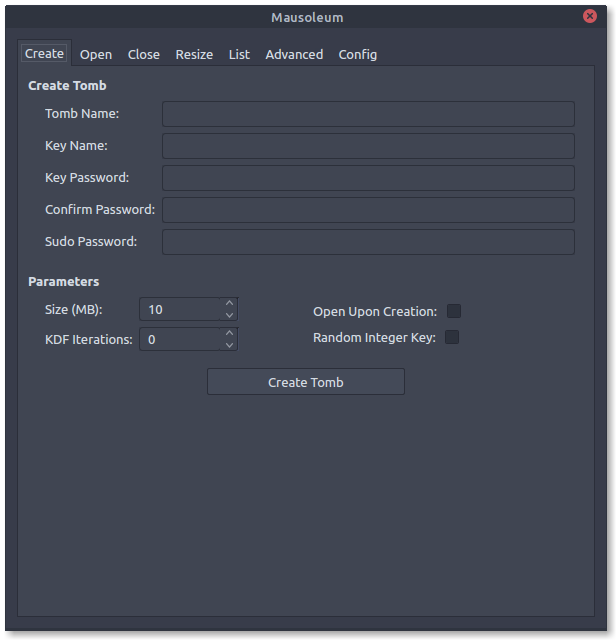
The command will open a new window that includes tabs that group Tomb functions into separate tabs. The ‘Create’ tab receives information needed to create a new tomb, the ‘Open’ tab allows the user to fill in information regarding the opening of an existing tomb, the ‘Close’ tab lets the user close opened tombs, the ‘Resize’ tab gives the user the ability to resize an existing tomb, the ‘List’ tab displays all active tombs, and the ‘Config’ tab allows the user to make configuration changes to the GUI.
Command Line Application
With Mausoleum installed, the command line application can be invoked with the following commands and arguments:
usage: mausoleum [options] command [arguments]

commands:
    construct               Dig, forge, and lock a new tomb
    enter                   Open an existing tomb
    alter                   Resize an existing tomb
    mold                    Create a QR code from an existing tomb key
    etch                    Embed an existing tomb key inside a JPEG image
    resurrect               Print to stdout the tomb key embedded within the JPEG image

positional arguments:
    name                    Name of the new or existing tomb
    size                    The size in megabytes for the new tomb
    key                     Name of the new or existing tomb key file

optional arguments:
    --open                  Option that opens a tomb after creation or resizing
If a key is not supplied as a command line argument, the application will search for a key with the name of the tomb with .key as the suffix.
Example of creating a new tomb and opening it thereafter:
$  mausoleum construct --open secret.tomb 100
Password:
Repeat for confirmation:
Example of opening an existing tomb:
$  mausoleum enter secret.tomb
Password:
Example of resizing an existing tomb:
$  mausoleum alter secret.tomb 200
Password:
Wrapper
Mausoleum may be imported as a module as seen in the following example:
import mausoleum.wrapper


def batch_create_tombs(names, size, password):
    """Take a list of names and batch create tombs."""

    for name in names:
        key = '{}.key' .format(name)
        mausoleum.wrapper.construct_tomb(name, size, key, password)
Contributions
All contributions are welcome! Feel free to submit a pull request for trivial changes. For other changes, please open an issue on the repository’s issue tracker.
1 maintainer

Metadata
1 maintainer
Release files for mausoleum 0.16.2
For a detailed explanation of source distributions (sdists) and built distributions (wheels), please see the package formats documentation.
Source distribution (sdist)
| File | Size | Uploaded | Provenance | Actions |
|---|---|---|---|---|
| mausoleum-0.16.2.tar.gz | 836.6 kB | With provenance | Details for mausoleum-0.16.2.tar.gz |
Built distribution (wheel)
| File | Interpreter | ABI | Platform | Actions Reset |
|---|---|---|---|---|
| mausoleum-0.16.2-py3-none-any.whl | Python 3 | none | any | Details for mausoleum-0.16.2-py3-none-any.whl |
Total release size: 861.2 kB
Release files / mausoleum-0.16.2.tar.gz
| Download URL | mausoleum-0.16.2.tar.gz |
|---|---|
| Size | 836.6 kB |
| Tags | Source |
|
SHA-256 checksum How to use checksums |
410c14594e368a9273246f799ab207cdc8ea90d40904b7c21055667644bcfb83
|
|
BLAKE2b-256 checksum How to use checksums |
aca791c113c920c09407199911ab5cdddbe38a699cd60ea1462f9217b1a2c1a4
|
| Upload date | |
|
Uploaded using Trusted Publishing? What is trusted publishing? |
Yes |
| Uploaded via |
twine/6.1.0 CPython/3.13.12
|
Provenance
Provenance describes where a file came from. On PyPI, provenance is shared via attestations, which provide a verifiable record of the build or publishing details. View details, limitations and caveats.


PyPI Publish Attestation
PyPI verified that this artifact, at this checksum, originated from the publisher listed below.
Signed by GitHub Actions, verified by PyPI on Apr 23, 2026.
Transparency logRelease files / mausoleum-0.16.2-py3-none-any.whl
| Download URL | mausoleum-0.16.2-py3-none-any.whl |
|---|---|
| Size | 24.6 kB |
| Tags | Python 3 |
|
SHA-256 checksum How to use checksums |
105c16c7b05619d47f75a2877500cd66299a3d15332ddd2b7062c6a9f2219171
|
|
BLAKE2b-256 checksum How to use checksums |
f8a3137b0ecee2a9ec86cf348fc86d40c0010a5d64490879f8b4a25001bf4da5
|
| Upload date | |
|
Uploaded using Trusted Publishing? What is trusted publishing? |
Yes |
| Uploaded via |
twine/6.1.0 CPython/3.13.12
|
Provenance
Provenance describes where a file came from. On PyPI, provenance is shared via attestations, which provide a verifiable record of the build or publishing details. View details, limitations and caveats.
PyPI Publish Attestation
PyPI verified that this artifact, at this checksum, originated from the publisher listed below.
Signed by GitHub Actions, verified by PyPI on Apr 23, 2026.
Transparency logSecurity for mausoleum 0.16.2
Provenance
Provenance describes where a file came from. On PyPI, provenance is shared via attestations, which provide a verifiable record of the build or publishing details. View details, limitations and caveats.
Full provenance
All 2 files in this release have been uploaded with provenance metadata.
Attestation for mausoleum-0.16.2.tar.gz
PyPI Publish Attestation
PyPI verified that this artifact, at this checksum, originated from the publisher listed below.
Signed by GitHub Actions, verified by PyPI on Apr 23, 2026.
Transparency logA note on package security
PyPI is a repository for distributing packages, not a service for auditing them. While third-party security researchers and our staff do their best to detect and remove malicious packages, PyPI cannot guarantee the quality, security or suitability of any given package.
To learn more about protecting yourself from malicious actors, visit our package security documentation.














