
A Python GUI, CLI, and wrapper for Tomb
Verified details
These details have been verified by PyPIProject links
GitHub Statistics
Maintainers

Project description







Mausoleum consists of a command line application and GUI application wrapped around Tomb (the Crypto Undertaker). Both applications were created with the intention of making it easier for users to interact with Tomb.
Installation
As Mausoleum is purely a wrapper for Tomb, it requires Tomb to be installed locally. For Tomb installation details, please see: https://www.dyne.org/software/tomb/.
With your environment set, the following command may be used to install Mausoleum:
$ pip install mausoleum
If you would rather install from source, run:
$  git clone https://github.com/mandeep/Mausoleum.git
$  cd Mausoleum
$  python setup.py install
GUI Application
To run the GUI application, simply run the following command in a terminal:
$ mausoleum-gui
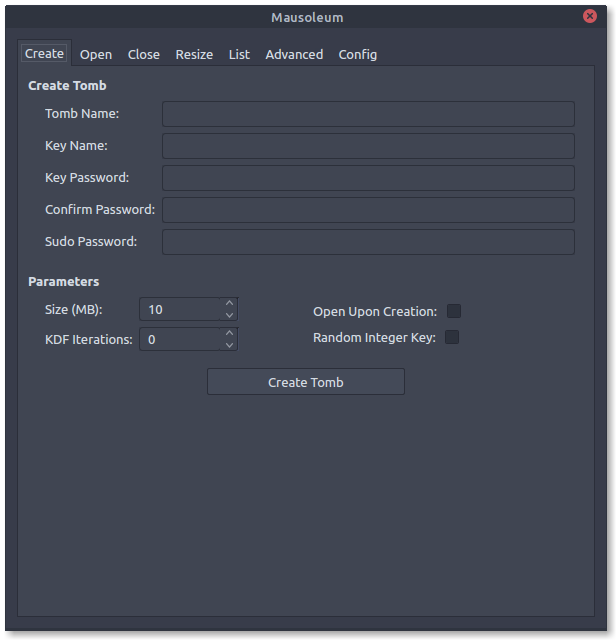
The command will open a new window that includes tabs that group Tomb functions into separate tabs. The ‘Create’ tab receives information needed to create a new tomb, the ‘Open’ tab allows the user to fill in information regarding the opening of an existing tomb, the ‘Close’ tab lets the user close opened tombs, the ‘Resize’ tab gives the user the ability to resize an existing tomb, the ‘List’ tab displays all active tombs, and the ‘Config’ tab allows the user to make configuration changes to the GUI.
Command Line Application
With Mausoleum installed, the command line application can be invoked with the following commands and arguments:
usage: mausoleum [options] command [arguments]

commands:
    construct               Dig, forge, and lock a new tomb
    enter                   Open an existing tomb
    alter                   Resize an existing tomb
    mold                    Create a QR code from an existing tomb key
    etch                    Embed an existing tomb key inside a JPEG image
    resurrect               Print to stdout the tomb key embedded within the JPEG image

positional arguments:
    name                    Name of the new or existing tomb
    size                    The size in megabytes for the new tomb
    key                     Name of the new or existing tomb key file

optional arguments:
    --open                  Option that opens a tomb after creation or resizing
If a key is not supplied as a command line argument, the application will search for a key with the name of the tomb with .key as the suffix.
Example of creating a new tomb and opening it thereafter:
$  mausoleum construct --open secret.tomb 100
Password:
Repeat for confirmation:
Example of opening an existing tomb:
$  mausoleum enter secret.tomb
Password:
Example of resizing an existing tomb:
$  mausoleum alter secret.tomb 200
Password:
Wrapper
Mausoleum may be imported as a module as seen in the following example:
import mausoleum.wrapper


def batch_create_tombs(names, size, password):
    """Take a list of names and batch create tombs."""

    for name in names:
        key = '{}.key' .format(name)
        mausoleum.wrapper.construct_tomb(name, size, key, password)
Contributions
All contributions are welcome! Feel free to submit a pull request for trivial changes. For other changes, please open an issue on the repository’s issue tracker.
Project details
Verified details
These details have been verified by PyPIProject links
GitHub Statistics
Maintainers
Release history Release notifications | RSS feed


Download files
Download the file for your platform. If you're not sure which to choose, learn more about installing packages.
Source Distribution
Built Distribution
Filter files by name, interpreter, ABI, and platform.
If you're not sure about the file name format, learn more about wheel file names.
Copy a direct link to the current filters
File details
Details for the file mausoleum-0.16.1.tar.gz.
File metadata
- Download URL: mausoleum-0.16.1.tar.gz
- Upload date:
- Size: 836.0 kB
- Tags: Source
- Uploaded using Trusted Publishing? Yes
- Uploaded via: twine/6.1.0 CPython/3.13.12
File hashes
| Algorithm | Hash digest | |
|---|---|---|
| SHA256 |
2c979d5438f029a45e7f9bbf4b14049bda666520f2a24f69789f7c7122650290
|
|
| MD5 |
9ffe14d91426128474a6ddf90c160f82
|
|
| BLAKE2b-256 |
bd712fc9529b92a644eb75a25f5e624ca91d92469fee60342e54391061df3a42
|
Provenance
The following attestation bundles were made for mausoleum-0.16.1.tar.gz:
Publisher:
publish-to-pypi.yml on mandeep/Mausoleum
-
Statement:
-
Statement type:
https://in-toto.io/Statement/v1 -
Predicate type:
https://docs.pypi.org/attestations/publish/v1 -
Subject name:
mausoleum-0.16.1.tar.gz -
Subject digest:
2c979d5438f029a45e7f9bbf4b14049bda666520f2a24f69789f7c7122650290 - Sigstore transparency entry: 1355506509
- Sigstore integration time:
-
Permalink:
mandeep/Mausoleum@8144e14c99d1821ab25edf2ee11dd69eb4c07032 -
Branch / Tag:
refs/tags/v0.16.1 - Owner: https://github.com/mandeep
-
Access:
public
-
Token Issuer:
https://token.actions.githubusercontent.com -
Runner Environment:
github-hosted -
Publication workflow:
publish-to-pypi.yml@8144e14c99d1821ab25edf2ee11dd69eb4c07032 -
Trigger Event:
release
-
Statement type:
File details
Details for the file mausoleum-0.16.1-py3-none-any.whl.
File metadata
- Download URL: mausoleum-0.16.1-py3-none-any.whl
- Upload date:
- Size: 24.5 kB
- Tags: Python 3
- Uploaded using Trusted Publishing? Yes
- Uploaded via: twine/6.1.0 CPython/3.13.12
File hashes
| Algorithm | Hash digest | |
|---|---|---|
| SHA256 |
7bcc38cef8817d1bbd271fa7a909733d08fad74bd876d7c07da4743d5a660d23
|
|
| MD5 |
72c2b6595931648064eef1e8ee77bb93
|
|
| BLAKE2b-256 |
48f59ae2b5acac463cd0a4944faa53e894f2bfd47265bd6b61ba52d47112923c
|
Provenance
The following attestation bundles were made for mausoleum-0.16.1-py3-none-any.whl:
Publisher:
publish-to-pypi.yml on mandeep/Mausoleum
-
Statement:
-
Statement type:
https://in-toto.io/Statement/v1 -
Predicate type:
https://docs.pypi.org/attestations/publish/v1 -
Subject name:
mausoleum-0.16.1-py3-none-any.whl -
Subject digest:
7bcc38cef8817d1bbd271fa7a909733d08fad74bd876d7c07da4743d5a660d23 - Sigstore transparency entry: 1355506515
- Sigstore integration time:
-
Permalink:
mandeep/Mausoleum@8144e14c99d1821ab25edf2ee11dd69eb4c07032 -
Branch / Tag:
refs/tags/v0.16.1 - Owner: https://github.com/mandeep
-
Access:
public
-
Token Issuer:
https://token.actions.githubusercontent.com -
Runner Environment:
github-hosted -
Publication workflow:
publish-to-pypi.yml@8144e14c99d1821ab25edf2ee11dd69eb4c07032 -
Trigger Event:
release
-
Statement type:






