
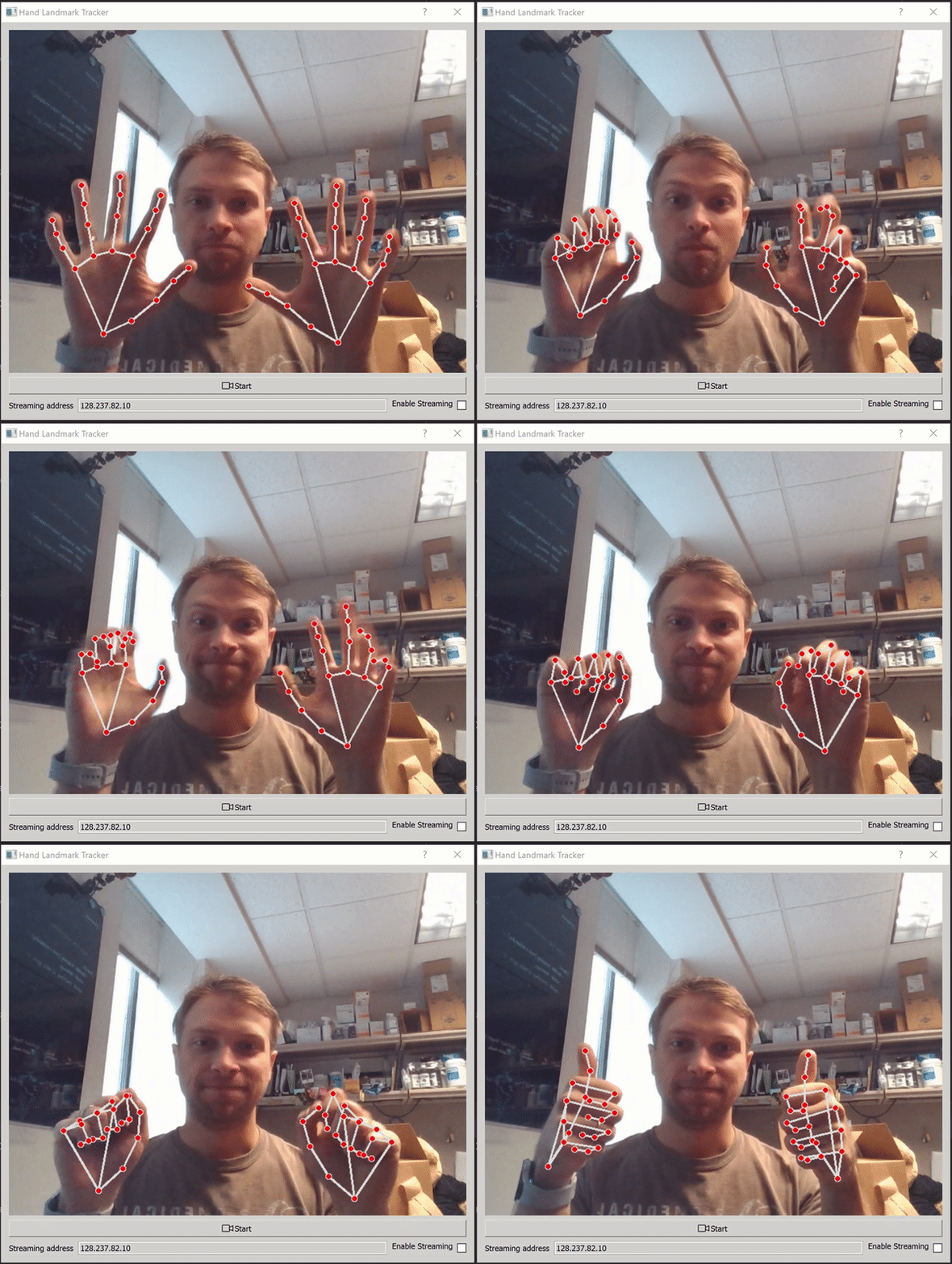
MAVIS — Motion Analysis and Visual Interaction Suite
Track hands from a webcam, video, or frames supplied by your own application. MAVIS provides a camera-free Python API, a desktop demo, recording and replay, CSV exports, and optional calibrated multi-camera and UDP/LSL workflows.
Release candidate: the distribution name is mavis-track, the Python
import is mavis_track, and the command is mavis-track. This checkout
prepares the first release; it has not been published to PyPI yet.
Existing handtrack imports and the handtracker command remain available
for compatibility.
Try the desktop demo
Use Python 3.10–3.12, 64-bit. The intended desktop platforms are Windows x64, Linux x64, and macOS Intel/Apple Silicon. The release validation matrix covers all four; camera permissions and native desktop behavior need device checks.
Until publication, install from this repository:
git clone https://github.com/Jshulgach/Hand-Landmark-Tracker.git
cd Hand-Landmark-Tracker
python -m venv .venv
Activate with .venv\Scripts\activate on Windows, or
source .venv/bin/activate on macOS/Linux, then:
python -m pip install ".[gui]"
mavis-track doctor --backend webcam
mavis-track demo
The demo starts with one camera and needs no calibration. Select hands, face,
pose, or everything in the window. Use --source 1 for another camera or
--source path/to/video.mp4 for a video.
After the first PyPI release, installation will be
python -m pip install "mavis-track[gui]".
Include MAVIS in your project
The base package does not require Qt, pandas, or LSL. Add mavis-track
to your dependencies after publication, or install . locally now.
Pass frames from your existing capture loop:
from mavis_track import HandTracker

with HandTracker(max_hands=2) as tracker:
    result = tracker.process(frame_bgr)  # Your uint8 image, shape (height, width, 3)
    for hand in result.hands:
        print(hand.track_id, hand.handedness, hand.landmarks.shape)
        # (21, 3) read-only coordinates owned by this result
MAVIS does not open a camera or window in this API. Empty frames produce an
empty result.hands tuple. Supply timestamp=seconds for a source clock
or use the default monotonic host clock. RGB input uses color="rgb".
See the integration guide and the complete
webcam example.
Record, replay, and export
mavis-track record --source 0 --frames 300 --max-hands 2 --session-name demo
mavis-track replay recordings/demo
mavis-track export recordings/demo
Recordings contain a numeric landmarks.npz and session.json; optional
--save-video adds annotated video. Export writes rectangular landmark,
angle, and hand identity CSVs. Missing hands use a validity mask and NaNs.
Replay honors recorded timestamps, including variable camera timing.
Coordinates and measurement limits
landmarks: image-normalized x/y; z is the model's wrist-relative depth, scaled similarly to x. These coordinates are not calibrated world meters.world_landmarks: optional hand-centered MediaPipe model estimates in meters. Separate hands do not share a global origin.angles: 14 named geometric finger flexion estimates in degrees. Theangle_spacefield identifies the coordinates used. These are not validated clinical joint measurements.track_id: short-lived association across adjacent frames. Missing hands reset association; IDs do not identify a person.
Advanced workflows
Install ".[gui,stream]" for desktop streaming. UDP can also be used with
the base package. Calibrated multi-camera tracking currently assumes one
hand shared across views; unrestricted multi-person/two-hand matching
requires further work.
mavis-track board --backend webcam
mavis-track calibrate --backend webcam
mavis-track gui --backend webcam --advanced-hands
Calibration uses matching image dimensions, held-out quality checks, and
validated camera matrices. Files live in a user data directory, with existing
HANDTRACK_WEBCAM_CALIBRATION_DIR and
HANDTRACK_OPTITRACK_CALIBRATION_DIR overrides supported. Source indices can
change when cameras are replugged: verify physical order or recalibrate.
OptiTrack remains an optional Windows SDK integration. The author has historical
Windows hardware tests; current release work has no OptiTrack hardware retest.
Obtain the SDK separately and set OPTITRACK_CAM_PY_PATH to its binding folder.
Development and release
python -m pip install -e ".[dev,gui,io,stream,docs,release]"
python -m pytest -q
mkdocs build --strict
python -m build
python -m twine check dist/*
Publishing is gated by the full software matrix and package checks. Audit · Release checklist · Documentation · Issues
MAVIS source is MIT licensed. Optional Qt dependencies and proprietary SDKs retain their own licenses; see third-party notices.
1 maintainer

Metadata
1 maintainer
Release files for mavis-track 0.1.0
For a detailed explanation of source distributions (sdists) and built distributions (wheels), please see the package formats documentation.
Source distribution (sdist)
| File | Size | Uploaded | |
|---|---|---|---|
| mavis_track-0.1.0.tar.gz | 207.9 kB | Details |
Built distribution (wheel)
| File | Interpreter | ABI | Platform | Reset |
|---|---|---|---|---|
| mavis_track-0.1.0-py3-none-any.whl | Python 3 | none | any | Details |
Total release size: 430.5 kB
Release files / mavis_track-0.1.0.tar.gz
| Download URL | mavis_track-0.1.0.tar.gz |
|---|---|
| Size | 207.9 kB |
| Tags | Source |
|
SHA-256 checksum How to use checksums |
0a45ada36cc010003e1c8fd57372f2ba42ce11097482c4d5d2d0bdff491ce808
|
|
BLAKE2b-256 checksum How to use checksums |
b4750a188f103878f4c8c47d901da5fb9c01805f2f37fb2f1390a07b387b2608
|
| Upload date | |
|
Uploaded using Trusted Publishing? What is trusted publishing? |
No |
| Uploaded via |
twine/7.0.0 CPython/3.11.9
|
Release files / mavis_track-0.1.0-py3-none-any.whl
| Download URL | mavis_track-0.1.0-py3-none-any.whl |
|---|---|
| Size | 222.6 kB |
| Tags | Python 3 |
|
SHA-256 checksum How to use checksums |
548572a484f739b51c0c0d7243a2c283e877258a7f99cabf452c9a8abe4c7973
|
|
BLAKE2b-256 checksum How to use checksums |
c8aef84a945f0aa859a5bb78f6e96ec1fc2c1e798fd6cd94974a0579b60a3556
|
| Upload date | |
|
Uploaded using Trusted Publishing? What is trusted publishing? |
No |
| Uploaded via |
twine/7.0.0 CPython/3.11.9
|













