
Simple Inline Calendar & Date Selection tool for MaxAPI bots

Project description
Date Selection tool for MaxAPI Bots
Description
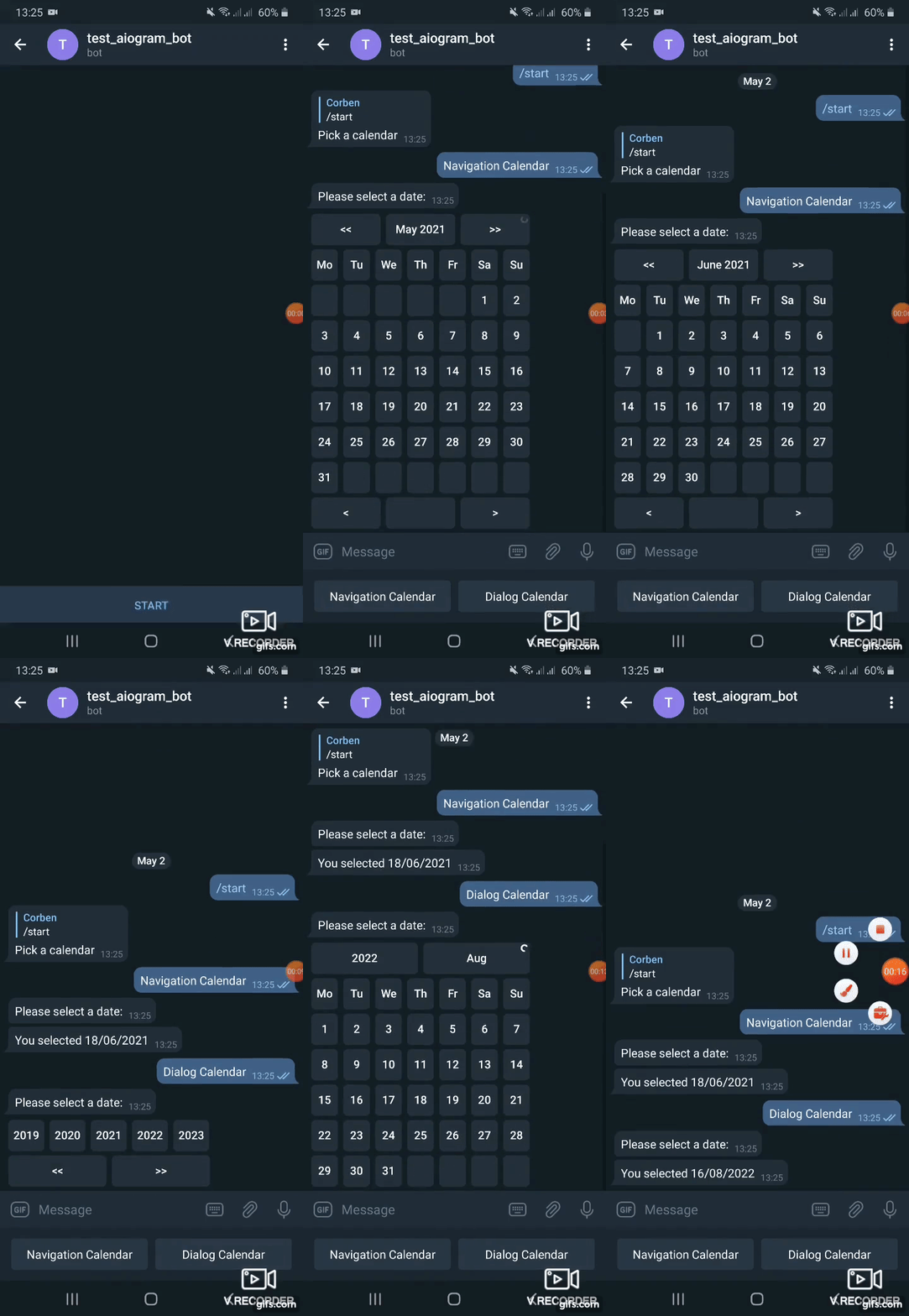
A simple inline calendar, date selection tool for aiogram telegram bots written in Python.
Offers two types of date pickers:
Navigation calendar - user can either select a date or move to the next or previous month/year by clicking a singe button.
Dialog calendar - user selects year on first stage, month on next stage, day on last stage.
From version 0.2 supports aiogram 3, use version 0.1.1 with aiogram 2. **From version 0.6 supports aiogram 3.7, use version 0.5 with aiogram <3.7 **
Main features
- Two calendars with abilities to navigate years, months, days altogether or in dialog
- Ability to set specified locale (language of captions) or inherit from user`s locale
- Limiting the range of dates to select from
- Highlighting todays date
Usage
Install package
pip install aiogram_calendar
A full working example on how to use aiogram-calendar is provided in *bot_example.py*.
In example keyboard with buttons is created.
Each button triggers a calendar in a different way by adding it to a message with a reply_markup.
reply_markup=await SimpleCalendar().start_calendar()
^^ will reply with a calendar created using English localization (months and days of week captions). Locale can be overridden by passing locale argument:
reply_markup=await SimpleCalendar(locale='uk_UA').start_calendar()
or by getting locale from User data provided by telegram API using get_user_locale method by passing message.from_user to it
reply_markup=await SimpleCalendar(locale=await get_user_locale(message.from_user)).start_calendar()
Depending on what button of calendar user will press callback is precessed using the process_selection method.
selected, date = await SimpleCalendar(locale=await get_user_locale(callback_query.from_user)).process_selection(callback_query, callback_data)
Here locale is specified from callback_query.from_user
Gif demo:
Release history Release notifications | RSS feed


Download files
Download the file for your platform. If you're not sure which to choose, learn more about installing packages.
Source Distribution
Built Distribution
Filter files by name, interpreter, ABI, and platform.
If you're not sure about the file name format, learn more about wheel file names.
Copy a direct link to the current filters
File details
Details for the file maxapi_calendar-0.1.0.tar.gz.
File metadata
- Download URL: maxapi_calendar-0.1.0.tar.gz
- Upload date:
- Size: 8.0 kB
- Tags: Source
- Uploaded using Trusted Publishing? No
- Uploaded via: uv/0.10.4 {"installer":{"name":"uv","version":"0.10.4","subcommand":["publish"]},"python":null,"implementation":{"name":null,"version":null},"distro":{"name":"Ubuntu","version":"25.10","id":"questing","libc":null},"system":{"name":null,"release":null},"cpu":null,"openssl_version":null,"setuptools_version":null,"rustc_version":null,"ci":null}
File hashes
| Algorithm | Hash digest | |
|---|---|---|
| SHA256 |
5f240972e7dfa08c227ff1d1e0029aff64ce17325295ad606fbe15e0f855bddc
|
|
| MD5 |
b74ad234277402b23223a2e0a3b6ed82
|
|
| BLAKE2b-256 |
24d1e7debbeb5f320a33fef1f66d8545e2aa6212d12eefa41b8acfcd918b4159
|
File details
Details for the file maxapi_calendar-0.1.0-py3-none-any.whl.
File metadata
- Download URL: maxapi_calendar-0.1.0-py3-none-any.whl
- Upload date:
- Size: 8.5 kB
- Tags: Python 3
- Uploaded using Trusted Publishing? No
- Uploaded via: uv/0.10.4 {"installer":{"name":"uv","version":"0.10.4","subcommand":["publish"]},"python":null,"implementation":{"name":null,"version":null},"distro":{"name":"Ubuntu","version":"25.10","id":"questing","libc":null},"system":{"name":null,"release":null},"cpu":null,"openssl_version":null,"setuptools_version":null,"rustc_version":null,"ci":null}
File hashes
| Algorithm | Hash digest | |
|---|---|---|
| SHA256 |
3fb4228818becc4f4491fe6e38dc71d003c8b11348324e616781c58e2bea8123
|
|
| MD5 |
96e3bd9ad5f2393fd6bff5bf9b9e8d16
|
|
| BLAKE2b-256 |
5ba36c10e9a9c42abbe21e432d2c3c4692bd8139feb887cf66cac860be35933d
|






