
Maxwell Bloch Solver
A PySide6 desktop application for simulating, visualizing, and fitting one-dimensional Maxwell-Bloch models to astronomical maser light-curve data. The application combines an interactive Qt interface, configurable physical and numerical parameters, Numba-accelerated time evolution, and publication-oriented plotting/export tools.
Screenshot
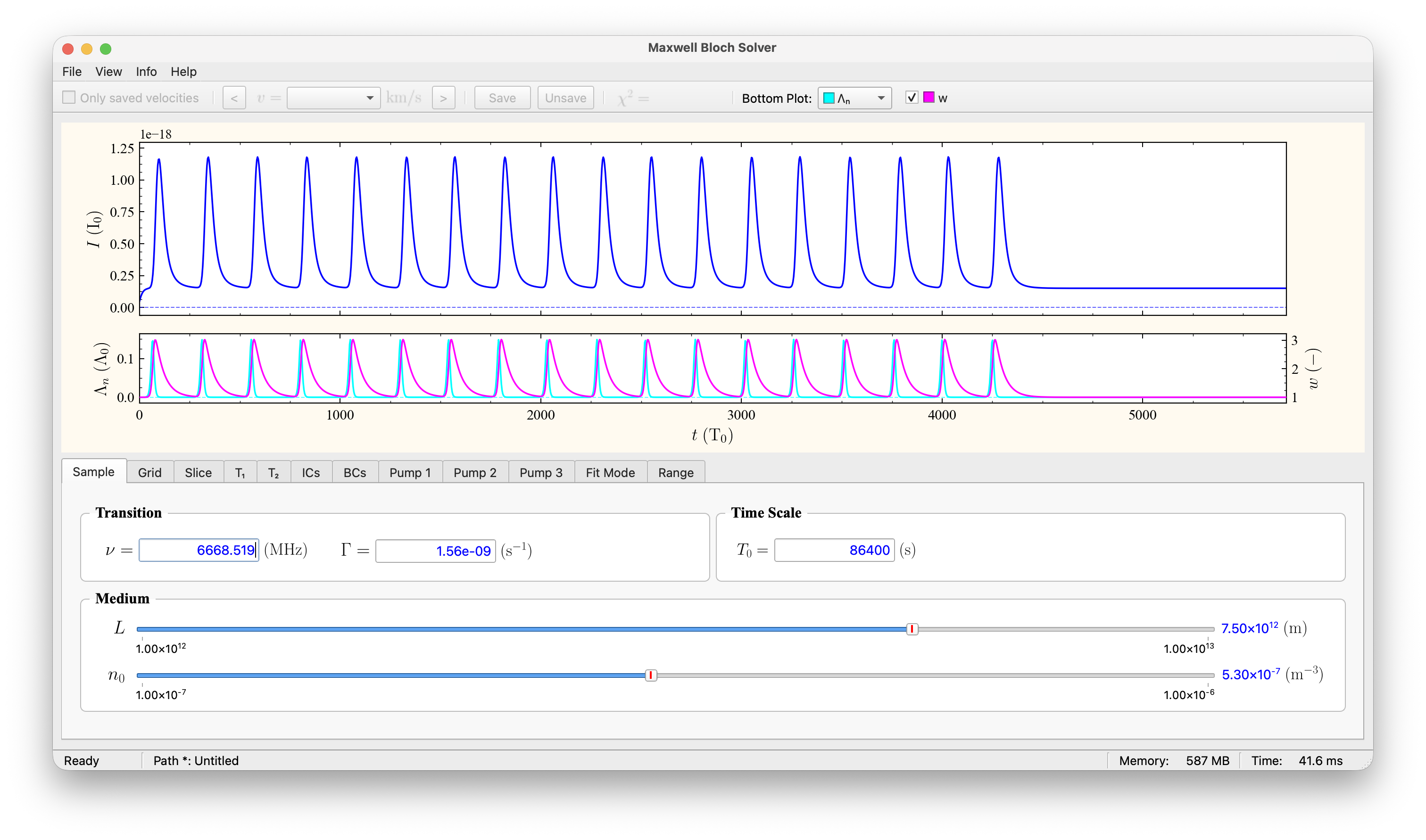
Features
- Interactive GUI for Maxwell-Bloch model configuration and visualization.
- Numba-accelerated numerical solver using Runge-Kutta time stepping, from the maxbloch package.
- Interface built with sciwidgets (sliders, parameter panels, plot canvas).
- Light-curve import from velocity-tagged text files.
- Support for period-tagged source folders, e.g. multiple folded periods for the same source.
- Adjustable source, sample, initial-condition, pump-profile, and plotting parameters.
- Built-in visualization of fitted flux, inversion/population, pump terms, and other solver quantities.
- Parameter saving/loading using JSON files.
- Export to PDF, PNG, or SVG, with PDF exports including metadata and parameter reports.
- Local user guide and equations reference.
Installation
The app needs Python 3.10 or newer. The easiest way is pipx, which installs the app in its own environment and puts the command on your path:
pipx install maxwell-bloch-solver
If you work in a conda or virtual environment, install it there with pip instead:
pip install maxwell-bloch-solver
Running the application
maxwell-bloch-solver
(mbsolver is a shorter name for the same command, and python -m mbsolver works too.)
Use the menu bar to load data folders, adjust parameters, run the solver and export plots.
Updating
The app tells you when a new version is available. To update:
pipx upgrade maxwell-bloch-solver
or pip install -U maxwell-bloch-solver in the environment where you installed it.
Using the solver from Python
Parameter files saved by the app can be solved in your own scripts. Install the
app with pip in the Python you run the script with (a pipx install is kept
separate from your own Python):
import mbsolver

f = mbsolver.ParamsFile("run_1.json")       # File → Save Parameters As…
params = f.params()                          # a fresh dict, safe to change
params["solve.sample"]["l"] = 1.0e13         # change anything
res = mbsolver.solve(params)                 # same numbers as the app

res["time"]             # time grid
res["intensity"][-1]    # intensity at the exit of the medium
For the parameter file of a data folder, f.velocities lists the velocity
components and f.params(12.3) picks one. f.metadata and f.app_version
tell who saved the file, when, and with which version.
params is a plain dictionary keyed by the names the app uses
("solve.grid.nt", "solve.sample", "solve.pump.pulse1", …). η and θ₀ are
computed from the sample values (ν, Γ, T₀, L, n₀), as in the app;
mbsolver.scaling(nu=…, gamma=…, t0=…, l=…, n0=…) returns them and the other
derived quantities. The result holds time, intensity and w (one row per
stored z plane), lambda_n (pump), A0 (boundary field), t1 and t2, in the
solver's dimensionless units; the app's flux scaling and offsets are not applied.
A commented example script listing all keys ships with the app: open
Help → Use from Python… to copy or save it, or read
example_script.py.
To build the parameters in code instead, use the
maxbloch package directly.
Input data format
The application expects light-curve files as plain text files with at least two whitespace-separated columns:
time flux
Blank lines and lines beginning with # are ignored.
Supported file-name patterns are:
Source_v=12.3.txt
Source_p1_v=12.3.txt
where:
Sourceis the source name,p1,p2, etc. are optional period labels,v=12.3is the velocity-component label.
Matching parameter files can be stored as:
Source_params.json
Source_p1_params.json
When period-tagged files are present, the application lets the user select the period set to load.
Exporting results
Plots can be exported from the GUI as:
- PNG
- SVG
PDF exports include the plot plus a report page containing metadata and the current parameter state.
Documentation
The user guide and the equations reference (PDF) are installed with the app; open them from the Help and Info menus.
Development
git clone https://github.com/vahid-anari/maxwell-bloch-solver.git
cd maxwell-bloch-solver
pip install -e .
mbsolver
python main.py in the repository root also starts the app from the source
folder. The code lives in src/mbsolver/:
src/mbsolver/
├── main.py           # application entry point
├── app/              # main window, plotting, solver controller, update pipeline
├── ui/               # physics parameter widgets, dialogs, splash screen, step viewer
├── io/               # data and parameter import/export
├── config/           # app metadata, style and UI defaults
├── utils/            # units, constants, helper functions
└── resources/        # settings.json, icons, user guide and equations PDFs
The numerical solver is the maxbloch package; the widgets come from sciwidgets.
License
This project is released under the MIT License. See LICENSE for details.
1 maintainer

Metadata
1 maintainer
Release files for maxwell-bloch-solver 9.1.1
For a detailed explanation of source distributions (sdists) and built distributions (wheels), please see the package formats documentation.
Source distribution (sdist)
| File | Size | Uploaded | |
|---|---|---|---|
| maxwell_bloch_solver-9.1.1.tar.gz | 1.6 MB | Details |
Built distribution (wheel)
| File | Interpreter | ABI | Platform | Reset |
|---|---|---|---|---|
| maxwell_bloch_solver-9.1.1-py3-none-any.whl | Python 3 | none | any | Details |
Total release size: 3.3 MB
Release files / maxwell_bloch_solver-9.1.1.tar.gz
| Download URL | maxwell_bloch_solver-9.1.1.tar.gz |
|---|---|
| Size | 1.6 MB |
| Tags | Source |
|
SHA-256 checksum How to use checksums |
53d146c5a98c8f447cd18cc9c1c25b956738ee83919c3173a568ffdeb2444219
|
|
BLAKE2b-256 checksum How to use checksums |
873e9ab789891ad9b9b9ae81f729bff2b6f3c7cf166c73075b2959a6ae33386e
|
| Upload date | |
|
Uploaded using Trusted Publishing? What is trusted publishing? |
No |
| Uploaded via |
twine/7.0.0 CPython/3.12.12
|
Release files / maxwell_bloch_solver-9.1.1-py3-none-any.whl
| Download URL | maxwell_bloch_solver-9.1.1-py3-none-any.whl |
|---|---|
| Size | 1.6 MB |
| Tags | Python 3 |
|
SHA-256 checksum How to use checksums |
d54abcf7c4dff25d0c8d83fb3ddb3f409456bd0e48c9d90bedc628a08ea86488
|
|
BLAKE2b-256 checksum How to use checksums |
fec61eaf64a2893f05e6797ed8b5bd2bafdfbc19ddeb6fd576724a2c50ae48dc
|
| Upload date | |
|
Uploaded using Trusted Publishing? What is trusted publishing? |
No |
| Uploaded via |
twine/7.0.0 CPython/3.12.12
|














