
Mayaku



The computer vision library that learns your data fastest.
Mayaku trains detection, instance segmentation, and keypoint models on your own data. It's
built around UniQuery — a query-based head — on a ConvNeXt backbone, and its base
models are purpose-pretrained on Objects365 (365 classes) for fast fine-tuning, so they
transfer to your classes quickly. Pure Python, zero custom CUDA kernels: one pip install mayaku trains on CUDA,
Apple Silicon, ROCm, or CPU, and exports to ONNX, CoreML, OpenVINO, and TensorRT.
Apache 2.0.
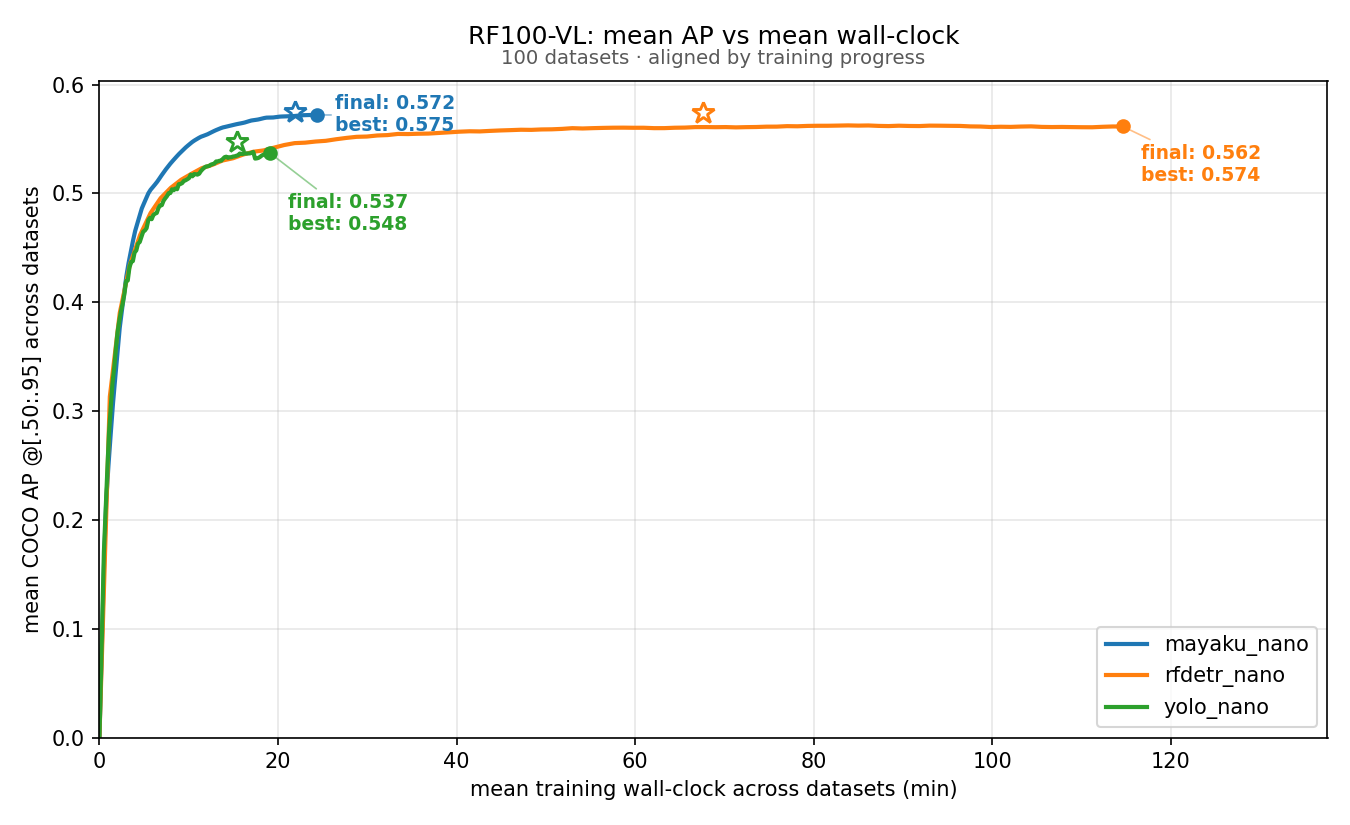
On RF100-VL — a 100-dataset benchmark of real, custom datasets — Mayaku's nano model reaches a higher mean AP than either comparison, and reaches it in shorter training time.
| Library | Params (M) | Mean AP @[.50:.95] | Training time |
|---|---|---|---|
| mayaku-n | 12.9 | 0.535 | 1.0× (≈14 min) |
| rfdetr-n | 30.5 | 0.513 | 7.7× (≈112 min) |
| yolo26n | 2.4 | 0.496 | 1.05× |
Benchmark scope: nano class only, the alphabetically first 20 of the 100 RF100-VL datasets, single RTX 3060. Each library runs its own default recipe to completion. Times are normalized to Mayaku's per-dataset time; the wall-clock shown is the median dataset. Parameter counts differ substantially across these models — they are listed so the comparison is read with that in mind. The benchmark is still running — the remaining datasets and the s/m/l tiers will be published as they finish, whatever they show.
Built for developers with a few hundred images of their own thing — retail shelves, defects on a line, insect wings — not another COCO leaderboard entry.
Highlights
- Fine-tunes fast. Strong accuracy on small custom datasets in minutes of wall-clock. See the RF100-VL result above.
auto_configadapts the recipe (schedule, LR, augmentation) to your dataset size automatically. - Objects365-pretrained. Base models are pretrained on a large, detection-native dataset (365 classes), a broad starting point for transfer.
- UniQuery head. Anchor-free, NMS-free, with image-conditioned query generation (QGN) and train-with-N / deploy-with-fewer refinement stages — a built-in speed/accuracy dial with no retraining. Detection and instance segmentation share one query representation; keypoints ride the same detector.
- Four sizes, three tasks.
mayaku-nthroughmayaku-l, each in detection, instance-segmentation, and keypoint variants. - Runs everywhere. Pure Python: no wheel chase, no ABI mismatches, no custom ops. CUDA / Apple Silicon (MPS) / ROCm / CPU from a single install.
- Deploys everywhere. Parity-tested exports to
onnx,coreml,openvino,tensorrt.
Install
pip install mayaku
That covers training, inference, evaluation, and model download. Export targets are optional extras — install only what you need:
pip install mayaku[onnx]       # ONNX export
pip install mayaku[coreml]     # CoreML export (macOS)
pip install mayaku[openvino]   # OpenVINO export (Intel CPU/iGPU/NPU)
pip install mayaku[tensorrt]   # TensorRT export (CUDA Linux)
Quickstart
Fine-tune on your own dataset. Point at COCO-format splits — a train annotation JSON and its
image directory; add a val split to get final eval. Pass a bundled model name as weights
and it fetches the pretrained checkpoint on first use; the class-specific head re-initialises
automatically when your class count differs.
from pathlib import Path

from mayaku import train

result = train(
    weights="mayaku-n-det",
    train_annotations=Path("data/train/_annotations.coco.json"),
    train_images=Path("data/train"),
    val_annotations=Path("data/valid/_annotations.coco.json"),
    val_images=Path("data/valid"),
)
print(result["final_box_ap"], result["final_weights"])
Same thing from the CLI:
mayaku train --weights mayaku-n-det \
  --annotations data/train/_annotations.coco.json --images data/train \
  --val-annotations data/valid/_annotations.coco.json --val-images data/valid
Predict:
from mayaku import from_pretrained

predictor = from_pretrained("mayaku-n-det")   # config + weights + device, auto
instances = predictor("photo.jpg")
print(instances.pred_boxes.tensor, instances.scores, instances.pred_classes)
mayaku predict mayaku-n-det photo.jpg --output result.json
Throughput
Measured on a single NVIDIA RTX 3060 — the most commonly owned GPU among Hugging Face users (HF hardware) — at 640px, TensorRT FP16, back-to-back with no cooldown pauses between timed inferences. CUDA numbers first; MPS and CPU figures will follow.
Two throughput numbers are reported: engine is the model forward pass alone, end-to-end is the full path you actually run (decode → preprocess → inference → post-process). The end-to-end number is the one that predicts your application's frame rate.
| Model | Params (M) | Engine FPS | End-to-end FPS | VRAM (MB) |
|---|---|---|---|---|
mayaku-n-det |
12.9 | 247.7 | 198.8 | 314 |
mayaku-s-det |
23.1 | 175.7 | 150.0 | 340 |
mayaku-m-det |
36.0 | 137.6 | 121.0 | 370 |
mayaku-l-det |
57.8 | 98.9 | 93.5 | 464 |
Model zoo
Base models are hosted and fetched on first use — pass a name instead of a path. Every size
ships in three task variants, mayaku-<size>-{det,seg,key} (e.g. mayaku-m-seg).
| Name | Backbone | Tasks | Profile |
|---|---|---|---|
mayaku-n |
ConvNeXt-femto | det · seg · key | edge / real-time |
mayaku-s |
ConvNeXt-nano | det · seg · key | balanced |
mayaku-m |
ConvNeXt-tiny | det · seg · key | high accuracy |
mayaku-l |
ConvNeXt-tiny (wide) | det · seg · key | max accuracy |
mayaku-xl |
ConvNeXt-base | det · seg · key | in training |
mayaku-xxl |
ConvNeXt-base (6-stage decoder) | det · seg · key | in training |
List available names:
mayaku download --list
Machine-readable index: manifest.json
(size + SHA256 per file). Cached under <project>/cache/mayaku/ (override with MAYAKU_CACHE_DIR).
Why Mayaku
Query-based, without DETR's slow convergence. UniQuery keeps the clean query-based design — no anchors, no NMS — but reaches its accuracy in a fraction of the training time DETR-style detectors need. An image-conditioned query generator (QGN) seeds queries from FPN features instead of learning them from scratch, so the model starts from meaningful proposals on epoch one. Train with N refinement stages, deploy with fewer — a speed/accuracy dial with no retraining.
Detection, segmentation, and keypoints from one family. Detection and instance segmentation are driven by a single shared query representation (the mask head is conditioned on the same per-object query features); keypoints run on the same detector. One architecture, one training path, three tasks.
Portability by design. No deformable conv, no custom CUDA/C++ ops, RGB-native end-to-end — the same code path runs on every backend and survives the trip through ONNX → CoreML / OpenVINO / TensorRT.
Deploy anywhere
mayaku export onnx     mayaku-n-det --output model.onnx
mayaku export coreml   mayaku-n-det --output model.mlpackage
mayaku export openvino mayaku-n-det --output model.xml      # .bin alongside
mayaku export tensorrt mayaku-n-det --output model.engine   # CUDA host
All four are parity-tested. On Intel CPU targets OpenVINO measurably beats PyTorch eager; on GPU targets the export artifact is the value.
Built on
UniQuery stands on a line of query-based detection work: Sparse R-CNN (iterative dynamic refinement), QueryInst (query-conditioned dynamic mask heads), Featurized Query R-CNN (image-conditioned query generation), and DN-DETR (denoising for stable early box regression). The backbone is ConvNeXt, with several sizes built on torchvision's implementation. What Mayaku adds is the unified head family, the Objects365 pretraining recipe, and the fine-tuning defaults that make them converge quickly on small datasets.
Roadmap
mayaku-xl/mayaku-xxl— ConvNeXt-base models (2- and 6-stage decoders) for the high-accuracy end of the range.- Full RF100-VL results — all 100 datasets across every size tier.
- Curated custom-class models — ready-to-use weights on a hand-picked set of common real-world classes (people, vehicles, and more), for projects that don't want to start from the Objects365 base.
- Documentation — a proper docs site, coming soon.
License
Apache 2.0 — see LICENSE. Applies to the full library and every published
model weight.
1 maintainer

Download files
Download the file for your platform. If you're not sure which to choose, learn more about installing packages.
Source Distribution
Built Distribution
Filter files by name, interpreter, ABI, and platform.
If you're not sure about the file name format, learn more about wheel file names.
Copy a direct link to the current filters
File details
Details for the file mayaku-2.0.0.tar.gz.
File metadata
- Download URL: mayaku-2.0.0.tar.gz
- Upload date:
- Size: 592.7 kB
- Tags: Source
- Uploaded using Trusted Publishing? No
- Uploaded via:
twine/6.1.0 CPython/3.13.14
File hashes
| Algorithm | Hash digest | |
|---|---|---|
| SHA256 |
cb3b2b7b3819e77a85eb00e8e740534716c6d768a0bbb399542419e1109c46a3
|
|
| MD5 |
85ce3de0e48420ed602fdd856321b022
|
|
| BLAKE2b-256 |
d7f2948db45a95ac4dcd34bc9f778e937b44eb6afac2e9265979a1a6ce8d8cc3
|
File details
Details for the file mayaku-2.0.0-py3-none-any.whl.
File metadata
- Download URL: mayaku-2.0.0-py3-none-any.whl
- Upload date:
- Size: 333.4 kB
- Tags: Python 3
- Uploaded using Trusted Publishing? No
- Uploaded via:
twine/6.1.0 CPython/3.13.14
File hashes
| Algorithm | Hash digest | |
|---|---|---|
| SHA256 |
a52cfcf620948d5e294e058ea09039d7f65357eced37588823ddda2ca283ccf7
|
|
| MD5 |
3270e80549f0015c03d5fb7a2b380a0d
|
|
| BLAKE2b-256 |
87efd588e38d63e6ebfe6eb12a719370b5aa260ff13d8f10c637ba6ff2af5722
|














