




mayatk
Maya 2025+ tech-art toolkit built on maya.cmds + maya.api.OpenMaya (no PyMEL) — modeling, animation, materials, rigging, and scene-pipeline automation, plus one-click bridges into Marmoset, Substance Painter, RizomUV, Blender, and Unity. The tool panels over it are tentacle's.
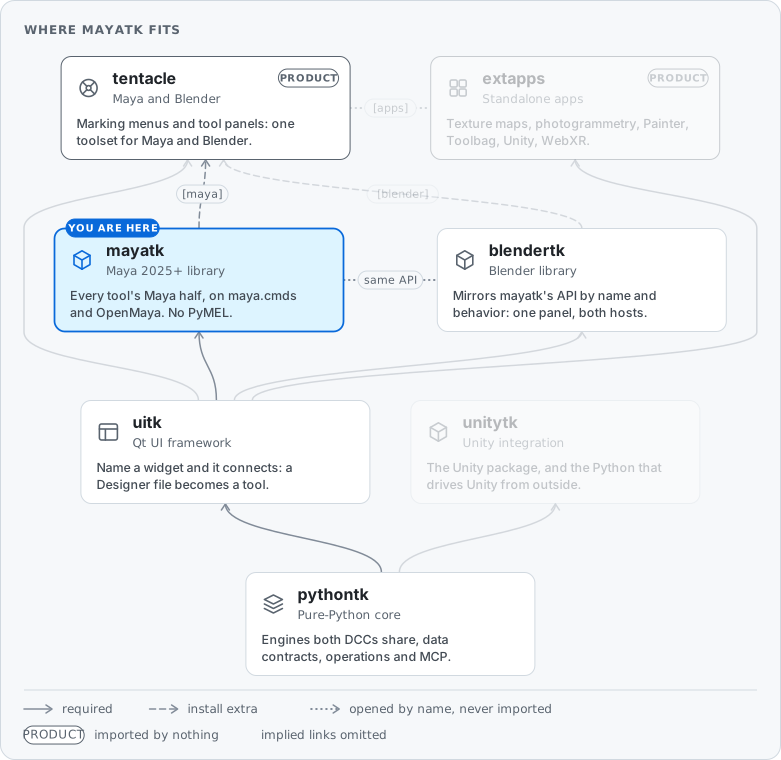
mayatk is the Maya layer of the pythontk → uitk → {mayatk, blendertk} → tentacle ecosystem: a library of composable helpers and each tool's Maya API half (Shot Sequencer, Channels, Scene Exporter, …). It holds no UI: the tool panels are tentacle's, one per tool for Maya and Blender, calling this API, so a script gets everything a panel does.
Installation
pip install mayatk
Requirements: Maya 2025+ (Python 3.11+).
mayatk also ships mayapy-package-manager.bat — an interactive Windows menu for installing/updating/backing up packages in Maya's bundled Python interpreter.
Packages
| Package | What it covers |
|---|---|
anim_utils |
Animation curves, shots, blendshape animation, playblast, smart bake |
audio_utils |
Audio clips, ffmpeg-backed conversion, timeline-keyed events |
cam_utils |
Camera utilities and default-camera handling |
core_utils |
CoreUtils, Components, AutoInstancer, MASH bridge, diagnostics, preview |
display_utils |
Visibility & isolation, color ID, exploded view |
edit_utils |
Selection, naming, primitives, snap, bevel, bridge, mirror, duplicate (linear/radial/grid), mesh graph |
env_utils |
MayaConnection, MayaSceneFiles (the maya operation host: a fresh mayapy per python -m pythontk ops call, one kept per MCP session), workspace, namespace sandbox, references, hierarchy sync, FBX/USD, scene exporter, Blender + Unity bridges, WebXR preview |
light_utils |
Lightmap baker, Light rigs, HDR manager, lights-from-geometry |
mat_utils |
GameShader, RenderEffects (per-object opacity / highlight channels), ImageToPlane, MatUpdater, shader templates, emissive groups, Marmoset + Substance bridges |
node_utils |
NodeUtils, Attributes, the Channels engine, shared scene data nodes |
nurbs_utils |
NURBS surfaces, ImageTracer, curve-to-tube |
render_utils |
Renderer switching and render-settings helpers (composed by hdr_manager) |
rig_utils |
Controls, skinning, tube / wheel / telescope / shadow / articulated rigs |
ui_utils |
MayaUiHandler, MayaMarkingMenuHost (the uitk.MarkingMenuHost adapter), channel box, native menus, hotkey collision check, node icons |
uv_utils |
UV utilities, Texture Combine (material atlas combine + UV / texture transfer), Rizom bridge |
xform_utils |
Transforms, matrices, pivot watcher |
Classes — and, for the wildcard-scanned *_utils roots, their public methods — are exposed at the package root via the lazy-loading resolver. Both bare and class-qualified forms work:
import mayatk as mtk

@mtk.undoable                           # bare form — wildcard-exposed
def operation():
    mtk.freeze_transforms("pCube1")

# Class-qualified form — explicit, no risk of collision
mtk.NodeUtils.is_group("group1")
mtk.XformUtils.freeze_transforms("pCube1")
mtk.EnvUtils.SCENE_UNIT_VALUES

sel = mtk.Selection()
For the full public surface, search it (read live from the installed source): python -m pythontk ops run api.search "query=<words>".
Design notes: Shadow Rig — a source-responsive rig type (the Rig: combo's planned Morphing entry: options weighed, a recommendation, the maintainer's decisions).
Tour
A curated subset — the packages table is the map; these are the standouts.
Auto-instancing
Convert geometrically identical meshes to instances. Duplicates are matched by geometry signature, so rotated and scaled copies are found regardless of transform or name:
import mayatk as mtk

mtk.AutoInstancer(tolerance=0.001, require_same_material=True).run()
Drive Maya from outside
MayaConnection launches and remote-controls Maya from any Python process — the backbone of mayatk's own test suite:
from mayatk import MayaConnection

conn = MayaConnection.get_instance()
conn.connect()                      # launches a fresh Maya on a free port
conn.execute("import maya.cmds as cmds; cmds.polySphere()")   # runs in that Maya, not yours
By default every connect() gets a new instance — an artist's open session is never touched (see Session safety below).
Smart bake
Analyzes what is actually driven — constraints, set-driven keys, expressions, IK — and bakes only those channels, onto an override layer, with a persisted manifest that makes the bake reversible even after save/reopen:
result = mtk.SmartBake(optimize_keys=True).execute()
mtk.SmartBake.restore()             # undo the bake — drivers resume
Scene audit
mtk.SceneAnalyzer.run_audit(adaptive=True)                  # print the report
html = mtk.SceneAnalyzer.format_audit_html(scope="all")    # {section: html}
# → scene overview, rendered vs unique triangles (every instance counted),
#   draw calls, per-material texture cost (GPU estimate), a ranked Fix First
#   list, top contributors, missing textures, leftover UV snapshots
The report behind tentacle's Get Scene Info. Sections render through pythontk's ReportDoc -- HTML tables for a viewer, the same content as text for the console -- and blendertk's SceneAnalyzer produces the same report from a Blender scene.
DCC bridges
One-click hand-offs that export the selection and drive the target app with a templated script: Marmoset Toolbag (including a bundled JSON-RPC plugin for live Toolbag scene ops), Substance 3D Painter, RizomUV, Blender, and Unity. Built on pythontk's HandoffBridge engine (RizomUV uses its own script-driven flow). Each has a tentacle tool panel (Blender's is the shared DCC Bridge) except Unity: its panel is extapps' Unity Scripts app, which tentacle opens with UnityBridge as its export half.
WebXrPreview is the same engine aimed at a browser instead of an application: mtk.WebXrPreview().push() converts the selection to glTF and publishes it to a loopback server, so a tab left open — including one open in a PC-tethered headset — swaps to the new version on its next poll. Baked lightmaps and the scene's records (the data_export carrier: lightmaps, materials, the handoff) ride along automatically. See Live WebXR preview (pythontk owns the shared pipeline).
More highlights
Preview— uitk'sPreviewControllerbound to a Maya scene session: tools show live results, roll back on cancel, replay on commit.Components— component islands, border edges, edge paths, normal-angle edge selection.ExplodedView— force-based exploded view (vectorized repulsion), toggleable and reversible.NamespaceSandbox— import files into disposable namespaces for analysis or object swapping, with guaranteed cleanup.HierarchySync— diff a working scene against a reference and repair it: create stubs, quarantine extras, fix fuzzy renames and reparents.TubeRig/WheelRig/ShadowRig— rig builders: FK / spline-IK / anchor chains from a mesh centerline, expression-driven wheel rotation, fake contact shadows.ArticulatedRig— rigid parts on hinge / swivel / ball / slide joints, proposed from the geometry; the skeleton ships with anarticulationrecord so a hand can grab it in Unity and the WebXR preview, solved as the Maya Grab Tool solves it.ImageTracer— trace images or Blue Pencil strokes into curves and meshes.DevTools/WidgetInspector— grep Maya's MEL source and globals; walk, snapshot, and diff Maya's live Qt widget tree.StyleSetter— restyle Maya's scriptable viewport colors to match another DCC.
Bundled UITK Editors
MayaUiHandler ships with a one-line entry point for launching the
uitk editor windows from a Maya shelf
button or script:
import mayatk as mtk
mtk.MayaUiHandler.instance().editors.show("ui_browser")
| Editor key | Description |
|---|---|
ui_browser |
Searchable launcher for every UI registered with the switchboard — tags, filtering, hide lists, launch options, JSON-portable presets. |
style_editor |
Pick a theme and tune its colors and metrics, saved as presets. |
shortcut_editor |
Keyboard-shortcut editor for slots and commands, with presets and import/export. Hosts can wire in Maya-aware collision checking via mtk.HotkeyCollisions.maya_collision_checker. |
global_shortcuts |
The marking-menu key and the navigation commands' shortcuts. |
preset_editor |
Browse, lock, hide and share every tool's presets in one tree. |
MayaUiHandler.instance() is reentrant: if tentacle (or any other tool)
already created the handler, the call returns the existing singleton; otherwise
it bootstraps one with a fresh Switchboard. The editor window is cached per-handler — clicking the shelf button twice focuses the existing window rather than spawning a duplicate.
Session safety
MayaConnection.connect() defaults to launch=True, force_new_instance=True — every call launches a fresh Maya on an unused port. The user's open session is never touched. The test runner (test/run_tests.py) defaults the same way; --reuse keeps a mayapy it launched between runs, never one a person opened. See AGENTS.md for the full rule.
Guides
- Shot Sequencer — the per-shot animation timeline: its Standard / Compact / Graph views, the shot, clip and key gestures, the graph editor, keys and header settings (the panel's
?help links here). - Shot Manifest — a build sheet turned into shots and kept in step with the scene: the sheet's columns and template options, behaviors, Assess, Build, Local Edits and Export, then the rules it keeps (it never creates scene objects or removes shots, never writes the sheet; the panel's
?help links here). - Scene data nodes — the
data_internal/data_exportcarriers every tool keeps scene-wide metadata on: what each record holds, and what an FBX, GLB or USD export carries. - Shot data in the FBX → Unity — exporting Shots as named Unity AnimationClips plus embedded shot metadata, and side-by-side coexistence with Audio events.
- Texture Combine — several materials into one atlas and one material, in place: stack-aware packing, per-material / mesh / island scale overrides, lightmap consolidation, and restore / re-combine from a scene record; plus the UV / texture Transfer mode (the panel's
?help links here). - Lightmap Baker — Arnold lighting baked into engine lightmaps: the panel, presets shared with the headless API, the Exclude set, where the maps land, and how the engine binds them.
- Articulated Rig — a prop of rigid parts (a lamp, a magnifier arm) rigged from its geometry: the joint types and how they are found, the rig, the
articulationrecord the Unity and WebXR runtimes pose, and grab semantics. - Emissive groups — regions whose glow plays on its own, as materials: a copy of the faces' material per group, its emission keyed by the group's weight; cross-package reference (pythontk's model, both hosts' halves, the delivery, the old tool's conversion).
- Live WebXR preview (pythontk) — what
WebXrPreviewbuilds and what survives the trip: lightmap carriage through a slot-less format, thematerialsrecord that repairs FBX translation loss, normal-map wiring, and the size/GPU-memory budget.
Format specs (co-located with the code that consumes them):
- Shot-manifest behavior and mapping files — both formats are defined once, in pythontk's shots engine (
BehaviorSpec/MappingSpecunderpythontk.core_utils.engines.shots.manifest), which also generates their reference: the Shot Manifest panel writesMAPPING_FORMAT.mdinto the user mapping folder it opens (MappingSpec.format_markdown();BehaviorSpec.format_markdown()for behaviors). - Scene-exporter template rules — export-template rule syntax.
Links
- Full API:
python -m pythontk ops run api.search "query=<words>"(the installed source, searched) - Blender parity: blendertk mirrors this package's public API (
btk.X↔mtk.X); the subpackage/class correspondence map — including what is deliberately absent on each side — is blendertk/docs/STRUCTURE.md. Consult it before adding, moving, or renaming a public symbol here. - Test suite:
test/README.md— suite layout, base classes, runner invocations - Changelog:
CHANGELOG.md - Contributor / AI-agent guide:
AGENTS.md - PyPI: https://pypi.org/project/mayatk/
- Issues: https://github.com/m3trik/mayatk/issues
License
MIT with the Commons Clause — see LICENSE. Free to use, modify and share, including in paid production work; what it forbids is selling mayatk, or a product or service whose value comes mainly from it. The Blender-side scripts under env_utils/blender_bridge/templates/ are plain MIT, since code that runs inside Blender must be GPL-compatible.
1 maintainer

Metadata
1 maintainer
Release files for mayatk 0.33.0
For a detailed explanation of source distributions (sdists) and built distributions (wheels), please see the package formats documentation.
Built distribution (wheel)
| File | Interpreter | ABI | Platform | Actions Reset |
|---|---|---|---|---|
| mayatk-0.33.0-py3-none-any.whl | Python 3 | none | any | Details for mayatk-0.33.0-py3-none-any.whl |
Release files / mayatk-0.33.0-py3-none-any.whl
| Download URL | mayatk-0.33.0-py3-none-any.whl |
|---|---|
| Size | 2.7 MB |
| Tags | Python 3 |
|
SHA-256 checksum How to use checksums |
d72493676fe598c53da52280120394f78fdffe4947f6bea99f0222cb8c7bf4bb
|
|
BLAKE2b-256 checksum How to use checksums |
eeafa5a928a6f73e16a9a3b31313103fab627aa71d85441a37ca1318b781fb40
|
| Upload date | |
|
Uploaded using Trusted Publishing? What is trusted publishing? |
No |
| Uploaded via |
twine/7.0.0 CPython/3.11.18
|
Security for mayatk 0.33.0
Provenance
Provenance describes where a file came from. On PyPI, provenance is shared via attestations, which provide a verifiable record of the build or publishing details. View details, limitations and caveats.
No provenance found
None of the files in this release were uploaded with provenance metadata.
A note on package security
PyPI is a repository for distributing packages, not a service for auditing them. While third-party security researchers and our staff do their best to detect and remove malicious packages, PyPI cannot guarantee the quality, security or suitability of any given package.
To learn more about protecting yourself from malicious actors, visit our package security documentation.














