
Mazely



An API for solving and generating mazes, written in Python.
Installation
Install mazely with pip:
pip install mazely
Documentation
A library reference can be found here.
Usage examples
Also, see the examples folder.
Load and display a maze
Create an instance of Maze and pass a path to a maze file to load an existing maze. Use the show_grid() method from Utilities to display a grid of the maze.
from mazely import Maze, Utilities

maze = Maze(path="resources/2015apec.maze")
utils = Utilities()
utils.show_grid(maze.grid)

Solve a maze and display its solution
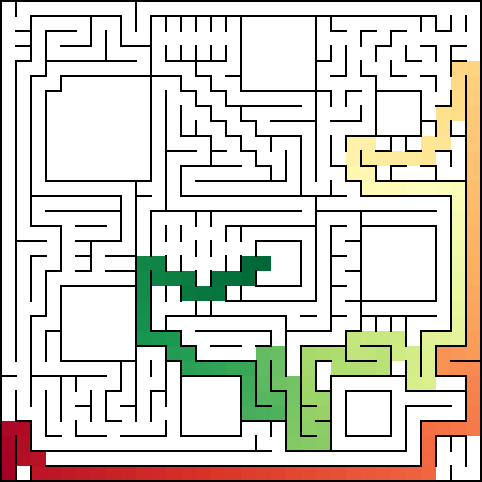
A solution is always made when you create an instance of Maze. To display the solution, use the show_solution() method from Utilities.
from mazely import Maze, Utilities

maze = Maze(path="resources/2019japan.maze")
utils = Utilities()
utils.show_solution()
Generate a maze and display its solution
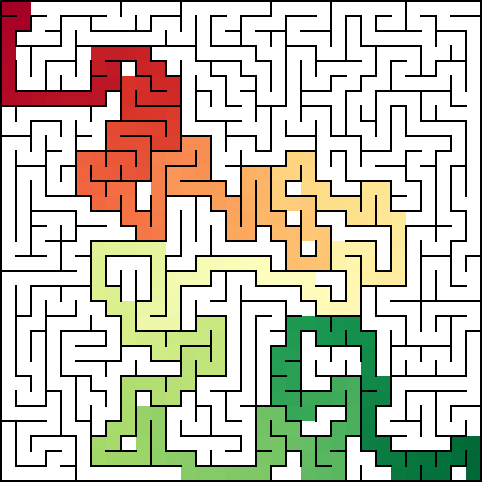
To generate a maze, pass the row and column counts as you create a Maze instance. Refer to the previous section to display its solution.
from mazely import Maze, Utilities

maze = Maze(32, 32)
utils = Utilities()
utils.show_solution()
Maze files
The library only supports a single maze format, as specified below.
File format
Each cell is 3 characters wide and 3 characters tall.
+---+
|   |
+---+
To specify the goal cell, replace the center with G.
+---+
| G |
+---+
And replace with S for the start cell.
+---+
| S |
+---+
Here is an example of a 3x3 maze.
+---+---+---+
|           |
+   +---+   +
|     G |   |
+---+---+   +
| S         |
+---+---+---+
Links
Here are a couple links to collections of maze files (format may not be supported):
1 maintainer

Metadata
1 maintainer
Release files for mazely 0.2.0
For a detailed explanation of source distributions (sdists) and built distributions (wheels), please see the package formats documentation.
Source distribution (sdist)
| File | Size | Uploaded | |
|---|---|---|---|
| mazely-0.2.0.tar.gz | 1.0 MB | Details |
Built distribution (wheel)
| File | Interpreter | ABI | Platform | Reset |
|---|---|---|---|---|
| mazely-0.2.0-py3-none-any.whl | Python 3 | none | any | Details |
Total release size: 1.1 MB
Release files / mazely-0.2.0.tar.gz
| Download URL | mazely-0.2.0.tar.gz |
|---|---|
| Size | 1.0 MB |
| Tags | Source |
|
SHA-256 checksum How to use checksums |
18c871d8a54a7ec6258c1a6f4ed8cdc91bed9ae0e6f3c3446d18c8ad072cbd4e
|
|
BLAKE2b-256 checksum How to use checksums |
0ed35a9396e6efef7e833c329049a34826978e5a094add6fda585d9eeaa662ef
|
| Upload date | |
|
Uploaded using Trusted Publishing? What is trusted publishing? |
Yes |
| Uploaded via |
twine/4.0.2 CPython/3.11.4
|
Release files / mazely-0.2.0-py3-none-any.whl
| Download URL | mazely-0.2.0-py3-none-any.whl |
|---|---|
| Size | 12.4 kB |
| Tags | Python 3 |
|
SHA-256 checksum How to use checksums |
a21b1c7310e5bcb5e8cff64a70ae862b4a7057c9a5bcfac268d0d855cc144abc
|
|
BLAKE2b-256 checksum How to use checksums |
cf56be4b4164032381088987256481ee1047ff1abccdf83ea6901fa4a0952d45
|
| Upload date | |
|
Uploaded using Trusted Publishing? What is trusted publishing? |
Yes |
| Uploaded via |
twine/4.0.2 CPython/3.11.4
|














