
Multiscale Byte Language Model

Project description
Multiscale Byte Language Model
Multiscale Byte Language Model is a hierarchical byte-level sequence-to-sequence model for multimodal tasks.
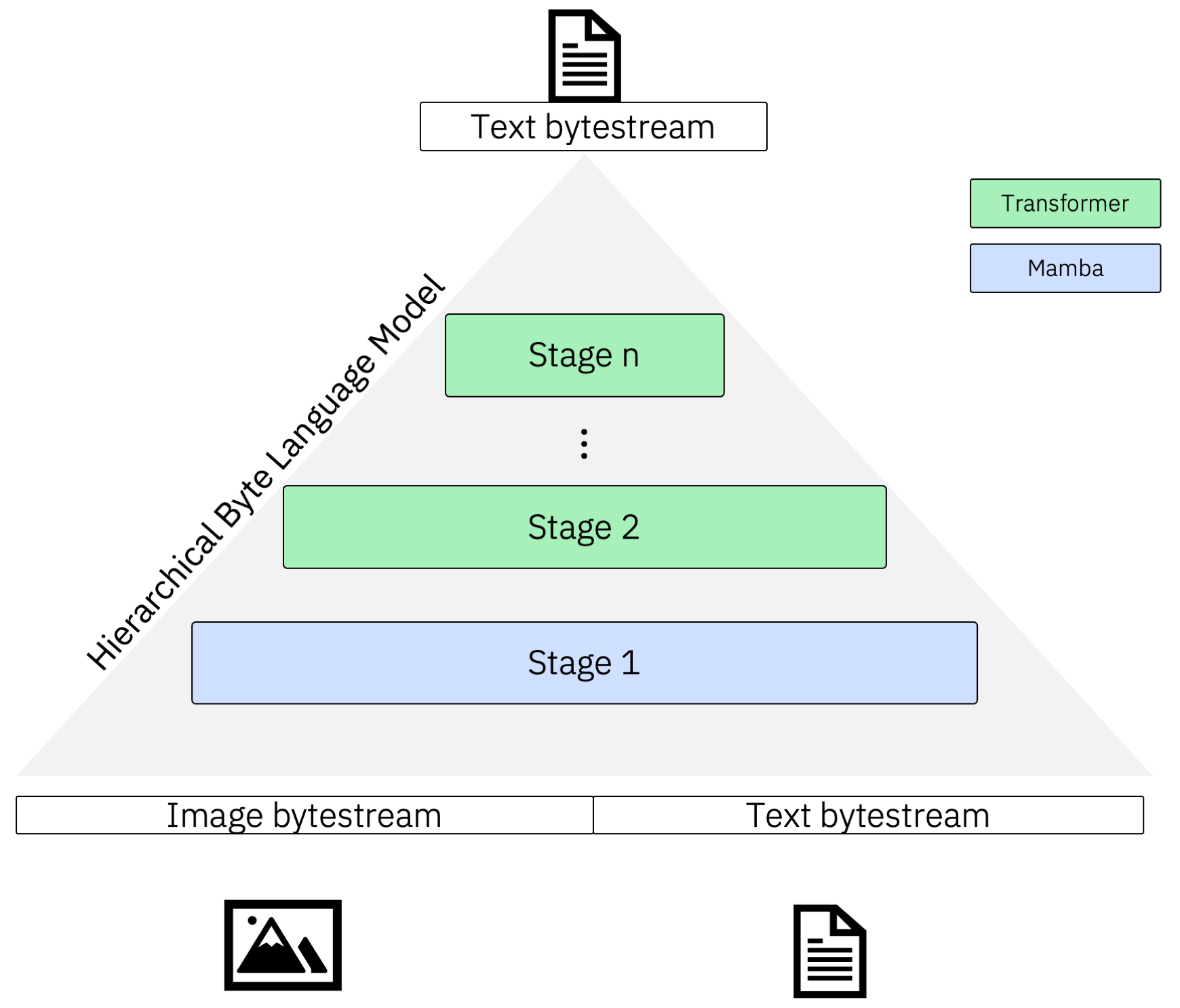
Install
MBLM is tested against Python versions 3.10, 3.11, 3.12 and 3.13.
Install from PyPI:
pip install mblm
For uv:
uv add mblm
Using Torch and Mamba
You will need to install a recent PyTorch version manually. We use >=2.4.1. It is best to do this after installing the package since some sub-dependencies might install their own (CPU) PyTorch version.
pip install 'torch>=2.4.1' --index-url https://download.pytorch.org/whl/cu124
Finally, in order to use the efficient Mamba-SSM, follow their instructions on the homepage. You'll need Linux and a GPU available during installation.
pip install mamba-ssm>=2.2.2 causal-conv1d>=1.4.0 --no-build-isolation
If mamba-ssm is not available, we fall back to using mambapy, which is written in pure PyTorch.
Quickstart
Using a built-in stage block
MBLM can be used with the default Transformer Decoder or Mamba block. The below model is a 2D MBLM with a global Mamba and local Transformer model.
import torch

from mblm import (
    MBLM,
    MambaBlock,
    MBLMModelConfig,
    MBLMReturnType,
    TransformerBlock,
)

mblm = MBLM(
    MBLMModelConfig(
        num_tokens=257,
        hidden_dims=[1024, 1024],
        seq_lens=[1024, 8],
        num_layers=[5, 5],
        pad_token_id=256,
        train_checkpoint_chunks=None,
        block=[
            MambaBlock(
                d_state=128,
                d_conv=4,
                expand=2,
                headdim=64,
                pos_emb_type=None,
            ),
            TransformerBlock(
                attn_head_dims=64,
                attn_num_heads=16,
                attn_use_rot_embs=True,
                use_flash_attn=True,
                pos_emb_type="fixed",
            ),
        ],
    )
)

x = torch.randint(0, 258, (1, 12)).long()

# Choose between any of the return types
logits = mblm.forward(x, return_type=MBLMReturnType.LOGITS)
loss = mblm.forward(x, return_type=MBLMReturnType.LOSS)
loss, logits = mblm.forward(x, return_type=MBLMReturnType.LOSS_LOGITS)

assert logits.shape == (1, 12, 257)
assert loss.ndim == 0
Alternatively, you can read configuration from a YAML string (or file):
import torch
import yaml

from mblm import MBLM, MBLMModelConfig, MBLMReturnType

yml_model_config = """
num_tokens: 257
hidden_dims: [1024, 1024]
seq_lens: [1024, 8]
num_layers: [5, 5]
pad_token_id: 256
train_checkpoint_chunks: null
block:
    - d_state: 128
      d_conv: 4
      expand: 2
      headdim: 64
      pos_emb_type: null
    - attn_head_dims: 64
      attn_num_heads: 16
      attn_use_rot_embs: true
      use_flash_attn: true
      pos_emb_type: fixed
"""

parsed_config = yaml.safe_load(yml_model_config)
mblm = MBLM(MBLMModelConfig.model_validate(parsed_config))
x = torch.randint(0, 258, (1, 12)).long()
mblm.forward(x, return_type=MBLMReturnType.LOSS)
Custom stage blocks
You can define custom stage blocks for MBLM as follows. A stageblock must provide a block_type field as well as a to_model function with the signature below that returns a torch.nn.Module. Other than that, specify whatever other parameters you might need. Note that the default blocks (Transformer and Mamba) are already registered.
import torch
from pydantic import Field

from mblm import MBLM, MBLMModelConfig, MBLMReturnType, TransformerBlock
from mblm.model.block import StageBlock

# Define any custom model
class LSTM(torch.nn.Module):
    def __init__(self, lstm: torch.nn.LSTM):
        super().__init__()
        self.lstm = lstm

    def forward(self, input_ids: torch.Tensor) -> torch.Tensor:
        # Wrap the LSTM forward to extract the output
        out, _ = self.lstm(input_ids)
        return out

# Add a block config and inherit from StageBlock
class LSTMBlock(StageBlock):
    block_type: str = Field(init=False, default="lstm")

    # Add whatever is needed
    dropout: float

    def to_model(self, model_dim: int, num_layers: int) -> torch.nn.Module:
        return LSTM(
            torch.nn.LSTM(
                input_size=model_dim,
                hidden_size=model_dim,
                batch_first=True,
                dropout=self.dropout,
                num_layers=num_layers,
            )
        )

mblm = MBLM(
    MBLMModelConfig(
        num_tokens=257,
        hidden_dims=[1024, 1024],
        seq_lens=[1024, 8],
        num_layers=[5, 5],
        pad_token_id=256,
        train_checkpoint_chunks=None,
        block=[
            LSTMBlock(
                dropout=0.1,
                pos_emb_type=None,
            ),
            TransformerBlock(
                attn_head_dims=64,
                attn_num_heads=16,
                attn_use_rot_embs=True,
                use_flash_attn=True,
                pos_emb_type="fixed",
            ),
        ],
    )
)

x = torch.randint(0, 258, (1, 12)).long()
mblm.forward(x, return_type=MBLMReturnType.LOSS)
If you want to parse a YAML config to a custom block, register the block before creating the model:
import torch
import yaml
from pydantic import Field

from mblm import MBLM, MBLMModelConfig, MBLMReturnType
from mblm.model.block import StageBlock
from mblm.model.config import block_registry  # Add this!

# Define any custom model
class MyLSTM(torch.nn.Module):
    def __init__(self, lstm: torch.nn.LSTM):
        super().__init__()
        self.lstm = lstm

    def forward(self, input_ids: torch.Tensor) -> torch.Tensor:
        # Wrap the LSTM forward to extract the output
        out, _ = self.lstm(input_ids)
        return out

# Add a block config and inherit from StageBlock
class LSTMBlockConfig(StageBlock):
    block_type: str = Field(init=False, default="lstm")

    # Add whatever is needed
    dropout: float

    def to_model(self, model_dim: int, num_layers: int) -> torch.nn.Module:
        return MyLSTM(
            torch.nn.LSTM(
                input_size=model_dim,
                hidden_size=model_dim,
                batch_first=True,
                dropout=self.dropout,
                num_layers=num_layers,
            )
        )

yml_model_config = """
num_tokens: 257
hidden_dims: [1024, 1024]
seq_lens: [1024, 8]
num_layers: [5, 5]
pad_token_id: 256
train_checkpoint_chunks: null
block:
    - dropout: 0.1
      pos_emb_type: null
    - attn_head_dims: 64
      attn_num_heads: 16
      attn_use_rot_embs: true
      use_flash_attn: true
      pos_emb_type: fixed
"""

block_registry.register(LSTMBlockConfig)  # Add this!

parsed_config = yaml.safe_load(yml_model_config)
mblm = MBLM(MBLMModelConfig.model_validate(parsed_config))
x = torch.randint(0, 258, (1, 12)).long()
mblm.forward(x, return_type=MBLMReturnType.LOSS)
Custom datasets
If you want to use the MBLM trainer with torchrun with a custom dataset, you will need to add a few special methods. Here is an end-to-end example where you launch training on your own:
# Filename: train_my_mblm.py

import torch
from typing_extensions import Unpack

from mblm import MambaBlock, TransformerBlock
from mblm.data.datasets import DistributedDataset, DistributedDatasetConfig
from mblm.data.types import BatchWithLossMask, ModelMode
from mblm.train.core.config import CoreTrainConfig
from mblm.train.mblm import (
    TrainEntryConfig,
    TrainMBLMIoConfig,
    TrainMBLMParams,
    dataset_registry,
    train_mblm,
)


class MyDataset(DistributedDataset[BatchWithLossMask]):
    def __init__(
        self,
        mode: ModelMode,
        dataset_dir: str,
        **args: Unpack[DistributedDatasetConfig],
    ):
        # Dummy example - Get data from anywhere, e.g., the disk
        print(f"Reading dataset from {dataset_dir}")
        if mode == ModelMode.TRAIN:
            data = list(range(10_000))
        else:
            data = list(range(2_000))
        self._data = data
        super().__init__(
            data_size=len(data),
            is_sequential=True,  # We have a sequential dataset
            **args,
        )

    def get_sample(self, from_idx: int):
        """
        Tell the superclass how to get a single sample - here, a sequence of
        the specified length.
        """
        data = torch.tensor(self._data[from_idx : from_idx + self.seq_len])
        return torch.ones_like(data), data

    @staticmethod
    def from_train_entry_config(
        config: TrainEntryConfig,
        mode: ModelMode,
        worker_id: int,
        num_workers: int,
    ) -> DistributedDataset[BatchWithLossMask]:
        """
        How to parse a training config to a dataset.
        """
        return MyDataset(
            dataset_dir=config.io.dataset_dir,
            mode=mode,
            seq_len=config.params.input_seq_len,
            num_workers=num_workers,
            worker_id=worker_id,
        )

    @staticmethod
    def supports_test_mode() -> bool:
        """
        Whether or not this dataset supports a test mode. Some datasets might not
        expose the answers in their test set so we cannot evaluate a model on it.
        Override if necessary
        """
        return True


# Register dataset with a unique ID
dataset_registry.register("mydataset", MyDataset)

config = TrainEntryConfig(
    io=TrainMBLMIoConfig(
        dataset_dir="data/datasets/my-dataset",
        dataset_id="mydataset",  # Must match the ID above
        name_model="my-model",
        output_dir="data/outputs",
        num_models_to_save=3,
        validate_amount=20,
        log_train_loss_amount=100,
    ),
    train=CoreTrainConfig(
        batch_size=1,
        target_elements=1000,
        target_elements_strategy="sequence",
        learning_rate=0.001,
        gradient_accumulate_every=4,
        gradient_clipping=1,
        shuffle_train=True,
        shuffle_eval=False,
    ),
    params=TrainMBLMParams(
        input_seq_len=128,
        num_tokens=257,
        hidden_dims=[512, 512],
        seq_lens=[16, 8],
        num_layers=[5, 5],
        pad_token_id=256,
        train_checkpoint_chunks=None,
        block=[
            MambaBlock(
                d_state=128,
                d_conv=4,
                expand=2,
                headdim=64,
                pos_emb_type=None,
            ),
            TransformerBlock(
                attn_head_dims=64,
                attn_num_heads=16,
                attn_use_rot_embs=True,
                use_flash_attn=True,
                pos_emb_type="fixed",
            ),
        ],
    ),
)

if __name__ == "__main__":
    train_mblm(config)
Then, run the above file with:
OMP_NUM_THREADS=1 uv run torchrun --standalone \
    --nproc_per_node=gpu train_my_mblm.py
Generally, training is started from a config file in YAML format. The above is just to give an idea of how everything works together.
Check the example configs - they should look very similar to the config above - and how we launch training (with scripts/train_mblm.py). With any config, simply run:
bash scripts/train_mblm.py -c <your-config>
Which will launch torchrun with all the necessary configuration.
Alternatively, you can always subclass the core trainer and do things you way. There are many examples in the source dir and the end-to-end tests.
Local development setup
We use uv for packaging and dependency management. Before proceeding, install a recent version (>= 0.5) via the instructions on the homepage.
Install dependencies
- With CUDA:
make install_cuda - CPU only (e.g., MacOS):
make install_cpu
If you've noticed, there are two SSM/Mamba dependencies:
mambapy, defined inpyproject.tomlmamba-ssm(withcausal-conv1d), defined inMakefile
Because the official Mamba implementation mamba-ssm requires a Linux machine and a GPU available during installation, we shim the dependencies. mambapy is used as a fallback for all unsupported platforms or when mamba-ssm is not installed. Because mamba-ssm is so delicate, it needs to be installed manually:
make install_mamba
For any experiments, we wish to use the new Mamba 2 block from mamba-ssm. If the import of this module fails, we fall back to a Mamba 1 block from mambapy, which is written in pure PyTorch.
Running scripts
- Project-related tasks (e.g., installing dependencies, running tests) are defined in the Makefile
Pre-Commit Hooks
Before every commit, we lint the staged Python and Jupyter Notebook files and check if they are formatted correctly. Doing this locally speeds up development because one does not have to wait for the CI to catch issues. Errors of these checks are not fixed automatically, instead, you will have to fix the files yourself before committing. You may bypass hooks with git commit -m <message> --no-verify. However, the CI will likely fail in this case.
All Pre-commit hooks can be run manually as well:
pre-commit run lintpre-commit run check-format
Note that:
- The
lintcommand is similar to themake lintcommand, but themakecommand operates on all files in the project and not just the staged files - While
check-formatsimply checks the format,make formatwill actually format the files
Citation
TBD.


Download files
Download the file for your platform. If you're not sure which to choose, learn more about installing packages.
Source Distribution
Built Distribution
Filter files by name, interpreter, ABI, and platform.
If you're not sure about the file name format, learn more about wheel file names.
Copy a direct link to the current filters
File details
Details for the file mblm-0.2.0.tar.gz.
File metadata
- Download URL: mblm-0.2.0.tar.gz
- Upload date:
- Size: 52.7 kB
- Tags: Source
- Uploaded using Trusted Publishing? No
- Uploaded via: uv/0.5.16
File hashes
| Algorithm | Hash digest | |
|---|---|---|
| SHA256 |
739cc4ebfc31d309841853f3c99bdc248c0a622c4935e98ddbb7063804f515fd
|
|
| MD5 |
e2e9f85d57a6111d103dfc86d126b9d6
|
|
| BLAKE2b-256 |
1a7ad9b54e2f9e65922a4c5ab44d0c6824fa860ed464d2ada39e524d384ee449
|
File details
Details for the file mblm-0.2.0-py3-none-any.whl.
File metadata
- Download URL: mblm-0.2.0-py3-none-any.whl
- Upload date:
- Size: 82.9 kB
- Tags: Python 3
- Uploaded using Trusted Publishing? No
- Uploaded via: uv/0.5.16
File hashes
| Algorithm | Hash digest | |
|---|---|---|
| SHA256 |
c6555278ce2efe1a4cc766b225f9555ace3660b2698afb2b0d07d1f62c2eacb4
|
|
| MD5 |
34579429d05d5cc6d03f928b362276db
|
|
| BLAKE2b-256 |
fbda519e035dca5f503f2a0f41498e26cce2e62f6d8099adfc3e97802409f8ac
|






