
mcast-tools
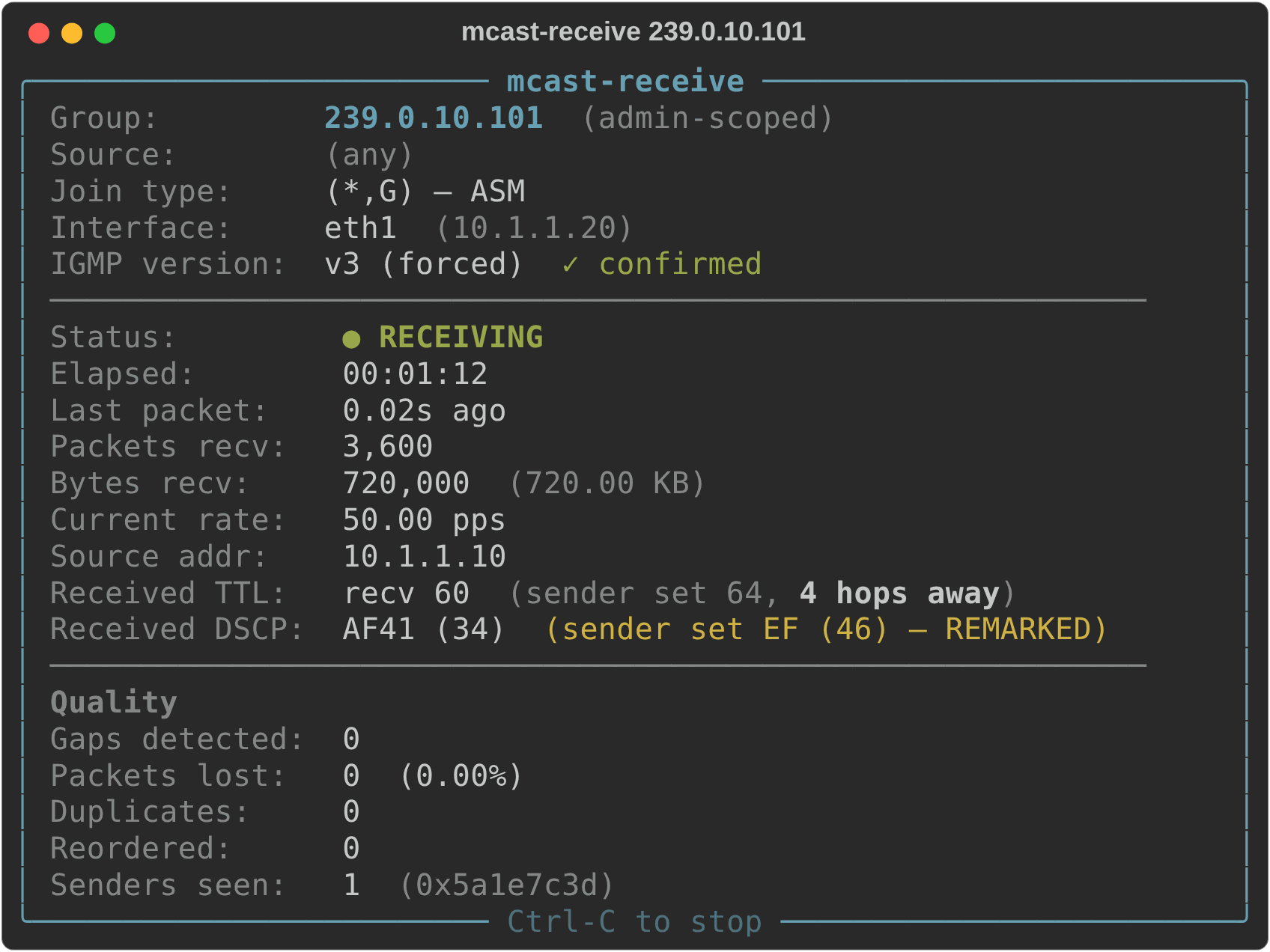
Multicast you can see. Send and receive IPv4 and IPv6 multicast on Linux and Windows, with live dashboards that show loss, duplicates and reordering as they happen, plus hop count and DSCP remarking on Linux receivers.
pipx install mcast-tools # or: pip install mcast-tools
Why mcast-tools?
iperf can push multicast. mcast-tools shows you what the network did to
it:
- Live dashboards. Status, rate, loss, duplicates, reordering and stalls, updated in real time.
- Hop count and DSCP remark detection. Every packet carries the TTL and DSCP its sender set, so a Linux receiver shows how far it travelled and whether anything on the path re-marked it.
- ASM and SSM. Any-source
(*,G)and source-specific(S,G)joins, with the IGMPv3/MLDv2 rules enforced and explained. - IGMP/MLD version control. Force IGMPv1–3 or MLDv1–2 on an interface for the length of a run, restored on exit (Linux, as root).
- IPv4 and IPv6, auto-detected. The group decides:
239.0.10.101is IPv4,ff3e::8000:1is IPv6. No flags. - Script-friendly.
--quietand--jsongive one-line summaries for automation.
Quick start
No lab needed: two terminals on one machine will do. In the first:
mcast-receive 239.0.10.101
In the second, or on another host:
mcast-send 239.0.10.101
Receiving on Windows? Allow inbound UDP port 19779 in Windows Defender Firewall first, with one PowerShell command.
A few more to try:
# SSM: accept one source only (pin the sender's source to match)
mcast-receive 232.1.1.1 --source 10.1.1.10
mcast-send 232.1.1.1 --source 10.1.1.10

# The same over IPv6, with MLDv2
mcast-receive ff3e::8000:1 --source 2001:db8::5
mcast-send ff3e::8000:1 --source 2001:db8::5

# Mark traffic EF; a Linux receiver flags any remarking along the path
mcast-send 239.0.10.101 --rate 1Mbps --dscp ef --ttl 64

# Which groups is this host joined to? (Linux)
mcast-status
Every command has --help listing all of its options.
The tools
| Command | What it does |
|---|---|
mcast-send |
Streams multicast at your chosen rate, size, TTL and DSCP |
mcast-receive |
Joins ASM or SSM and runs the live dashboard |
mcast-status |
Lists the host's group memberships (Linux) |
Linux and Windows
mcast-send and mcast-receive run natively on both. On Windows 11,
mcast-receive is verified with Linux senders over IPv4 and IPv6, ASM and
SSM, and mcast-send over IPv4.
Linux-only for now: mcast-status, IGMP/MLD version forcing, hop count and
DSCP remark detection on the receiving side, choosing the interface
(Windows uses its default one; IPv6 receivers can take an interface
index), and sending to link-local IPv6 groups.
Learn more
The guide covers every option, IPv6 scopes and zones, SSM source pinning, the Windows details and what's on the wire.
Python 3.10+. MIT licensed.
1 maintainer

Metadata
1 maintainer
Release files for mcast-tools 0.2.3
For a detailed explanation of source distributions (sdists) and built distributions (wheels), please see the package formats documentation.
Source distribution (sdist)
| File | Size | Uploaded | Provenance | Actions |
|---|---|---|---|---|
| mcast_tools-0.2.3.tar.gz | 49.9 kB | With provenance | Details for mcast_tools-0.2.3.tar.gz |
Built distribution (wheel)
| File | Interpreter | ABI | Platform | Actions Reset |
|---|---|---|---|---|
| mcast_tools-0.2.3-py3-none-any.whl | Python 3 | none | any | Details for mcast_tools-0.2.3-py3-none-any.whl |
Total release size: 85.6 kB
Release files / mcast_tools-0.2.3.tar.gz
| Download URL | mcast_tools-0.2.3.tar.gz |
|---|---|
| Size | 49.9 kB |
| Tags | Source |
|
SHA-256 checksum How to use checksums |
b014ebd7cf0de87b8107c04be1640b55ab46d1a6fd58fc0159cdedf4d8a12232
|
|
BLAKE2b-256 checksum How to use checksums |
794f78e2a14e74b175d6442971a60ac457ca38815355b51600f82f201d3f6619
|
| Upload date | |
|
Uploaded using Trusted Publishing? What is trusted publishing? |
Yes |
| Uploaded via |
twine/7.0.0 CPython/3.13.16
|
Provenance
Provenance describes where a file came from. On PyPI, provenance is shared via attestations, which provide a verifiable record of the build or publishing details. View details, limitations and caveats.


PyPI Publish Attestation
PyPI verified that this artifact, at this checksum, originated from the publisher listed below.
Signed by GitHub Actions, verified by PyPI on Nov 18, 2026.
Transparency logRelease files / mcast_tools-0.2.3-py3-none-any.whl
| Download URL | mcast_tools-0.2.3-py3-none-any.whl |
|---|---|
| Size | 35.7 kB |
| Tags | Python 3 |
|
SHA-256 checksum How to use checksums |
a6889a220f81c81d1ad7424577a2fe596e3607cc5b2a8b02760ded2fcf8479d5
|
|
BLAKE2b-256 checksum How to use checksums |
21de7afefa92846cda55b3455710dcd982bc5f45306fb4f371166db44bb484d3
|
| Upload date | |
|
Uploaded using Trusted Publishing? What is trusted publishing? |
Yes |
| Uploaded via |
twine/7.0.0 CPython/3.13.16
|
Provenance
Provenance describes where a file came from. On PyPI, provenance is shared via attestations, which provide a verifiable record of the build or publishing details. View details, limitations and caveats.
PyPI Publish Attestation
PyPI verified that this artifact, at this checksum, originated from the publisher listed below.
Signed by GitHub Actions, verified by PyPI on Nov 18, 2026.
Transparency logSecurity for mcast-tools 0.2.3
Provenance
Provenance describes where a file came from. On PyPI, provenance is shared via attestations, which provide a verifiable record of the build or publishing details. View details, limitations and caveats.
Full provenance
Both files in this release have been uploaded with provenance metadata.
Attestation for mcast_tools-0.2.3.tar.gz
PyPI Publish Attestation
PyPI verified that this artifact, at this checksum, originated from the publisher listed below.
Signed by GitHub Actions, verified by PyPI on Nov 18, 2026.
Transparency logA note on package security
PyPI is a repository for distributing packages, not a service for auditing them. While third-party security researchers and our staff do their best to detect and remove malicious packages, PyPI cannot guarantee the quality, security or suitability of any given package.
To learn more about protecting yourself from malicious actors, visit our package security documentation.














