



mcBase64x32
A high-performance Base64x32 implementation specialized for maximizing data storage in Minecraft books, written in Rust for maximum performance.
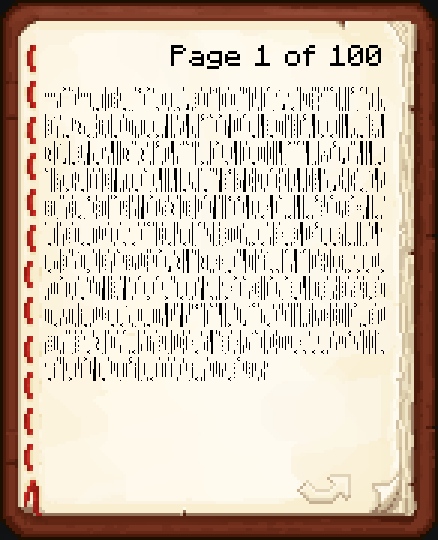
Minecraft book page filled with mcbase64x32 characters
Overview
mcBase64x32 is a custom encoding scheme designed specifically for storing data efficiently in Minecraft books. It uses a 64x32-2-character alphabet using Unicode characters of pixel width of 1 and 2 and by combining these characters we achieve optimal compression while keeping the Minecraft book limits of characters and pixels.
We basically use a bunch of 1 and 2 pixel width Unicode characters to build 2048 unique pairs of them that then we use to encode and decode data.
Features
- High Performance: Implemented in Rust for ultra-fast encoding/decoding
- Minecraft Optimized: Designed specifically for maximum data storage in Minecraft books
- Zero Dependencies: No external Python dependencies required
Installation
Using uv (Recommended)
uv add mcbase64x32
Using pip
pip install mcbase64x32
From Source
git clone https://github.com/victordlp8/mcBase64x32.git
cd mcBase64x32
uv sync
uv tool install -e .
Quick Start
import mcbase64x32


# Encode data
data = b"Hello, Minecraft World!"
encoded = mcbase64x32.encode(data)
print(f"Encoded: {encoded}")

# Decode data
decoded = mcbase64x32.decode(encoded)
print(f"Decoded: {decoded.decode()}")

# Check compression ratio
original_size = len(data)
encoded_size = len(encoded)
compression_ratio = original_size / encoded_size
print(f"Compression ratio: {compression_ratio:.2f}x")
API Reference
Functions
encode(payload: bytes) -> str
Encodes binary data into mcBase64x32 format.
Parameters:
payload(bytes): The binary data to encode
Returns:
str: The encoded string in mcBase64x32 format
decode(text_in_mcbase64x32: str) -> bytes
Decodes mcBase64x32 string back to binary data.
Parameters:
text_in_mcbase64x32(str): The encoded string to decode
Returns:
bytes: The decoded binary data
Raises:
ValueError: If the encoded string contains invalid characters
Constants
MAX_BYTES_PER_PAGE
The maximum number of bytes that can be stored per Minecraft book page (694 bytes).
How It Works
mcBase64x32 uses a custom encoding scheme that:
- Converts data to 11-bit chunks: Each chunk represents a value from 0-2047
- Maps to Unicode characters: Uses a custom built 64x32-2-character alphabet made of pairs of Unicode characters
- Optimizes for Minecraft: Designed specifically for maximum data storage in Minecraft books
- Includes dynamic length header: up to 32-bit length prefix ensures proper decoding
- Rust-powered: Compiled Rust extension for maximum performance
Performance
The implementation is optimized for speed using:
- Rust compilation: Native compiled code for maximum performance
- Pre-computed lookup tables: Character mappings are pre-calculated at compile time
- Bit manipulation: Efficient binary operations for encoding/decoding
- Memory optimization: Minimal memory allocations during processing
Testing
Run the test suite:
# Using uv
uv run pytest

# Using pytest directly
pytest

# With coverage
uv run pytest --cov=mcbase64x32
Requirements
- Python >= 3.13
- No external dependencies required
Development
Setup Development Environment
git clone https://github.com/victordlp8/mcBase64x32.git
cd mcBase64x32
uv sync
Running Tests
uv run pytest
Building Package
uv build
License
This project is licensed under the MIT License - see the LICENSE file for details.
Authors
- ThorTuwy - Initial work and inventor of the custom base
- victordlp8 - Main developer and maintainer
1 maintainer

Metadata
1 maintainer
Release files for mcbase64x32 2.0.1
For a detailed explanation of source distributions (sdists) and built distributions (wheels), please see the package formats documentation.
Source distribution (sdist)
| File | Size | Uploaded | Provenance | Actions |
|---|---|---|---|---|
| mcbase64x32-2.0.1.tar.gz | 47.1 kB | Without provenance | Details for mcbase64x32-2.0.1.tar.gz |
Release files / mcbase64x32-2.0.1.tar.gz
| Download URL | mcbase64x32-2.0.1.tar.gz |
|---|---|
| Size | 47.1 kB |
| Tags | Source |
|
SHA-256 checksum How to use checksums |
cefc52cbee7091c6b4fdbe31b93889c6c8942385ff72584f368224b98ed35157
|
|
BLAKE2b-256 checksum How to use checksums |
8c8628497e45808eb5adac43f67d5c44792f15eebf3a25e5bada5e5fa8883acf
|
| Upload date | |
|
Uploaded using Trusted Publishing? What is trusted publishing? |
Yes |
| Uploaded via |
uv/0.9.26 {"installer":{"name":"uv","version":"0.9.26","subcommand":["publish"]},"python":null,"implementation":{"name":null,"version":null},"distro":{"name":"Ubuntu","version":"24.04","id":"noble","libc":null},"system":{"name":null,"release":null},"cpu":null,"openssl_version":null,"setuptools_version":null,"rustc_version":null,"ci":true}
|
Security for mcbase64x32 2.0.1
Provenance
Provenance describes where a file came from. On PyPI, provenance is shared via attestations, which provide a verifiable record of the build or publishing details. View details, limitations and caveats.
No provenance found
None of the files in this release were uploaded with provenance metadata.
A note on package security
PyPI is a repository for distributing packages, not a service for auditing them. While third-party security researchers and our staff do their best to detect and remove malicious packages, PyPI cannot guarantee the quality, security or suitability of any given package.
To learn more about protecting yourself from malicious actors, visit our package security documentation.














