

Blueprints
Text-based structures for Minecraft.



Blueprints are a text-based structure format for Minecraft optimized for human-readability. A blueprint compiles-down to a single NBT structure file that can be loaded with a structure block.
Here are some reasons you may want to use blueprints:
- They can be diff'd and properly included in version control, unlike their NBT equivalent.
- They are far smaller and less repetitive than their SNBT equivalent, which is often used for version control.
- They can be expressed purely through text, without having to think about the underlying structure format (and without having to open the game).
- They can be updated to (and optimized for) a newer version of the game, just by re-running the CLI with the
--data_versionargument. - They have the potential to take up significantly less space than their NBT equivalent, for codebases that take advantage of composition.
Keep in mind that - although they are optimized for human-readbility - blueprints aren't nearly as "hands-on" as editing structures in-game. There are pros and cons to either approach, and the case for blueprints should be weighed carefully based on project size and complexity.
Usage
Blueprints are created and maintained in the same way as vanilla resources, but under a made-up blueprints folder.
See the examples and the demo pack for reference.
The most basic invocation of the CLI looks like this:
python -m blueprints build --input path/to/input/pack --output path/to/output/pack --data_version 2715
--inputis the path to the input pack. This is where your blueprints reside.--outputis the path to the output pack. This is where the generated structures files will be placed. This can be the same as the input pack, but beware of overwriting existing files.--data_versionis required and2715should be replaced with the version of the game you are targeting.
Run python -m mcblueprints build --help for a complete list of options.
Examples
All examples use YAML instead of JSON, but the YAML used is 1:1 convertible to/from JSON.
See the full demo pack for a complete set of examples.
This first example uses basic blocks to create a simple structure.
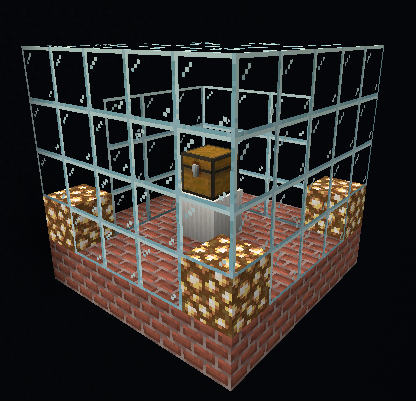
fleecy_box:base
data/fleecy_box/blueprints/base.yaml
# Restrict the size of the structure. An error will be raised if anything extends
# outside of these bounds. This goes by (x, y, z) or (length x height x width).
size: [5, 5, 5]

# The palette maps characters to different types of palette entries that describe how to
# populate the structure. These can be blocks as well as other blueprints.
palette:
  # Strings are assumed to be basic blocks.
  _: minecraft:air
  g: minecraft:glass
  c: minecraft:glowstone
  b: minecraft:bricks
  # To define block states, use the block type entry.
  P:
    type: block
    name: minecraft:quartz_pillar
    state:
      axis: y
  X:
    type: block
    name: minecraft:tnt
    state:
      unstable: true
  # To define NBT data, use the block type entry.
  T:
    type: block
    name: minecraft:trapped_chest
    data:
      Items:
        - id: minecraft:diamond
          Count: 1b
          Slot: 13b

# The layout is a 2-D list of strings (a 3-D list of characters) that says how to build
# the structure, piece by piece, using the palette. Note that the first section of the
# layout corresponds to the top-most layer of blocks in the structure.
layout:
  - - ggggg
    - ggggg
    - ggggg
    - ggggg
    - ggggg

  - - ggggg
    - g___g
    - g___g
    - g___g
    - ggggg

  - - ggggg
    - g___g
    - g_T_g
    - g___g
    - ggggg

  - - cgggc
    - g___g
    - g_P_g
    - g___g
    - cgggc

  - - bbbbb
    - bbbbb
    - bbXbb
    - bbbbb
    - bbbbb
This next example uses composition and a filter to include a modified version of another blueprint.
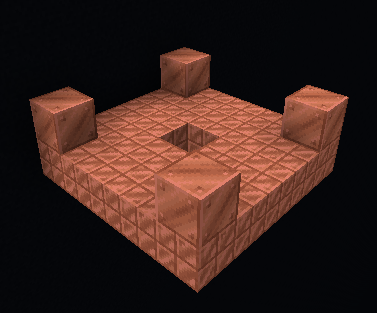
fleecy_box:copper
data/fleecy_box/blueprints/copper.yaml
# Make sure to account for any included structures in the final structure.
size: [5, 5, 5]

palette:
  # Blueprints are composable. They can be included within one another, and the final
  # structure will be a flattened version with a minimal palette.
  B:
    type: blueprint
    blueprint: fleecy_box:base
    # A filter changes the way blocks are included from other blueprints.
    filter: fleecy_box:copperize

layout:
  - - B
Note the use of a filter: these can be used to change the way blocks are included from other blueprints.
fleecy_box:copperize
data/fleecy_box/filters/copperize.yaml
# Replace one block with another block.
- type: replace_blocks
  blocks:
    - minecraft:bricks
  replacement: minecraft:cut_copper

- type: replace_blocks
  blocks:
    - minecraft:glowstone
    - minecraft:quartz_pillar
  replacement: minecraft:copper_block

# Keep only the listed blocks, discarding the rest.
- type: keep_blocks
  blocks:
    - minecraft:copper_block
    - minecraft:cut_copper
1 maintainer

Metadata
1 maintainer
Release files for mcblueprints 0.1.0
For a detailed explanation of source distributions (sdists) and built distributions (wheels), please see the package formats documentation.
Source distribution (sdist)
| File | Size | Uploaded | |
|---|---|---|---|
| mcblueprints-0.1.0.tar.gz | 19.7 kB | Details |
Built distribution (wheel)
| File | Interpreter | ABI | Platform | Reset |
|---|---|---|---|---|
| mcblueprints-0.1.0-py3-none-any.whl | Python 3 | none | any | Details |
Total release size: 47.9 kB
Release files / mcblueprints-0.1.0.tar.gz
| Download URL | mcblueprints-0.1.0.tar.gz |
|---|---|
| Size | 19.7 kB |
| Tags | Source |
|
SHA-256 checksum How to use checksums |
b49a4f510c0789748868f340831a1030d85aeea17f4815e4dc3bd664b5684c0f
|
|
BLAKE2b-256 checksum How to use checksums |
39610f228fed5b28ee018242aba36ad2910f010aaca1260ed37293318eae8a85
|
| Upload date | |
|
Uploaded using Trusted Publishing? What is trusted publishing? |
No |
| Uploaded via |
poetry/1.1.4 CPython/3.8.5 Linux/5.4.72-microsoft-standard-WSL2
|
Release files / mcblueprints-0.1.0-py3-none-any.whl
| Download URL | mcblueprints-0.1.0-py3-none-any.whl |
|---|---|
| Size | 28.2 kB |
| Tags | Python 3 |
|
SHA-256 checksum How to use checksums |
71e98c082a92cff3ed610d07cc166c6e6cd8db3557b436d412d0f7abefd8c902
|
|
BLAKE2b-256 checksum How to use checksums |
2864b2172755158078580ca03d8c7aefb72c9c64a53883be965e831e5e20468a
|
| Upload date | |
|
Uploaded using Trusted Publishing? What is trusted publishing? |
No |
| Uploaded via |
poetry/1.1.4 CPython/3.8.5 Linux/5.4.72-microsoft-standard-WSL2
|













