






Reads Standard BioTools .mcd files and writes OME-TIFFs for QuPath, Napari and Fiji — from a desktop app, the command line or Python.
- Convert — each region (ROI) becomes its own multi-channel OME-TIFF.
- Stitch — all regions onto one canvas, placed by recorded stage coordinates.
- Post-process — channel subsets, pyramidal copies, re-compression.
🚀 Quick start
Requires Python 3.9+. Runs on Windows, macOS and Linux.
pip install mcd_stitcher
Then open the desktop app:
mcd_gui
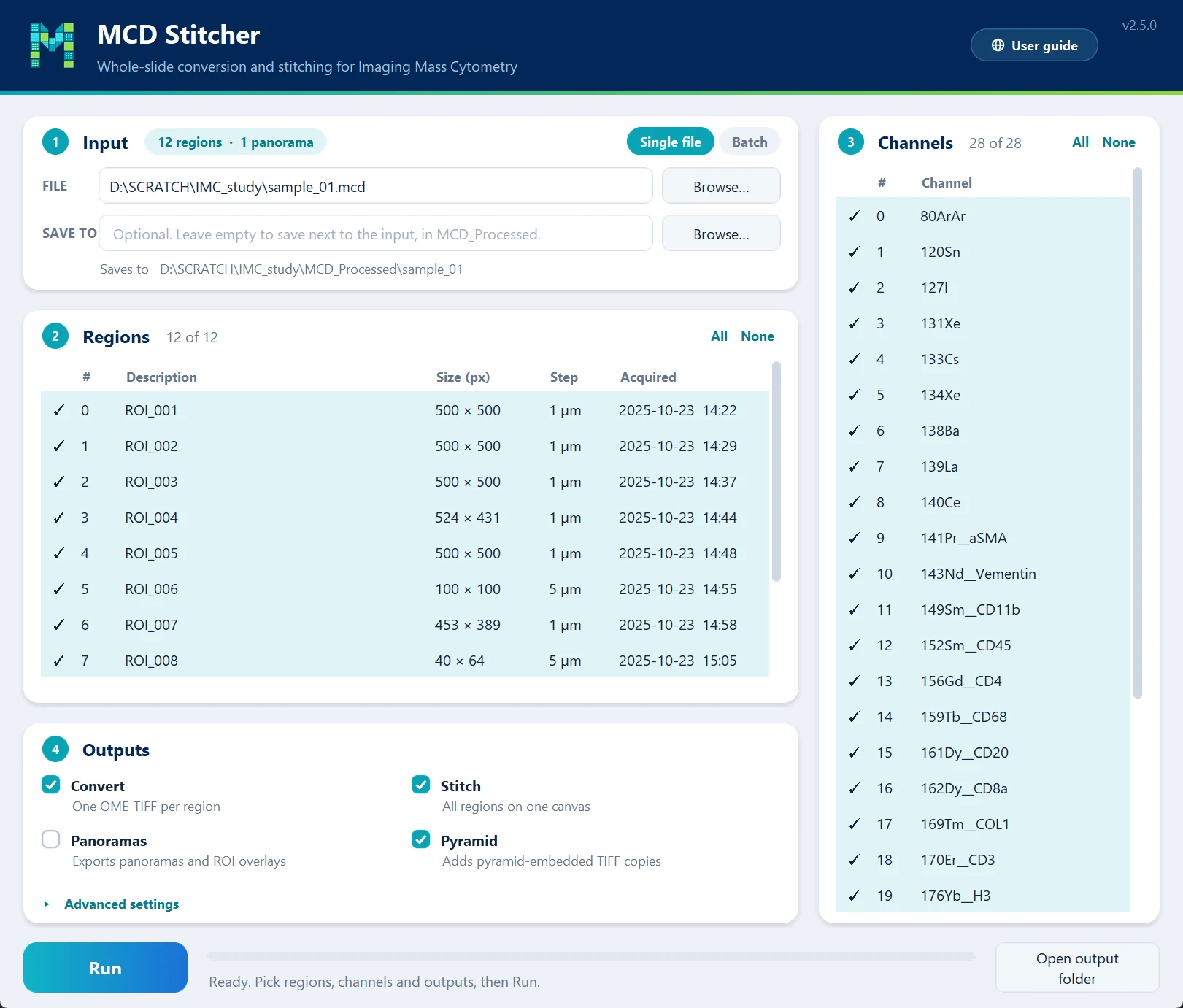
Choose a .mcd file — or switch to Batch for a folder of them — tick the outputs you want and press Run. Everything lands in MCD_Processed/<file name>/, next to your input.
💡 Tip — tick Pyramid as well. It adds tiled, multi-resolution copies that let large stitched files pan and zoom smoothly, especially on low-RAM systems.
Prefer the command line or Python? The command-line guide and the Python API are in the documentation, along with tutorials and troubleshooting:

🔬 How it works
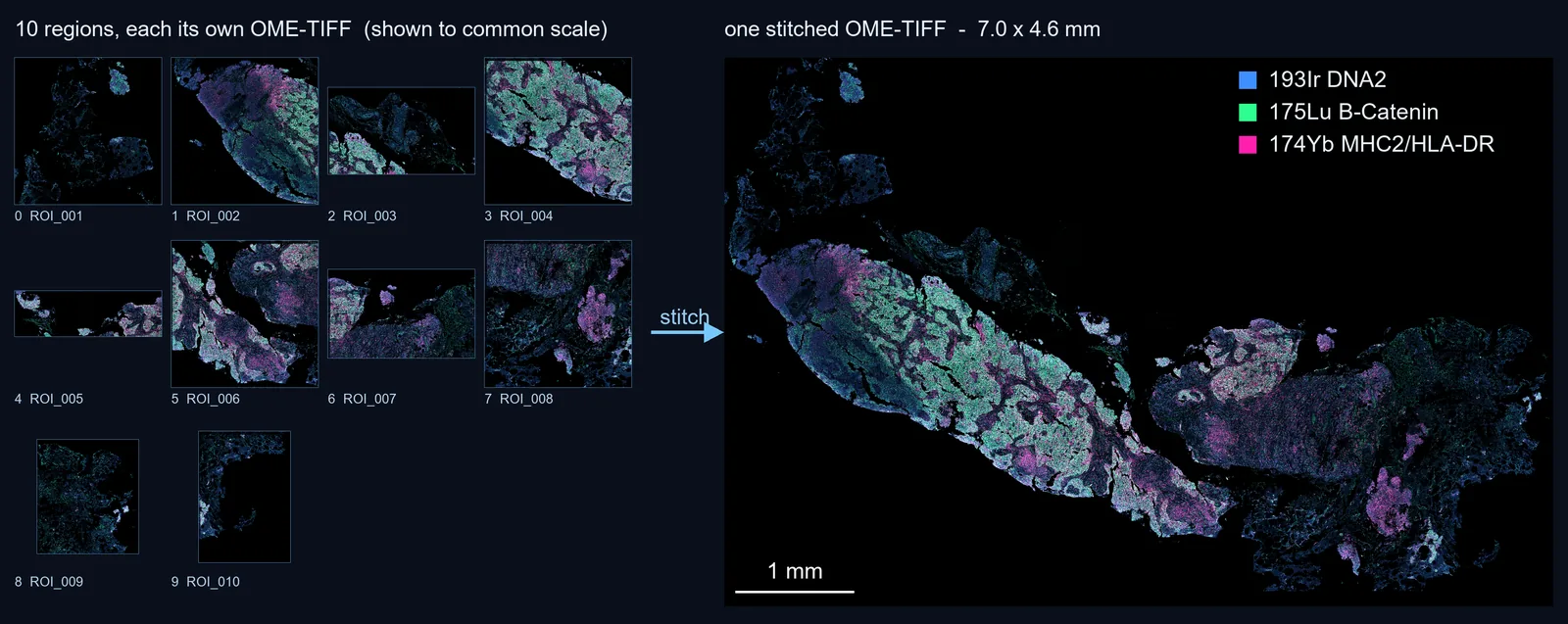
Left: Ten regions from one .mcd file, shown to common scale. Right: the same ten placed on a single 7.0 × 4.6 mm canvas at 0.5 µm/px.
- Read — each region comes straight out of the
.mcdfile with its channels, pixel size and stage position. - Convert — every region is written to its own OME-TIFF, channel names included.
- Stitch — the regions are placed on one canvas at their recorded stage positions: no registration, no seam blending. Regions acquired at different step sizes are resampled onto the finest common grid, and where regions overlap the earliest acquisition stays on top.
- Post-process — optional channel subsets and pyramidal copies, made from the files above.
Large slides are processed in pieces sized to the memory available, so the same run works on a laptop and on a cluster node.
⚡ Commands
| Command | What it does |
|---|---|
mcd_gui |
The desktop app, for one file or a batch. |
mcd_process |
Everything in one command: convert, stitch, panoramas and post-processing. |
mcd_convert, mcd_stitch |
One step each. |
tiff_subset |
Channel subsets and pyramids from existing OME-TIFFs. |
mcd_process "file.mcd" -m                     # inspect: regions, panoramas, channel indices
mcd_process "folder/" --convert --stitch      # every .mcd in a folder, both outputs
mcd_process "file.mcd" --stitch -r "0-3"      # stitch only regions 0–3 (indices from -m)
mcd_process "file.mcd" --convert -f "0-5,7"   # plus copies with only these channels
📖 Every option, the output layout and more examples are in the command-line guide.
📄 Citation
If MCD Stitcher helps your work, please cite:
Chaurasia, P. (2026). MCD Stitcher: An open-source tool for whole-slide stitching and conversion of Imaging Mass Cytometry data. bioRxiv. https://doi.org/10.64898/2026.06.26.732348
@article{chaurasia2026mcdstitcher,
  title   = {MCD Stitcher: An open-source tool for whole-slide stitching and conversion of Imaging Mass Cytometry data},
  author  = {Chaurasia, Pawan},
  journal = {bioRxiv},
  year    = {2026},
  doi     = {10.64898/2026.06.26.732348}
}
🐛 Issues and questions
Found a bug or have a question? Open an issue on the issue tracker. A log helps: tick Save a log file in the app, or paste the command's output.
📝 Changelog
Release notes are in CHANGELOG.md, and on the documentation site.
📜 License
MIT — see LICENSE.
1 maintainer

Metadata
1 maintainer
Release files for mcd-stitcher 2.5.0
For a detailed explanation of source distributions (sdists) and built distributions (wheels), please see the package formats documentation.
Source distribution (sdist)
| File | Size | Uploaded | |
|---|---|---|---|
| mcd_stitcher-2.5.0.tar.gz | 109.2 kB | Details |
Built distribution (wheel)
| File | Interpreter | ABI | Platform | Reset |
|---|---|---|---|---|
| mcd_stitcher-2.5.0-py3-none-any.whl | Python 3 | none | any | Details |
Total release size: 219.9 kB
Release files / mcd_stitcher-2.5.0.tar.gz
| Download URL | mcd_stitcher-2.5.0.tar.gz |
|---|---|
| Size | 109.2 kB |
| Tags | Source |
|
SHA-256 checksum How to use checksums |
bf26177115eccd813556b8e58f1bf6989a740c9f444dae1ee715990c2b926650
|
|
BLAKE2b-256 checksum How to use checksums |
d29fbe4b749779880260de7d5d4a09bd7097d683001221bb845f07216400242d
|
| Upload date | |
|
Uploaded using Trusted Publishing? What is trusted publishing? |
Yes |
| Uploaded via |
twine/7.0.0 CPython/3.13.14
|
Provenance
Provenance describes where a file came from. On PyPI, provenance is shared via attestations, which provide a verifiable record of the build or publishing details. View details, limitations and caveats.


PyPI Publish Attestation
PyPI verified that this artifact, at this checksum, originated from the publisher listed below.
Signed by GitHub Actions, verified by PyPI on Oct 14, 2026.
Transparency logRelease files / mcd_stitcher-2.5.0-py3-none-any.whl
| Download URL | mcd_stitcher-2.5.0-py3-none-any.whl |
|---|---|
| Size | 110.7 kB |
| Tags | Python 3 |
|
SHA-256 checksum How to use checksums |
005e97fb2d3836c8112a55986adba2934dcacc52c18fbbf26969847c909c5465
|
|
BLAKE2b-256 checksum How to use checksums |
69cc1828aee9027b6042974892d73b79dcbeacb98926895fc0c76b3cc3a231dd
|
| Upload date | |
|
Uploaded using Trusted Publishing? What is trusted publishing? |
Yes |
| Uploaded via |
twine/7.0.0 CPython/3.13.14
|
Provenance
Provenance describes where a file came from. On PyPI, provenance is shared via attestations, which provide a verifiable record of the build or publishing details. View details, limitations and caveats.
PyPI Publish Attestation
PyPI verified that this artifact, at this checksum, originated from the publisher listed below.
Signed by GitHub Actions, verified by PyPI on Oct 14, 2026.
Transparency log













