

English | 中文
Preface: mcp-agent-graph is an efficient, lightweight, and easy-to-use Agent development framework. As an Agent developer, you might use visual workflow orchestration tools like Dify or Coze; you might prefer code development and have experience with langgraph, crewai, Google ADK, etc. How is mcp-agent-graph different from these frameworks? What makes it worth recommending? This article will introduce the project's design philosophy and functional features. We aim to help you understand this project in the shortest time possible - perhaps you'll find it perfectly matches your needs.
Core Project Philosophy: need -> agent
📚 Documentation | 📦 PyPI Package | 📄 Design Philosophy, Features & Roadmap
📚 Table of Contents
- 🚀 Deployment Guide
- ✨ Core Features
- 📝 Summary
- 🖼️ Frontend Feature Showcase
- 🏗️ Development Details
- 📖 Citation
- WeChat Group
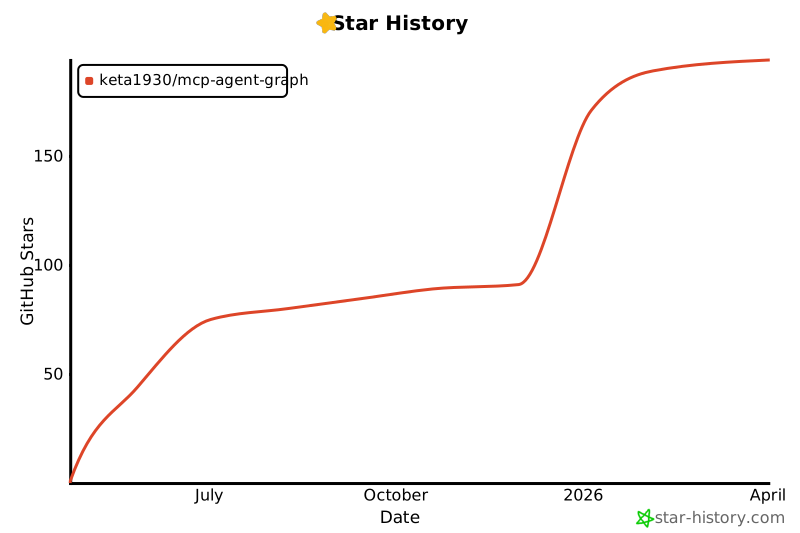
- ⭐ Star History
🚀 Deployment Guide
Frontend Deployment
# Navigate to frontend directory
cd frontend

# Install dependencies
npm install

# Run development server
npm run dev
The frontend development server will run on port 5173.
Backend Deployment
Option 1: PyPI Installation (Recommended)
# Install mag package directly from PyPI
pip install mcp-agent-graph

# View examples
# Clone repository to get example code
git clone https://github.com/keta1930/mcp-agent-graph.git
cd mcp-agent-graph/sdk_demo
Update: Starting from v1.3.1, we officially released the Python SDK. You can now install and use it directly via pip. Latest SDK version is v1.3.7
Tip: We provide usage examples in the sdk_demo directory.
Option 2: Using Conda
# Create and activate conda environment
conda create -n mag python=3.11
conda activate mag

# Clone repository
git clone https://github.com/keta1930/mcp-agent-graph.git
cd mcp-agent-graph

# Install dependencies
pip install -r requirements.txt

# Run main application
cd mag
python main.py
Option 3: Using uv (Recommended)
# Install uv if you don't have it
Installation guide: https://docs.astral.sh/uv/getting-started/installation/

# Clone repository
git clone https://github.com/keta1930/mcp-agent-graph.git
cd mcp-agent-graph

# Install dependencies
uv sync
.venv\Scripts\activate.ps1 (powershell)
.venv\Scripts\activate.bat (cmd)

# Run directly with uv
cd mag
uv run python main.py
The backend server will run on port 9999, MCP client on port 8765.
Quick Start
In the mag/sdk_demo directory, we provide the sdk_demo\deepresearch.zip file, which can be directly imported into the frontend to run the DEMO
✨ Core Features
1️⃣ From need to Agent
This is an amazing feature! AI-generated agents. Previously, you might need to write extensive code to design agents, or orchestrate workflows in the frontend by adding nodes one by one. mcp-agent-graph provides a solution: simply write down your requirements, and the system will generate an excellent graph for you!
From need to graph, it might take only 3 minutes, or even less! Once the graph is generated, it will appear on your canvas (agent). You can view each node in the graph, the overall process, and the readme file! Click on each node to see which tools (mcp server) it selected, prompts, models, context passing between nodes... If it doesn't meet your requirements, you can use the AI graph optimization feature to tell the AI your updated requirements, and it will adjust the process, add or remove nodes, modify prompts or tool calls for you.
2️⃣ AI-Generated MCP Tools (From need to MCP)
This is a future-oriented feature! Create custom MCP tools through natural language descriptions.
Traditional MCP tool development requires extensive programming knowledge and understanding of the MCP protocol. mcp-agent-graph breaks this barrier: simply describe what you want the tool to do, and AI will generate a complete, production-ready MCP tool for you!
From description to deployment in minutes! Just provide requirements, and the system will: automatically generate Python code following MCP standards, create proper virtual environments with all dependencies, handle port management and conflict detection, automatically register the tool to your system configuration, provide comprehensive documentation and usage examples. The generated tools are immediately ready for use in your agents or can be shared with the community. This democratizes MCP tool development, making it accessible to everyone regardless of technical background.
3️⃣ Nested Graphs (Hierarchical World)
This is an architectural innovation! Building "Agent within Agent" hierarchical intelligent systems. Traditional workflows are often flat, and when systems become complex, they become difficult to manage and maintain. mcp-agent-graph introduces the concept of nested graphs: any complete graph can be used as a single node in another graph! This creates infinite possibilities.
Hierarchical design, unlimited scalability! You can first build a "document analysis" graph containing document parsing, content extraction, format conversion nodes. Then encapsulate this entire graph as a single node for use in a larger "knowledge management" graph. This hierarchical design allows you to: build reusable agent modules, manage complex large-scale systems, achieve true modular development. Each layer has clear responsibility boundaries, maintaining system integrity while having extremely strong maintainability.
4️⃣ Graph to MCP Server
This is a standardization feature! Export agent graphs as standard MCP services. In the AI tool ecosystem, interoperability between different platforms and frameworks has always been a challenge. mcp-agent-graph provides graph-to-mcp functionality: one-click export of any graph as a standard MCP server Python script!
Build once, run everywhere! The exported MCP server fully complies with MCP protocol standards and can be directly called by Claude Desktop, Cline, cursor, and other AI applications or any MCP-supporting systems. Your agent instantly becomes a widely integrable tool. The exported script includes complete dependency management, configuration files, and installation instructions, allowing recipients to deploy immediately. This lays the foundation for agent standardization and ecosystem development.
5️⃣ Visual Graph Editor
Canvas as Code! You can build complex agent workflows simply by dragging nodes and connecting lines on the visual canvas. What you see is what you get, design is development! Each node has rich configuration options, allowing you to set prompts, select models, configure tool calls, and define input-output relationships directly in the interface. The connections between nodes clearly show data flow and execution order, making complex logic clear at a glance. Real-time preview functionality lets you view the execution effects of your current design at any time.
6️⃣ Node as Agent
Every node is an independent agent. Each node in the graph has complete Agent capabilities! Every node can call tools and handle complex tasks. Microservice-oriented agent architecture, each node is an expert! You can configure specialized role prompts for each node, making it an expert in specific domains. One node can be a data analyst, another can be a content creator, and a third can be a decision maker. They gain powerful tool capabilities through MCP servers, such as accessing file systems, web searching, performing calculations, etc. Nodes collaborate through context passing, forming a powerful agent team.
7️⃣ Agent Trading and Transfer
This is an ecosystem feature! Complete agent packaging, sharing, and deployment solution. In the current AI development environment, sharing a complete agent system often requires complex environment configuration, dependency installation, and documentation, greatly limiting agent propagation and reuse. mcp-agent-graph provides complete agent lifecycle management: packaging agent systems and all their dependencies into self-contained, portable units.
One-click packaging, one-click deployment, agent ecosystem! The system automatically generates comprehensive README documentation, detailing agent functionality, requirements, and usage methods. Recipients don't need to understand complex technical details to quickly understand and deploy your agents. This feature provides a complete solution for agent marketplace trading, team collaboration, and open-source sharing. You can easily: share professional tools with colleagues, deliver custom solutions to clients, contribute your creations to the open-source community.
8️⃣ Python SDK Deep Integration
This is a dual-wheel development mode! Perfect combination of frontend visual design and backend code execution. mcp-agent-graph provides through Python SDK: frontend drag-and-drop design, backend code execution! Perfect fusion of design and development, both visual and code-controllable!
You can quickly design and debug agent graphs in the frontend visual interface, then install the SDK with one command pip install mcp-agent-graph and directly load and run these graphs in Python. This means: developers can integrate into existing systems with code; teams can collaboratively design through visual interfaces and finally deploy to production environments through code; your agent graphs can seamlessly embed into existing Python projects with free combination. The SDK provides complete graph loading, execution, and monitoring capabilities, making agent graphs powerful weapons in your code toolbox.
📝 Summary
mcp-agent-graph, as a refined, compact, and convenient Agent development framework, achieves full-process simplified development from requirements to deployment.
To help you quickly experience the framework's capabilities, we provide the deepresearch.zip package in the project's sdk_demo directory. This is a complete deep research graph that you can directly import into the frontend interface to run and learn. Through this practical case, you will deeply understand how mcp-agent-graph makes complex agent logic simple and intuitive.
Finally, whether or not you use this framework, we wish you all the best in your Agent development journey and hope you build your ideal intelligent applications soon!
🖼️ Frontend Feature Showcase
deepresearch (AI Generated)
Deep analysis of user questions, multi-round intelligent retrieval, and comprehensive research system that generates visualized HTML web pages

corporate_ethics_dilemma_v2 (AI Generated)
AI CFO Alex faces complex corporate ethical choices, exploring AI decision-making mechanisms in conflicts of interest

corporate_ethics_dilemma_v3 (AI Generated)
Auto-generated README for graphs

AI-Generated MCP Tools
AI-generated MCP tools, the tools in the image are: Factorial Calculator; URL Content Scraper Tool


mcp_manager
MCP Manager for managing MCP servers

graph_runner
Graph runner for executing graphs

🏗️ Development Details
For detailed development information, including complete feature lists, Agent configuration references, agent node parameters, configuration examples, and advanced usage guides, please see the Development Details Documentation.
📖 Citation
If you find MCP Agent Graph helpful for your research or work, please consider citing it:
@misc{mcp_agent_graph_2025,
  title        = {mcp-agent-graph},
  author       = {Yan Yixin},
  howpublished = {\url{https://github.com/keta1930/mcp-agent-graph}},
  note         = {Accessed: 2025-04-24},
  year         = {2025}
}
WeChat Group

⭐ Star History
1 maintainer

Metadata
1 maintainer
Release files for mcp-agent-graph 3.0.0
For a detailed explanation of source distributions (sdists) and built distributions (wheels), please see the package formats documentation.
Source distribution (sdist)
| File | Size | Uploaded | Provenance | Actions |
|---|---|---|---|---|
| mcp_agent_graph-3.0.0.tar.gz | 751.2 kB | Without provenance | Details for mcp_agent_graph-3.0.0.tar.gz |
Built distribution (wheel)
| File | Interpreter | ABI | Platform | Actions Reset |
|---|---|---|---|---|
| mcp_agent_graph-3.0.0-py3-none-any.whl | Python 3 | none | any | Details for mcp_agent_graph-3.0.0-py3-none-any.whl |
Total release size: 929.9 kB
Release files / mcp_agent_graph-3.0.0.tar.gz
| Download URL | mcp_agent_graph-3.0.0.tar.gz |
|---|---|
| Size | 751.2 kB |
| Tags | Source |
|
SHA-256 checksum How to use checksums |
2f0f79961b2c81e745398decea20f01c39cc095cd7d2362cd3a561ccf518f14b
|
|
BLAKE2b-256 checksum How to use checksums |
3fa518218416bd0be03ca6b25ceefa0dbd527286bdeb762991b8c96a808ce446
|
| Upload date | |
|
Uploaded using Trusted Publishing? What is trusted publishing? |
No |
| Uploaded via |
twine/6.1.0 CPython/3.11.8
|
Release files / mcp_agent_graph-3.0.0-py3-none-any.whl
| Download URL | mcp_agent_graph-3.0.0-py3-none-any.whl |
|---|---|
| Size | 178.8 kB |
| Tags | Python 3 |
|
SHA-256 checksum How to use checksums |
6e7271ac61efdcbab6aebff90689992e735b726586981c49b38b2459ce58498c
|
|
BLAKE2b-256 checksum How to use checksums |
50930b22b2b9db2885e5b3a6d947dfeb8cfabc08fc8cfdf50daa082058f039a0
|
| Upload date | |
|
Uploaded using Trusted Publishing? What is trusted publishing? |
No |
| Uploaded via |
twine/6.1.0 CPython/3.11.8
|
Security for mcp-agent-graph 3.0.0
Provenance
Provenance describes where a file came from. On PyPI, provenance is shared via attestations, which provide a verifiable record of the build or publishing details. View details, limitations and caveats.
No provenance found
None of the files in this release were uploaded with provenance metadata.
A note on package security
PyPI is a repository for distributing packages, not a service for auditing them. While third-party security researchers and our staff do their best to detect and remove malicious packages, PyPI cannot guarantee the quality, security or suitability of any given package.
To learn more about protecting yourself from malicious actors, visit our package security documentation.














