
MCP Alchemy

Status: Works great and is in daily use without any known bugs.
Status2: I just added the package to PyPI and updated the usage instructions. Please report any issues :)
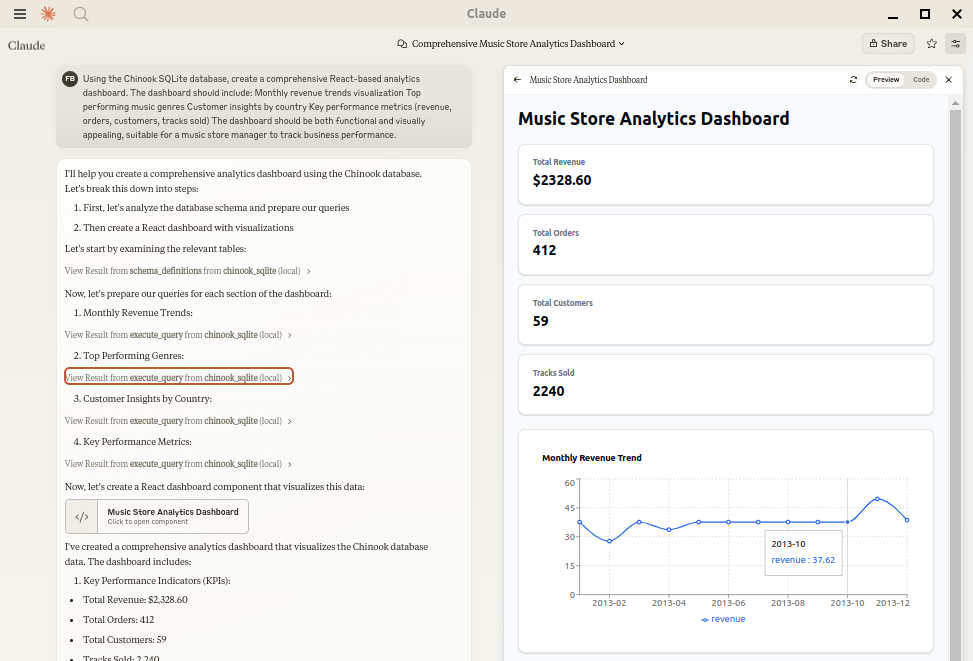
Let Claude be your database expert! MCP Alchemy connects Claude Desktop directly to your databases, allowing it to:
- Help you explore and understand your database structure
- Assist in writing and validating SQL queries
- Displays relationships between tables
- Analyze large datasets and create reports
- Claude Desktop Can analyse and create artifacts for very large datasets using claude-local-files.
Works with PostgreSQL, MySQL, MariaDB, SQLite, Oracle, MS SQL Server, CrateDB, and a host of other SQLAlchemy-compatible databases.
Installation
Ensure you have uv installed:
# Install uv if you haven't already
curl -LsSf https://astral.sh/uv/install.sh | sh
Usage with Claude Desktop
Add to your claude_desktop_config.json. You need to add the appropriate database driver in the --with parameter.
Note: After a new version release there might be a period of up to 600 seconds while the cache clears locally cached causing uv to raise a versioning error. Restarting the MCP client once again solves the error.
SQLite (built into Python)
{
  "mcpServers": {
    "my_sqlite_db": {
      "command": "uvx",
      "args": ["--from", "mcp-alchemy==2025.04.16.110003",
               "--refresh-package", "mcp-alchemy", "mcp-alchemy"],
      "env": {
        "DB_URL": "sqlite:////absolute/path/to/database.db"
      }
    }
  }
}
PostgreSQL
{
  "mcpServers": {
    "my_postgres_db": {
      "command": "uvx",
      "args": ["--from", "mcp-alchemy==2025.04.16.110003", "--with", "psycopg2-binary",
               "--refresh-package", "mcp-alchemy", "mcp-alchemy"],
      "env": {
        "DB_URL": "postgresql://user:password@localhost/dbname"
      }
    }
  }
}
MySQL/MariaDB
{
  "mcpServers": {
    "my_mysql_db": {
      "command": "uvx",
      "args": ["--from", "mcp-alchemy==2025.04.16.110003", "--with", "pymysql",
               "--refresh-package", "mcp-alchemy", "mcp-alchemy"],
      "env": {
        "DB_URL": "mysql+pymysql://user:password@localhost/dbname"
      }
    }
  }
}
Microsoft SQL Server
{
  "mcpServers": {
    "my_mssql_db": {
      "command": "uvx",
      "args": ["--from", "mcp-alchemy==2025.04.16.110003", "--with", "pymssql",
               "--refresh-package", "mcp-alchemy", "mcp-alchemy"],
      "env": {
        "DB_URL": "mssql+pymssql://user:password@localhost/dbname"
      }
    }
  }
}
Oracle
{
  "mcpServers": {
    "my_oracle_db": {
      "command": "uvx",
      "args": ["--from", "mcp-alchemy==2025.04.16.110003", "--with", "cx_oracle",
               "--refresh-package", "mcp-alchemy", "mcp-alchemy"],
      "env": {
        "DB_URL": "oracle+cx_oracle://user:password@localhost/dbname"
      }
    }
  }
}
CrateDB
{
  "mcpServers": {
    "my_cratedb": {
      "command": "uvx",
      "args": ["--from", "mcp-alchemy==2025.04.16.110003", "--with", "sqlalchemy-cratedb>=0.42.0.dev1",
               "--refresh-package", "mcp-alchemy", "mcp-alchemy"],
      "env": {
        "DB_URL": "crate://user:password@localhost:4200/?schema=testdrive"
      }
    }
  }
}
For connecting to CrateDB Cloud, use a URL like
crate://user:password@example.aks1.westeurope.azure.cratedb.net:4200?ssl=true.
Environment Variables
DB_URL: SQLAlchemy database URL (required)CLAUDE_LOCAL_FILES_PATH: Directory for full result sets (optional)EXECUTE_QUERY_MAX_CHARS: Maximum output length (optional, default 4000)
API
Tools
-
all_table_names
- Return all table names in the database
- No input required
- Returns comma-separated list of tables
users, orders, products, categories -
filter_table_names
- Find tables matching a substring
- Input:
q(string) - Returns matching table names
Input: "user" Returns: "users, user_roles, user_permissions" -
schema_definitions
- Get detailed schema for specified tables
- Input:
table_names(string[]) - Returns table definitions including:
- Column names and types
- Primary keys
- Foreign key relationships
- Nullable flags
users: id: INTEGER, primary key, autoincrement email: VARCHAR(255), nullable created_at: DATETIME Relationships: id -> orders.user_id -
execute_query
- Execute SQL query with vertical output format
- Inputs:
query(string): SQL queryparams(object, optional): Query parameters
- Returns results in clean vertical format:
1. row id: 123 name: John Doe created_at: 2024-03-15T14:30:00 email: NULL Result: 1 rows- Features:
- Smart truncation of large results
- Full result set access via claude-local-files integration
- Clean NULL value display
- ISO formatted dates
- Clear row separation
Claude Local Files
When claude-local-files is configured:
- Access complete result sets beyond Claude's context window
- Generate detailed reports and visualizations
- Perform deep analysis on large datasets
- Export results for further processing
The integration automatically activates when CLAUDE_LOCAL_FILES_PATH is set.
Developing
First clone the github repository, install the dependencies and your database driver(s) of choice:
git clone git@github.com:runekaagaard/mcp-alchemy.git
cd mcp-alchemy
uv sync
uv pip install psycopg2-binary
Then set this in claude_desktop_config.json:
...
"command": "uv",
"args": ["run", "--directory", "/path/to/mcp-alchemy", "-m", "mcp_alchemy.server", "main"],
...
My Other LLM Projects
- MCP Redmine - Let Claude Desktop manage your Redmine projects and issues.
- MCP Notmuch Sendmail - Email assistant for Claude Desktop using notmuch.
- Diffpilot - Multi-column git diff viewer with file grouping and tagging.
- Claude Local Files - Access local files in Claude Desktop artifacts.
MCP Directory Listings
MCP Alchemy is listed in the following MCP directory sites and repositories:
Contributing
Contributions are warmly welcomed! Whether it's bug reports, feature requests, documentation improvements, or code contributions - all input is valuable. Feel free to:
- Open an issue to report bugs or suggest features
- Submit pull requests with improvements
- Enhance documentation or share your usage examples
- Ask questions and share your experiences
The goal is to make database interaction with Claude even better, and your insights and contributions help achieve that.
License
Mozilla Public License Version 2.0
1 maintainer

Metadata
1 maintainer
Release files for mcp-alchemy 2025.5.2.204258
For a detailed explanation of source distributions (sdists) and built distributions (wheels), please see the package formats documentation.
Source distribution (sdist)
| File | Size | Uploaded | |
|---|---|---|---|
| mcp_alchemy-2025.5.2.204258.tar.gz | 684.1 kB | Details |
Built distribution (wheel)
| File | Interpreter | ABI | Platform | Reset |
|---|---|---|---|---|
| mcp_alchemy-2025.5.2.204258-py3-none-any.whl | Python 3 | none | any | Details |
Total release size: 696.8 kB
Release files / mcp_alchemy-2025.5.2.204258.tar.gz
| Download URL | mcp_alchemy-2025.5.2.204258.tar.gz |
|---|---|
| Size | 684.1 kB |
| Tags | Source |
|
SHA-256 checksum How to use checksums |
cf93569628da843ca9a7d4cd4d306f3bff650d3c9f88448682e71759e1cbde0c
|
|
BLAKE2b-256 checksum How to use checksums |
22b79f09c0d19d3043be4bca52d9af6a3cd4acfb363ef9142bb5543b8084f341
|
| Upload date | |
|
Uploaded using Trusted Publishing? What is trusted publishing? |
No |
| Uploaded via |
uv/0.6.12
|
Release files / mcp_alchemy-2025.5.2.204258-py3-none-any.whl
| Download URL | mcp_alchemy-2025.5.2.204258-py3-none-any.whl |
|---|---|
| Size | 12.7 kB |
| Tags | Python 3 |
|
SHA-256 checksum How to use checksums |
459952fe2b8256f8b8525a42b7429fb51baa8a391777b5ec0857154ff6794eea
|
|
BLAKE2b-256 checksum How to use checksums |
e09294094f56c61dae7e14c584cc6f619b832e1cd13473a738a6bc1fadf98ce6
|
| Upload date | |
|
Uploaded using Trusted Publishing? What is trusted publishing? |
No |
| Uploaded via |
uv/0.6.12
|














