
Apple Mail MCP Server




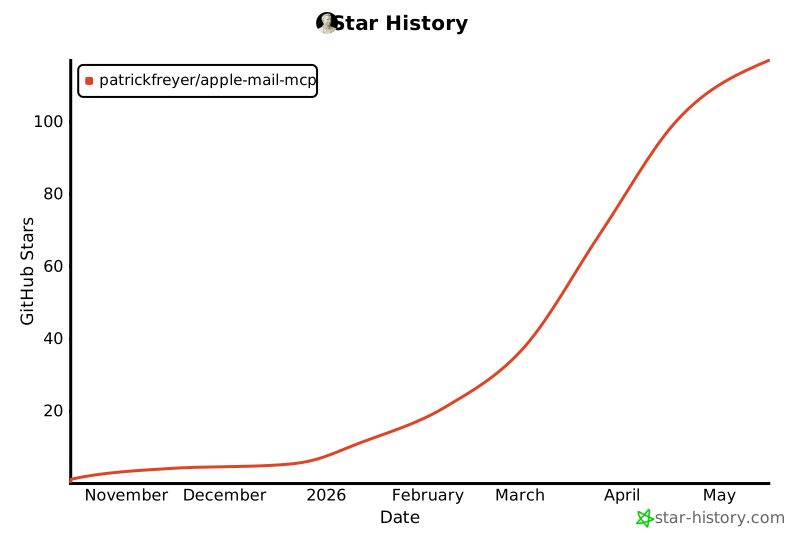
Star History
An MCP server that gives AI assistants full access to Apple Mail -- read, search, compose, organize, and analyze emails via natural language. Built with FastMCP.
Quick Install
Prerequisites: macOS with Apple Mail configured, Python 3.10+
Claude Code Plugin (Recommended)
Two commands — gets you the MCP server, /email-management slash command, and the Email Management Expert skill:
claude plugin marketplace add patrickfreyer/apple-mail-mcp
claude plugin install apple-mail@apple-mail-mcp
Then restart Claude Code.
Other Install Methods
uvx (zero install, MCP server only)
claude mcp add apple-mail -- uvx mcp-apple-mail
Or for Claude Desktop (~/Library/Application Support/Claude/claude_desktop_config.json):
{
  "mcpServers": {
    "apple-mail": {
      "command": "uvx",
      "args": ["mcp-apple-mail"]
    }
  }
}
pip install (MCP server only)
pip install mcp-apple-mail
claude mcp add apple-mail -- mcp-apple-mail
npx skills (skill only, for Claude Code, Codex, Cursor and other agents)
Installs the Email Management Expert skill via the open skills CLI. The skill does not include the MCP server, so install that too (e.g. with uvx above):
npx skills add patrickfreyer/apple-mail-mcp
claude mcp add apple-mail -- uvx mcp-apple-mail
Add -g to install the skill globally, or -a <agent> to target a specific agent.
Claude Desktop MCPB
- Download the latest
apple-mail-mcp-vX.Y.Z.mcpbfrom Releases - Open Claude Desktop → Settings → Developer → MCP Servers → Install from file
- Select the
.mcpbfile and grant Mail.app permissions
Manual setup
git clone https://github.com/patrickfreyer/apple-mail-mcp.git
cd apple-mail-mcp/plugin
python3 -m venv venv
venv/bin/pip install -r requirements.txt

claude mcp add apple-mail -- /bin/bash $(pwd)/start_mcp.sh
Tools (23)
Reading & Search
| Tool | Description |
|---|---|
get_inbox_overview |
Dashboard with unread counts, folders, and recent emails |
list_inbox_emails |
List emails with account/read-status filtering and optional content preview |
get_mailbox_unread_counts |
Unread counts per mailbox or per-account summary |
list_accounts |
List all configured Mail accounts |
search_emails |
Unified search — subject, sender, body text, dates, attachments, flag status/color, cross-account |
read_email |
Read one message by numeric id — headers, capped plain-text body and attachment metadata (text or JSON) |
get_email_thread |
Conversation thread view |
Organization
| Tool | Description |
|---|---|
list_mailboxes |
Folder hierarchy with message counts |
create_mailbox |
Create new mailboxes (supports nested paths) |
move_email |
Move/archive emails with filters (subject, sender, date, read status, dry-run) |
update_email_status |
Mark read/unread, flag/unflag (optional flag color) — by filters or message IDs |
manage_trash |
Soft delete, permanent delete, empty trash (with dry-run) |
Composition
| Tool | Description |
|---|---|
compose_email |
Send new emails (plain text or HTML body) |
reply_to_email |
Reply or reply-all with optional HTML body |
forward_email |
Forward with optional message, CC/BCC |
manage_drafts |
Create, list, send, and delete drafts |
create_rich_email_draft |
Build a rich HTML .eml draft, open it in Mail, and optionally save it to Drafts |
Attachments
| Tool | Description |
|---|---|
list_email_attachments |
List attachments with names and sizes |
save_email_attachment |
Save attachments to disk |
Smart Inbox
| Tool | Description |
|---|---|
get_awaiting_reply |
Find sent emails that haven't received a reply |
get_needs_response |
Identify emails that likely need your response |
get_top_senders |
Analyse most frequent senders by count or domain |
Analytics & Export
| Tool | Description |
|---|---|
get_statistics |
Email analytics (volume, top senders, read ratios) |
export_emails |
Export single emails or mailboxes to TXT/HTML |
inbox_dashboard |
Interactive UI dashboard (requires mcp-ui-server) |
Configuration
Read-Only Mode
Pass --read-only to block delivery. Nothing leaves the machine: compose_email and reply_to_email refuse mode="send", manage_drafts refuses action="send", and forward_email is removed entirely because it has no non-sending mode.
The composing tools stay registered so that mode="draft" and mode="open" keep working. Those never deliver anything, and they are the only place in the compose surface that supports attachments — manage_drafts and create_rich_email_draft cannot attach files.
{
  "mcpServers": {
    "apple-mail": {
      "command": "/path/to/venv/bin/python3",
      "args": ["/path/to/apple_mail_mcp.py", "--read-only"]
    }
  }
}
User Preferences (Optional)
Set the USER_EMAIL_PREFERENCES environment variable to give the assistant context about your workflow:
{
  "mcpServers": {
    "apple-mail": {
      "command": "/path/to/venv/bin/python3",
      "args": ["/path/to/apple_mail_mcp.py"],
      "env": {
        "USER_EMAIL_PREFERENCES": "Default to BCG account, show max 50 emails, prefer Archive and Projects folders"
      }
    }
  }
}
For .mcpb installs, configure this in Claude Desktop under Developer > MCP Servers > Apple Mail MCP.
Safety Limits
Batch operations have conservative defaults to prevent accidental bulk actions:
| Operation | Default Limit |
|---|---|
update_email_status |
10 emails |
manage_trash |
5 emails |
move_email |
1 email |
Override via function parameters when needed.
File Access
By default the server can write and attach files anywhere your user account can, except a hardened denylist of locations an attacker could use for code execution or credential theft. (Attachment bytes come from whoever emailed you, and a prompt-injected email can steer tool arguments.)
Writes (save_email_attachment, export_emails, create_rich_email_draft's output_path) are refused for:
- any dotfile or dot-folder directly in your home folder: shell startup files (
~/.zshrc,~/.zshenv,~/.zprofile,~/.zlogin,~/.bashrc,~/.bash_profile,~/.profile),~/.ssh,~/.gnupg,~/.aws,~/.config(incl.~/.config/git),~/.gitconfig,~/.netrc,~/.envrc,~/.local/bin, ... .git/hooks,.git/configand.envrcin any folder- autostart, persistence and app-config folders:
~/Library/LaunchAgents,~/Library/LaunchDaemons,/Library/LaunchAgents,/Library/LaunchDaemons,~/Library/Application Support(incl.com.apple.backgroundtaskmanagementagent),~/Library/Application Scripts,~/Library/Preferences,~/Library/Keychains,~/Library/Mail,~/Library/Containers, ... - folders on
PATH:~/bin,/usr/local/bin,/opt/homebrew/bin, and/etc
Attachments (compose_email, reply_to_email, ...) may be any readable file except secrets: ~/.ssh, ~/.gnupg, ~/.aws, ~/.netrc, ~/.git-credentials, ~/.config/gh, .env files, ~/Library/Keychains, and browser profiles and cookie stores (Safari, Chrome, Firefox, Edge, Brave, Arc, ...).
Paths are resolved (~, .., symlinks) before checking, and matching is case-insensitive like APFS.
Restricting further (opt-in). To confine writes or attachments to specific folders, list them (colon-separated) in the server's env, or pass --write-dir / --attach-dir (repeatable) as arguments. Once set, only those folders are allowed for that side, and the denylist still applies inside them. The tool's own cache (~/Library/Caches/apple-mail-mcp, the default rich-draft location) stays writable.
"env": {
  "APPLE_MAIL_MCP_WRITE_DIRS": "~/Downloads:~/Documents/mail-exports",
  "APPLE_MAIL_MCP_ATTACH_DIRS": "~/Documents:~/Desktop"
}
Usage Examples
Show me an overview of my inbox
Search for emails about "project update" in my Gmail
Reply to the email about "Domain name" with "Thanks for the update!"
Move emails with "invoice" in the subject to my Archive folder
Show me email statistics for the last 30 days
Create a rich HTML draft for a weekly update and open it in Mail
Rich HTML Drafts
Use create_rich_email_draft when you need a visually formatted email, newsletter, or leadership update.
- It generates an unsent
.emlfile with multipart plain-text + HTML bodies - It can open the draft directly in Mail for editing
- It can optionally ask Mail to save the opened compose window into Drafts
- It accepts partial details, so you can start with just an account and subject and fill in the rest later
This is more reliable than injecting raw HTML into AppleScript content, which Mail often stores as literal markup.
Email Management Skill
A companion Claude Code Skill is included that teaches Claude expert email workflows (Inbox Zero, daily triage, folder organization). When installed as a plugin, the skill is loaded automatically. For standalone MCP installs, add it with npx skills add patrickfreyer/apple-mail-mcp or copy it manually:
cp -r plugin/skills/email-management ~/.claude/skills/email-management
Requirements
- macOS with Apple Mail configured
- Python 3.7+
fastmcp(+ optionalmcp-ui-serverfor dashboard)- Claude Desktop or any MCP-compatible client
- Mail.app permissions: Automation + Mail Data Access (grant in System Settings > Privacy & Security > Automation)
Troubleshooting
| Issue | Fix |
|---|---|
| Mail.app not responding | Ensure Mail.app is running; check Automation permissions in System Settings |
| Slow searches | Set include_content: false and lower max_results |
| Mailbox not found | Use exact folder names; nested folders use / separator (e.g., Projects/Alpha) |
| Permission errors | Grant access in System Settings > Privacy & Security > Automation |
| Rich draft shows raw HTML | Use create_rich_email_draft instead of pasting HTML into manage_drafts or AppleScript content |
Project Structure
apple-mail-mcp/
├── .claude-plugin/
│   └── marketplace.json       # Marketplace manifest (for plugin distribution)
├── plugin/                    # Claude Code plugin
│   ├── .claude-plugin/
│   │   └── plugin.json        # Plugin manifest
│   ├── skills/                # Email Management Expert skill (also invocable as /email-management)
│   ├── apple_mail_mcp/        # Python MCP server package (24 tools)
│   ├── apple_mail_mcp.py      # Entry point
│   ├── start_mcp.sh           # Startup wrapper (auto-creates venv)
│   └── requirements.txt
├── apple-mail-mcpb/           # MCPB build files (Claude Desktop)
├── LICENSE
└── README.md
Contributing
- Fork the repository
- Create a feature branch (
git checkout -b feature/my-feature) - Commit and push
- Open a Pull Request
Releasing
Follow these steps when cutting a new release to keep all version strings in sync:
- Bump
__version__inplugin/apple_mail_mcp/__init__.pyto the new version. - Update
apple-mail-mcpb/manifest.json("version"field) to match. - Update
pyproject.toml(version = ...under[project]) to match. - Update both version fields in
server.json("version"and"packages"[0]["version"]) to match. - Run
python3 scripts/check_versions.py— it must print OK before you proceed. - Commit, tag, and push:
git tag vX.Y.Z && git push origin vX.Y.Z. - Create a GitHub release from the tag.
- Build and publish to PyPI:
python -m build && twine upload dist/*(requires PyPI credentials).
The test suite also enforces version consistency (
tests/test_version_consistency.py), so any CI run on a branch with mismatched versions will fail fast.
License
MIT -- see LICENSE.
Links
1 maintainer

Metadata
1 maintainer
Release files for mcp-apple-mail 3.3.0
For a detailed explanation of source distributions (sdists) and built distributions (wheels), please see the package formats documentation.
Source distribution (sdist)
| File | Size | Uploaded | Provenance | Actions |
|---|---|---|---|---|
| mcp_apple_mail-3.3.0.tar.gz | 80.2 kB | With provenance | Details for mcp_apple_mail-3.3.0.tar.gz |
Built distribution (wheel)
| File | Interpreter | ABI | Platform | Actions Reset |
|---|---|---|---|---|
| mcp_apple_mail-3.3.0-py3-none-any.whl | Python 3 | none | any | Details for mcp_apple_mail-3.3.0-py3-none-any.whl |
Total release size: 169.6 kB
Release files / mcp_apple_mail-3.3.0.tar.gz
| Download URL | mcp_apple_mail-3.3.0.tar.gz |
|---|---|
| Size | 80.2 kB |
| Tags | Source |
|
SHA-256 checksum How to use checksums |
7555c8ffa74086847f50a49285cc11d567c4cef38b889fe55c1e91da35fcc0e0
|
|
BLAKE2b-256 checksum How to use checksums |
bca8f87355ea12ccb8e59af210ecfc4549b7d1d0c45e88c79389aa2727b11b26
|
| Upload date | |
|
Uploaded using Trusted Publishing? What is trusted publishing? |
Yes |
| Uploaded via |
twine/7.0.0 CPython/3.13.16
|
Provenance
Provenance describes where a file came from. On PyPI, provenance is shared via attestations, which provide a verifiable record of the build or publishing details. View details, limitations and caveats.


PyPI Publish Attestation
PyPI verified that this artifact, at this checksum, originated from the publisher listed below.
Signed by GitHub Actions, verified by PyPI on Nov 3, 2026.
Transparency logRelease files / mcp_apple_mail-3.3.0-py3-none-any.whl
| Download URL | mcp_apple_mail-3.3.0-py3-none-any.whl |
|---|---|
| Size | 89.4 kB |
| Tags | Python 3 |
|
SHA-256 checksum How to use checksums |
55f6bc5d83d648d18a459714f502cf4a5382dff782a2d36b9191b5f94ccb3e7f
|
|
BLAKE2b-256 checksum How to use checksums |
3618ab8cada2d05701f391e59cc4368082be113e841b65ebefa27935aee4541e
|
| Upload date | |
|
Uploaded using Trusted Publishing? What is trusted publishing? |
Yes |
| Uploaded via |
twine/7.0.0 CPython/3.13.16
|
Provenance
Provenance describes where a file came from. On PyPI, provenance is shared via attestations, which provide a verifiable record of the build or publishing details. View details, limitations and caveats.
PyPI Publish Attestation
PyPI verified that this artifact, at this checksum, originated from the publisher listed below.
Signed by GitHub Actions, verified by PyPI on Nov 3, 2026.
Transparency logSecurity for mcp-apple-mail 3.3.0
Provenance
Provenance describes where a file came from. On PyPI, provenance is shared via attestations, which provide a verifiable record of the build or publishing details. View details, limitations and caveats.
Full provenance
All 2 files in this release have been uploaded with provenance metadata.
Attestation for mcp_apple_mail-3.3.0.tar.gz
PyPI Publish Attestation
PyPI verified that this artifact, at this checksum, originated from the publisher listed below.
Signed by GitHub Actions, verified by PyPI on Nov 3, 2026.
Transparency logA note on package security
PyPI is a repository for distributing packages, not a service for auditing them. While third-party security researchers and our staff do their best to detect and remove malicious packages, PyPI cannot guarantee the quality, security or suitability of any given package.
To learn more about protecting yourself from malicious actors, visit our package security documentation.














