






mcp-audprobe
Actively test whether an MCP server you own really validates the bearer token's audience (aud),
issuer (iss) and expiry (exp). It mints test tokens with a local fake authorization server key,
sends them to your server, and reports FAIL if a token that must be rejected is accepted.
⚠️ Only test servers you own or are authorized to test
mcp-audprobesends authenticated requests with deliberately invalid tokens. Use it only against servers you operate or have explicit written permission to test. By default the CLI refuses any target that is not on loopback (localhost,127.0.0.0/8,::1);--allow-remoteexists solely for your own staging/test deployments. Never point it at someone else's server. The demo and test-suite only talk to servers they start on127.0.0.1.
The problem
A resource server must accept only tokens issued for it. Two recent advisories show servers that checked signature, issuer and expiry but not the audience, so a valid token for a different service of the same authorization server was accepted:
- MCP Python SDK: GHSA-w4fh-qvv9-3v23
(CVE-2026-116684, medium). Affected
mcp1.10.0–1.29.1 and 2.0.0–2.1.1; fixed in 1.30.0 / 2.2.0. Upgrading alone changes nothing: the patched versions addAuthSettings(validate_token_resource=...), which is off unless set. To enable the check you must (1) setvalidate_token_resource=Truewithresource_server_url= the audience your authorization server puts in tokens for your server, and (2) return the token's audience fromTokenVerifier.verify_token()asAccessToken.resource. With only the first change every request gets 401. (Confirmed against the advisory text andmcp1.30.0 source:mcp/server/auth/settings.py,mcp/server/auth/middleware/bearer_auth.py.) - AWS API MCP Server: GHSA-4prq-p2x5-w9fh
(CVE-2026-115413, high).
awslabs.aws-api-mcp-server>=1.3.0, <1.6.0 (streamable-http + OAuth) validated signature, issuer and expiry but not the audience/client; fixed in 1.6.0, which requires operators to set an expected audience or client ID.
Context: thread. A config setting that is "off unless you set it" is easy to miss, hence an active test that you can run in CI.
Install
Available on PyPI (release notes: Releases):
pipx install mcp-audprobe       # recommended: isolated CLI   (or: uvx mcp-audprobe --help)
pip install mcp-audprobe        # into the current environment (Python >= 3.10)
mcp-audprobe --version
From a clone (development):
pip install -e .            # CLI only (Python >= 3.10)
pip install -e ".[demo]"    # + MCP Python SDK (>=1.30.0,<2) and Pillow, for the demo servers / PNG
pip install -e ".[test]"    # + pytest, ruff
How it works
mcp-audprobe auth-serverruns a fake authorization server on loopback: RS256 JWKS at/.well-known/jwks.jsonplus OIDC/OAuth metadata. The RSA key is generated locally into--key-file.- Your server under test is configured to trust that issuer/JWKS (in CI/dev only!).
mcp-audprobe probesigns tokens with the same key file and sends each one asAuthorization: Bearer …on an MCP JSON-RPCinitializerequest (POST,Accept: application/json, text/event-stream).
| # | Check id | Token | Must be |
|---|---|---|---|
| 0 | CONTROL |
valid: correct iss, aud, signature, exp | accepted, else the run is INCONCLUSIVE (attack checks are SKIPPED) |
| 1 | AUD-OTHER |
valid signature/iss/exp, aud = another service |
rejected |
| 2 | AUD-MISSING |
valid signature/iss/exp, no aud claim |
rejected |
| 3 | ISS-WRONG |
signed with the trusted key, iss ≠ trusted issuer (isolates the iss check) |
rejected |
| 4 | EXP-EXPIRED |
valid otherwise, exp one hour in the past |
rejected |
Definition of "accepted": an HTTP 2xx response to the authenticated request. Rejected = 401 or 403.
Anything else (other 4xx/5xx, redirects, network error/timeout) is "unexpected": the control then makes the run
INCONCLUSIVE, and for an attack token the check is ERROR. Verdicts: accepted → FAIL, rejected → PASS.
Overall result / exit code: PASS (0), FAIL (1, any attack token accepted), INCONCLUSIVE (2, control not
accepted or an ERROR), usage/safety error (3).
Usage
# 1. fake authorization server (creates key.pem if missing; keep it out of git)
mcp-audprobe auth-server --port 9000 --issuer http://127.0.0.1:9000 --key-file key.pem &

# 2. start your MCP server so it trusts issuer http://127.0.0.1:9000 and JWKS
#    http://127.0.0.1:9000/.well-known/jwks.json  (fetched lazily; see demo/demo_server.py)

# 3. probe
mcp-audprobe probe http://127.0.0.1:8001/mcp \
  --audience http://127.0.0.1:8001/mcp \
  --issuer http://127.0.0.1:9000 --key-file key.pem \
  --auth-server http://127.0.0.1:9000      # optional: verify the AS serves our key id first
Options: --json (JSON on stdout instead of the table), --json-out FILE (table and JSON file),
--other-audience URL, --timeout S, --no-color, --allow-remote. python -m mcp_audprobe also works.
CI / GitHub Action
action.yml (composite) installs the tool, starts the fake auth server in the background, probes, writes
audprobe-report.json, stops the auth server, and fails the job on FAIL/INCONCLUSIVE. Your server must be
started in an earlier step on loopback, trusting http://127.0.0.1:9000 (default auth-port).
- name: Start my MCP server (127.0.0.1:8001, trusts the fake AS at http://127.0.0.1:9000)
  run: ./start-server.sh
- uses: bymustfa/mcp-audprobe@v1
  with:
    url: http://127.0.0.1:8001/mcp
    audience: http://127.0.0.1:8001/mcp
@v1is a floating major tag that always points to the latestv1.x.yrelease. For supply-chain safety you can instead pin a full commit SHA:uses: bymustfa/mcp-audprobe@<sha> # v1.0.0.
Full example: examples/audprobe-workflow.yml.
| Input | Default | Meaning |
|---|---|---|
url (required) |
MCP endpoint of your server, e.g. http://127.0.0.1:8001/mcp |
|
audience (required) |
audience/resource the server must accept (usually its own URL) | |
auth-port |
9000 |
port for the fake authorization server |
issuer |
http://127.0.0.1:<auth-port> |
issuer your server trusts |
other-audience |
https://other-service.example/mcp |
audience for the wrong-audience token |
json-output |
audprobe-report.json |
path for the JSON report |
allow-remote |
false |
allow a non-loopback target (own staging only) |
python-version |
3.12 |
Python used to run the tool |
Outputs: result (PASS/FAIL/INCONCLUSIVE) and report (path of the JSON report). Check
action.yml for the authoritative list.
JSON schema (schema_version: 1)
{
  "schema_version": 1, "tool": "mcp-audprobe", "tool_version": "0.1.0",
  "target": "http://127.0.0.1:18001/mcp", "expected_audience": "…", "other_audience": "…", "issuer": "…",
  "request": "POST initialize (JSON-RPC) with Authorization: Bearer <token>",
  "control": { "id": "CONTROL", "name": "…", "description": "…",
               "token_claims": {"iss": "…", "aud": "…", "exp": 0},   // aud absent when not sent
               "aud_present": true, "http_status": 200 /* null on network error */,
               "outcome": "accepted" /* accepted|rejected|unexpected */, "error": null, "accepted": true },
  "checks": [ { "id": "AUD-OTHER" /* AUD-OTHER|AUD-MISSING|ISS-WRONG|EXP-EXPIRED */, "name": "…", "description": "…",
                "token_claims": {…}, "aud_present": true, "http_status": 200,
                "outcome": "accepted" /* null when SKIPPED */,
                "verdict": "FAIL" /* PASS|FAIL|ERROR|SKIPPED */, "error": null } ],
  "summary": { "passed": 2, "failed": 2, "errors": 0, "skipped": 0 },
  "result": "FAIL",              // PASS | FAIL | INCONCLUSIVE
  "exit_code": 1
}
Raw tokens are never written to the report. Field names and order are stable within a schema_version.
Demo
pip install -e ".[demo]"   # or: make install
./demo/run_demo.sh         # or: make demo
Starts the fake auth server and two real MCP Python SDK servers (demo/demo_server.py) on 127.0.0.1,
probes both, saves everything to demo/output/ (*.txt, *.json, demo.png), then stops all processes.
- vulnerable: verifies signature,
iss,exp, notaud;validate_token_resource=False;verify_token()does not setAccessToken.resource. - hardened: same verifier, but
verify_token()returns the token'saudasAccessToken.resourceandAuthSettings(validate_token_resource=True, resource_server_url=<its own URL>).
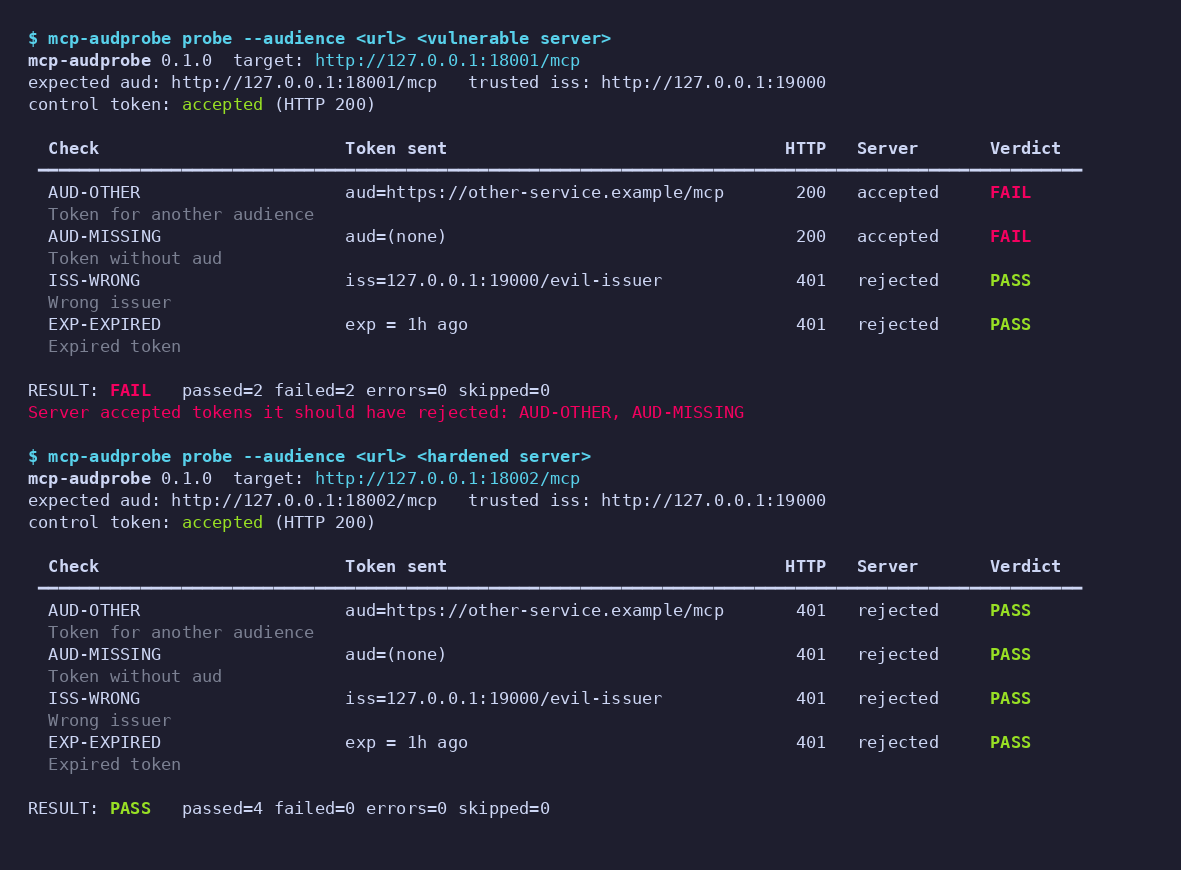
Expected: vulnerable = FAIL (AUD-OTHER, AUD-MISSING accepted), hardened = PASS. The vulnerable server still
rejects wrong-iss and expired tokens: exactly the AWS advisory's description (signature, issuer and expiry
checked, audience not). Tests: pytest (unit tests for minting and verdict logic, mocked-transport probe
tests, and an end-to-end test against both demo servers).
Limitations
- Black-box, HTTP-level only: it observes status codes, not why a server rejected a token. A 401 for an unrelated
reason (e.g. server cannot fetch JWKS) looks like a pass for attack checks; the
CONTROLtoken guards against the "rejects everything" case. - Your server must be configured to trust the fake issuer/JWKS. Run it against a dev/CI configuration of the
same code, not production with real trust anchors; a production config will reject the control token
(→
INCONCLUSIVE). - Tests the audience as an exact string/URL you provide. Servers that accept several audiences or list-valued
aud, scope/client-ID based checks (e.g. Cognitoclient_id), opaque (non-JWT) tokens, DPoP and mTLS-bound tokens are not covered. - The wrong-
isstoken uses the trusted key, so it tests theisscomparison, not key/issuer binding. - Uses
initializeonly. Servers that enforce auth later (per tool call) or need sessions may need more. - Clock skew leeway on the server is not probed (expired token is 1 h old).
- Demo servers are for demonstration, not production templates. Developed against
mcp1.30.0; the demo servers use the 1.xFastMCPAPI (mcp>=1.30.0,<2;mcp2.x renamed it and is not supported by the demo yet).
Comparison with authgent
authgent (Apache-2.0) was read on 2026-11-01 (README,
docs/methodology.md, server/authgent_server/scanner.py, read-only). Its authgent-server lint <mcp-url>
is an MCP-OAuth conformance scanner: it inspects discovery metadata (RFC 9728 protected resource metadata,
RFC 8414 AS metadata), advertised capabilities (PKCE methods, RFC 8707 resource indicators, DCR, iss
parameter, …), plus a few probes of the authorization server (PKCE plain at /authorize, duplicate DCR
registrations) and a heuristic GET /. Its MCP-AUD-001 only checks that the AS advertises
resource_indicators_supported.
Based on that review, authgent does not appear to submit forged or mis-audienced bearer tokens to the MCP
resource server, so it does not perform this active aud/iss/exp acceptance test. It can tell you the AS
supports resource indicators; it cannot tell you whether your server rejects a token minted for another
audience, which is the failure in the two advisories above. The tools are complementary: authgent audits
metadata/spec conformance of a (possibly remote) server and also ships an AS and SDKs; mcp-audprobe is a narrow
black-box test of token validation on servers you run locally with a throwaway fake issuer. (I did not audit
authgent's own SDK middleware, nor verify claims beyond the files named above; its behaviour may change.)
Contributing
See CONTRIBUTING.md, the Code of Conduct and the Security Policy. Türkçe: README.tr.md.
License
MIT, see LICENSE.
1 maintainer

Metadata
1 maintainer
Release files for mcp-audprobe 1.0.1
For a detailed explanation of source distributions (sdists) and built distributions (wheels), please see the package formats documentation.
Source distribution (sdist)
| File | Size | Uploaded | Provenance | Actions |
|---|---|---|---|---|
| mcp_audprobe-1.0.1.tar.gz | 26.0 kB | With provenance | Details for mcp_audprobe-1.0.1.tar.gz |
Built distribution (wheel)
| File | Interpreter | ABI | Platform | Actions Reset |
|---|---|---|---|---|
| mcp_audprobe-1.0.1-py3-none-any.whl | Python 3 | none | any | Details for mcp_audprobe-1.0.1-py3-none-any.whl |
Total release size: 44.7 kB
Release files / mcp_audprobe-1.0.1.tar.gz
| Download URL | mcp_audprobe-1.0.1.tar.gz |
|---|---|
| Size | 26.0 kB |
| Tags | Source |
|
SHA-256 checksum How to use checksums |
8e00b153cf31f95b5e1f11304a0359c4a944e2fae0e9f515904b8cc3d8582631
|
|
BLAKE2b-256 checksum How to use checksums |
34ece794b98f5f90bfd172beadae8f98dcb7595cab9a0bb945b475eee97a1c95
|
| Upload date | |
|
Uploaded using Trusted Publishing? What is trusted publishing? |
Yes |
| Uploaded via |
twine/7.0.0 CPython/3.13.16
|
Provenance
Provenance describes where a file came from. On PyPI, provenance is shared via attestations, which provide a verifiable record of the build or publishing details. View details, limitations and caveats.


PyPI Publish Attestation
PyPI verified that this artifact, at this checksum, originated from the publisher listed below.
Signed by GitHub Actions, verified by PyPI on Nov 1, 2026.
Transparency logRelease files / mcp_audprobe-1.0.1-py3-none-any.whl
| Download URL | mcp_audprobe-1.0.1-py3-none-any.whl |
|---|---|
| Size | 18.7 kB |
| Tags | Python 3 |
|
SHA-256 checksum How to use checksums |
4518ba248dea83e6a3763016917fe32fd98d42925e14c3bd82ebaed143176406
|
|
BLAKE2b-256 checksum How to use checksums |
fb36fea17559fe6bee8597de08718e01941e49acf1fceef9097e4ef6e6b9f19e
|
| Upload date | |
|
Uploaded using Trusted Publishing? What is trusted publishing? |
Yes |
| Uploaded via |
twine/7.0.0 CPython/3.13.16
|
Provenance
Provenance describes where a file came from. On PyPI, provenance is shared via attestations, which provide a verifiable record of the build or publishing details. View details, limitations and caveats.
PyPI Publish Attestation
PyPI verified that this artifact, at this checksum, originated from the publisher listed below.
Signed by GitHub Actions, verified by PyPI on Nov 1, 2026.
Transparency logSecurity for mcp-audprobe 1.0.1
Provenance
Provenance describes where a file came from. On PyPI, provenance is shared via attestations, which provide a verifiable record of the build or publishing details. View details, limitations and caveats.
Full provenance
Both files in this release have been uploaded with provenance metadata.
Attestation for mcp_audprobe-1.0.1.tar.gz
PyPI Publish Attestation
PyPI verified that this artifact, at this checksum, originated from the publisher listed below.
Signed by GitHub Actions, verified by PyPI on Nov 1, 2026.
Transparency logA note on package security
PyPI is a repository for distributing packages, not a service for auditing them. While third-party security researchers and our staff do their best to detect and remove malicious packages, PyPI cannot guarantee the quality, security or suitability of any given package.
To learn more about protecting yourself from malicious actors, visit our package security documentation.














