
AWSレベル判定くん MCPサーバー版
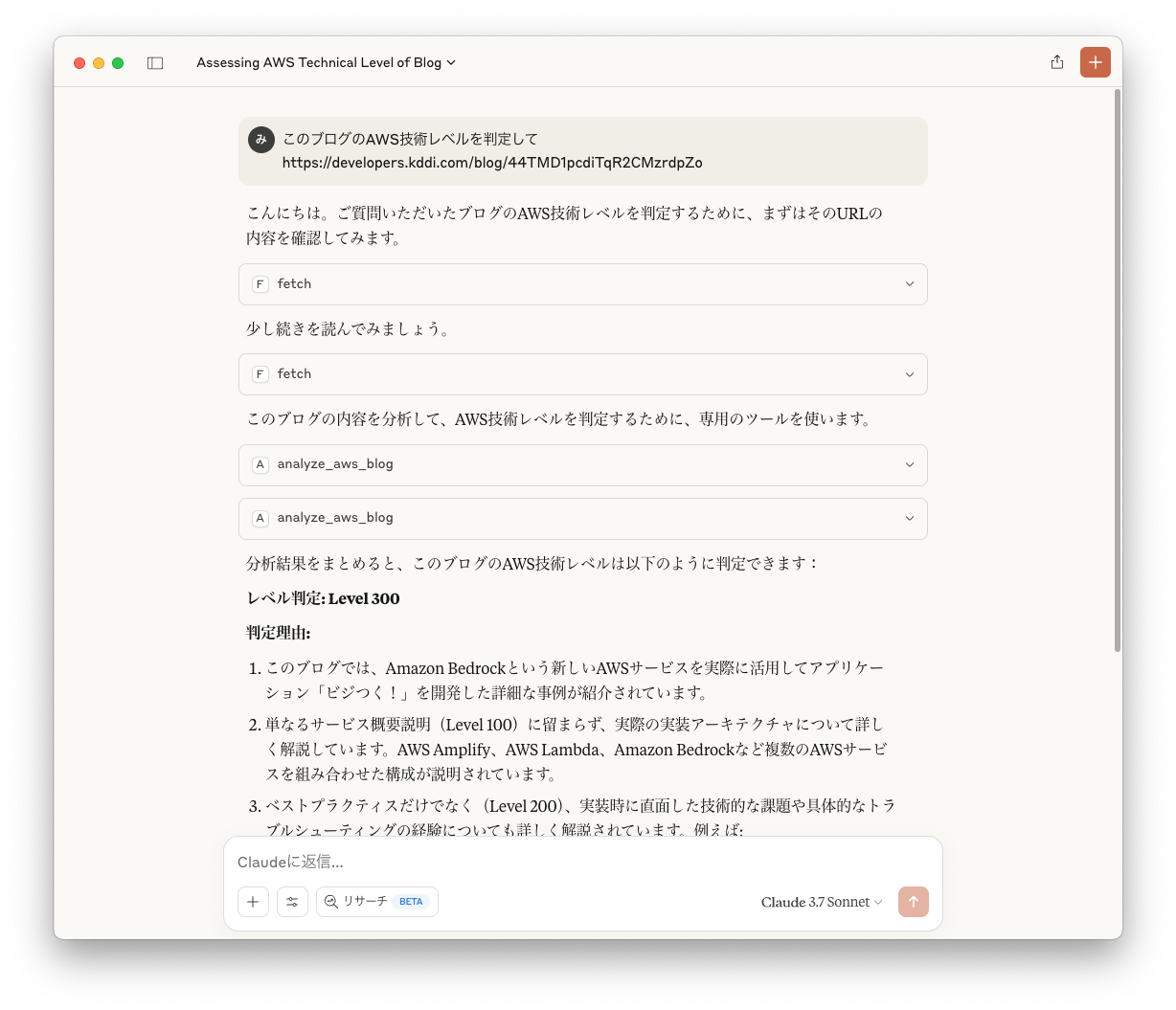
AWS技術ブログの内容を分析し、レベルを判定するMCPサーバーです。
大好評のうちにサービス終了となった #AWSレベル判定くん の魂を継いでいます。
概要
このMCPサーバーは、AWS技術ブログの内容を分析し、以下の4つのレベルのいずれかに判定します:
- Level 100: AWSサービスの概要を解説するレベル
- Level 200: トピックの入門知識を持っていることを前提に、ベストプラクティス、サービス機能を解説するレベル
- Level 300: 対象のトピックの詳細を解説するレベル
- Level 400: 複数のサービス、アーキテクチャによる実装でテクノロジーがどのように機能するかを解説するレベル
インストール
uvxを使用する方法(推奨)
uvを使用する場合、特別なインストールは不要です。uvxを使って直接実行できます:
uvx mcp-aws-level-checker
PyPI経由でインストールする方法
pip を使用してインストールすることもできます:
pip install mcp-aws-level-checker
インストール後は、次のコマンドで実行できます:
python -m mcp_aws_level_checker
設定方法
Claude.app での設定
Claude の設定に以下を追加してください:
uvx を使用する場合
"mcpServers": {
  "aws-level-checker": {
    "command": "uvx",
    "args": ["mcp-aws-level-checker"]
  }
}
pip でインストールした場合
"mcpServers": {
  "aws-level-checker": {
    "command": "python",
    "args": ["-m", "mcp_aws_level_checker"]
  }
}
VS Code での設定
VS Code の設定ファイルに以下を追加してください。Ctrl + Shift + P を押して、Preferences: Open User Settings (JSON) と入力することで設定ファイルを開けます。
あるいは、.vscode/mcp.json ファイルをワークスペースに作成することで、設定を他のユーザーと共有できます。
.vscode/mcp.jsonファイルを使用する場合は、mcpキーが必要です。
uvx を使用する場合
{
  "mcp": {
    "servers": {
      "aws-level-checker": {
        "command": "uvx",
        "args": ["mcp-aws-level-checker"]
      }
    }
  }
}
pip でインストールした場合
{
  "mcp": {
    "servers": {
      "aws-level-checker": {
        "command": "python",
        "args": ["-m", "mcp_aws_level_checker"]
      }
    }
  }
}
MCPサーバー仕様
- ツール名:
analyze_aws_blog - 入力形式:AWSブログ記事のテキスト全文
- 出力形式:以下のとおり
レベル: [判定したレベル (100/200/300/400)]
判定理由: [判定理由の詳細説明]
ヒント
Fetchと組み合わせて使うと便利です。
1 maintainer

Metadata
1 maintainer
Release files for mcp-aws-level-checker 0.1.1
For a detailed explanation of source distributions (sdists) and built distributions (wheels), please see the package formats documentation.
Source distribution (sdist)
| File | Size | Uploaded | Provenance | |
|---|---|---|---|---|
| mcp_aws_level_checker-0.1.1.tar.gz | 4.0 kB | Without provenance | Details |
Built distribution (wheel)
| File | Interpreter | ABI | Platform | Reset |
|---|---|---|---|---|
| mcp_aws_level_checker-0.1.1-py3-none-any.whl | Python 3 | none | any | Details |
Total release size: 9.9 kB
Release files / mcp_aws_level_checker-0.1.1.tar.gz
| Download URL | mcp_aws_level_checker-0.1.1.tar.gz |
|---|---|
| Size | 4.0 kB |
| Tags | Source |
|
SHA-256 checksum How to use checksums |
d780d0fb1d2654b02c31c29bccc4e0cfeff9a025c1b41edc3bc714cd6022f80a
|
|
BLAKE2b-256 checksum How to use checksums |
aca346e76343b4dc2e6fcbf814e2f98d3ccc473ffb437172021644ba4b3a46cd
|
| Upload date | |
|
Uploaded using Trusted Publishing? What is trusted publishing? |
No |
| Uploaded via |
twine/6.1.0 CPython/3.12.7
|
Release files / mcp_aws_level_checker-0.1.1-py3-none-any.whl
| Download URL | mcp_aws_level_checker-0.1.1-py3-none-any.whl |
|---|---|
| Size | 5.9 kB |
| Tags | Python 3 |
|
SHA-256 checksum How to use checksums |
014c0089983bfc0322c89c67d102be77150e18e4e9bcb781b207776d3a1d5359
|
|
BLAKE2b-256 checksum How to use checksums |
0c37376e569d54ba17f629ccb55a2fb47661a920bd3df73a83943b152289b11f
|
| Upload date | |
|
Uploaded using Trusted Publishing? What is trusted publishing? |
No |
| Uploaded via |
twine/6.1.0 CPython/3.12.7
|
Security for mcp-aws-level-checker 0.1.1
Provenance
Provenance describes where a file came from. On PyPI, provenance is shared via attestations, which provide a verifiable record of the build or publishing details. View details, limitations and caveats.
No provenance found
None of the files in this release were uploaded with provenance metadata.
A note on package security
PyPI is a repository for distributing packages, not a service for auditing them. While third-party security researchers and our staff do their best to detect and remove malicious packages, PyPI cannot guarantee the quality, security or suitability of any given package.














