
An MCP server exposing Azure services (Blob, Key Vault, Service Bus, Resources) as AI tools

Project description
mcp-azure-toolkit
An MCP server that exposes core Azure services as read-mostly tools any MCP client can call.





What it is - Install - Configure - Run and register with a client - Tools - Architecture - Security model - Design decisions - Development - Benchmarks - Known limitations - Contributing - License
What it is
mcp-azure-toolkit is a Model Context Protocol (MCP)
server that lets an AI client - GitHub Copilot, Claude Desktop, Cursor - inspect Azure
resources through a small, safe set of tools. It speaks MCP over stdio: an MCP client
launches it as a subprocess, and the model calls its tools to list blob containers, read
secrets by name, peek a Service Bus queue, enumerate resource groups, and so on.
Two things make it safe to hand to an autonomous client:
- It authenticates with
DefaultAzureCredential, so it uses whatever identity the host already has (Azure CLI login, managed identity, environment credentials). There are no secrets in the server config. - The exposed operations are read-mostly by design. Destructive operations are intentionally omitted (see Security model).
You only enable the services you configure: set just the storage variables and you get a blob-only server. The live Azure path has been verified end-to-end against a real storage account.
Install
pip install "mcp-azure-toolkit[azure]"
The [azure] extra pulls in the per-service Azure SDKs. The bare package (mcp and
azure-identity only) installs without them, which is useful for development against the
in-memory backends. Python 3.11+ is required.
Configure
Set the environment variables for the services you want to expose. Each is optional - a service is registered only when its variable is present.
| Variable | Enables | Example |
|---|---|---|
AZURE_STORAGE_ACCOUNT_URL |
Blob tools | https://acct.blob.core.windows.net |
AZURE_KEY_VAULT_URL |
Key Vault tools | https://vault.vault.azure.net |
AZURE_SERVICE_BUS_NAMESPACE |
Service Bus tools | ns.servicebus.windows.net |
AZURE_SUBSCRIPTION_ID |
Resource group tools | 00000000-0000-0000-0000-000000000000 |
Authentication uses DefaultAzureCredential: run az login, or supply a managed identity
or environment credentials. No keys go in this config. See .env.example
for a starting point.
Run and register with a client
Run it directly as a stdio MCP server (this is how a client launches it):
mcp-azure-toolkit
It is installed as a console-script entry point, so the command resolves to the server's
stdio loop. Normally you do not run it by hand - you register the command with an MCP client.
For example, Claude Desktop (claude_desktop_config.json):
{
  "mcpServers": {
    "azure-toolkit": {
      "command": "mcp-azure-toolkit",
      "env": {
        "AZURE_STORAGE_ACCOUNT_URL": "https://acct.blob.core.windows.net",
        "AZURE_SUBSCRIPTION_ID": "00000000-0000-0000-0000-000000000000"
      }
    }
  }
}
The server is also published with a smithery.yaml so it can be discovered
and launched through the Smithery MCP registry.
Tools
Nine tools across four services. Only the tools whose service you configured are registered.
| Tool | Service | What it does |
|---|---|---|
blob_list_containers |
Blob Storage | List blob containers in the storage account |
blob_list_blobs |
Blob Storage | List blobs in a container |
blob_read |
Blob Storage | Read a blob's text content |
keyvault_list_secrets |
Key Vault | List secret names (values not returned) |
keyvault_get_secret |
Key Vault | Get a secret value by name |
servicebus_send |
Service Bus | Send a text message to a queue |
servicebus_peek |
Service Bus | Peek (without consuming) messages on a queue |
resource_list_groups |
Resource Manager | List resource groups in the subscription |
resource_list_resources |
Resource Manager | List resources (name, type) in a resource group |
Tools return plain JSON-serialisable values (strings, lists, dicts), so any MCP client can consume them.
Architecture
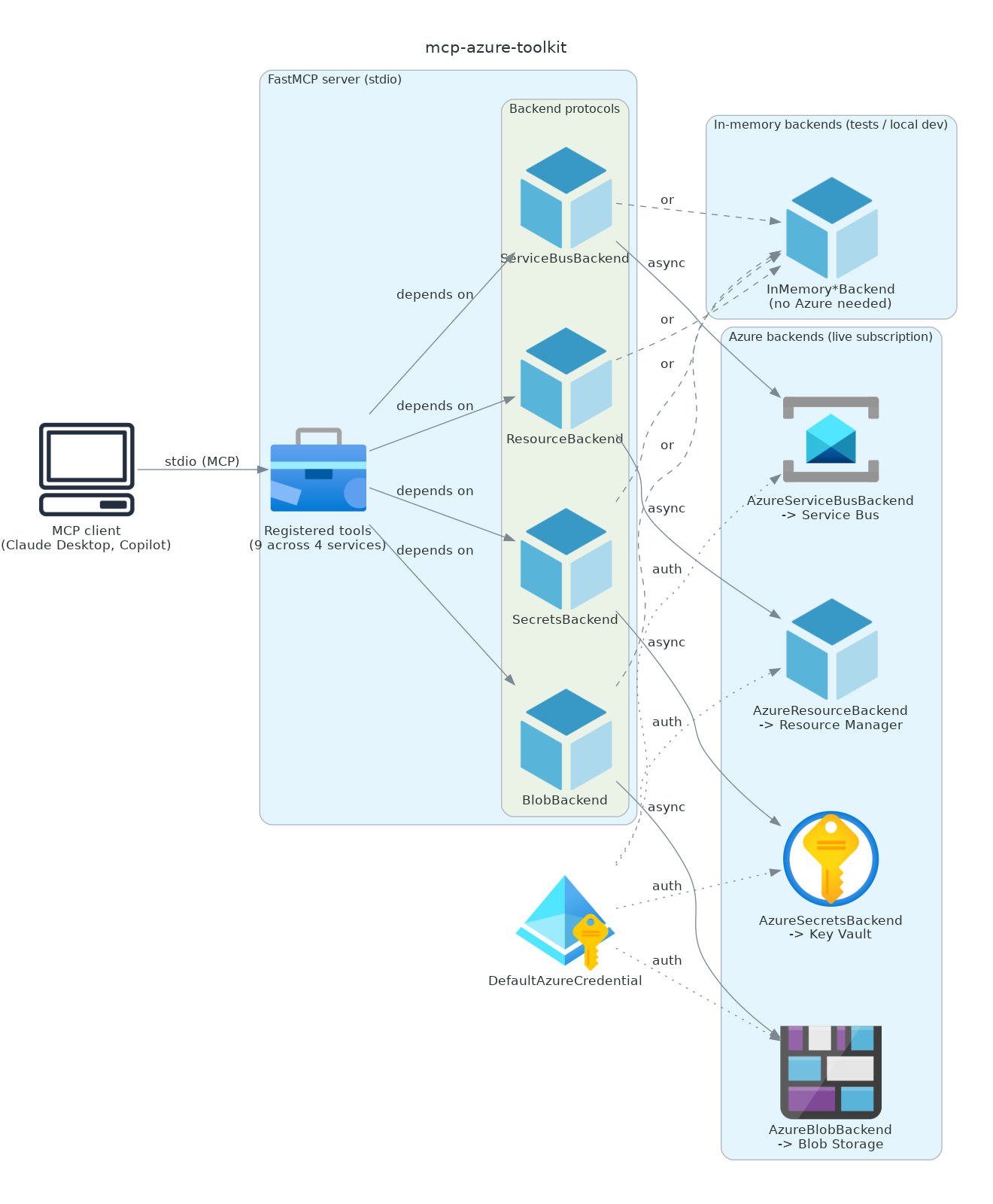
An MCP client launches the server over stdio. At startup the server reads
config.py, and build_azure_server
(server.py) registers tools for only the configured
services. Each tool depends on a narrow async backend protocol, never on the Azure SDK
directly:
- Server and tool registration.
build_servertakes any subset of backends and wires their operations up as MCP tools (tools.py). The same function is used in production and in tests. - Backend protocols.
BlobBackend,SecretsBackend,ServiceBusBackend, andResourceBackend(backends.py) define the minimal surface each tool group needs. - Two implementations per protocol.
Azure*Backendwraps the real Azure SDK; the synchronous SDK clients run in a worker thread viaasyncio.to_threadso they do not block the event loop.InMemory*Backendis a dependency-free fake. - Four Azure services. Blob Storage, Key Vault, Service Bus, and Resource Manager, each
reached through
DefaultAzureCredential.
Because tools see only the protocols, the same server runs against real Azure or against the in-memory fakes with no code change. That is what lets the whole tool surface be tested with no live subscription.
Security model
- No secrets in config. Authentication is
DefaultAzureCredential, so the server borrows the host's existing identity (az login, managed identity, or environment credentials). Nothing sensitive is stored in the MCP client config or the environment file beyond resource URLs. - Read-mostly by design. The exposed operations are deliberately limited: blobs and secrets are read-only, and Service Bus offers send plus a non-destructive peek. Destructive operations (delete, purge, overwrite) are intentionally omitted so the server is safe to hand to an autonomous AI client. If you need them, add them behind an approval gate.
- Least surface by default. Only the services you explicitly configure are registered, so an unconfigured service is not reachable at all.
Design decisions
- Backend protocol plus fakes. Tools depend on small async protocols rather than the Azure SDK. This keeps the tool layer testable without Azure and makes the safety boundary (which operations exist) explicit and easy to audit.
- Sync SDK wrapped in
asyncio.to_thread. The Azure SDK clients used here are synchronous; running them in a worker thread keeps the async MCP server responsive without pulling in the async SDK variants. - Optional per-service registration. Configuration is all-optional and a service is only wired up when its variable is set, so the same package can be a blob-only server or a full four-service server.
- Azure SDKs behind an optional extra. The base install stays lean (just
mcpandazure-identity); the heavier per-service SDKs come with[azure].
Development
The full tool surface is tested against the in-memory backends, so no Azure subscription or credentials are needed.
pip install -e ".[dev]"
pytest          # tool surface tested against in-memory backends, no Azure needed
ruff check .
mypy mcp_azure_toolkit
Benchmarks
The numbers below measure the toolkit's own dispatch overhead (argument validation, tool
lookup, async invocation, result serialisation) using the in-memory backends, so they do not
include any Azure round-trip. Regenerate with
python scripts/benchmark.py | python scripts/inject_readme_section.py --section benchmarks.
In-memory tool-dispatch latency over 2000 iterations per tool (no live Azure; measures toolkit overhead only).
| Tool | mean (ms) | p50 (ms) | p95 (ms) | p99 (ms) |
|---|---|---|---|---|
blob_list_containers |
0.043 | 0.038 | 0.074 | 0.093 |
blob_list_blobs |
0.046 | 0.040 | 0.077 | 0.103 |
blob_read |
0.038 | 0.032 | 0.069 | 0.084 |
keyvault_list_secrets |
0.047 | 0.041 | 0.091 | 0.104 |
keyvault_get_secret |
0.032 | 0.029 | 0.054 | 0.070 |
servicebus_send |
0.032 | 0.030 | 0.043 | 0.066 |
servicebus_peek |
0.080 | 0.076 | 0.132 | 0.162 |
resource_list_groups |
0.036 | 0.033 | 0.052 | 0.074 |
resource_list_resources |
0.044 | 0.039 | 0.070 | 0.084 |
Known limitations
- Operations are read-mostly on purpose; there are no delete/purge/overwrite tools.
- Blob reads decode content as UTF-8 text, so binary blobs are not supported by
blob_read. - The real
Azure*Backendclasses require a live Azure subscription and are exercised only against one; they are excluded from coverage. - The toolkit covers four services (Blob, Key Vault, Service Bus, Resource Manager); other Azure services are out of scope for now.
Contributing
Contributions are welcome. A good change adds or fixes a tool with a test that runs against an in-memory backend (no live Azure), keeps operations read-mostly by default, and follows the existing style. Open an issue describing the change before a large PR.
License
Release history Release notifications | RSS feed


Download files
Download the file for your platform. If you're not sure which to choose, learn more about installing packages.
Source Distribution
Built Distribution
Filter files by name, interpreter, ABI, and platform.
If you're not sure about the file name format, learn more about wheel file names.
Copy a direct link to the current filters
File details
Details for the file mcp_azure_toolkit-0.1.1.tar.gz.
File metadata
- Download URL: mcp_azure_toolkit-0.1.1.tar.gz
- Upload date:
- Size: 16.4 kB
- Tags: Source
- Uploaded using Trusted Publishing? No
- Uploaded via: twine/6.2.0 CPython/3.12.5
File hashes
| Algorithm | Hash digest | |
|---|---|---|
| SHA256 |
e93fcb1fd8fbdd9acb18b22b14eec2b36bfc44cbc9e18975754904b58792ccce
|
|
| MD5 |
47cfb4ebb656631cce667b69f519c263
|
|
| BLAKE2b-256 |
0041a85e5979b2dddf6b492b130aaf43c4fdf3e7e71cd0c396051f03b72ff818
|
File details
Details for the file mcp_azure_toolkit-0.1.1-py3-none-any.whl.
File metadata
- Download URL: mcp_azure_toolkit-0.1.1-py3-none-any.whl
- Upload date:
- Size: 12.2 kB
- Tags: Python 3
- Uploaded using Trusted Publishing? No
- Uploaded via: twine/6.2.0 CPython/3.12.5
File hashes
| Algorithm | Hash digest | |
|---|---|---|
| SHA256 |
c1ac520977f7124f102425cb879b00d6b8a72a5f7fde2c83de5e1b6033474c8d
|
|
| MD5 |
8782afb6317c5c66dbb0c27e7b176644
|
|
| BLAKE2b-256 |
0c557b97e33e50352487a87a35f95281a23ca24bf26742d74856a33a59397f7e
|






