
Model Context Protocol server for Cyberbro IOC analysis and enrichment
Verified details
These details have been verified by PyPIProject links
GitHub Statistics
Maintainers

Project description
Cyberbro MCP Server
Extract IoCs from messy text and analyze them with Cyberbro.
🌐 demo.cyberbro.net

Model Context Protocol server for Cyberbro.
This project is packaged as a standard Python distribution and can be launched with:
uvx mcp-cyberbropip install mcp-cyberbrothenmcp-cyberbro
Why this server
- Analyze observables (IP, domain, URL, hash, etc.) via Cyberbro engines.
- Integrate threat-analysis actions directly in MCP-capable assistants.
- Run with
stdio,sse, orstreamable-httptransports. - Compatible with any MCP client that supports one of these transports.
Installation
Use with uvx (standalone)
uvx mcp-cyberbro --cyberbro_url http://localhost:5000
Use with pip
pip install mcp-cyberbro
mcp-cyberbro --cyberbro_url http://localhost:5000
Local development
pip install -e .
mcp-cyberbro --cyberbro_url http://localhost:5000
Docker
Default container command starts in streamable-http mode on port 8000.
docker run --rm -p 8000:8000 \
  -e CYBERBRO_URL=http://host.docker.internal:5000 \
  ghcr.io/stanfrbd/mcp-cyberbro:latest
To force stdio transport:
docker run -i --rm \
  -e CYBERBRO_URL=http://host.docker.internal:5000 \
  ghcr.io/stanfrbd/mcp-cyberbro:latest \
  --transport stdio
Configuration
Copy .env.example and set at least:
CYBERBRO_URL(required)
Supported environment variables:
CYBERBRO_URLAPI_PREFIX(default:api)SSL_VERIFY(true/false)MCP_TRANSPORT(stdio,sse,streamable-http)MCP_HOSTMCP_PORTMCP_MOUNT_PATHMCP_SSE_PATHMCP_STREAMABLE_HTTP_PATH
CLI flags are also available and override env values.
MCP Client Integration
You can use this server with Claude Desktop, Claude Code, Cursor, OpenAI-compatible MCP clients, or any other MCP client.
Example config using uvx:
{
  "mcpServers": {
    "cyberbro": {
      "command": "uvx",
      "args": ["mcp-cyberbro"],
      "env": {
        "CYBERBRO_URL": "http://localhost:5000",
        "API_PREFIX": "api"
      }
    }
  }
}
Example with Docker + stdio:
{
  "mcpServers": {
    "cyberbro": {
      "command": "docker",
      "args": [
        "run",
        "-i",
        "--rm",
        "-e",
        "CYBERBRO_URL",
        "ghcr.io/stanfrbd/mcp-cyberbro:latest",
        "--transport",
        "stdio"
      ],
      "env": {
        "CYBERBRO_URL": "http://localhost:5000"
      }
    }
  }
}
MCP Registry Metadata
server.json is included for MCP Registry publication and points to PyPI package mcp-cyberbro.
Release Pipelines
Release-created workflows:
.github/workflows/publish-test-pypi.yml.github/workflows/publish-pypi.yml.github/workflows/publish-mcp-plugin.yml
Available Tools
analyze_observableis_analysis_completeget_analysis_resultsget_enginesget_web_url
Example Prompts
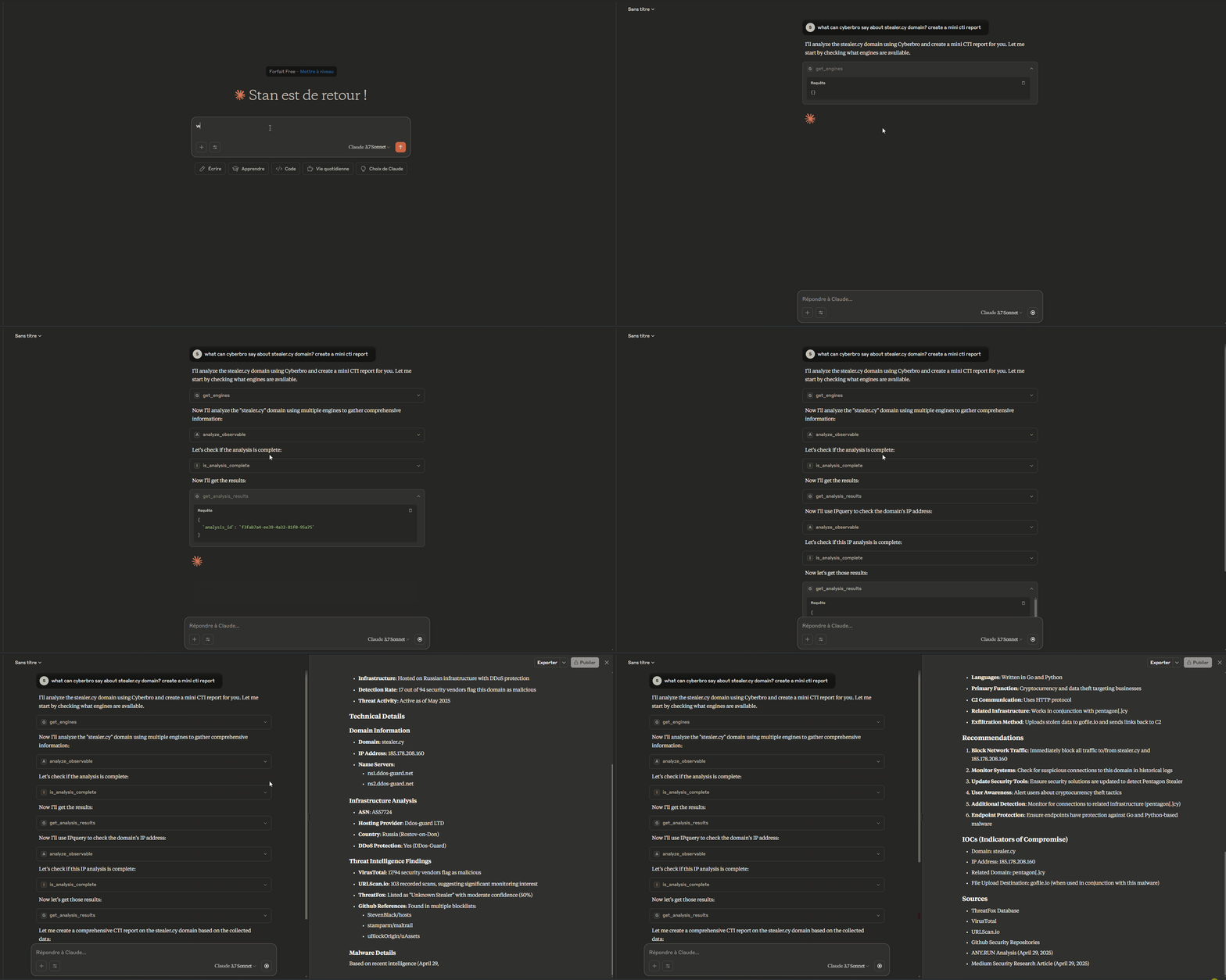
Here are practical prompt examples you can use with any MCP-capable assistant connected to Cyberbro.
Getting Indicator Details
- Cyberbro: Check indicators for target.com
- Can you check this IP reputation with Cyberbro? 192.168.1.1. Use github, google and virustotal engines.
- I want to analyze the domain example.com. What can Cyberbro tell me about it? Use max 3 engines.
- Analyze these observables with Cyberbro: suspicious-domain.com, 8.8.8.8, and 44d88612fea8a8f36de82e1278abb02f. Use all available engines.
Observable Analysis
- I found this (hash|domain|url|ip|extension). Can you submit it for analysis to Cyberbro and analyze the results?
OSINT Investigation
- Create an OSINT report for the domain example.com using Cyberbro. Use all available engines and pivot on the results for more information. Use a maximum of 10 analysis requests.
Acknowledgements
License
MIT
Project details
Verified details
These details have been verified by PyPIProject links
GitHub Statistics
Maintainers


Download files
Download the file for your platform. If you're not sure which to choose, learn more about installing packages.
Source Distribution
Built Distribution
Filter files by name, interpreter, ABI, and platform.
If you're not sure about the file name format, learn more about wheel file names.
Copy a direct link to the current filters
File details
Details for the file mcp_cyberbro-0.0.1.tar.gz.
File metadata
- Download URL: mcp_cyberbro-0.0.1.tar.gz
- Upload date:
- Size: 11.1 kB
- Tags: Source
- Uploaded using Trusted Publishing? Yes
- Uploaded via: twine/6.1.0 CPython/3.13.7
File hashes
| Algorithm | Hash digest | |
|---|---|---|
| SHA256 |
2b63d4fa9d53bd2b6d317423194c62b68739ddd3c90c8780bd68b65650bbd5ee
|
|
| MD5 |
24d64ec85454d4a63e6c0b3a3358f452
|
|
| BLAKE2b-256 |
57e3fd3ecb47dead95ac07c2e8599ec07c934af3fcb796b033f24cf612d99dda
|
Provenance
The following attestation bundles were made for mcp_cyberbro-0.0.1.tar.gz:
Publisher:
publish-pypi.yml on stanfrbd/mcp-cyberbro
-
Statement:
-
Statement type:
https://in-toto.io/Statement/v1 -
Predicate type:
https://docs.pypi.org/attestations/publish/v1 -
Subject name:
mcp_cyberbro-0.0.1.tar.gz -
Subject digest:
2b63d4fa9d53bd2b6d317423194c62b68739ddd3c90c8780bd68b65650bbd5ee - Sigstore transparency entry: 1252479741
- Sigstore integration time:
-
Permalink:
stanfrbd/mcp-cyberbro@813ec19f69ce8e50798f4243be36602ea8ebeef5 -
Branch / Tag:
refs/tags/v0.0.1 - Owner: https://github.com/stanfrbd
-
Access:
public
-
Token Issuer:
https://token.actions.githubusercontent.com -
Runner Environment:
github-hosted -
Publication workflow:
publish-pypi.yml@813ec19f69ce8e50798f4243be36602ea8ebeef5 -
Trigger Event:
release
-
Statement type:
File details
Details for the file mcp_cyberbro-0.0.1-py3-none-any.whl.
File metadata
- Download URL: mcp_cyberbro-0.0.1-py3-none-any.whl
- Upload date:
- Size: 10.6 kB
- Tags: Python 3
- Uploaded using Trusted Publishing? Yes
- Uploaded via: twine/6.1.0 CPython/3.13.7
File hashes
| Algorithm | Hash digest | |
|---|---|---|
| SHA256 |
a57d8f2426ca9e8ac84e4c578bd42db462a5607b094a78ec4d43be98653115c5
|
|
| MD5 |
14209f31bafb5c244389698ea2ab2e85
|
|
| BLAKE2b-256 |
7f0a755debef315401f76a0cd009464d4b965255fc66b72c1fb2104fb9579e75
|
Provenance
The following attestation bundles were made for mcp_cyberbro-0.0.1-py3-none-any.whl:
Publisher:
publish-pypi.yml on stanfrbd/mcp-cyberbro
-
Statement:
-
Statement type:
https://in-toto.io/Statement/v1 -
Predicate type:
https://docs.pypi.org/attestations/publish/v1 -
Subject name:
mcp_cyberbro-0.0.1-py3-none-any.whl -
Subject digest:
a57d8f2426ca9e8ac84e4c578bd42db462a5607b094a78ec4d43be98653115c5 - Sigstore transparency entry: 1252479754
- Sigstore integration time:
-
Permalink:
stanfrbd/mcp-cyberbro@813ec19f69ce8e50798f4243be36602ea8ebeef5 -
Branch / Tag:
refs/tags/v0.0.1 - Owner: https://github.com/stanfrbd
-
Access:
public
-
Token Issuer:
https://token.actions.githubusercontent.com -
Runner Environment:
github-hosted -
Publication workflow:
publish-pypi.yml@813ec19f69ce8e50798f4243be36602ea8ebeef5 -
Trigger Event:
release
-
Statement type:






