
MCP Dashboard



Cost and benefit of your MCP toolbox, across Claude Code, OpenAI Codex, Gemini CLI, and Cursor — what each server costs in RAM, CPU, context tokens, and startup time, weighed against how often you actually call it, with working on/off switches and a skills directory.
Zero required runtime dependencies and no remote UI assets. Python 3.10+
standard library only; psutil is an optional extra for live CPU sampling.
The installable v1 package, isolated state, diagnostics, recovery controls, and
release automation are implemented. The repository remains a v1 release
candidate until the cross-platform release checklist and first tagged
publication are completed.
Design record: DESIGN.md — why, how it measures cost, the provenance and verdict rules, and how the control endpoint is secured. What's next: ROADMAP.md.
Where outputs go: inside an Obsidian vault, Markdown outputs go to its
Obsidian Vault Management/Systems/ folder. Otherwise reports, state, cache,
profiles, and recovery points use platform-native user directories—never
site-packages. Override the application home with MCP_DASHBOARD_HOME, the
vault with MCP_DASHBOARD_VAULT, or individual outputs with --html/--note.
Why
Local stdio MCP servers (launched via npx, node, uvx, python,
docker) are real OS processes, spawned once per open agent session —
three open sessions run every stdio server three times. Remote connectors
cost no local RAM but still inject tool schemas into every request. So the
question is never RAM alone: it is cost versus use.
Install and start in 60 seconds
Prerequisite: Python 3.10+. No API key is needed. After v1 is published:
pipx install mcp-dashboard
mcp-dashboard --doctor
mcp-dashboard open --probe
Until the first PyPI publication, install the release candidate directly from
GitHub with pipx install git+https://github.com/SarutobiSasuke8/mcp-dashboard.git,
or use the source workflow in the onboarding guide.
That command discovers local MCP configuration, briefly probes enabled stdio
servers, starts the authenticated dashboard at 127.0.0.1:7817, and opens the
correct one-time URL in your browser. Keep the terminal open while using live
switches; press Ctrl+C to stop it. The first probe can take a little longer
because each server is started once.
For a faster read-only first look, run mcp-dashboard --open. See the complete
installation and onboarding guide, including source
installation, privacy choices, migration, troubleshooting, and scheduled scans.
Do not bookmark the tokenized live URL: a fresh local security token is generated on every run. Reopen the dashboard with the command above.
Usage
mcp-dashboard open                  # live dashboard + browser (recommended)
mcp-dashboard open --probe          # also refresh context/startup measurements
mcp-dashboard scan                  # write a static dashboard + directory note
mcp-dashboard --open                # static report and open it
mcp-dashboard --report              # append a usage snapshot
mcp-dashboard --tasks               # file high-severity findings as tasks
mcp-dashboard --profile coding      # apply a named server set
mcp-dashboard --list-profiles
mcp-dashboard --restore-last        # undo the most recent dashboard config change
mcp-dashboard --no-usage            # do not read agent transcripts
mcp-dashboard --json out.json       # recursively redacted machine-readable snapshot
mcp-dashboard --demo --open         # preview safe sample data
Everyday opening flow
The memorable command is:
mcp-dashboard open
Use --probe when server definitions change or you want fresh startup/context
measurements; ordinary live opens can omit it. Use --open without --serve
for a static report whose controls are intentionally disabled.
Tests: python -m unittest discover -s tests (standard library only; 73 tests).
Optional: pipx inject mcp-dashboard psutil for live CPU sampling (and any CPU
reading at all on Windows).
Platforms: built and battle-tested on Windows; the macOS/Linux paths
(ps-based process matching, POSIX config locations) are implemented and
unit-tested in CI but have had less real-machine mileage — issues welcome.
Views
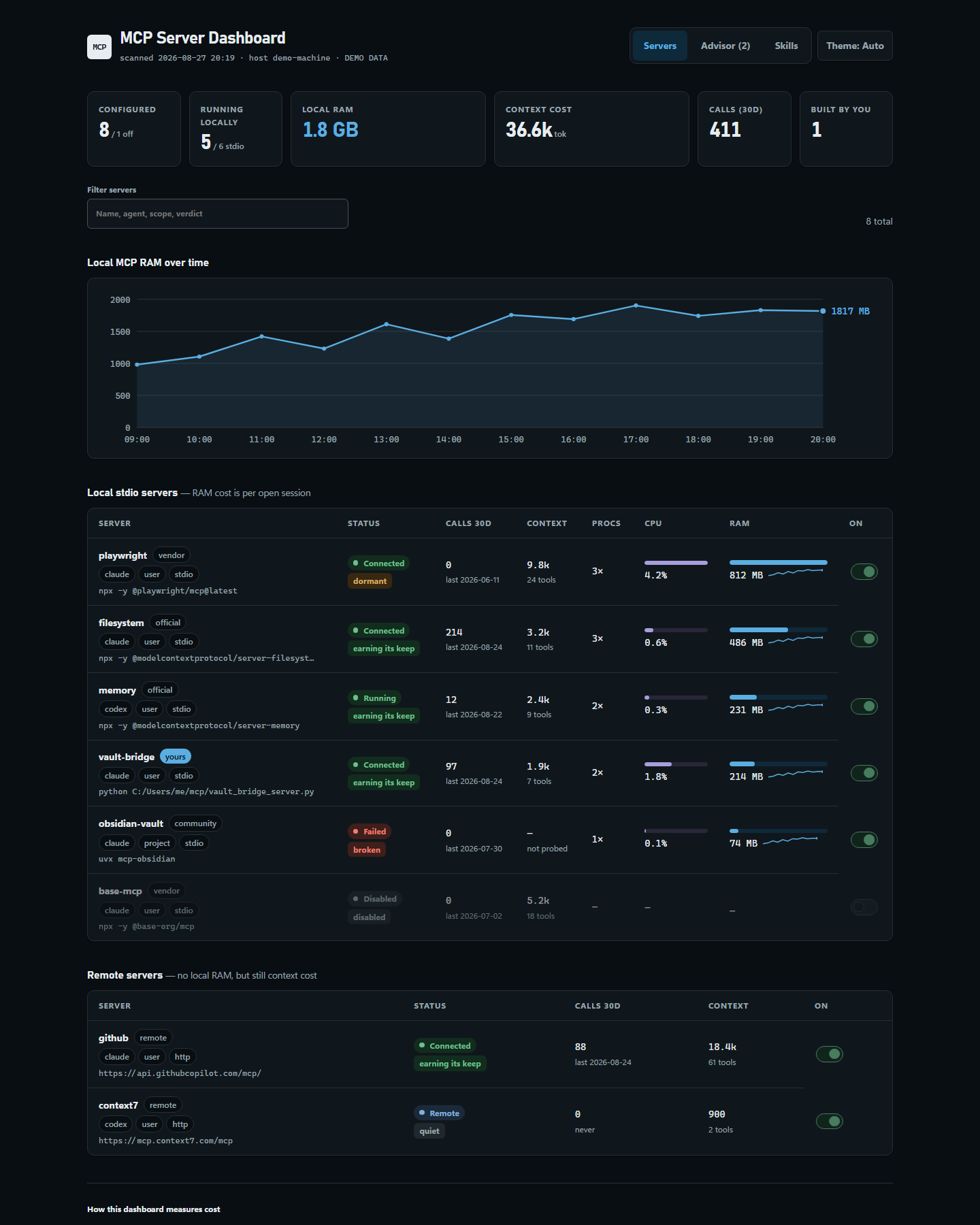
- Servers — filterable tiles, RAM-over-time chart, and a table per server: status, verdict, calls in 30 days, context cost, process count, CPU, RAM with sparkline, and an on/off switch. Tables collapse into labelled cards on smaller screens. Local stdio and remote servers are listed separately because only the former cost RAM.
- Advisor — ranked recommendations with estimated savings and one-click switch-off, profile buttons, most-used and heaviest bar charts, and any plaintext credentials found in config.
- Skills — every skill from Claude,
.agents,.codex, vault, project, user, synced, and plugin paths, with filtering, 30-day usage,lockedmarkers fromskills-lock.json, and name-collision warnings showing which copy wins.
The header theme control cycles automatic, light, and dark modes. The chosen view and theme survive live-control reloads.
How it measures
- Config:
~/.claude.json(user + per-project), each project's.mcp.json,~/.codex/config.toml(CODEX_HOMErespected),~/.gemini/settings.json,~/.cursor/mcp.json. - RAM/CPU: process table via psutil, else
ps/ PowerShellGet-CimInstance; matches each server's most distinctive command token and sums the process tree. Shells, editors, and search tools are never counted, and neither are this script's own ancestors. A process tree matching more than one configured definition is counted once and marked as estimated. - Context cost (
--probe): starts each stdio server, completes the MCPinitializehandshake, callstools/list, and records tool count, estimated schema tokens, startup latency, and real stderr on failure. Cached inmcp-probe-cache.json; a configuration fingerprint invalidates stale results automatically. - Usage:
tool_useblocks namedmcp__<server>__<tool>in Claude Code transcripts (~/.claude/projects/**/*.jsonl), plus best-effort parsing of Codex rollout logs. Counts are separated by agent and attributed to a matching project definition where the transcript identifies one, so duplicate configurations do not multiply totals. Skill invocations are counted the same way.
Verdicts
earning (used in 30d) · quiet (cheap and idle) · dormant (used before,
not lately) · unused (never called, still costing) · expensive (high cost,
≤2 calls) · broken (failing) · disabled. Servers installed less than 7
days ago are not judged as unused.
Provenance
Badges: yours (self-built), official, vendor, community, remote,
unlabeled. Auto-detected, overridden by mcp-provenance.json:
{ "vault-bridge": "self-built",
  "some-server": { "provenance": "community", "note": "forked for X" } }
Toggles and profiles (--serve)
The static HTML cannot change config — control lives in the local server.
Off removes the server from that agent's config (CLI first, direct file edit
with a timestamped backup as fallback) and stashes it in
mcp-disabled.json; on restores it. Profiles in mcp-profiles.json enable
a named set and disable everything else, across all agents at once. Changes
apply to new sessions. Profile changes are transactional: if any mutation
fails, the affected config and stash files are restored to their pre-profile
state. Live changes require confirmation and create a local single-use recovery
point; use the Advisor's recovery button or mcp-dashboard --restore-last.
Because this endpoint edits real config, it binds to loopback only, rejects a
non-loopback Host (blocking DNS rebinding), and requires a per-run token —
the initial query token establishes a short-lived HttpOnly,
SameSite=Strict loopback session cookie, and mutations require an exact
same-origin request. The live response also sends a separate nonce-based
Content Security Policy, disables framing and caching, and suppresses
referrers. Open the URL the command prints; the token is removed from the
visible URL once the page initializes.
Scheduling
.\Register-MCPDashboardScan.ps1                              # every 4h, quiet scan
.\Register-MCPDashboardScan.ps1 -IntervalHours 12 -Report -Probe
.\Register-MCPDashboardScan.ps1 -Unregister
Files
| File | What |
|---|---|
mcp_dashboard.py, mcpdash/ |
The tool |
pyproject.toml |
Package metadata and mcp-dashboard console entry point |
mcp-provenance.json |
Source-checkout seed for user provenance labels |
mcp-profiles.json |
Source-checkout seed for named server sets |
Register-MCPDashboardScan.ps1 |
Scheduled-task registration |
tests/, scripts/ |
Tests and installed-wheel/release verification |
<outputs>/MCP Server Dashboard.html |
Generated dashboard |
<outputs>/MCP Directory.md |
Living registry note |
<outputs>/MCP Usage Report.md |
Rolling snapshots (--report) |
| Platform config/state/cache directories | Profiles, provenance, registry, history, caches, disabled stash, and recovery points |
Trimming RAM
- Act on the Advisor tab — it ranks by what you actually use.
- Move single-project servers to that project's
.mcp.json. - Prefer remote (HTTP) variants where they exist — zero local RAM.
- Close idle sessions; each holds its own copy of every stdio server.
Safety
Every config edit — including ones routed through the claude/codex
CLIs — takes a timestamped backup of the file first, and disabled servers
are stashed in full so switching them back on is lossless. Machine-readable
exports recursively redact credential-like values in environment, header,
command arguments, authenticated URLs, query parameters, and vendor-specific
config blocks. The test suite runs inside a hard sandbox
(Path.home patched, agent CLIs stubbed) and can never touch your real config.
The tool reads local agent configuration and transcript metadata to calculate
usage. It does not send that data anywhere. Generated reports can contain
server names, project names, and local paths, so review them before sharing.
Disable transcript reading with --no-usage or
MCP_DASHBOARD_NO_USAGE=1.
See SECURITY.md for the security model and private reporting
instructions.
Contributing and release status
Bug reports and focused pull requests are welcome; start with CONTRIBUTING.md. The codebase is a packaged v1 release candidate; publication still depends on the maintainer-owned administration, cross-platform evidence, and tag gates in ROADMAP.md and the release checklist. See CHANGELOG.md for versioned changes.
License
MIT. Free to use, fork, and build on.
1 maintainer

Metadata
1 maintainer
Release files for mcp-dashboard 1.0.0
For a detailed explanation of source distributions (sdists) and built distributions (wheels), please see the package formats documentation.
Source distribution (sdist)
| File | Size | Uploaded | Provenance | |
|---|---|---|---|---|
| mcp_dashboard-1.0.0.tar.gz | 69.2 kB | With provenance | Details |
Built distribution (wheel)
| File | Interpreter | ABI | Platform | Reset |
|---|---|---|---|---|
| mcp_dashboard-1.0.0-py3-none-any.whl | Python 3 | none | any | Details |
Total release size: 130.5 kB
Release files / mcp_dashboard-1.0.0.tar.gz
| Download URL | mcp_dashboard-1.0.0.tar.gz |
|---|---|
| Size | 69.2 kB |
| Tags | Source |
|
SHA-256 checksum How to use checksums |
cb3687d87ccf2374d652f1800541e72f6a119c8679153a5c207bc475d2ba11bd
|
|
BLAKE2b-256 checksum How to use checksums |
e5d0303183ed06f3102740ff8722171f43e696e4f5558b379fb070dddc228ba0
|
| Upload date | |
|
Uploaded using Trusted Publishing? What is trusted publishing? |
Yes |
| Uploaded via |
twine/7.0.0 CPython/3.13.14
|
Provenance
Provenance describes where a file came from. On PyPI, provenance is shared via attestations, which provide a verifiable record of the build or publishing details. View details, limitations and caveats.


PyPI Publish Attestation
PyPI verified that this artifact, at this checksum, originated from the publisher listed below.
Signed by GitHub Actions, verified by PyPI on Aug 28, 2026.
Transparency logRelease files / mcp_dashboard-1.0.0-py3-none-any.whl
| Download URL | mcp_dashboard-1.0.0-py3-none-any.whl |
|---|---|
| Size | 61.3 kB |
| Tags | Python 3 |
|
SHA-256 checksum How to use checksums |
f488187a6c1631eb9a5fa49484e89233831702b25dc8b1c5736b5bffd867b11c
|
|
BLAKE2b-256 checksum How to use checksums |
ce7cf7fd36a65b1e678c71a0921a1627ca931fd886d87c4b5bec54097f162619
|
| Upload date | |
|
Uploaded using Trusted Publishing? What is trusted publishing? |
Yes |
| Uploaded via |
twine/7.0.0 CPython/3.13.14
|
Provenance
Provenance describes where a file came from. On PyPI, provenance is shared via attestations, which provide a verifiable record of the build or publishing details. View details, limitations and caveats.
PyPI Publish Attestation
PyPI verified that this artifact, at this checksum, originated from the publisher listed below.
Signed by GitHub Actions, verified by PyPI on Aug 28, 2026.
Transparency logSecurity for mcp-dashboard 1.0.0
Provenance
Provenance describes where a file came from. On PyPI, provenance is shared via attestations, which provide a verifiable record of the build or publishing details. View details, limitations and caveats.
Full provenance
All 2 files in this release have been uploaded with provenance metadata.
Attestation for mcp_dashboard-1.0.0.tar.gz
PyPI Publish Attestation
PyPI verified that this artifact, at this checksum, originated from the publisher listed below.
Signed by GitHub Actions, verified by PyPI on Aug 28, 2026.
Transparency logA note on package security
PyPI is a repository for distributing packages, not a service for auditing them. While third-party security researchers and our staff do their best to detect and remove malicious packages, PyPI cannot guarantee the quality, security or suitability of any given package.













