
mcp-dev-toolbox
Ask your AI agent about your codebase in plain English — and get answers grounded in your actual code and git history.
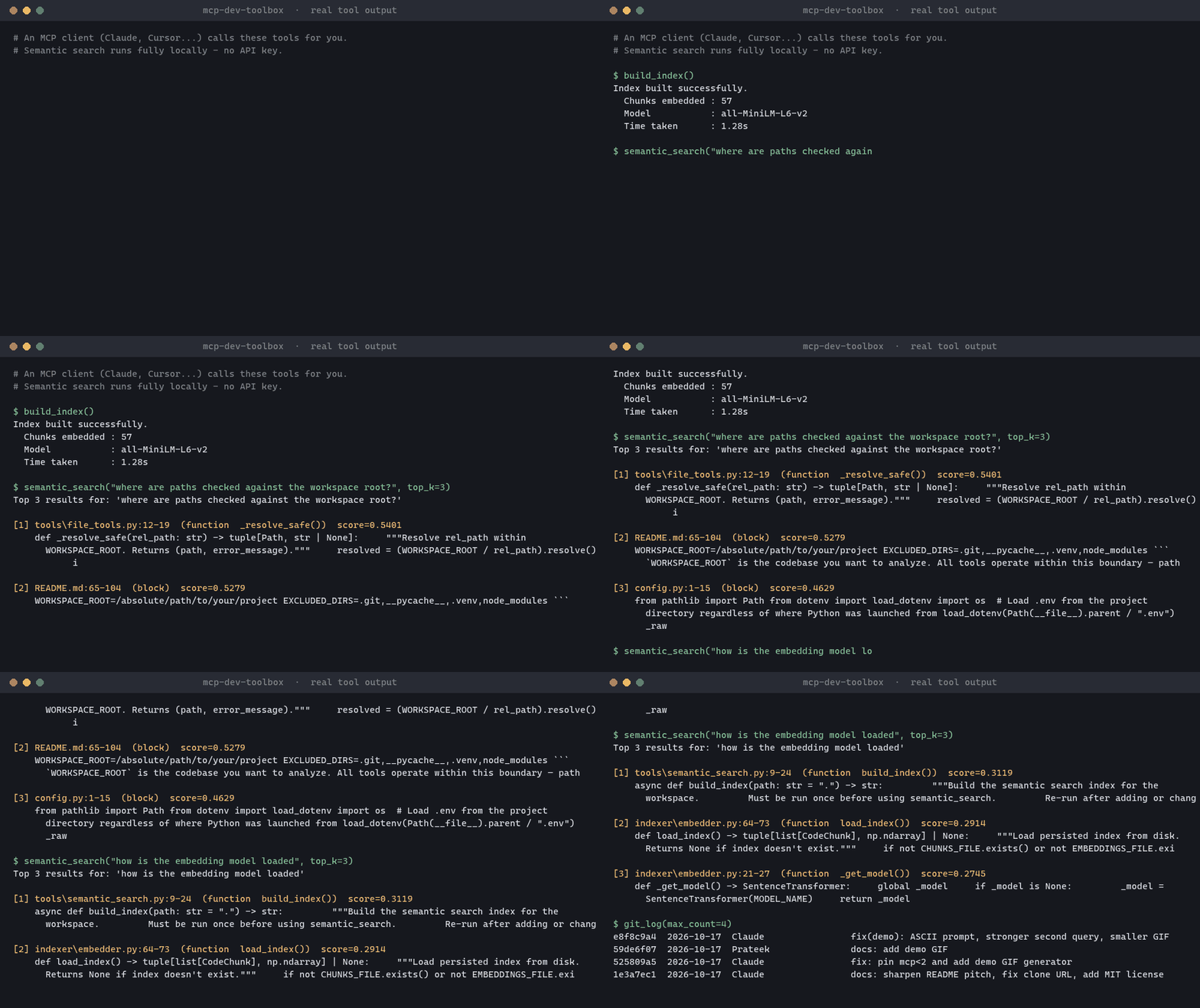



An MCP server for Claude Desktop, Claude Code, Cursor and any other MCP client. Its headline feature is local semantic code search: find code by meaning ("where do we validate auth tokens?") using on-device embeddings — no API key, no code leaving your machine. Alongside it you get git history, diffs, blame, file inspection, and ready-made prompts for code review and commit messages.
Why use it
- 🔍 Semantic search, fully local —
all-MiniLM-L6-v2embeddings indexed per function/class, stored on disk, no external API calls. - 🕰️ Git-aware — the agent can read log, diff, status and blame instead of guessing what changed.
- 🔒 Sandboxed by design — every path is confined to
WORKSPACE_ROOT; git runs without a shell. - 🧩 Uses the whole MCP spec — 12 tools, 3 resources and 4 prompts, not just tools.
- ☁️ Local or cloud — stdio for desktop clients, SSE + Dockerfile for one-click Railway deploys.
Quick start
git clone https://github.com/walter789/MCP-dev-toolbox.git
cd MCP-dev-toolbox
pip install -r requirements.txt
Then point your MCP client at server.py with WORKSPACE_ROOT set to the project you want to explore (full config below), and ask:
"Build the index, then find where we handle database connection errors."
Features
| Primitive | Count | What's included |
|---|---|---|
| Tools | 12 | Git history, diffs, blame · File search, TODO finder, stats · LOC counter, long-function detector · Semantic search (embedding-based) |
| Resources | 3 | file://{path} · git://status · git://log |
| Prompts | 4 | Code review · Commit message · Explain codebase · Debug guide |
Setup
1. Clone and install
git clone https://github.com/walter789/MCP-dev-toolbox.git
cd MCP-dev-toolbox
pip install -r requirements.txt
2. Configure environment
cp .env.example .env
Edit .env:
WORKSPACE_ROOT=/absolute/path/to/your/project
EXCLUDED_DIRS=.git,__pycache__,.venv,node_modules
WORKSPACE_ROOT is the codebase you want to analyze. All tools operate within this boundary — paths outside it are rejected.
3. Add to Claude Desktop
Open your Claude Desktop config (claude_desktop_config.json) and add:
{
  "mcpServers": {
    "dev-toolbox": {
      "command": "python",
      "args": ["/absolute/path/to/mcp-dev-toolbox/server.py"],
      "env": {
        "WORKSPACE_ROOT": "/absolute/path/to/your/project"
      }
    }
  }
}
Restart Claude Desktop. You'll see the toolbox icon appear in the toolbar.
Claude Code:
claude mcp add dev-toolbox -e WORKSPACE_ROOT=/absolute/path/to/your/project -- python /absolute/path/to/MCP-dev-toolbox/server.py
Cursor: add the same mcpServers block to ~/.cursor/mcp.json (or .cursor/mcp.json in a project).
Tools Reference
Git Tools
| Tool | Description | Key Args |
|---|---|---|
git_log |
Recent commits with hash, author, date, message | max_count, since_days |
git_status |
Working tree status (modified / staged / untracked) | — |
git_diff |
Diff for a file or all staged changes | file_path, staged |
git_blame |
Last modifier per line | file_path, start_line, end_line |
File Tools
| Tool | Description | Key Args |
|---|---|---|
find_todos |
Search for TODO/FIXME/HACK/NOTE comments | path, extensions |
search_in_files |
Regex search across source files | pattern, path, extensions, case_sensitive |
get_file_stats |
Size, line count, encoding, last modified | file_path |
list_recent_files |
Files modified in the last N days | days, extensions, path |
Code Tools
| Tool | Description | Key Args |
|---|---|---|
count_lines_by_language |
LOC breakdown by file extension | path, exclude_blank |
find_long_functions |
Detect functions exceeding a line threshold | file_path, threshold |
Semantic Search Tools
| Tool | Description | Key Args |
|---|---|---|
build_index |
Embed the workspace (per function/class) into a local index | path |
semantic_search |
Find code by meaning using natural language | query, top_k |
Resources Reference
| URI | Description |
|---|---|
file://{path} |
Read any workspace file as a resource |
git://status |
Current git status output |
git://log |
Last 20 commits |
Prompts Reference
| Prompt | Description | Args |
|---|---|---|
code_review |
Structured code review | file_path, focus_area |
commit_message |
Conventional commit from a diff summary | diff_summary |
explain_codebase |
Onboarding walkthrough from an entry point | entry_point |
debug_guide |
Systematic debugging template | error_message, file_path |
Semantic Search
Unlike search_in_files (regex), semantic search finds code by meaning.
# First, build the index (once per project)
→ build_index

# Then search naturally
→ semantic_search("user authentication logic")
→ semantic_search("database connection setup")
→ semantic_search("error handling in API calls")
The index is stored under .mcp_index/ (gitignored) and persists across sessions.
Re-run build_index after major code changes.
Model used: all-MiniLM-L6-v2 (~80 MB, runs fully locally — no API key needed).
Cloud Deploy (Railway)
The server supports two transports controlled by the TRANSPORT env var:
| Mode | Transport | When to use |
|---|---|---|
TRANSPORT=stdio (default) |
stdin/stdout | Local Claude Desktop / Cursor |
TRANSPORT=sse |
HTTP + SSE | Cloud deployment |
Deploy to Railway (free tier)
- Push this repo to GitHub
- Go to railway.app → New Project → Deploy from GitHub repo
- Railway auto-detects the
Dockerfileand builds it - Set these environment variables in Railway dashboard:
TRANSPORT=sse WORKSPACE_ROOT=/app - Railway gives you a public URL — copy it from Settings → Domains. It includes a
generated hash suffix:
https://mcp-dev-toolbox-production-<hash>.up.railway.app
Note: Railway ships your source as a zip archive (not
git clone), so.gitis never in the build context. The Dockerfile handles this by runninggit fetchat build time, giving the container the last 50 commits of history for git tools to work.
Connect Claude Desktop to the cloud server
Claude Desktop requires mcp-remote as a bridge for SSE servers:
{
  "mcpServers": {
    "dev-toolbox-cloud": {
      "command": "npx",
      "args": [
        "-y",
        "mcp-remote",
        "https://your-app-production-<hash>.up.railway.app/sse"
      ]
    }
  }
}
Replace the URL with your exact Railway domain. Do not add --transport sse —
it is not a valid mcp-remote flag.
Verify the server is reachable before configuring Claude Desktop by opening
https://your-url/sse in a browser. A healthy server responds with:
event: endpoint
data: /messages/?session_id=...
Example Conversations
"Show me what changed this week"
Claude calls
git_log(since_days=7)and summarizes the commits.
"Find all TODO comments in the src/ folder"
Claude calls
find_todos(path="src", extensions=["py"]).
"What's the largest file by line count?"
Claude calls
count_lines_by_language()thenget_file_stats()on the top result.
"Review my authentication module"
Claude uses the
code_reviewprompt → readsfile://src/auth.py→ returns structured review.
"Write a commit message for my staged changes"
Claude calls
git_diff(staged=True)then uses thecommit_messageprompt.
Security
- All file operations validate that the resolved path is within
WORKSPACE_ROOTbefore reading. - Git subprocess calls run in
WORKSPACE_ROOTwith no shell interpolation (create_subprocess_exec, notshell=True). - Binary files are detected and skipped rather than returned as garbled text.
Project Structure
mcp-dev-toolbox/
├── server.py                  # Thin launcher: `python server.py` from a source checkout
├── mcp_dev_toolbox/
│   ├── server.py              # FastMCP app + main() — wires all modules
│   ├── config.py              # Loads .env, exposes WORKSPACE_ROOT + EXCLUDED_DIRS
│   ├── tools/
│   │   ├── git_tools.py       # 4 git tools (async subprocess)
│   │   ├── file_tools.py      # 4 file analysis tools
│   │   ├── code_tools.py      # 2 code analysis tools
│   │   └── semantic_search.py # 2 semantic search tools (build_index, semantic_search)
│   ├── indexer/
│   │   ├── chunker.py         # Code by function/class, Markdown by heading, capped chunk size
│   │   └── embedder.py        # Embeds chunks with all-MiniLM-L6-v2, cosine similarity search
│   ├── resources/
│   │   └── handlers.py        # 3 resource handlers
│   └── prompts/
│       └── templates.py       # 4 prompt templates
├── tests/                     # pytest suite (`python -m pytest`)
├── scripts/make_demo_gif.py   # Regenerates docs/demo.gif from real tool output
├── pyproject.toml             # Package metadata + `mcp-dev-toolbox` command
├── Dockerfile                 # CPU-only torch; fetches git history at build time
├── requirements.txt
├── .env.example
└── LICENSE
Development
pip install -e ".[dev]"
python -m pytest
License
MIT © 2026 Prateek Pal
1 maintainer

Metadata
1 maintainer
Release files for mcp-dev-toolbox 0.1.0
For a detailed explanation of source distributions (sdists) and built distributions (wheels), please see the package formats documentation.
Source distribution (sdist)
| File | Size | Uploaded | |
|---|---|---|---|
| mcp_dev_toolbox-0.1.0.tar.gz | 16.4 kB | Details |
Built distribution (wheel)
| File | Interpreter | ABI | Platform | Reset |
|---|---|---|---|---|
| mcp_dev_toolbox-0.1.0-py3-none-any.whl | Python 3 | none | any | Details |
Total release size: 38.1 kB
Release files / mcp_dev_toolbox-0.1.0.tar.gz
| Download URL | mcp_dev_toolbox-0.1.0.tar.gz |
|---|---|
| Size | 16.4 kB |
| Tags | Source |
|
SHA-256 checksum How to use checksums |
4657f1abe6db5a6629c237a3d2859bb303dd1c8feb30e45377d24f66b7c7ea19
|
|
BLAKE2b-256 checksum How to use checksums |
337e9b270a4b3c0c6215e16b06e0cf734cdf5fa7c7185aea2b9f7caf45b9a1e7
|
| Upload date | |
|
Uploaded using Trusted Publishing? What is trusted publishing? |
Yes |
| Uploaded via |
twine/7.0.0 CPython/3.13.14
|
Provenance
Provenance describes where a file came from. On PyPI, provenance is shared via attestations, which provide a verifiable record of the build or publishing details. View details, limitations and caveats.


PyPI Publish Attestation
PyPI verified that this artifact, at this checksum, originated from the publisher listed below.
Signed by GitHub Actions, verified by PyPI on Oct 18, 2026.
Transparency logRelease files / mcp_dev_toolbox-0.1.0-py3-none-any.whl
| Download URL | mcp_dev_toolbox-0.1.0-py3-none-any.whl |
|---|---|
| Size | 21.7 kB |
| Tags | Python 3 |
|
SHA-256 checksum How to use checksums |
5fc51143d004f0961f675f72ed6139caf7791e9f7f51613a84660a1cad2665e1
|
|
BLAKE2b-256 checksum How to use checksums |
cf592594a61348ecc81b8f97a6a8bb0317bd45e24b3b97b623229b1c144219fc
|
| Upload date | |
|
Uploaded using Trusted Publishing? What is trusted publishing? |
Yes |
| Uploaded via |
twine/7.0.0 CPython/3.13.14
|
Provenance
Provenance describes where a file came from. On PyPI, provenance is shared via attestations, which provide a verifiable record of the build or publishing details. View details, limitations and caveats.
PyPI Publish Attestation
PyPI verified that this artifact, at this checksum, originated from the publisher listed below.
Signed by GitHub Actions, verified by PyPI on Oct 18, 2026.
Transparency log












