
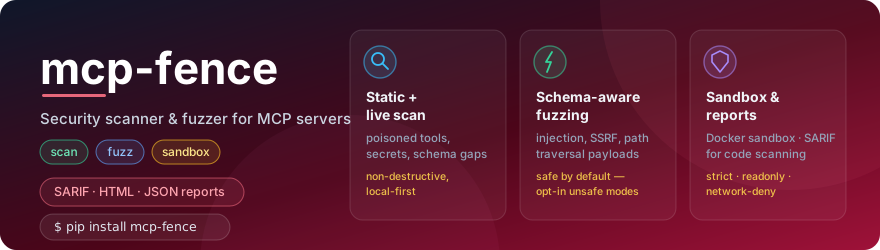



Local-first security scanner, MCP protocol inspector, dynamic fuzzer, Docker sandbox, and report generator for Model Context Protocol servers.
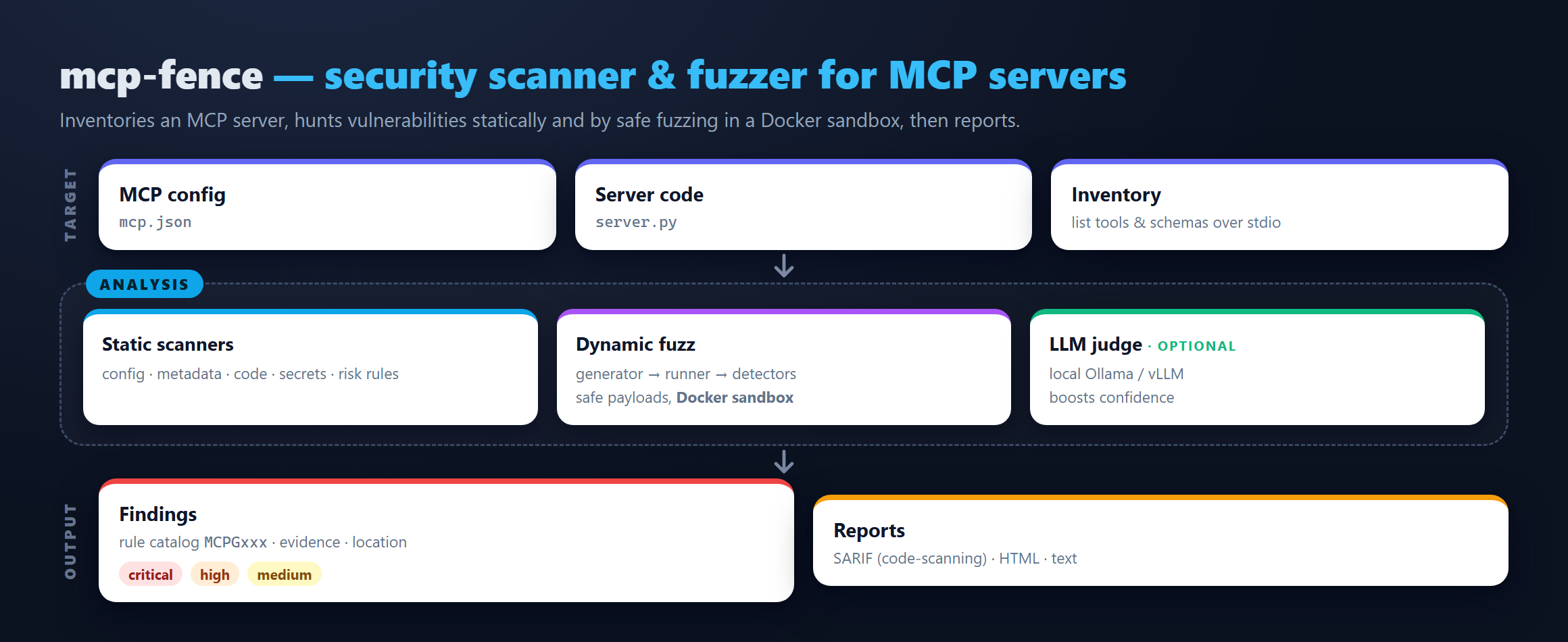
mcp-fence is a developer tool. Point it at your mcp.json (or any
running MCP server you wrote) and it will:
- Statically scan the config and source for tool poisoning, dangerous startup commands, plaintext secrets, schema gaps, and unauthenticated HTTP transports.
- Inspect the server live over stdio — runs
initialize,tools/list, gathers schemas/annotations. - Fuzz every tool with schema-aware payloads (path traversal,
command injection, SSRF, prompt injection, oversize input, type
confusion). Safe by default; opt in to runtime payloads via
--toy-modeor--allow-unsafe. - Sandbox any stdio server in Docker with sensible profiles
(
strict,filesystem-readonly,network-deny,dev). - Report findings as a plain-text table, JSON, SARIF 2.1.0 (for GitHub code scanning), or a fully offline HTML page.
It is non-destructive, local-first, and uses no cloud LLM by default. An optional local-LLM judge can talk to a local Ollama or OpenAI-compatible endpoint.
Install
From PyPI:
pip install mcp-fence
From source (for contributors):
git clone https://github.com/DaoyuanLi2816/mcp-fence
cd mcp-fence
python -m venv .venv
source .venv/bin/activate          # Windows: .venv\Scripts\activate
python -m pip install -e ".[dev]"
Requires Python 3.11+.
30-second quickstart
# 1. Bring up the bundled examples in your working directory.
mcp-fence init-example ./mcp-fence-examples

# 2. Static scan the intentionally poisoned metadata server.
mcp-fence scan mcp-fence-examples/vulnerable_metadata_server/mcp.json

# 3. Live-inspect the safe baseline.
mcp-fence inspect mcp-fence-examples/safe_server/mcp.json

# 4. Fuzz the arbitrary-file-read server.
mcp-fence fuzz mcp-fence-examples/vulnerable_filesystem_server/mcp.json

# 5. Generate a `docker run` command that sandboxes any of the above.
mcp-fence sandbox mcp-fence-examples/vulnerable_filesystem_server/mcp.json \
    --profile strict --dry-run

# 6. Turn a saved JSON result into an offline HTML report.
mcp-fence scan mcp-fence-examples/vulnerable_metadata_server/mcp.json \
    --format json --output /tmp/scan.json
mcp-fence report /tmp/scan.json --format html --output /tmp/scan.html
Example output
mcp-fence 0.1.2 :: scan :: target=mcp-fence-examples/vulnerable_metadata_server/mcp.json
  summary: total=1 score=7/100 verdict=FAIL
  by_severity: high=1
  by_category: secrets=1

# Findings
  SEV   RULE     TITLE                    CATEGORY  WHERE                    DETAIL
  HIGH  MCPG006  Plaintext secret in env  secrets   param=OPENAI_API_KEY     Environment variable `OPENAI_API_KEY` appears to contain a plaintext secret.
Supported transports
| Transport | scan | inspect | fuzz | sandbox | Notes |
|---|---|---|---|---|---|
| stdio | ✓ | ✓ | ✓ | ✓ | First-class. |
| streamable-http | ✓ | — | — | — | Static (config) only; live HTTP inspector v0.2. |
| sse / websocket | ✓ | — | — | — | Same. |
Supported risk classes
Full catalog in docs/rule_catalog.md. Highlights:
- Tool poisoning — prompt-injection phrases in tool descriptions,
hidden HTML comments, zero-width characters, confusable tool names
(Unicode + ASCII visual confusables like
Iist_filesvslist_files). - Dangerous startup commands —
shell=True,curl | sh,sudo,/var/run/docker.sock,--privileged, references to~/.ssh,~/.aws. - Transport binding —
0.0.0.0+ no auth, HTTP without bearer. - Schema risks — unbounded strings, missing
additionalProperties, high-risk param names (command,path,url,webhook, …) without pattern/enum/maxLength. - Source code — shell invocation (
shell=True,os.system), use ofeval/exec, unsafe deserialization (pickle, unsafeyaml.load), disabled TLS verification, hard-coded secrets. - Dynamic — path traversal hitting a planted fake secret, command injection marker echoed back, SSRF accepting metadata IPs, malformed input passing schema validation, sensitive patterns in tool output.
- Protocol — server hangs, schema mismatches, non-JSON output on stdio.
Why MCP servers need their own scanner
MCP server output flows directly into an LLM's context. Anything in a tool's description, name, or response can be interpreted by the assistant as instructions:
- Tool metadata is attacker-controllable once you install someone else's server.
- Tool inputs are LLM-controllable and untrusted by default.
- Tool outputs end up in the LLM's prompt and can carry injection payloads from external content.
General-purpose SAST / npm-audit / pip-audit don't model any of this. mcp-fence has rules and fuzzers built specifically for it.
Safety boundaries
- Non-destructive payloads. The command-injection marker is
echo MCPG_FUZZ_MARKER_8f2a. Norm,mv,chmod, or destructive primitives are ever emitted. - Local-first. No code, configuration, or scan result is uploaded anywhere.
- No cloud LLM by default. Optional
--llm-judgetalks to a local endpoint only. - No public-network scanning. SSRF payloads test the tool's validation behaviour; we don't initiate outbound requests for you.
- Safe path probing. Path-traversal payloads target a planted
fake_secret.txtinside the bundled examples or any explicit--traversal-target. They never aim at/etc/shadowor~/.ssh/.
--allow-unsafe is an explicit safety hatch for use inside the
mcp-fence sandbox Docker profile. See SECURITY.md and
docs/sandboxing.md.
Optional local-LLM judge (Ollama / vLLM)
For semantic suspiciousness scoring on tool descriptions, enable the optional judge:
ollama pull qwen3:8b
mcp-fence scan mcp-fence-examples/vulnerable_metadata_server/mcp.json \
    --inspect --llm-judge ollama --llm-model qwen3:8b
Sized for a 16 GB GPU (e.g. RTX 4080). Failures are silent: the core
scan completes either way. See docs/local_llm.md.
GitHub Action
Drop .github/workflows/mcp-fence.yml
into any repo with an mcp.json. It discovers every mcp.json,
.mcp.json, and claude_desktop_config.json in the repo, merges their
findings into a single SARIF run, and uploads it to GitHub's code
scanning dashboard.
For a single known config path, a minimal equivalent looks like:
- name: install mcp-fence
  run: pip install mcp-fence
- name: scan
  run: mcp-fence scan path/to/mcp.json --format sarif --output mcp-fence.sarif
- uses: github/codeql-action/upload-sarif@v3
  with:
    sarif_file: mcp-fence.sarif
    category: mcp-fence
Five most useful commands
mcp-fence scan mcp-fence-examples/vulnerable_metadata_server/mcp.json
mcp-fence inspect mcp-fence-examples/safe_server/mcp.json
mcp-fence fuzz mcp-fence-examples/vulnerable_filesystem_server/mcp.json
mcp-fence sandbox mcp-fence-examples/vulnerable_shell_server/mcp.json --profile strict --dry-run
mcp-fence report /tmp/scan.json --format html --output /tmp/scan.html
Roadmap
See docs/roadmap.md. v0.2 adds AST-based source
scanning, HTTP/SSE live inspector, a local SSRF capture server, and a
pre-trained tool-poisoning classifier.
License
Apache-2.0. See LICENSE.
1 maintainer

Metadata
1 maintainer
Release files for mcp-fence 0.1.2
For a detailed explanation of source distributions (sdists) and built distributions (wheels), please see the package formats documentation.
Source distribution (sdist)
| File | Size | Uploaded | |
|---|---|---|---|
| mcp_fence-0.1.2.tar.gz | 74.6 kB | Details |
Built distribution (wheel)
| File | Interpreter | ABI | Platform | Reset |
|---|---|---|---|---|
| mcp_fence-0.1.2-py3-none-any.whl | Python 3 | none | any | Details |
Total release size: 157.4 kB
Release files / mcp_fence-0.1.2.tar.gz
| Download URL | mcp_fence-0.1.2.tar.gz |
|---|---|
| Size | 74.6 kB |
| Tags | Source |
|
SHA-256 checksum How to use checksums |
48537e6070063ada784686721fea0be5fb327ce4dc09dd56ddd9fcf68a9e76af
|
|
BLAKE2b-256 checksum How to use checksums |
1f3b6a33b01b33a762c56eb2e7fe563072382f3467300ae7527441cdd417a66e
|
| Upload date | |
|
Uploaded using Trusted Publishing? What is trusted publishing? |
Yes |
| Uploaded via |
twine/6.1.0 CPython/3.13.12
|
Provenance
Provenance describes where a file came from. On PyPI, provenance is shared via attestations, which provide a verifiable record of the build or publishing details. View details, limitations and caveats.


PyPI Publish Attestation
PyPI verified that this artifact, at this checksum, originated from the publisher listed below.
Signed by GitHub Actions, verified by PyPI on Jul 11, 2026.
Transparency logRelease files / mcp_fence-0.1.2-py3-none-any.whl
| Download URL | mcp_fence-0.1.2-py3-none-any.whl |
|---|---|
| Size | 82.8 kB |
| Tags | Python 3 |
|
SHA-256 checksum How to use checksums |
24797ca5113a34318f70eb0f9b17742144e9ff8aad8df83339a17cfe1e6a663d
|
|
BLAKE2b-256 checksum How to use checksums |
24e694376cf8808ffd15596b2f879fda74687b53e4da0934a234a7dae6fd7e12
|
| Upload date | |
|
Uploaded using Trusted Publishing? What is trusted publishing? |
Yes |
| Uploaded via |
twine/6.1.0 CPython/3.13.12
|
Provenance
Provenance describes where a file came from. On PyPI, provenance is shared via attestations, which provide a verifiable record of the build or publishing details. View details, limitations and caveats.
PyPI Publish Attestation
PyPI verified that this artifact, at this checksum, originated from the publisher listed below.
Signed by GitHub Actions, verified by PyPI on Jul 11, 2026.
Transparency log













