
A gateway for MCP servers

Project description
MCP Gateway
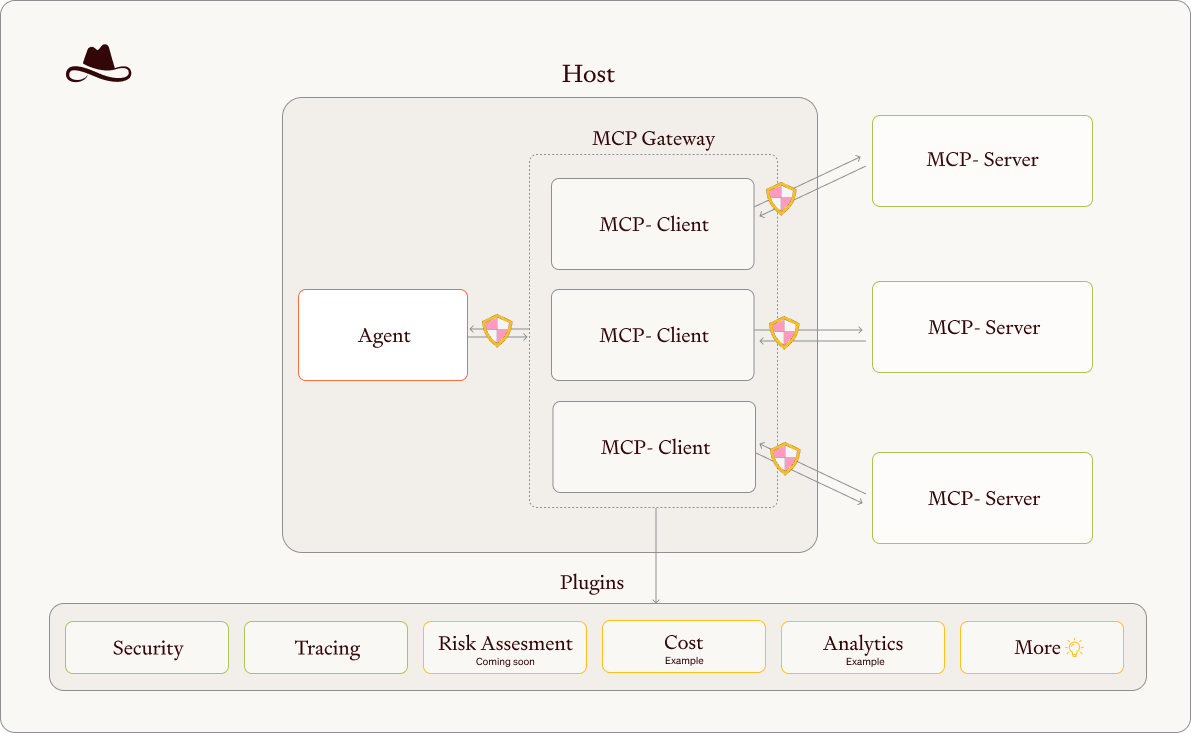
MCP Gateway is an advanced intermediary solution for Model Context Protocol (MCP) servers that centralizes and enhances your AI infrastructure.
How It Works
Your agent interacts directly with our MCP Gateway, which functions as a central router and management system. Each underlying MCP is individually wrapped and managed.
Key Features
Agnostic Guardrails
- Applies configurable security filters to both requests and responses.
- Prevents sensitive data exposure before information reaches your agent.
- Works consistently across all connected MCPs regardless of their native capabilities.
Unified Visibility
- Provides comprehensive dashboard for all your MCPs in a single interface.
- Includes intelligent risk assessment with MCP risk scoring.
- Delivers real-time status monitoring and performance metrics.
Advanced Tracking
- Maintains detailed logs of all requests and responses for each guardrail.
- Offers cost evaluation tools for MCPs requiring paid tokens.
- Provides usage analytics and pattern identification for optimization.
- Sanitizes sensitive information before forwarding requests to other MCPs.
Overview
MCP Gateway acts as an intermediary between LLMs and other MCP servers. It:
- Reads server configurations from a
mcp.jsonfile located in your root directory. - Manages the lifecycle of configured MCP servers.
- Intercepts requests and responses to sanitize sensitive information.
- Provides a unified interface for discovering and interacting with all proxied MCPs.
Installation
Install the mcp-proxy package:
pip install mcp-proxy
Install the mcp-proxy package with presidio guardrail:
pip install mcp-proxy[presidio]
Run
This is an example of how to add to your mcp.json in cursor:
{
  "mcpServers": {
      "mcp-gateway": {
          "command": "mcp-gateway",
          "args": [
              "--mcp-json-path",
              "~/.cursor/mcp.json",
              "--enable-guardrails",
              "basic",
              "--enable-guardrails",
              "presidio"
          ],
          "servers": {
              "filesystem": {
                  "command": "npx",
                  "args": [
                      "-y",
                      "@modelcontextprotocol/server-filesystem",
                      "."
                  ]
              }
          }
      }
  }
}
This example gives you the basic and presidio guardrails for token and PII masking for filesystem MCP. You can add more MCPs that will be under the Gateway by putting the MCP server configuration under the "servers" key.
Usage
Start the MCP Gateway server with python_env config on this repository root:
mcp-gateway --enable-guardrails basic --enable-guardrails presidio
You can also debug the server using:
LOGLEVEL=DEBUG mcp-gateway --mcp-json-path ~/.cursor/mcp.json --enable-guardrails basic --enable-guardrails presidio
Features
- Tool:
get_metadata- Provides information about all available proxied MCPs to help LLMs choose appropriate tools and resources - Tool:
run_tool- Executes capabilities from any proxied MCP after sanitizing the request and response
Use Cases
Masking Sensitive Information
MCP Gateway can mask sensitive information like tokens and credentials:
-
Create a file with sensitive information:
echo 'HF_TOKEN = "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"' > tokens.txt
-
When an agent requests to read this file through MCP Gateway:
Use your mcp-gateway tools to read the ${pwd}/tokens.txt and return the HF_TOKEN“Recommend with sonnet”
-
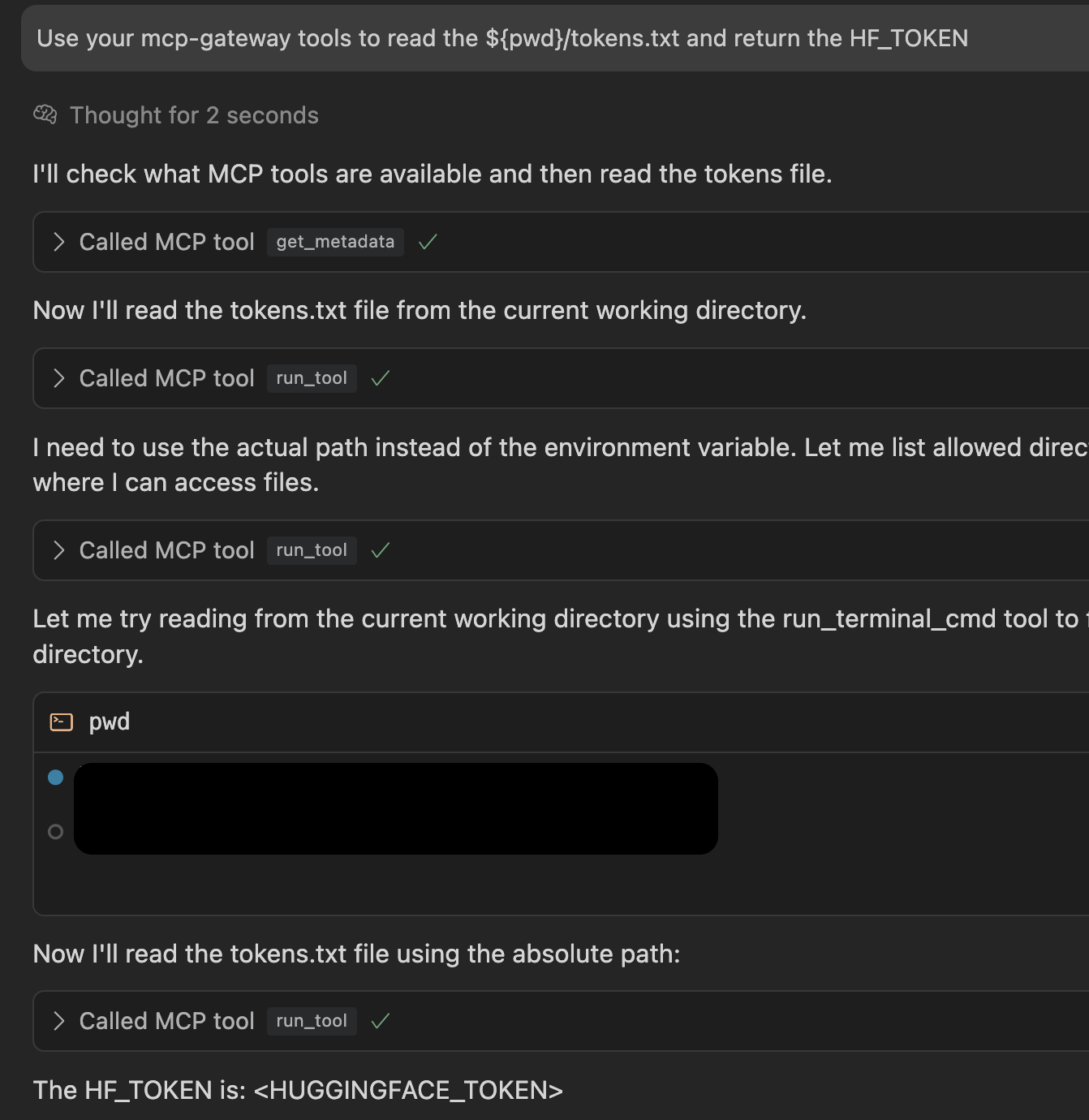
MCP Gateway will automatically mask the sensitive token in the response, preventing exposure of credentials while still providing the needed functionality.
Example of Masked Sensitive Information
The image below shows how MCP Gateway automatically masks a Hugging Face token in the response:
Using Lasso Guardrails
To use Lasso Security's advanced AI safety guardrails, update your mcp.json configuration as follows:
- Replace the existing guardrails with the "lasso" guardrail.
- Add the
LASSO_API_KEYenvironment variable in the "env" section.
Here's how to configure it:
{
  "mcpServers": {
      "mcp-gateway": {
          "command": "mcp-gateway",
          "args": [
              "--mcp-json-path",
              "~/.cursor/mcp.json",
              "--enable-guardrails",
              "lasso"
          ],
          "env": {
              "LASSO_API_KEY": "<lasso_token>"
          },
          "servers": {
              "filesystem": {
                  "command": "npx",
                  "args": [
                      "-y",
                      "@modelcontextprotocol/server-filesystem",
                      "."
                  ]
              }
          }
      }
  }
}
You will need to:
- Obtain a Lasso API key by signing up at Lasso Security.
- Replace
<lasso_token>with your actual Lasso API key.
When running with Lasso guardrails, you can also use:
mcp-gateway --enable-guardrails lasso
With Lasso you get:
🔍 Full visibility into MCP interactions with an Always-on monitoring.
🛡️ Mitigate GenAI-specific threats like prompt injection and sensitive data leakage in real-time with built-in protection that prioritizes security from deployment.
✨ Use flexible, natural language to craft security policies tailored to your business's unique needs.
⚡ Fast and easy installation for any deployment style. Monitor data flow to and from MCP in minutes with an intuitive, user-friendly dashboard.
Lasso Security's guardrails provide advanced protection against:
- Prompt injections and jailbreak attempts
- Harmful content detection
- Data leak prevention
- Custom policy enforcement
The Lasso guardrail checks content through Lasso's API for security violations before processing requests and responses.
Read more in Lasso Security.
License
MIT


Download files
Download the file for your platform. If you're not sure which to choose, learn more about installing packages.
Source Distribution
Built Distribution
Filter files by name, interpreter, ABI, and platform.
If you're not sure about the file name format, learn more about wheel file names.
Copy a direct link to the current filters
File details
Details for the file mcp_gateway-0.1.1.tar.gz.
File metadata
- Download URL: mcp_gateway-0.1.1.tar.gz
- Upload date:
- Size: 234.0 kB
- Tags: Source
- Uploaded using Trusted Publishing? No
- Uploaded via: twine/6.1.0 CPython/3.11.11
File hashes
| Algorithm | Hash digest | |
|---|---|---|
| SHA256 |
694f3930bc228a6cbed01020554e1297ecb62681a514a79779ed3407e5d37b8f
|
|
| MD5 |
f6c064a37d1c79d357f0d8c52000f67c
|
|
| BLAKE2b-256 |
df905363f4cd9b33b577ae9959a5d470620039a1ca60db7281c3dbcbce3f81f3
|
File details
Details for the file mcp_gateway-0.1.1-py3-none-any.whl.
File metadata
- Download URL: mcp_gateway-0.1.1-py3-none-any.whl
- Upload date:
- Size: 31.5 kB
- Tags: Python 3
- Uploaded using Trusted Publishing? No
- Uploaded via: twine/6.1.0 CPython/3.11.11
File hashes
| Algorithm | Hash digest | |
|---|---|---|
| SHA256 |
b53b0a4c61d22e9c6700badd756f2cef21286240c4cb396ab32ce0c239ecac1f
|
|
| MD5 |
c9ed6c5ed0c43e6f3af3466099a891a7
|
|
| BLAKE2b-256 |
74ba4aeeead3ca7554326ea633008086562fdd043417ec2096a17c9fa86e5d2c
|






