
Gausium OpenAPI MCP Server - Control Gausium robots through Claude

Project description
🤖 Gausium OpenAPI MCP Server




🔧 A powerful MCP server bridging AI models with Gausium robots
Control and monitor Gausium cleaning robots through Claude, Cursor, and other AI assistants
🚀 Quick Start • 📖 Documentation • 🛠️ Installation • 🎯 Examples • 🇨🇳 中文文档
🌟 What is this?
This MCP (Model Control Protocol) server enables seamless interaction between AI models and Gausium cleaning robots through a standardized interface. Perfect for building intelligent automation workflows with Claude Code, Cursor, and other MCP-compatible AI tools.
🔗 Repository: https://github.com/cfrs2005/mcp-gs-robot
🎯 Key Benefits
- 🤖 AI-First Design: Built specifically for AI assistant integration
- 🔄 Real-time Control: Monitor and command robots instantly
- 📊 Rich Data Access: Get detailed status, maps, and task reports
- 🛡️ Secure: OAuth-based authentication with environment variables
- 🌐 Universal: Works with Claude, Cursor, and any MCP client
🏗️ Architecture
The server follows a layered architecture that separates concerns and promotes maintainability:

🔄 MCP Protocol Flow
The diagram below shows how AI models interact with Gausium robots through the MCP protocol:

✨ Features
🛠️ Core MCP Tools
| Tool | Description | Status |
|---|---|---|
🤖 list_robots |
List all accessible robots | ✅ Ready |
📊 get_robot_status |
Get detailed robot status and position | ✅ Ready |
📋 list_robot_task_reports |
Retrieve cleaning task reports with filtering | ✅ Ready |
🗺️ list_robot_maps |
Get available maps for robot navigation | ✅ Ready |
🎯 create_robot_command |
Send commands to robots (start/pause/stop) | ✅ Ready |
🏢 get_site_info |
Get building and floor information | ✅ Ready |
📍 get_map_subareas |
Get detailed area information for tasks | ✅ Ready |
🚀 submit_temp_task |
Submit temporary cleaning tasks | ✅ Ready |
🧠 Smart Routing Tools (New in v0.1.8)
| Tool | Description | Status |
|---|---|---|
🎯 get_robot_status_smart |
Auto-select V1/V2 API based on robot series | ✅ Ready |
📊 get_task_reports_smart |
Intelligent task report API routing | ✅ Ready |
🔍 get_robot_capabilities |
Show supported APIs for specific robot | ✅ Ready |
🔧 Advanced Workflows
- 🎛️ Automated Task Execution: Complete workflows from status → task selection → execution
- 📈 Batch Operations: Handle multiple robots simultaneously
- 🗺️ Map Management: Upload, download, and manage robot maps
- 📊 Report Generation: Generate PNG maps from task reports
- 🏗️ Site-based Tasks: Advanced task creation with building/floor context
🤝 Supported Robot Lines
M-line Robots (Traditional Cleaning Robots)
- OMNIE (OMNIE series) - Multi-purpose cleaning robot
- Vacuum 40 (40 series) - Vacuum cleaning robot
- Scrubber 50 (50 series) - Floor scrubbing robot
- Scrubber 75 (75 series) - Heavy-duty floor scrubbing robot
S-line Robots (Advanced Smart Robots, including SW series)
- Phantas (S series) - Phantom intelligent cleaning robot
- BEETLE (SW series) - Beetle smart cleaning robot
📁 Project Structure
The project follows a structured layout optimized for MCP development:
🗂️ mcp-gs-robot/
├── 📦 src/gs_openapi/           # Main package
│   ├── 🔌 api/                  # Direct API integrations
│   │   ├── 🤖 robots.py         # Robot management APIs
│   │   └── 🗺️ maps.py           # Map management APIs
│   ├── 🔐 auth/                 # Authentication layer
│   │   └── 🎫 token_manager.py  # OAuth token lifecycle
│   ├── ⚙️ config.py             # Configuration management
│   ├── 🔧 core/                 # Core functionality
│   │   ├── 📡 client.py         # HTTP client wrapper
│   │   └── 🛣️ endpoints.py      # API endpoint definitions
│   ├── 🔌 mcp/                  # MCP server implementation
│   │   └── 🌉 gausium_mcp.py    # Main MCP bridge
│   └── 🔄 workflows/            # Automated workflows
│       └── 🎯 task_engine.py    # Task automation engine
├── 📚 docs/                     # Documentation
│   ├── 🖼️ images/               # Visual documentation
│   ├── 📖 apis.md              # API documentation
│   └── 🧪 TESTING_GUIDE.md     # Testing instructions
├── 🚀 main.py                  # Application entry point
└── 📋 pyproject.toml           # Package configuration
🔍 Key Components
| Component | Purpose | Icon |
|---|---|---|
| config.py | Base URLs, API paths, environment variables | ⚙️ |
| token_manager.py | OAuth token acquisition and refresh | 🔐 |
| api/robots.py | Robot status, commands, task reports | 🤖 |
| api/maps.py | Map listing, upload, download | 🗺️ |
| gausium_mcp.py | MCP server integration layer | 🌉 |
| task_engine.py | Automated workflow orchestration | 🎯 |
| main.py | Server initialization and tool registration | 🚀 |
🚀 Quick Start
📦 Installation
Option 1: Install from PyPI (Recommended)
pip install mcp-gs-robot
Option 2: Install from Source
# Clone repository
git clone https://github.com/cfrs2005/mcp-gs-robot.git
cd mcp-gs-robot

# Setup with uv (recommended)
uv venv
source .venv/bin/activate  # Windows: .venv\Scripts\activate
uv pip install -e .
🔧 Configuration
Set up your Gausium API credentials:
# Required environment variables
export GS_CLIENT_ID="your_client_id"
export GS_CLIENT_SECRET="your_client_secret"
export GS_OPEN_ACCESS_KEY="your_access_key"
🔑 Get credentials from Gausium Developer Portal
🏃♂️ Running the Server
# Start MCP server (stdio mode)
python -m gs_openapi.main
# or if installed via pip:
mcp-gs-robot
✅ Server starts using stdio transport (perfect for Claude Code)
🔌 Claude Code Integration
Method 1: Automatic installation with environment setup
# Add MCP server with environment variables
claude mcp add mcp-gs-robot \
  --env GS_CLIENT_ID="your_client_id" \
  --env GS_CLIENT_SECRET="your_client_secret" \
  --env GS_OPEN_ACCESS_KEY="your_access_key"
Method 2: Manual configuration
Add to your claude_desktop_config.json:
{
  "mcpServers": {
    "mcp-gs-robot": {
      "command": "mcp-gs-robot",
      "env": {
        "GS_CLIENT_ID": "your_client_id",
        "GS_CLIENT_SECRET": "your_client_secret",
        "GS_OPEN_ACCESS_KEY": "your_access_key"
      }
    }
  }
}
Method 3: Using environment file
If you prefer to use a .env file:
# Set global environment variables
export GS_CLIENT_ID="your_client_id"
export GS_CLIENT_SECRET="your_client_secret"
export GS_OPEN_ACCESS_KEY="your_access_key"

# Simple MCP installation
claude mcp add mcp-gs-robot
💡 Note: This MCP server uses
stdiotransport (not SSE), which is perfect for Claude Code integration
🎯 Examples
📱 Claude Code Usage
# In Claude Code, you can now use natural language:

"List all my robots"
# → Calls mcp__mcp-gs-robot__list_robots

"Get status of robot GS101-0100-V1P-B001"
# → Calls mcp__mcp-gs-robot__get_robot_status

"Start cleaning task for robot in building 5"
# → Orchestrates site info → map selection → task creation
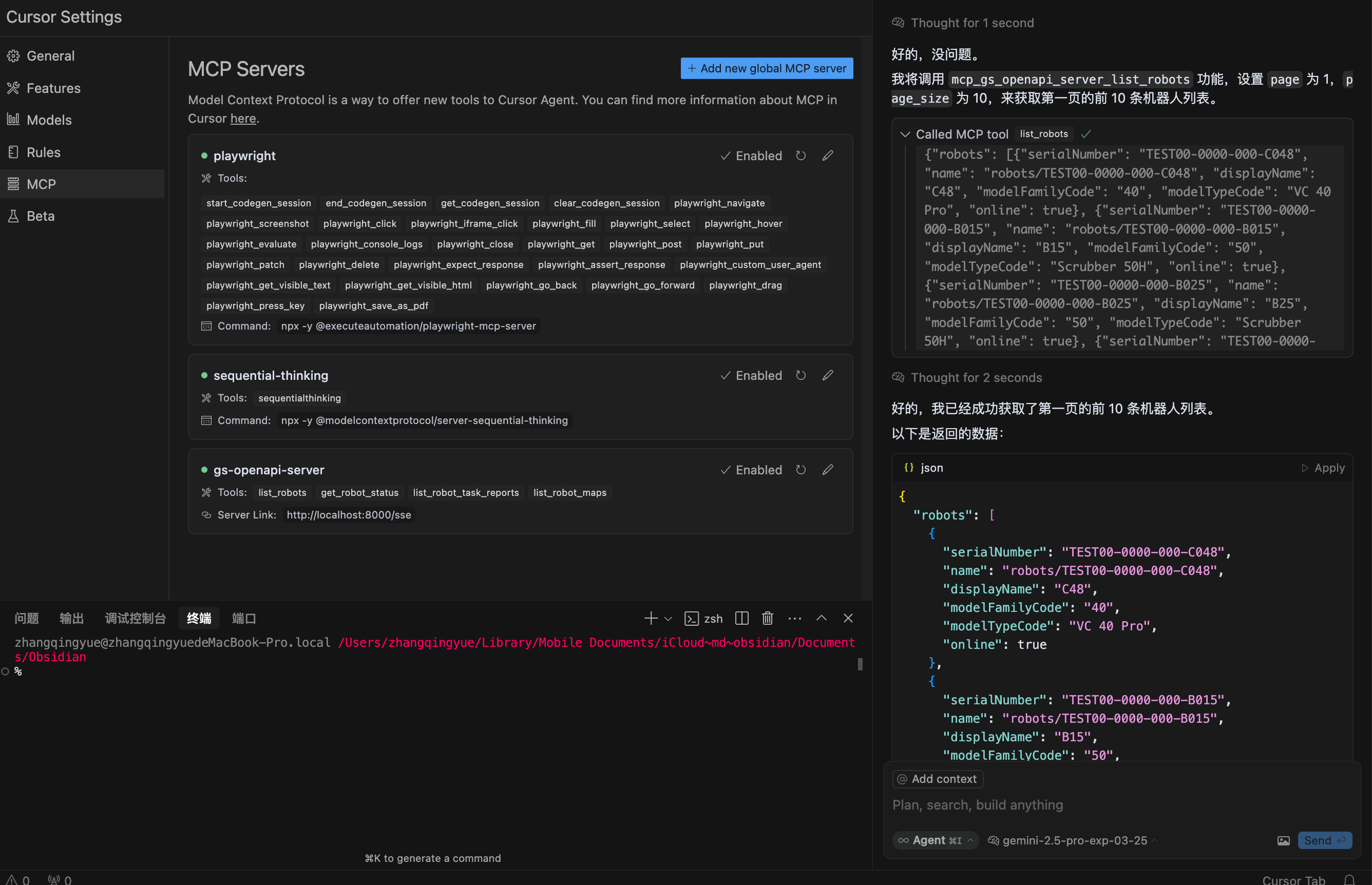
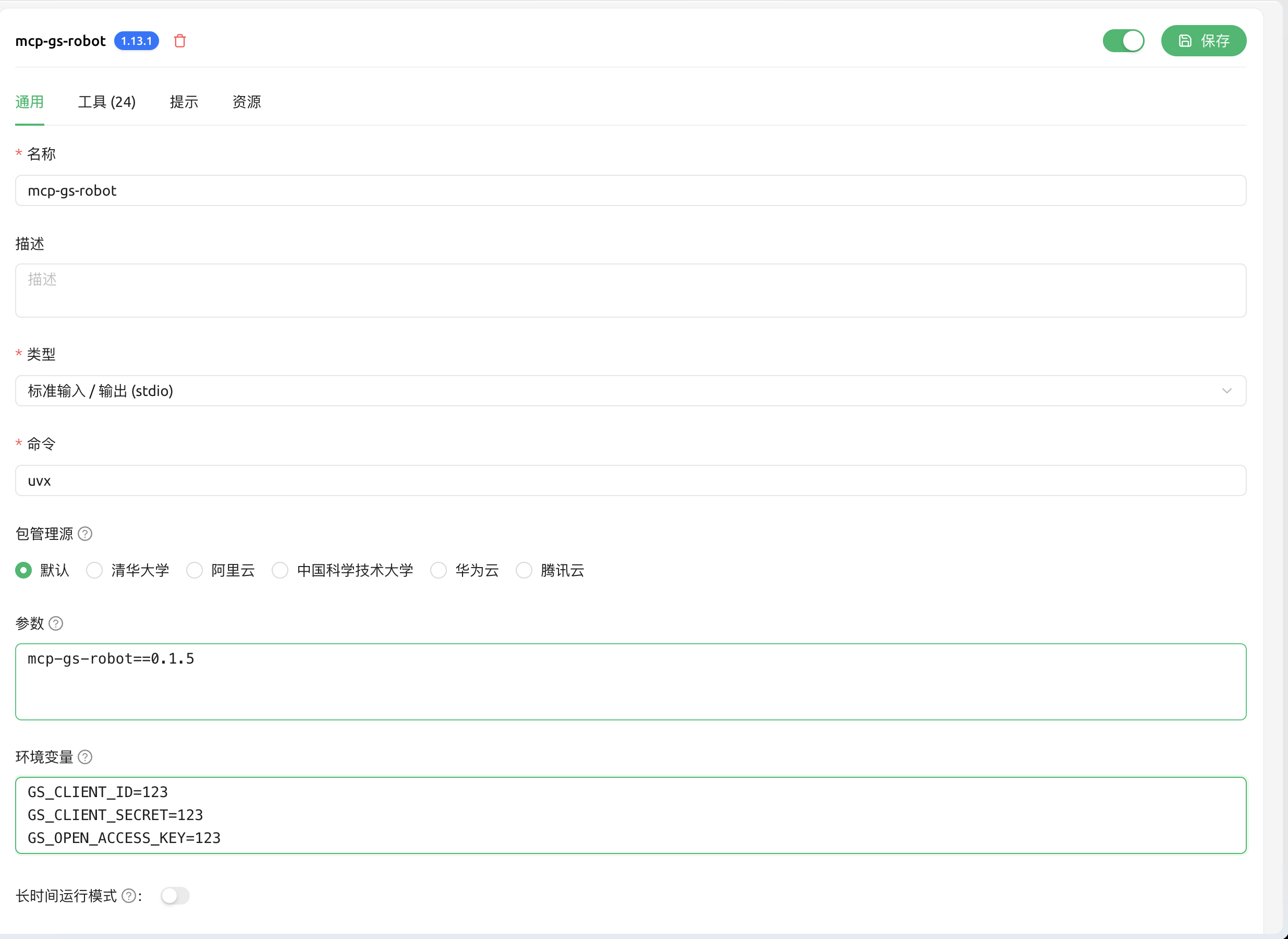
🖥️ IDE Integration
Cursor Configuration:
Cherry Studio Configuration:
🐛 Debugging
Monitor server logs for troubleshooting:

📖 Documentation
| Document | Purpose |
|---|---|
| 🎯 Claude Code Integration | Complete Claude Code setup guide |
| 📋 API Reference | Complete API documentation |
| 🧪 Testing Guide | How to test the MCP server |
| 🔧 Configuration | Detailed setup instructions |
🤝 Contributing
We welcome contributions! Please:
- 🍴 Fork the repository
- 🌿 Create a feature branch
- ✅ Add tests for your changes
- 📝 Update documentation
- 🔄 Submit a pull request
📄 License
MIT License - see LICENSE file for details.
🆘 Support
Made with ❤️ for the Claude Code community
Enabling AI-powered robot automation, one task at a time 🤖✨
Release history Release notifications | RSS feed


Download files
Download the file for your platform. If you're not sure which to choose, learn more about installing packages.
Source Distribution
Built Distribution
Filter files by name, interpreter, ABI, and platform.
If you're not sure about the file name format, learn more about wheel file names.
Copy a direct link to the current filters
File details
Details for the file mcp_gs_robot-0.1.8.tar.gz.
File metadata
- Download URL: mcp_gs_robot-0.1.8.tar.gz
- Upload date:
- Size: 21.8 kB
- Tags: Source
- Uploaded using Trusted Publishing? No
- Uploaded via: twine/6.1.0 CPython/3.12.11
File hashes
| Algorithm | Hash digest | |
|---|---|---|
| SHA256 |
722b5f1bd116137eec6e6e6ffe4efa7dafc82f1e0e1ed181b8f9601f4266c6d4
|
|
| MD5 |
f0bc47774ea0c0298ef26dfe2a263449
|
|
| BLAKE2b-256 |
cc98f3d92f067bdada2ad89a7e103d8d80a54ac148be84f1063c3b3bb3c73568
|
File details
Details for the file mcp_gs_robot-0.1.8-py3-none-any.whl.
File metadata
- Download URL: mcp_gs_robot-0.1.8-py3-none-any.whl
- Upload date:
- Size: 27.3 kB
- Tags: Python 3
- Uploaded using Trusted Publishing? No
- Uploaded via: twine/6.1.0 CPython/3.12.11
File hashes
| Algorithm | Hash digest | |
|---|---|---|
| SHA256 |
893d9f99c62916ee8388f07af2fbadd477a2c5249305a01e479b531cb08b0365
|
|
| MD5 |
cd9d50dbbd5aa2a1c2e89eb1057aa976
|
|
| BLAKE2b-256 |
98a56f10a226f1fe2473281d82deff2977a61f382a4d74737b59cc33c1d5a184
|






