
MCP HCaptcha Server
A Model Context Protocol (MCP) server for AceDataCloud's hCaptcha captcha-solving APIs.
Features
- Solve hCaptcha image challenges and retrieve hCaptcha site tokens.
- Shared async task polling via
/captcha/tasks - Bearer-token authentication through AceDataCloud
Connect locally
Use the local stdio package and an AceDataCloud API token. The public hosted HTTPS endpoint could not be verified, so this README does not offer it as a connection option. The local MCP process still calls AceDataCloud's API; it does not run the underlying service offline.
- Open Ace Data Cloud → Applications. Sign in, or register an account first.
- Find General application. If it has not been created, choose Initialize General Application. A general key can use the services available to your account; a dedicated application's key is limited to its service. Check the required service/model access and current pricing.
- Copy the API Key from the application card, or open Keys / Manage Keys → Create to create a separate key for this integration. Give it a recognizable name so you can revoke or rotate it independently.
- When creating a key, review Expiration Time, Set Usage Limitation, and Allowed APIs. Enable only the restrictions you need, allow the operations you will call, then click Create and copy the token from the key list. Task lookup does not grant permission to submit a generation. Confirm the application's balance can cover your first request; any trial allowance is whatever your account currently displays.
- Copy only the token value, without quotation marks, spaces, or
Bearer. An API Key / API Token field expects this raw value; only a manually configured HTTPAuthorizationheader needs theBearerprefix. Aplatform-...account-management token cannot replace a generation API key.
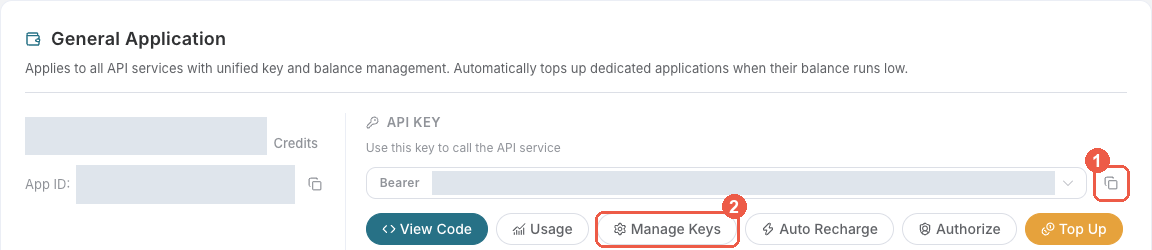
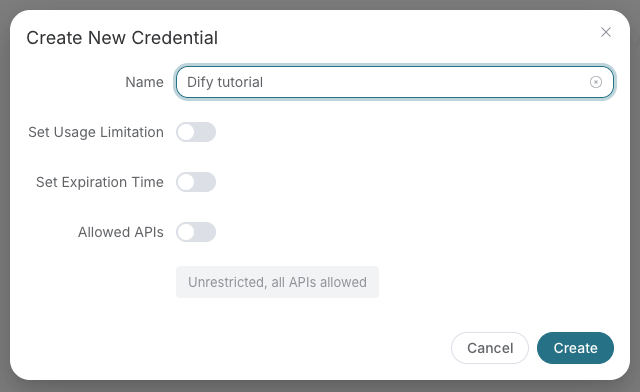
Save the key in the client's credential store or the environment variable shown below. Never put it in a prompt, shared workflow, screenshot, or Git commit. If authentication fails, check the full copied value, application/service access, expiration, usage limit, and balance before creating another key.
Local stdio
Install the package and give the local process an API token:
python -m pip install mcp-hcaptcha
export ACEDATACLOUD_API_TOKEN='YOUR_API_TOKEN'
mcp-hcaptcha
For Claude Desktop local MCP, merge this entry into the file opened by its developer settings (~/Library/Application Support/Claude/claude_desktop_config.json on macOS). uvx requires uv on PATH:
{
  "mcpServers": {
    "hcaptcha": {
      "command": "uvx",
      "args": ["mcp-hcaptcha"],
      "env": {"ACEDATACLOUD_API_TOKEN": "YOUR_API_TOKEN"}
    }
  }
}
Keep this user-level file private. Self-hosted HTTP uses mcp-hcaptcha --transport http --port 8000; expose it only with suitable network and TLS controls. Local execution still calls the AceDataCloud API.
Check the connection
Confirm that the MCP client loads its tools. hcaptcha_get_usage_guide returns reference information; it does not prove downstream API access or balance. A real service request can be billed. If it returns 401, check the API token; if it returns 403 or an account/balance error, read that response before retrying.
Tools
hcaptcha_recognize— Recognize hCaptcha image challengeshcaptcha_get_token— Get an hCaptcha token for a website, optionally withrqdatahcaptcha_get_task— Poll a captcha task resulthcaptcha_get_usage_guide— Get hCaptcha usage guidehcaptcha_get_api_info— Get hCaptcha API information
Service details
1 maintainer

Metadata
1 maintainer
Release files for mcp-hcaptcha 2026.10.12.0
For a detailed explanation of source distributions (sdists) and built distributions (wheels), please see the package formats documentation.
Source distribution (sdist)
| File | Size | Uploaded | |
|---|---|---|---|
| mcp_hcaptcha-2026.10.12.0.tar.gz | 18.8 kB | Details |
Built distribution (wheel)
| File | Interpreter | ABI | Platform | Reset |
|---|---|---|---|---|
| mcp_hcaptcha-2026.10.12.0-py3-none-any.whl | Python 3 | none | any | Details |
Total release size: 39.1 kB
Release files / mcp_hcaptcha-2026.10.12.0.tar.gz
| Download URL | mcp_hcaptcha-2026.10.12.0.tar.gz |
|---|---|
| Size | 18.8 kB |
| Tags | Source |
|
SHA-256 checksum How to use checksums |
a182007f934a3c07d33420b41c3abe9d59992fe0cd51ed193f22bd78663ed197
|
|
BLAKE2b-256 checksum How to use checksums |
ab2fbb614c14971794eeacb334cf15eb47202c108cdbccdf33b6a6e478385a59
|
| Upload date | |
|
Uploaded using Trusted Publishing? What is trusted publishing? |
No |
| Uploaded via |
twine/7.0.0 CPython/3.12.3
|
Release files / mcp_hcaptcha-2026.10.12.0-py3-none-any.whl
| Download URL | mcp_hcaptcha-2026.10.12.0-py3-none-any.whl |
|---|---|
| Size | 20.3 kB |
| Tags | Python 3 |
|
SHA-256 checksum How to use checksums |
bf67e49219b35557c85a97ab5c28f8dab684773aed3e590f1db048974af8a9ab
|
|
BLAKE2b-256 checksum How to use checksums |
6b59fbdc7733f05808696461a565449de15a54c227c8d47a86c03b51039ba8db
|
| Upload date | |
|
Uploaded using Trusted Publishing? What is trusted publishing? |
No |
| Uploaded via |
twine/7.0.0 CPython/3.12.3
|














